Professional Lookbook Templates for Brands: Design, Share & Sell Smarter
Published on: March 9, 2022
Last update: April 21, 2026, 2025
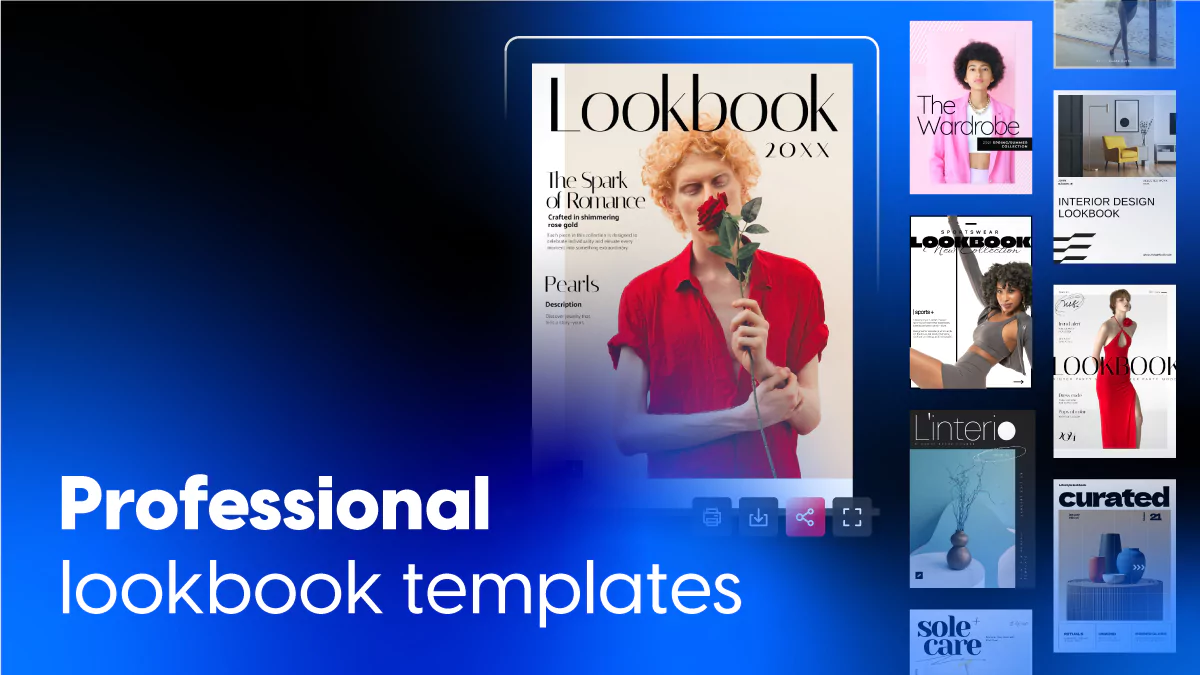
Fashion brands, retailers and wholesalers use digital lookbooks to visually express their style, engage customers, and drive sales. Whether you’re looking at lookbook examples for inspiration or ready-made fashion lookbook templates to streamline the design process, Flipsnack offers the perfect solution.
What is a lookbook?
A lookbook is a collection of photos that shows off a product, brand, or style. Fashion brands use them to present new collections. Interior designers use them to showcase spaces. Photographers use them as portfolios. The idea is simple: let the visuals sell the story. A good lookbook doesn’t explain everything. It shows it.
How to make a lookbook that works
Lead with your best visuals. The first page sets the tone. If it doesn’t grab attention, people won’t keep scrolling. Put your strongest images up front.
Tell a story. Don’t just dump photos in a random order. Group them by theme, collection, season, or mood. A lookbook should flow, not feel like a photo dump.
Keep text minimal. This isn’t a catalog. Captions, product names, and short descriptions are enough. Let the images do the heavy lifting.
Stay consistent. Pick a visual style and stick with it. Same lighting, same color palette, same mood throughout. Mixing styles makes the whole thing feel scattered.
Make it interactive if it’s digital. Add clickable links to product pages, embed videos of the collection in action, or include shopping buttons so viewers buy what they see. A lookbook that connects interest to action is worth more than one that just looks pretty.
Design for mobile. Most people will view it on their phone. If the images are too small or the layout breaks on a smaller screen, you’ve lost them.
End with a next step. A link to shop, a contact page, a booking form. Don’t let the viewer finish and wonder where to go. Make the next move obvious.
Quick comparison: choose your ideal lookbook template
| Template Name | Primary Industry | Best For | Main Focus | Key Benefits |
|---|---|---|---|---|
| Home and Lifestyle Lookbook Template | Home Decor / Retail | Home goods brands, interior designers, lifestyle retailers | Decor and lifestyle collections, curated product presentations | Captions, spotlight sections, full-page images; interactive slideshows, shop areas; link buttons to product pages. |
| Digital Fashion Lookbook Template | Fashion | Fashion brands, designers, retailers | Clothing collections, brand identity, new launches | Video, GIFs, audio support; popup slideshows, captions; shop areas and link buttons to product pages; bold visual layouts. |
| Materials and Surfaces Lookbook Template | Construction / Architecture | Suppliers, manufacturers, designers | Flooring, tiles, wall finishes, architectural surfaces | Video, product tags, shop buttons; link zones to specs or purchase options; built-in contact form for lead capture; website embed. |
| Lifestyle and Travel Lookbook Template | Travel / Lifestyle / Fashion | Travel companies, lifestyle brands, fashion retailers | Aspirational collections, editorial-style campaigns | Videos, tags, popup slideshows; captions for context; link areas and contact forms for direct action. |
| Luxury Slabs & Surfaces Lookbook Template | Construction / Luxury Materials | Suppliers, showrooms, manufacturers of premium surfaces | Marble, granite, quartz, luxury slabs | Large photo slideshows, spotlight sections, video presentations; shopping lists, embedded showroom maps, lead forms. |
| Professional Lifestyle Lookbook Template | Lifestyle / Retail | Lifestyle brands, retailers, wholesale teams | Lifestyle collections, brand identity, sales tools | Smooth slide effect; go-to-page buttons, GIFs, stickers, product tags, shopping list; social media buttons; clickable links to website or store. |
| Customizable Sportswear Lookbook Template | Sportswear / Fitness | Sportswear brands and retailers | Gym and activewear collections, shoppable catalogs | Black-and-white design; contact forms for newsletter sign-ups; product tags, buy buttons, shopping list feature; photo slideshows, embedded videos. |
| Interactive Fashion Lookbook Design | Fashion | Fashion brands and retailers | Shoppable collections, seasonal campaigns, wholesale | Product tags, shopping buttons, direct links; WhatsApp pre-orders; wishlist feature; photo slideshows, videos; collaboration tools with roles and permissions. |
| Interactive Beauty Lookbook Template | Beauty / Skincare | Beauty brands, skincare companies, marketers | Beauty products, skincare lines, trend showcases | GIFs, product tags, captions, embedded videos; buy buttons, shopping list feature; digital bookshelf for organizing collections. |
| Digital Valentine’s Day Lookbook Template | Retail / Lifestyle | Lifestyle brands, retailers, marketers | Valentine’s Day and romance-themed seasonal campaigns | Beige and red design; hyperlinks, product tags, shopping buttons, GIFs, stickers, photo slideshows; collaboration features with roles and permissions. |
| Interactive Jewelry Magazine Template | Luxury / Jewelry | Luxury jewelry brands, retailers, marketers | Jewelry collections, brand storytelling, craftsmanship | Videos, slideshows, interactive content; built-in statistics (views, clicks, time spent per page); public or private sharing. |
| Interactive Home Decor Lookbook Template | Home Decor / Interior Design | Interior designers, home decor retailers, marketers | Home decor collections, seasonal campaigns | Blue and black design with white fonts; smooth sliding effect; videos, product tags, GIFs, stickers; real-time editing without republishing. |
| Spa Online Lookbook Template | Wellness / Beauty | Spas, wellness centers, beauty service providers | Spa treatments, service menus, client bookings | Clean consistent layout; videos, photo slideshows, direct links to booking; free stock image library; print and digital ready. |
| Editable Interior Design Lookbook Template | Interior Design / Furniture | Interior designers, furniture retailers, home decor brands | Furniture collections with color and style variations | Image spreads, slideshows, embedded videos; grouping by collection; multiple color and style options per piece; public or private sharing. |
| Downloadable Fashion Lookbook Template | Fashion | Fashion brands, designers, retailers | Bold visual collections, trade show materials | Bold colors, unique fonts, layered elements; go-to-page buttons, spotlight effects; exact hex code matching; PDF download for print. |
What customers say about Flipsnack templates
The best flipbook tool I have used
Flipsnack is easy to use and offers all the features a small business needs, at a very affordable price. There are plenty of templates to choose from to speed up the project. Each template is easily tailored to your needs. The support is good and fast through the chat function, and they also provide a phone number (infrequently these days) in case you prefer a phone call.
Leonardo Soto, President of SotoNets Cloud Solutions
Reviewed on G2
Table of contents
- What is a lookbook?
- How to make a lookbook that works
- Quick comparison: choose your ideal lookbook template
- What customers say about Flipsnack templates
- Professional lookbook templates you can customize
- 1. Home and Lifestyle Lookbook Template
- 2. Digital Fashion Lookbook Template
- 3. Materials and Surfaces Lookbook Template
- 4. Lifestyle and Travel Lookbook Template
- 5. Luxury Slabs & Surfaces Lookbook Template
- 6. Professional Lifestyle Lookbook Template
- 7. Customizable Sportswear Lookbook
- 8. Interactive Fashion Lookbook Design
- 9. Interactive Beauty Lookbook Template
- 10. Digital Valentines Day Lookbook Template
- 11. Interactive Jewelry Magazine Template
- 12. Interactive Home Decor Lookbook Template
- 13. Spa Online Lookbook Template
- 14. Editable Interior Design Lookbook Template
- 15. Downloadable Fashion Lookbook Template
- How to make a lookbook in Flipsnack
- Turn inspiration into sales with Flipsnack’s lookbook templates
- FAQs on digital lookbooks
Now let’s delve in on how to use Flipsnack’s lookbook templates to create branded lookbooks with shopping buttons that can bring your business more sales.
Professional lookbook templates you can customize
1. Home and Lifestyle Lookbook Template
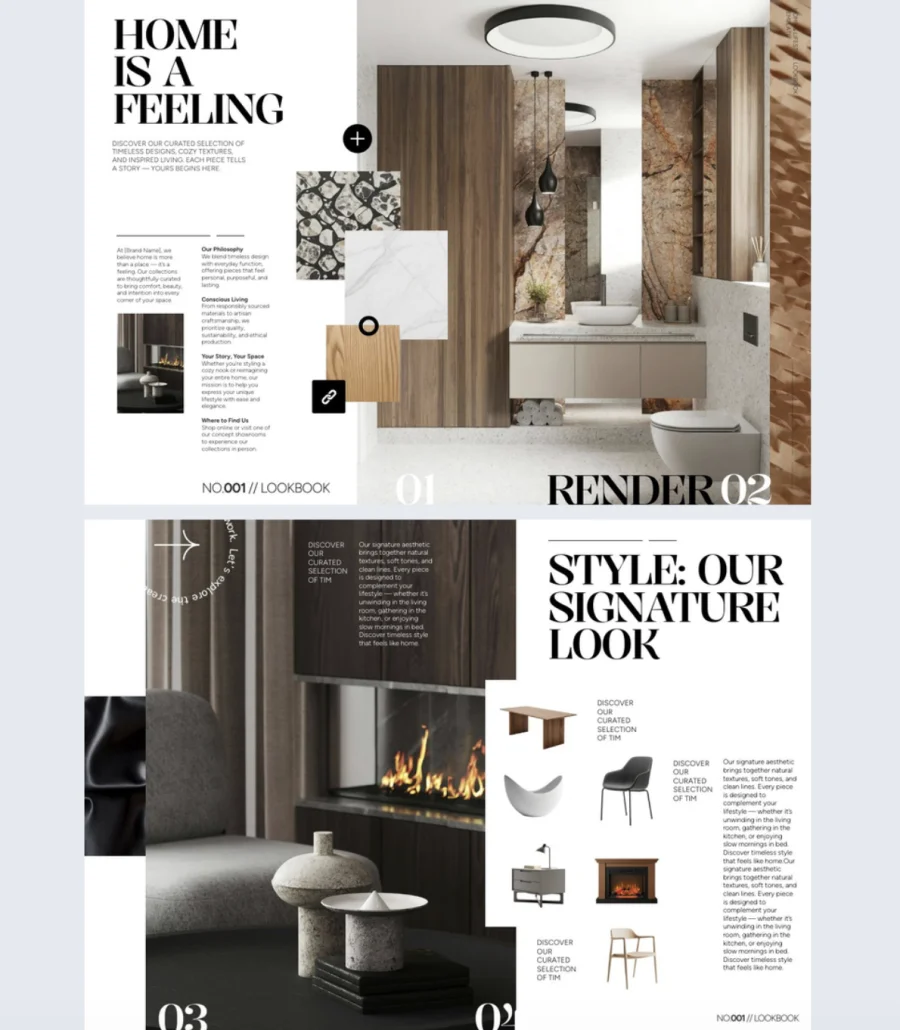

A product catalog lists items. A lookbook makes people want them. This template helps home and lifestyle brands present their collections in a clean, visual format that turns browsing into buying.
Best for: Home goods brands, interior designers, and lifestyle retailers who want to showcase collections with both style and function.
Real-world application: A home decor brand launching a new seasonal collection can use this template to group products by room or style, spotlight hero pieces with full-page images, and add interactive slideshows so viewers flip through the full range. Link buttons take viewers straight to product pages so they can buy what catches their eye without leaving the experience.
The template includes space for captions, spotlight sections, and full-page images. Add interactive slideshows and shop areas to guide viewers through your offering. Link buttons connect directly to product pages, and enable customers to place in-catalog orders removing the gap between inspiration and purchase. Customize it in Flipsnack’s Design Studio to match your brand.
Common mistake to avoid: Don’t show products in isolation. Style them in real settings. A lamp on a white background is a catalog shot. A lamp on a styled nightstand next to a cozy bed is a lookbook moment. Context sells.
Share via link, embed on your website, or distribute through email and social media.
2. Digital Fashion Lookbook Template
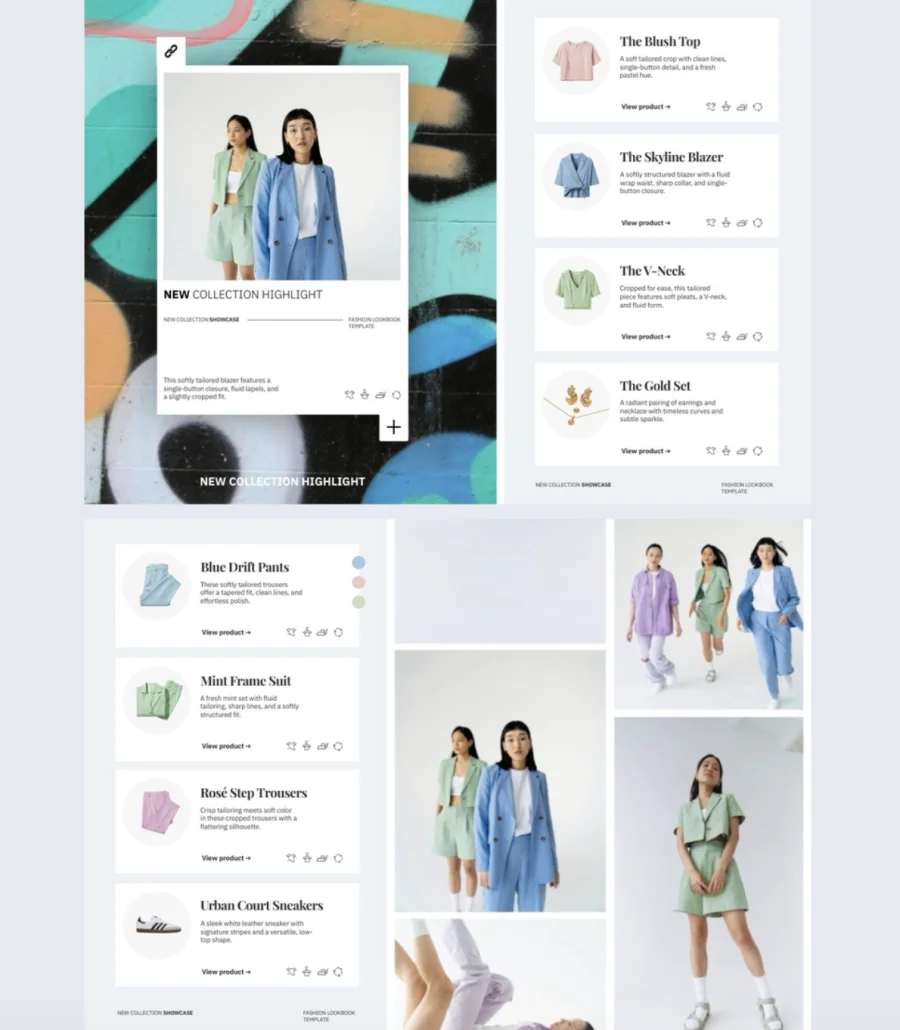
Fashion is visual. Your lookbook should feel like your brand, not read like a product list. This template puts bold visuals front and center and supports rich media like video, GIFs, and audio so your collection comes to life on screen.
Best for: Fashion brands, designers, and retailers who want to promote new collections, build brand identity, and drive traffic to their online store.
Real-world application: A fashion brand dropping a new seasonal collection can use this template to lead with large, bold campaign shots, embed a behind-the-scenes video from the shoot, and add popup slideshows for each look so viewers see styling details without cluttering the main layout. Dedicated shop areas and clickable buttons link each piece directly to its product page. Viewers go from “I love that” to “add to cart” in one click.
The template supports high-quality visuals, videos, GIFs, and audio. Add popup slideshows and captions for detail without overcrowding the design. Shop areas and link buttons connect items directly to product pages. Customize everything in Flipsnack’s Design Studio to match your brand identity.
Common mistake to avoid: Don’t overload every page with media. A video, a GIF, and a slideshow on the same spread compete for attention instead of directing it. Pick one hero element per page and let it breathe.
3. Materials and Surfaces Lookbook Template
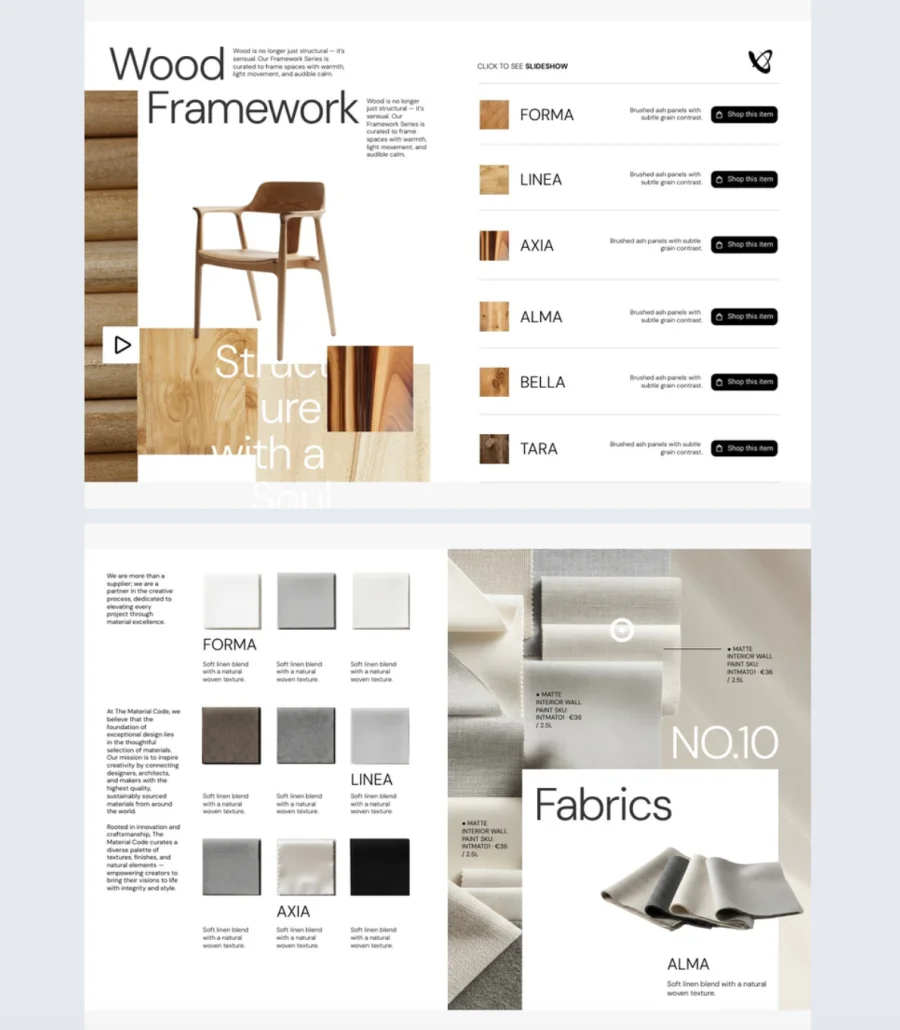
Textures, finishes, and surface details don’t translate well in a flat PDF. Buyers need to see them up close. This template gives suppliers and manufacturers an interactive way to showcase materials like flooring, tiles, and wall finishes with the detail buyers actually need to make a decision.
Best for: Suppliers, manufacturers, and designers in flooring, tiles, wall finishes, or architectural surfaces who need a product presentation that goes beyond static images.
Real-world application: A flooring supplier can use this template to tag each product with specs, embed videos showing how a surface looks under different lighting, and add shop buttons so buyers jump straight to ordering. Include a contact form so interested buyers reach out without leaving the lookbook. Embed the whole thing on your website and it works as a sales tool around the clock.
The template supports videos, product tags, and shop buttons to highlight material features. Link zones connect each product to detailed specs or purchase options. A built-in contact form captures leads directly. Customize everything in Flipsnack’s Design Studio.
Common mistake to avoid: Don’t rely on photos alone for materials. A tile looks different in a photo than it does installed. Add videos or close-up slideshows that show texture, scale, and real-world application. Buyers want to see what they’re getting, not guess.
Embed on your website as a sales-ready asset, share via link, or distribute to buyers directly.
4. Lifestyle and Travel Lookbook Template
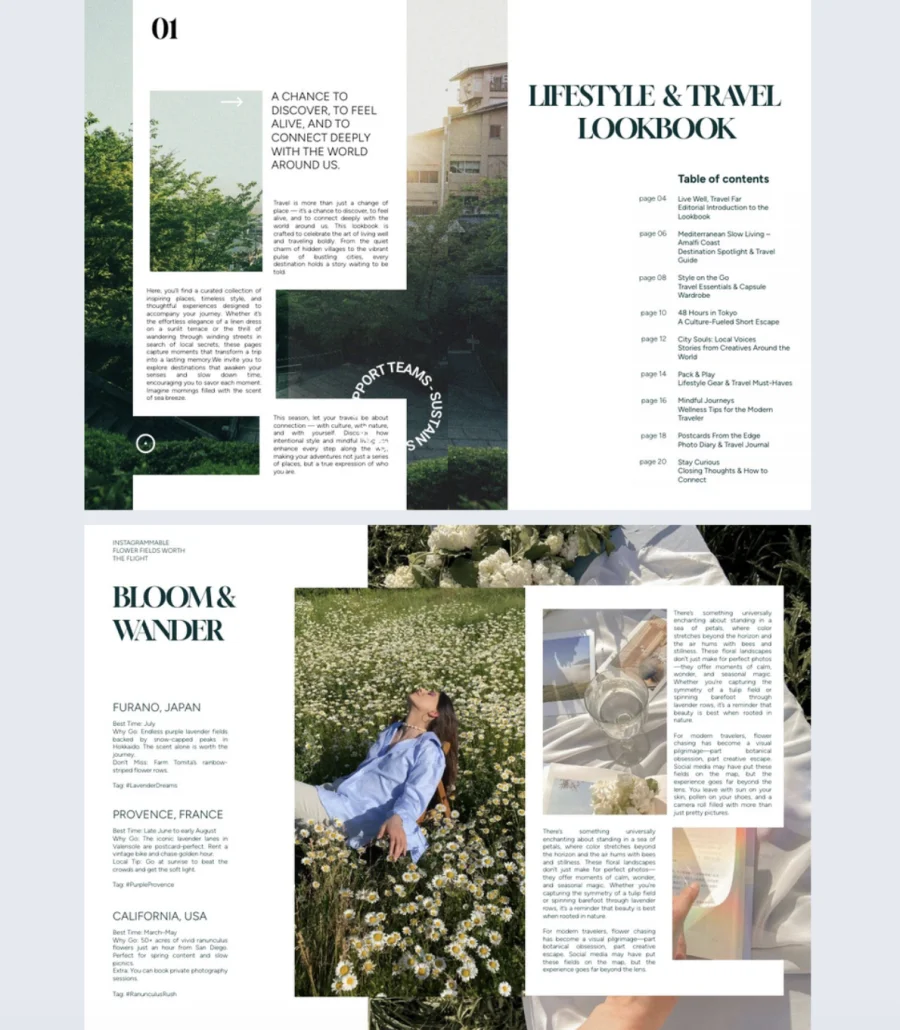
People don’t buy travel gear or lifestyle products because of specs. They buy the feeling. This template helps brands create lookbooks with an editorial, aspirational tone that makes viewers picture themselves in the story.
Best for: Travel companies, lifestyle brands, and fashion retailers who want to promote collections through visual storytelling rather than product listings.
Real-world application: A travel brand launching a new line of luggage and accessories can use this template to pair product shots with aspirational destination imagery. Add videos of the gear in action, use popup slideshows to show different colorways or angles, and tag each item with just enough detail to inform without interrupting the mood. Include link areas so viewers explore the full collection and a contact form so interested buyers reach out on the spot.
The template combines immersive visuals, videos, and popup slideshows to create an editorial feel. Tags and captions add context while keeping the layout light. Built-in link areas and contact forms drive action without breaking the experience. Customize in Flipsnack’s Design Studio.
Common mistake to avoid: Don’t mix aspirational imagery with catalog-style product shots in the same lookbook. It breaks the mood. Keep the visual tone consistent throughout. Save the white-background product photos for your website. The lookbook is where the lifestyle sells.
5. Luxury Slabs & Surfaces Lookbook Template
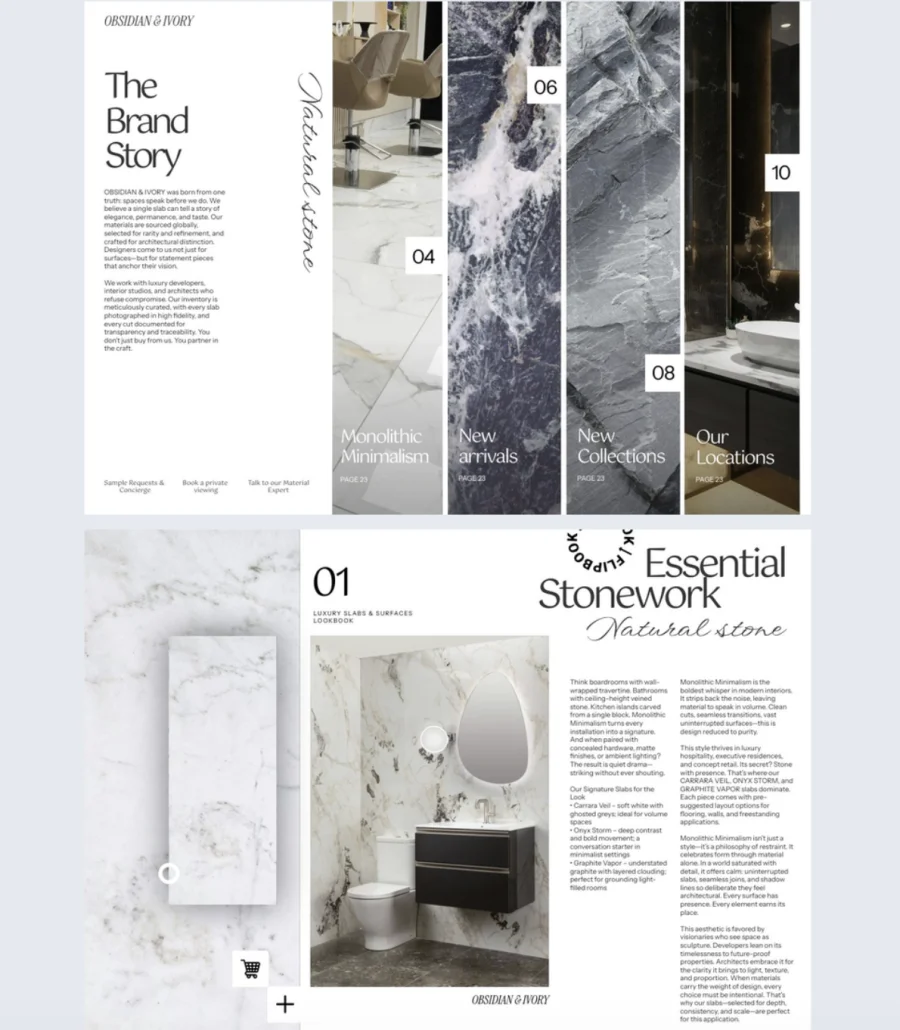
Premium surfaces like marble, granite, and quartz sell on visual impact. Buyers need to see the veining, the finish, the scale. This template gives suppliers and showrooms a clean, elegant format to present luxury materials the way they deserve to be seen.
Best for: Suppliers, showrooms, and manufacturers of high-end surface materials like marble, granite, quartz, or other luxury slabs. Works for sales presentations, showroom displays, or digital catalogs.
Real-world application: A stone supplier showcasing a new line of marble slabs can use large photo slideshows to display each slab’s unique veining and finish, embed video presentations of the material in installed settings, and use spotlight sections to highlight premium pieces. Add a shopping list so buyers build their order as they browse, embed a showroom location map so they know where to see the material in person, and include a lead form to capture inquiries on the spot.
The clean layout and strong branding options let your products take center stage. Add photo slideshows, spotlight sections, and video presentations in Flipsnack’s Design Studio. Built-in interactive features include shopping lists, embedded maps for showroom locations, and lead forms for collecting inquiries.
Common mistake to avoid: Don’t photograph luxury slabs on a cluttered warehouse floor. The lookbook sets the expectation. If the imagery doesn’t match the premium price point, buyers question the quality before they even visit the showroom.
6. Professional Lifestyle Lookbook Template
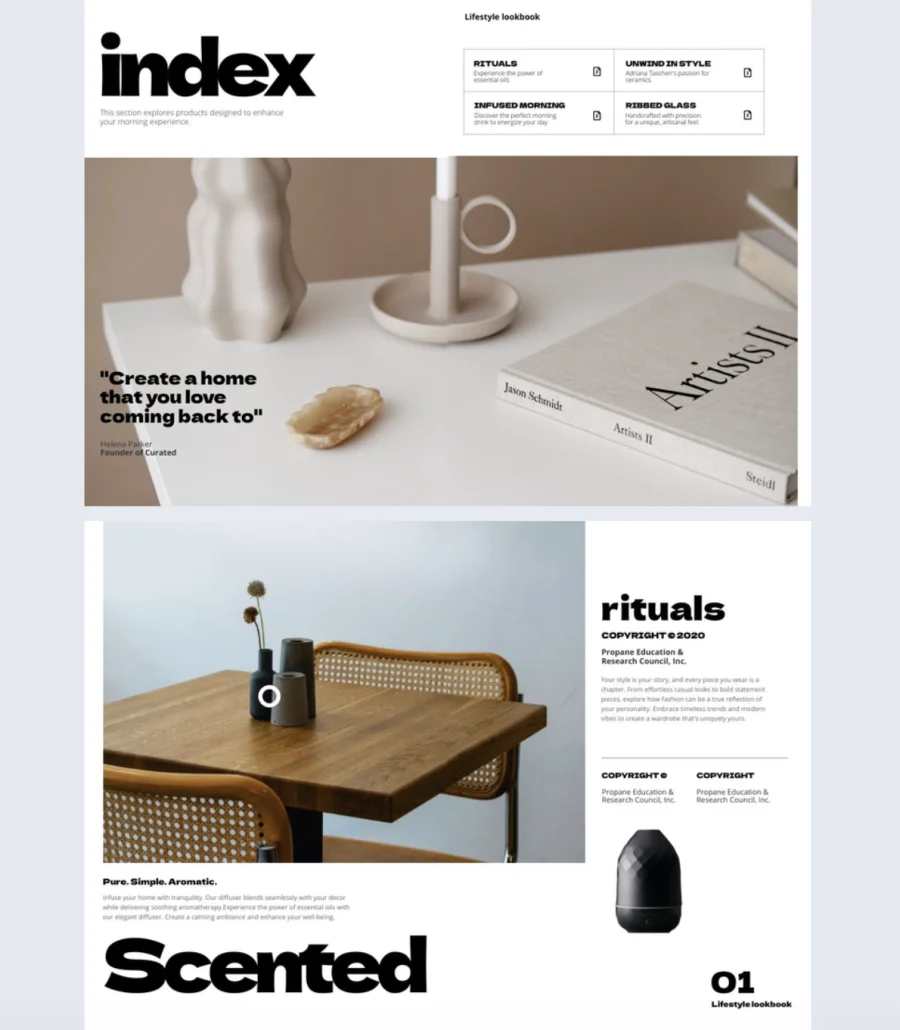
A lifestyle brand’s lookbook is often the first impression a buyer or retailer gets of a collection. This template makes sure that first impression is clean, modern, and professional, with built-in tools to turn interest into action.
Best for: Lifestyle brands, retailers, and wholesale teams who need a polished digital lookbook for presenting collections, building brand identity, or equipping sales teams.
Real-world application: A lifestyle brand presenting a new collection to wholesale buyers can use this template to showcase products with a smooth slide effect for seamless browsing. Add product tags and a shopping list feature so buyers build their order as they browse. Include go-to-page buttons for quick navigation between categories, embed videos for hero pieces, and add social media buttons to drive engagement beyond the lookbook. Link directly to your website, product pages, or online store so buyers take action instantly.
The template features a clean white background with a contemporary cover design. Fully customizable in Flipsnack’s Design Studio. Adjust fonts, colors, and layouts. Add interactive elements like embedded videos, captions, infographics, go-to-page buttons, GIFs, stickers, product tags, and a shopping list feature. Include clickable links to your website or online store and social media buttons to extend engagement.
Common mistake to avoid: Don’t send buyers a lookbook with no way to order. If they love what they see but have to email you separately to place an order, you’ve added friction. Use product tags and shopping lists to make the path from browsing to buying seamless.
7. Customizable Sportswear Lookbook
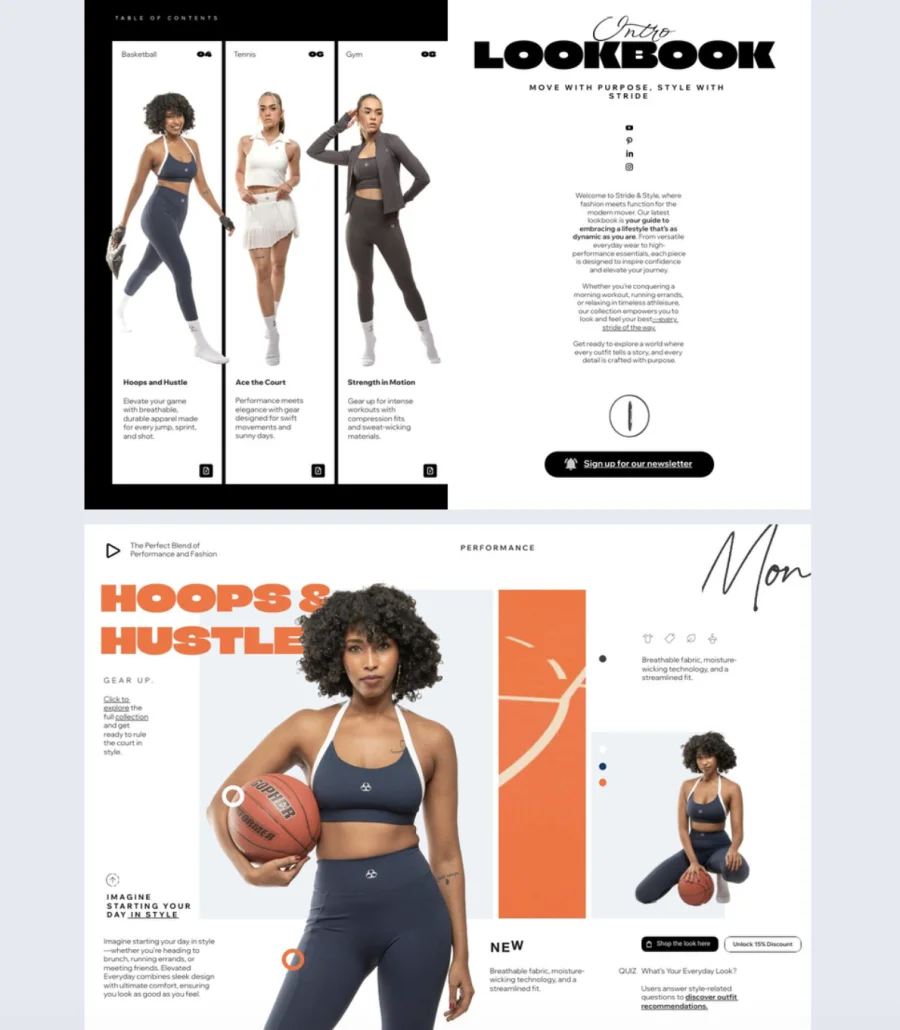
Sportswear is about movement, energy, and performance. A flat product grid doesn’t capture any of that. This template helps sportswear brands present their collections in a clean, modern format that keeps the focus on the apparel while giving customers a direct path to purchase.
Best for: Sportswear brands and retailers who want a dynamic, shoppable lookbook for new collection launches, seasonal campaigns, or wholesale presentations.
Real-world application: A sportswear brand dropping a new gym collection can use this template to showcase each piece on models with photo slideshows showing different angles and fits. Embed videos of the apparel in motion during workouts. Add product tags linking to each item, include buy buttons so customers shop directly from the page, and use Flipsnack’s shopping list feature so buyers save favorites and send orders straight to your inbox. Include a contact form for newsletter sign-ups to keep customers in the loop on new arrivals and exclusive offers.
The template features a simple black-and-white color scheme that keeps the focus on the apparel. Fully customizable in Flipsnack’s Design Studio. Add captions, photo slideshows, embedded videos, and social media buttons. Include interactive contact forms for newsletter sign-ups, product tags, buy buttons, and the shopping list feature for a seamless ordering experience.
Common mistake to avoid: Don’t show sportswear on static, stiff poses. The product is made for movement. Use action shots, videos, or GIFs that show the apparel in use. Buyers want to see how it looks mid-workout, not hanging on a mannequin.
8. Interactive Fashion Lookbook Design
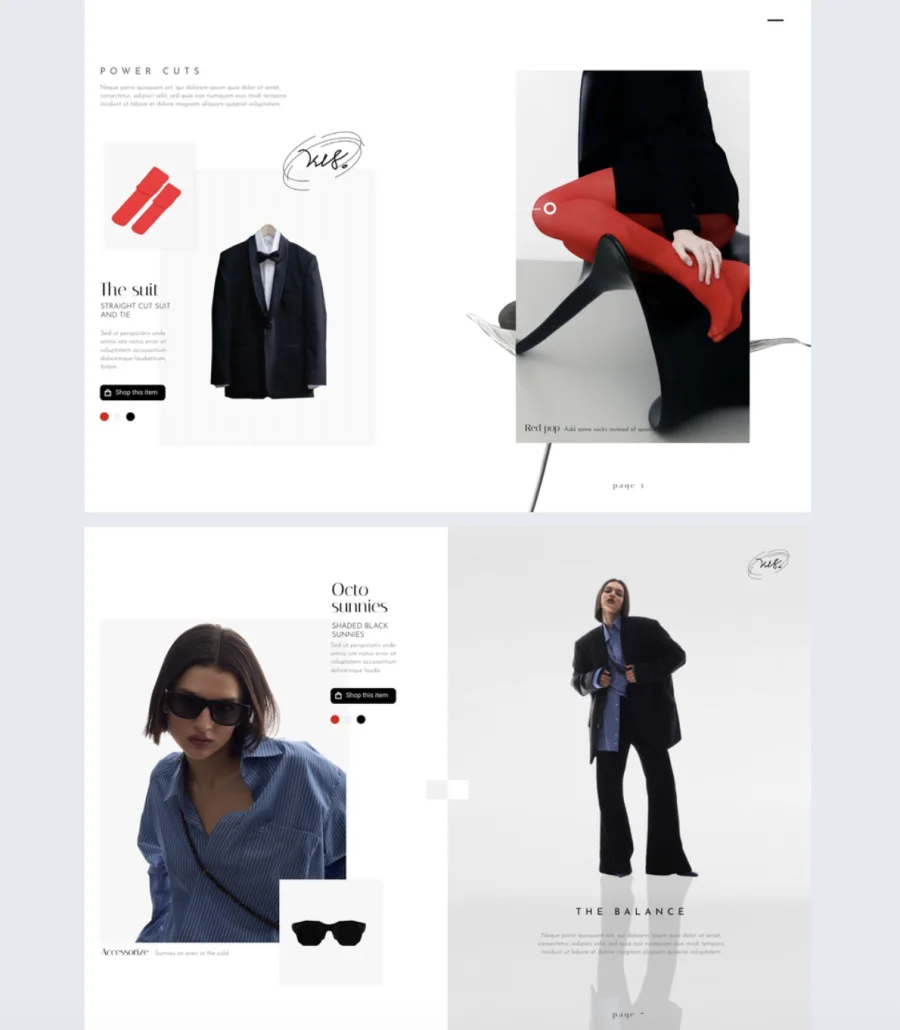
A lookbook that inspires but doesn’t let people buy is a missed opportunity. This template turns visual storytelling into a direct sales channel with built-in product tags, shopping buttons, and links that let customers shop while they browse.
Best for: Fashion brands and retailers who want a sleek, shoppable lookbook that drives purchases, not just engagement. Works for new collection launches, seasonal campaigns, or wholesale presentations.
Real-world application: A fashion brand launching a new collection can use this template to display each look with photo slideshows showing multiple outfit variations. Add product tags so viewers see pricing and details on hover, include shopping buttons for direct purchases, and enable WhatsApp pre-orders so customers secure items with a single message. Offer a wishlist feature so shoppers save favorites and email them for later pickup. One lookbook, multiple ways to convert.
The minimalist, stylish design is fully customizable in Flipsnack’s Design Studio. Add your logo, color palette, and fonts for a cohesive brand identity throughout. Include product tags, shopping buttons, direct links, WhatsApp pre-orders, and wishlist features to turn browsing into buying. Add photo slideshows, videos, or multiple versions of the same pieces so customers explore different styling options.
Common mistake to avoid: Don’t bury the shopping functionality. If viewers have to hunt for the buy button, they won’t. Make product tags and shopping buttons visible and consistent on every page. The easier the path to purchase, the higher the conversion.
9. Interactive Beauty Lookbook Template
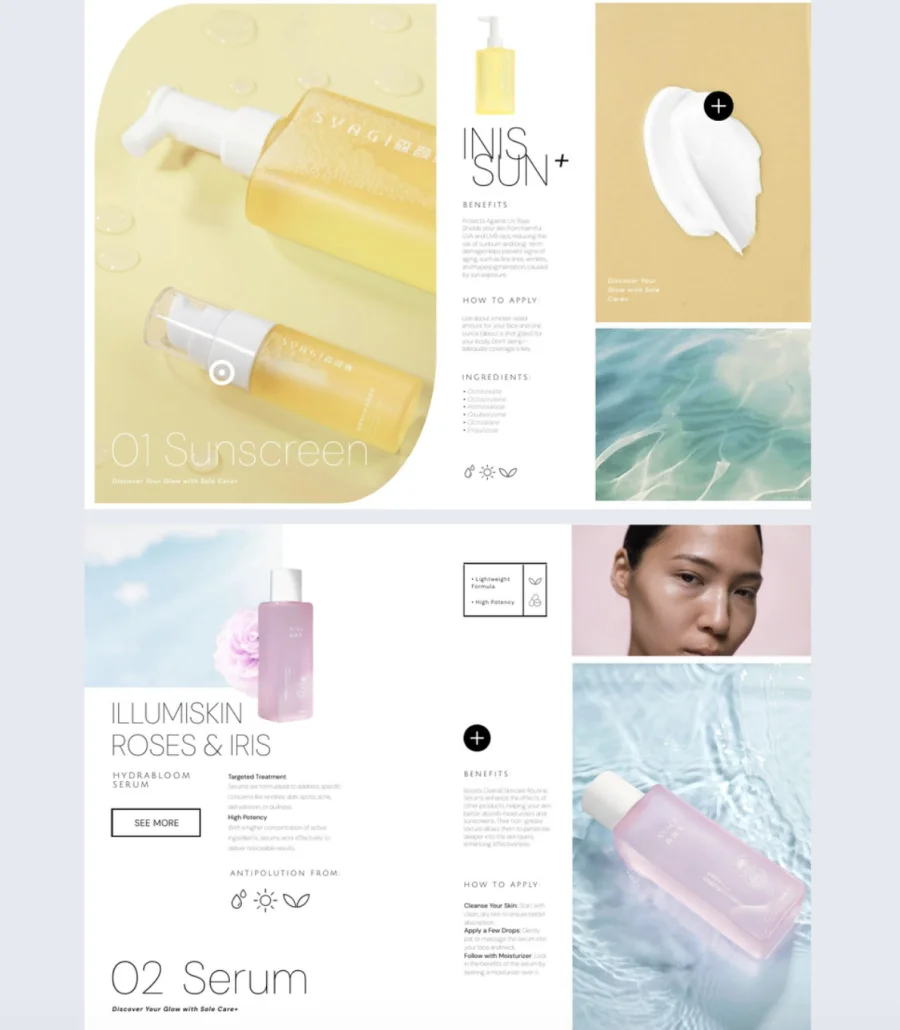
Beauty products sell through texture, color, and detail. A flat image on a page doesn’t capture that. This template helps beauty brands bring their products to life with a soft, modern design built for visual impact and clean presentation.
Best for: Beauty brands, skincare companies, and marketers who want a polished, interactive lookbook for product launches, seasonal collections, or trend showcases.
Real-world application: A skincare brand launching a new line can use this template to showcase each product with embedded videos demonstrating application, GIFs showing before-and-after results, and product tags with ingredient details. Add buy buttons so viewers purchase directly or use the shopping list feature so customers save favorites and complete their order later. Store every seasonal lookbook on Flipsnack’s digital bookshelf so past collections stay accessible and organized in one hub.
The template features a soft color palette with a yellow and white cover and black font for a clean, elegant look. Customize it in Flipsnack’s Design Studio. Add GIFs, product tags, captions, and embedded videos. Include buy buttons or redirect links to streamline the purchasing journey. Organize all your lookbooks on Flipsnack’s digital bookshelf for easy access, navigation, and sharing.
Common mistake to avoid: Don’t use heavily filtered or retouched images that misrepresent the product. Beauty buyers are savvy. They want to see real textures, true colors, and honest results. Authenticity builds trust and reduces returns.

10. Digital Valentines Day Lookbook Template
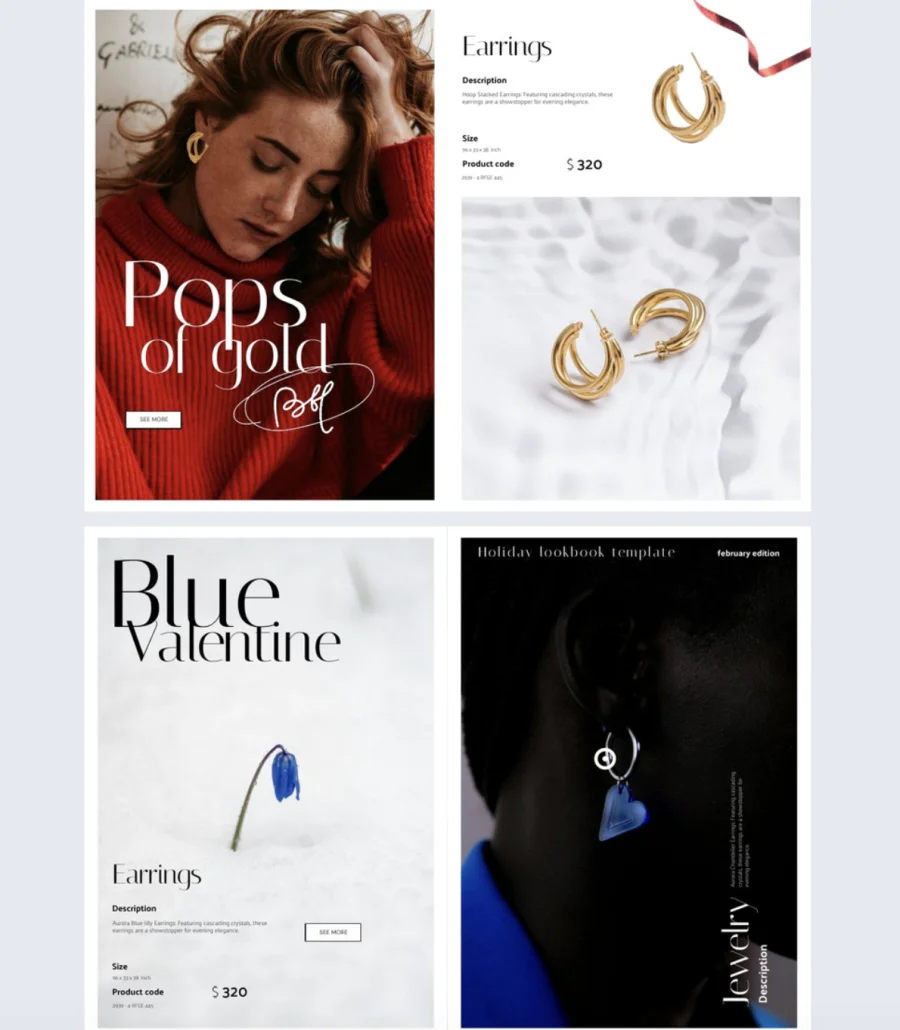
Seasonal campaigns have a short window. You need to move fast without sacrificing quality. This Valentine’s Day lookbook template gives lifestyle brands and retailers a ready-made, romantic design they can customize and publish quickly, while the collection is still relevant.
Best for: Lifestyle brands, retailers, and marketers running Valentine’s Day or romance-themed campaigns. Works for jewelry, gifts, fashion, or any seasonal collection tied to the holiday.
Real-world application: A jewelry brand promoting a Valentine’s Day gift collection can use this template to showcase pieces with a photo slideshow, tag each item with pricing and details, and add shopping buttons so viewers buy directly from the lookbook. Use Flipsnack’s collaboration features to speed up the process. Assign designers to handle layouts, marketers to add product tags and links, and managers to leave approvals directly in the platform. Built-in notes and feedback tools replace the email chains so the lookbook ships on time.
The template features a sophisticated beige and red design with sleek black typography. Customize it in Flipsnack’s Design Studio. Add hyperlinks, product tags, shopping buttons, GIFs, stickers, captions, and photo slideshows so customers explore and shop effortlessly. Use collaboration features to assign roles and permissions across your team.
Common mistake to avoid: Don’t launch your seasonal lookbook the week of the holiday. Shoppers start browsing early. Have it live at least two to three weeks before Valentine’s Day so you capture early buyers, not just last-minute ones.
11. Interactive Jewelry Magazine Template
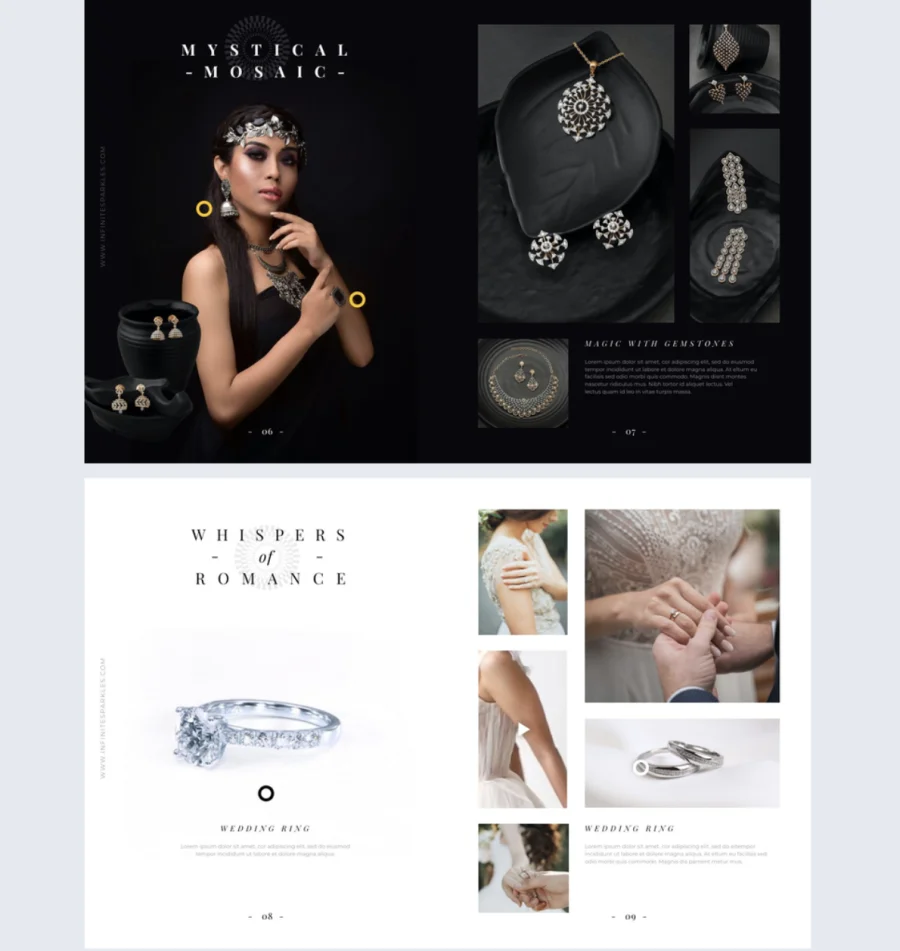
Jewelry needs more than a photo to sell. Buyers want to see how it catches light, how it sits on skin, how it feels as part of a story. This template helps luxury brands present their collections with the detail and emotion that static images can’t deliver.
Best for: Luxury jewelry brands, retailers, and marketers who want an editorial-quality lookbook that showcases craftsmanship and drives both engagement and sales.
Real-world application: A jewelry brand launching a new collection can use this template to tell the story behind each piece. Embed videos showing how a necklace moves, add slideshows of each piece styled in different settings, and use interactive content to highlight details like materials and craftsmanship. After sharing, use Flipsnack’s built-in statistics to track views, clicks, and time spent on each page. See which pieces capture the most attention and use that data to guide your marketing and inventory decisions.
The template is fully customizable in Flipsnack’s Design Studio. Add videos, slideshows, and interactive content to showcase every detail. Track performance with built-in statistics including views, clicks, and time spent per page. Use those real-time analytics to make data-driven decisions and refine your content.
Common mistake to avoid: Don’t treat every piece the same. Hero pieces deserve full-page spreads, videos, and storytelling. Everyday items can sit in a grid. Giving everything equal weight means nothing stands out.
12. Interactive Home Decor Lookbook Template
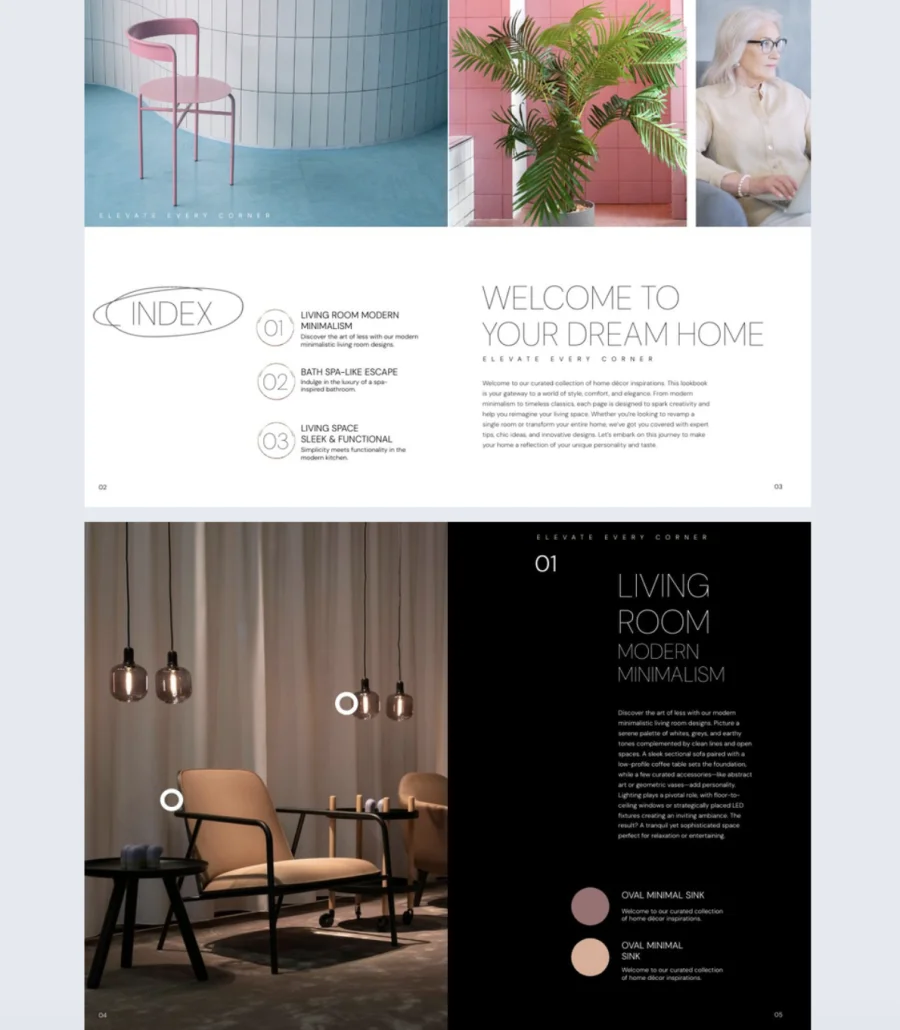
Home decor collections change fast. New arrivals, seasonal swaps, price updates. Your lookbook needs to keep up without a full redesign every time. This template gives interior designers and retailers a sleek, modern format with real-time editing so your content stays current without republishing.
Best for: Interior designers, home decor retailers, and marketers who need a polished, interactive lookbook for showcasing collections. Especially useful for brands managing frequent product changes or time-sensitive campaigns.
Real-world application: A home decor retailer running a seasonal campaign can use this template to showcase the full collection with a smooth sliding effect that feels like a presentation. Add product tags with pricing and descriptions, embed videos of styled room setups, and include GIFs and stickers to add depth. When a product sells out or pricing changes, update the lookbook in real time. No re-exporting, no redistributing. The live version updates automatically.
The template features a sophisticated blue and black background with crisp white fonts for a striking visual contrast. A smooth sliding effect delivers a presentation-style browsing experience. Customize it in Flipsnack’s Design Studio. Add videos, product tags, product descriptions, GIFs, and stickers. Make real-time edits anytime without needing to reshare.
Common mistake to avoid: Don’t let outdated pricing or sold-out items sit in a live lookbook. Nothing frustrates a buyer faster than clicking “shop” on something that’s no longer available. Use real-time editing to keep everything accurate and aligned with your current inventory.
13. Spa Online Lookbook Template
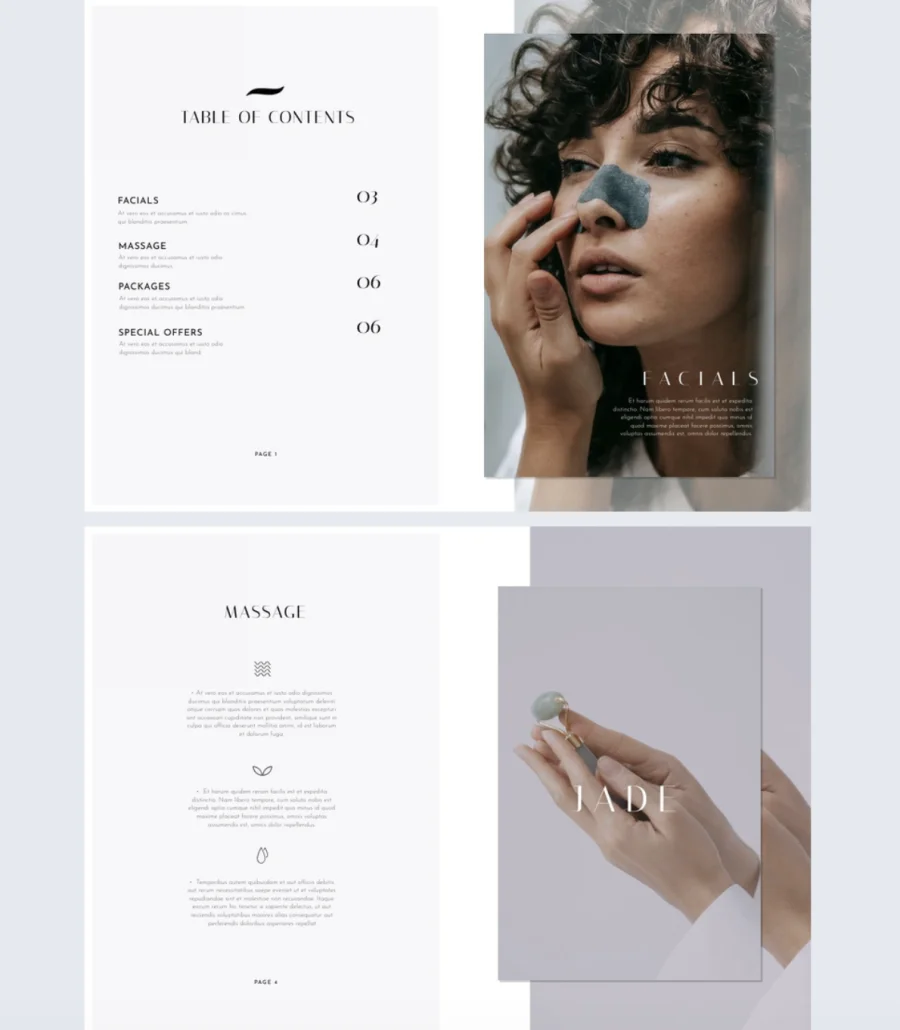
A spa menu printed on a folded card doesn’t do your services justice. This template helps spas and wellness brands present their treatments in a visually rich, interactive format that turns browsers into bookings.
Best for: Spas, wellness centers, and beauty service providers who want a professional digital catalog that showcases treatments and drives client bookings.
Real-world application: A spa launching a new treatment menu can use this template to pair each service with high-quality images, add photo slideshows showing the experience, and embed videos of treatments in action. Include direct links to your booking page so clients go from “that looks amazing” to “booked” in one click. Upload your own photos or pull from Flipsnack’s free stock image library to match your brand’s aesthetic.
The clean, consistent layout features high-quality images for each treatment with a similar design across every two-page spread for a polished look. Customize it in Flipsnack’s Design Studio. Add videos, photo slideshows, and direct links. Upload your own images or choose from Flipsnack’s free stock library.
Common mistake to avoid: Don’t just list services and prices. Show the experience. A photo of a treatment room, a short video of a massage technique, or a slideshow of before-and-after facials tells clients what to expect. People book experiences, not line items.
14. Editable Interior Design Lookbook Template
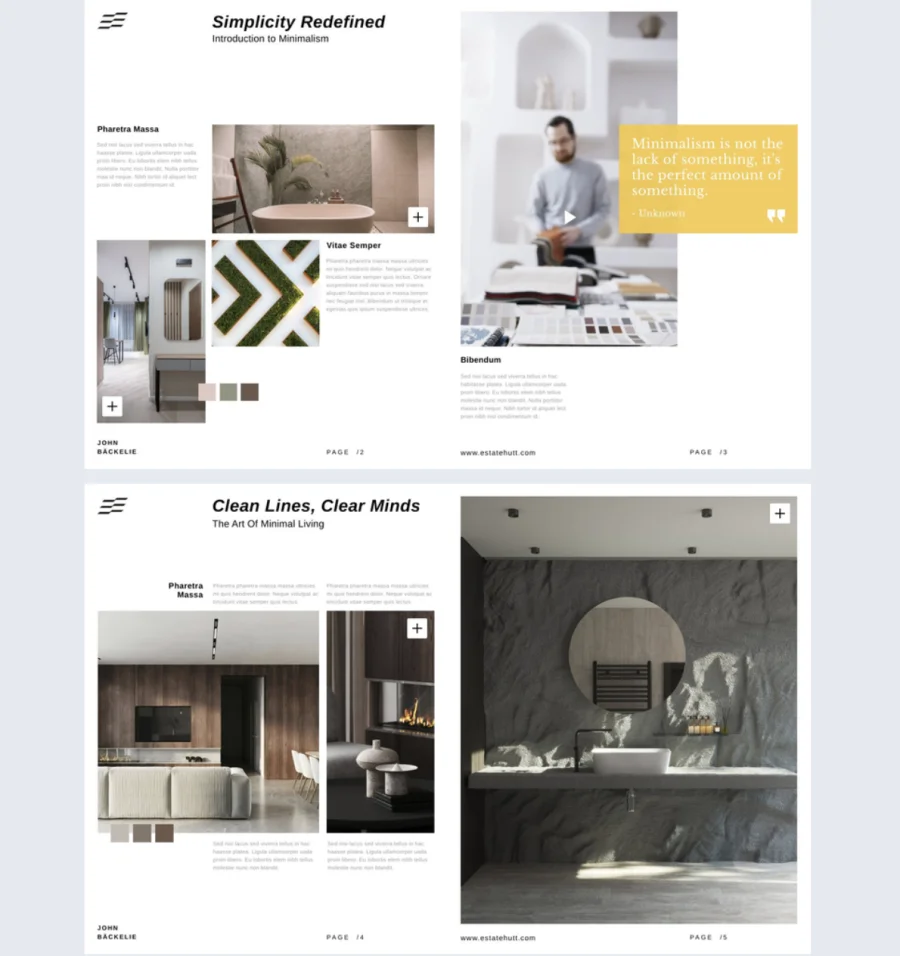
Interior design is about options. Clients want to see how a piece looks in different colors, styles, and combinations before they commit. This template lets designers group furniture and decor together and show every variation without cramming it all onto one page.
Best for: Interior designers, furniture retailers, and home decor brands who want to present collections with multiple style and color options in an interactive, browsable format.
Real-world application: An interior designer presenting a living room collection can group a sofa, side table, and armchair together, then use slideshows to show each piece in different color options. Embed videos of a styled room walkthrough so clients see how everything fits together in context. Clients browse at their own pace, explore variations, and land on the combination that works for their space.
The template is fully editable in Flipsnack’s Design Studio. Highlight each product with image spreads, slideshows, or embedded videos. Group furniture and decor pieces together and offer different color and style variations. Flipsnack’s interactive features provide a seamless browsing experience with multiple design options to explore.
Common mistake to avoid: Don’t show furniture pieces in isolation without context. A chair in a blank space tells clients nothing about scale, pairing, or style. Always show pieces styled together so clients can picture the full look, not just individual items.
Share publicly or privately with select customers via link, email, or embed on your website.
15. Downloadable Fashion Lookbook Template
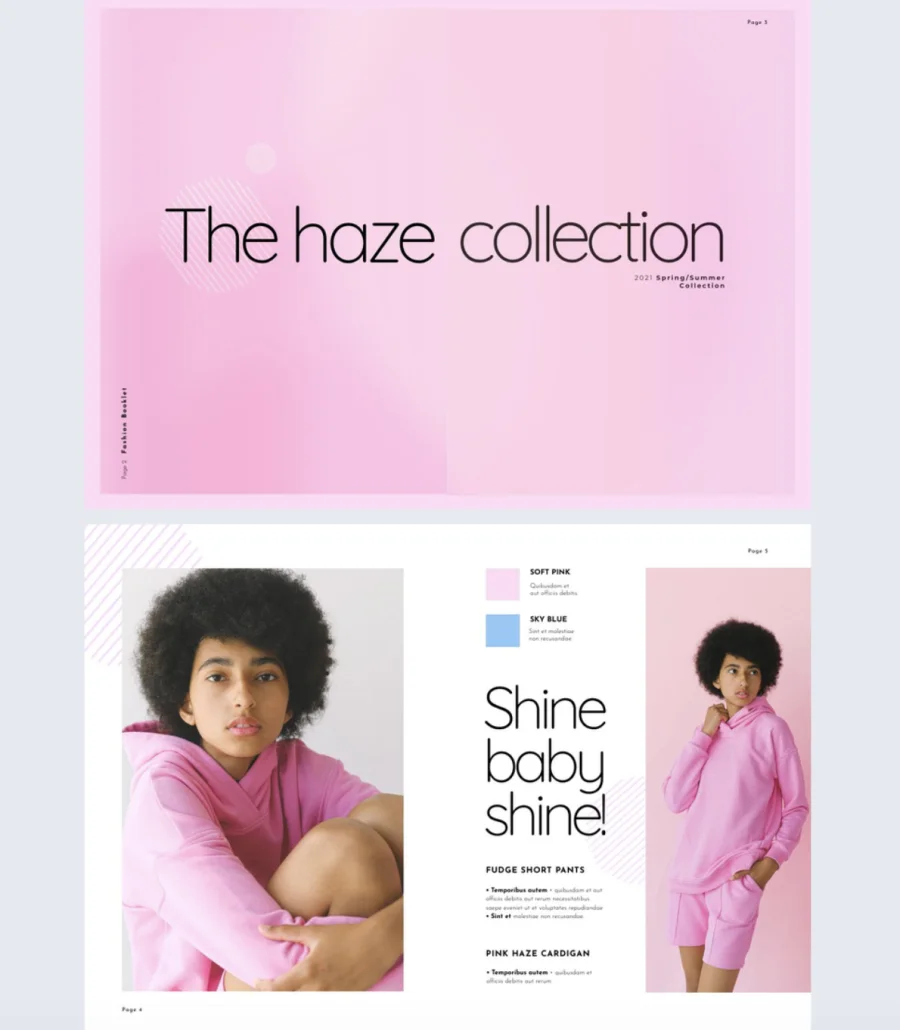
Fashion lookbooks are where you get to be bold. This template is built for brands that want to experiment with colors, fonts, and layered elements to create something that feels as unique as their collection.
Best for: Fashion brands, designers, and retailers who want a visually striking, customizable lookbook they can share digitally or download as a PDF for print distribution.
Real-world application: A designer preparing for a trade show can use this template to build a lookbook that doubles as a digital and print asset. Add product images, match brand colors using exact hex codes, and experiment with shapes and overlapping elements to add depth. Include go-to-page buttons for digital browsing and spotlight effects to enlarge smaller product details. When it’s ready, share it online for digital audiences and download it as a PDF for buyers who want a physical copy at the booth.
Fully customizable in Flipsnack’s Design Studio. Add your own product images, brand book elements, and exact hex codes for a cohesive look. Include go-to-page buttons, spotlight effects, and interactive features to highlight every detail. Download as a PDF for print or share digitally.
Common mistake to avoid: Don’t go so bold with the design that the products get lost. Colors, fonts, and layered elements should enhance the collection, not compete with it. If a viewer notices the layout before the clothes, dial it back.
How to make a lookbook in Flipsnack
1. Start with a template
Browse Flipsnack’s library of professionally designed lookbook templates. From clean product grids to editorial-style layouts, you’ll find designs for many use cases. Click the template that best fits your project to start editing, or choose one from this list.
2. Customize every detail
Use Flipsnack’s Design Studio to make the template your own. Add your company logo, adjust colors to match your brand palette, and select from a wide range of fonts.
Replace placeholder content with product photos, collection descriptions, and pricing details. To make your lookbook more interactive, embed videos, link to product pages, insert GIFs, and add clickable buttons or contact forms.
3. Share your lookbook digitally
Once your lookbook is ready, you can share it anywhere or keep it private. Flipsnack gives you full control, from simple shareable links and website embeds to password protection, unlisted links, one-time passcodes, and domain restrictions. Whether it’s for the public, buyers, or your internal team, you decide who can access it and how.
4. Save and reuse your template
Keep your customized lookbook design in your Flipsnack account along with your brand assets such as logos, fonts, and colors. This makes it easy to produce new lookbooks for future seasons or product lines while ensuring your branding stays consistent and the process efficient.
Turn inspiration into sales with Flipsnack’s lookbook templates
Creating a visually striking, on-brand fashion lookbook doesn’t have to be complex. With Flipsnack’s fashion lookbook templates, marketers and brand managers can build interactive lookbooks that do more than just showcase products – they tell a story.
From fully customizable layouts and interactive elements like videos, product tags, and shopping buttons, to easy collaboration and real-time updates. Flipsnack gives fashion brands the tools to streamline their digital lookbook creation process. Design, edit, and distribute professional digital lookbooks that truly reflect your brand’s style.
FAQs on digital lookbooks
A lookbook typically includes:
– High-quality product images styled in context
– A consistent visual theme throughout
– Minimal text, just captions, product names, or short descriptions
– A clear flow grouped by collection, theme, or category
– A call to action like a shop button, booking link, or contact form
A catalog lists products with specs, pricing, and detailed descriptions. A lookbook tells a visual story. It focuses on mood, styling, and lifestyle rather than technical details. Catalogs inform. Lookbooks inspire. Many brands use both, but they serve different purposes.
To customize a lookbook template:
– Replace placeholder images with your own product photos
– Apply your brand colors, fonts, and logo
– Arrange pages by collection, theme, or category
– Add interactive elements like videos, product tags, or shop buttons
– Adjust the layout to match the mood of your brand
Common mistakes include:
– Using catalog-style product shots instead of styled imagery
– Overcrowding pages with too many products or text
– Mixing visual styles that break the mood
– Not including a way for viewers to shop or take action
– Ignoring mobile readability for digital lookbooks

Hi Jani,
Nice post, I like this post very much. I love to read your post, Some points like “Souris Mini” and “Kensie” are awesome.
Thanks for sharing.
Thank you Sweta, those are some of my favorites as well!
Beautiful Post. I find it informative. Thank you.
nice design ideas
Nice ideas.thanks a lot.
Thank you so much!!