Booklet vs Book: When to Use Each Format for Marketing
Published on: September 17, 2026
You’ve got a product catalog ready. A sales pitch prepared. An event announcement that needs to go out. You could print it. You could email it as a PDF. You could turn it into an interactive digital booklet. Each format looks polished. Each costs money and time. Each reaches your audience differently—and some stick around longer than others.
So what’s the real difference between a booklet and a book? And when does going digital actually win?
This guide cuts through the jargon. It’s built for marketing managers, sales enablement teams and anyone trying to choose a format without overthinking it. By the end, you’ll know exactly which format solves your problem.
Table of contents
What’s a booklet?
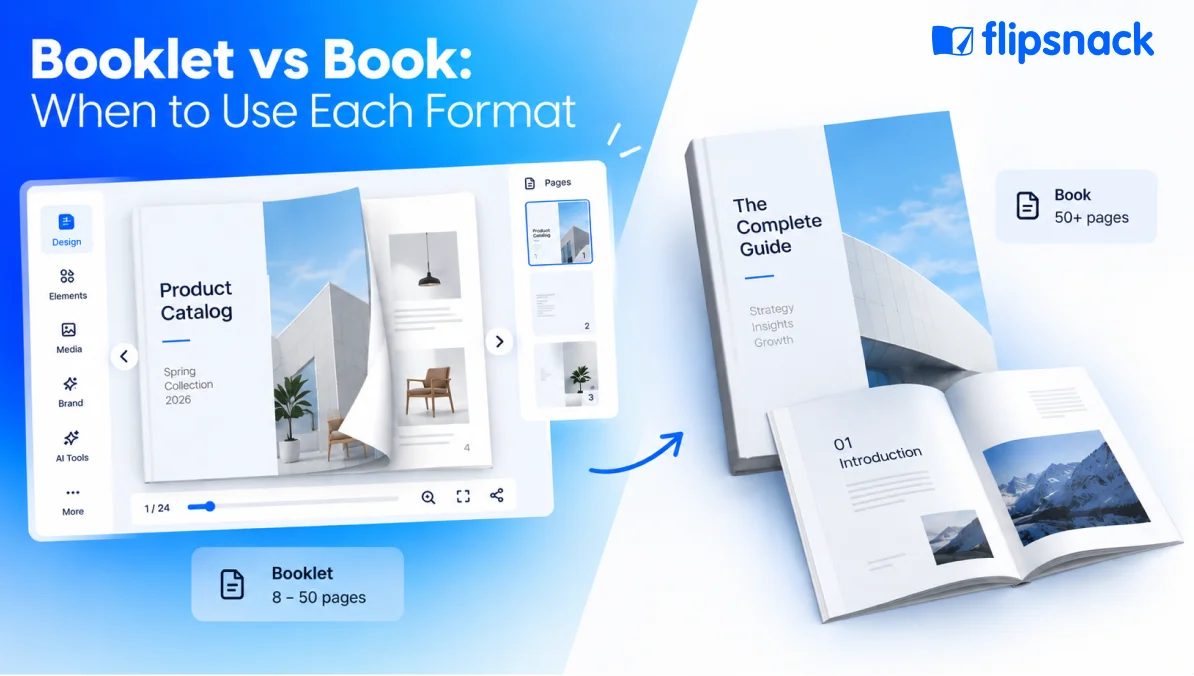
The short answer: A booklet is a small, bound publication—typically 8–50 pages, saddle-stitched or perfect-bound, designed for affordable distribution and quick reading. It’s the marketing workhorse.
Booklets live in the space between a single-page flyer and a full book. They’re compact (usually 5.5 x 8.5 or 6 x 9 inches), easy to carry and cheap to produce. That’s why they dominate: product catalogs, sales brochures, event programs, training guides and company profiles all use booklet format.
Binding methodology matters significantly. Saddle-stitch (staples down the spine) is most common and keeps costs low. Perfect binding (glued spine, like a paperback) looks more professional but costs more.
But how does a booklet compare to a full book? Let’s see.
What’s a book?
The short answer: A book is a longer, bound publication (50+ pages) with a spine, designed for comprehensive content, long-term reference or extended reading. Books signal authority and investment.
Books hold depth. They’re built for readers who want to settle in—either for immersion (novels, memoirs) or reference (manuals, educational texts, corporate documentation). Books stay on shelves for years. They get archived. They’re consulted repeatedly.
Books cost more to produce than booklets and take longer to print. But they land differently. Holding a printed book communicates seriousness in a way a thin booklet doesn’t.
Here’s the key tension: Booklets prioritize speed and cost. Books prioritize depth and authority. Let’s compare them directly.
Key differences at a glance
The short answer: Booklets are compact, affordable and fast to produce. Books are comprehensive, durable and signal authority. The “best” format depends on your use case.
| Dimension | Booklet | Book |
| Page count | 8–50 | 50+ |
| Size | Pocket-sized (5.5 x 8.5, 6 x 9) | Varied (6 x 9, 8.5 x 11) |
| Binding | Saddle stitch (typical) or perfect bind | Hardcover, softcover or perfect bind |
| Production time | 1–3 weeks (print) | 3–8 weeks (print) |
| Cost per unit | $0.50–$5 | $3–$15+ |
| Shelf life | 6 months–2 years | 2–5+ years |
| Best for | Marketing, events, quick reference | Comprehensive guides, education, archives |
| Updates | Requires reprinting | Time-consuming; new editions only |
Each row hints at a decision criterion. When you update pricing monthly, reprinting a book becomes expensive fast. When you need something to stay relevant for five years, a booklet’s shelf life isn’t enough. Let’s dig into when to choose each.
When should you use a booklet?
The short answer: Use a booklet when you need affordable, portable, easy-to-update collateral for a specific campaign or audience.
Booklets dominate when cost-per-unit, quick production and portability matter more than comprehensive depth. Here’s where marketing and sales teams reach for booklet format:
Product catalogs (small to medium lines). Showcase 10–100 SKUs with photos, descriptions and pricing. Booklet format keeps costs controlled and makes mailing affordable. Larger catalogs (100+ SKUs) move into book territory or go digital.
Sales brochures and leave-behinds. Reps hand these out after pitches, at trade show booths, at events. Booklet format is the industry standard—agents can carry dozens without weight penalty.
Event programs and conference agendas. Eight to sixteen pages, printed booklet format. Standard for conferences, trade shows, weddings. Attendees keep them as reference and souvenir. (Though digital event programs are catching up—more on that later.)
Training guides and instruction manuals. Twelve to thirty-two pages for step-by-step user guides, assembly manuals, care instructions. Quick reference, kept for years but not read cover-to-cover.
Company profiles and introductory brochures. New business pitches, investor intros, nonprofit fundraising. Booklet format signals professionalism without the expense of a full annual report.
Real estate property brochures. Real estate agents create property booklets for listings. Digital booklets dominate this space now—agents need to update details, photos and prices constantly.
In each case, a booklet wins because it’s affordable, portable and fast to produce. But there’s a catch: updates require reprinting. That’s where digital booklets change the equation.
Digital booklets: The modern third option
The short answer: A digital booklet is an online, interactive version of a booklet—usually with a page-flipping effect, embedded video, clickable links and analytics. It’s updated instantly, tracked for engagement and costs nothing to distribute.
A digital booklet is not just a PDF. It’s an experience designed for modern workflows. Here are the core differences:
Live updates without reprinting. Print a booklet with a price: $49. Price changes to $39. You’ve got two choices: throw away inventory or send conflicting messaging. A digital booklet? Change the price in seconds. One link. No reprint. No confusion. This is the single biggest pain point marketing and sales teams mention.
Engagement you can actually see. Print a booklet and mail it to 500 prospects. Zero visibility into who reads it, what pages they stop at, or whether they act on it. A digital booklet tells you everything: time spent on page, which links get clicked, whether leads filled out forms, how many times somebody opened it. This data changes how you iterate.
Lead capture built in. Printed booklets are one-way. Digital booklets include embedded forms: “Download our case study. Enter your email.” Your marketing collateral becomes a lead generation tool.
No printing or storage costs. A printed booklet: $1–$3 per unit, plus storage, fulfillment, waste. A digital booklet: made once, shared infinite times. Cost per share: zero.
Easy to share and embed. Email a link. Embed on your website. Share on social. One asset, infinite distribution channels. Printed booklets live in boxes.
When digital wins: Frequent updates needed. Lead gen is a goal. Budget-conscious. Remote or digital-first audience.
When print still wins: Trade shows and in-person events (hand-to-hand contact matters). Premium brand moments (luxury, formal settings). Direct mail (breaks through digital noise). Waiting rooms and passive brand building.
Digital booklet vs. printed booklet
| Factor | Digital booklet | Printed booklet |
| Cost per unit | $0 (after creation) | $0.50–$5 |
| Production time | Minutes to hours | 1–3 weeks |
| Update frequency | Instant, no reprint | Requires new print run |
| Engagement visibility | Full analytics | None |
| Tactile experience | None | Premium feel, memorable |
| Lead capture ability | Yes (embedded forms) | No |
| Best for | Frequent updates, lead gen, digital audiences | Trade shows, premium positioning, brand moments |
Choose digital if: You update content monthly or more. Your audience is remote. You need to track engagement. Lead capture is a goal. Budget is tight.
Choose print if: Attendees want a take-home keepsake. Premium feel is critical. Your audience values tactile experience. You expect long shelf life. Print budget justifies the per-unit cost.
The trend: Most marketing teams use both. Print for high-touch moments. Digital for everything else. That’s the hybrid strategy that wins.
How to create a digital booklet (free)
The short answer: Upload a PDF or start from a template, customize branding, add interactivity, then publish. Takes 20–60 minutes. No design skills required.
Step 1: Gather your content
Collect product descriptions, photos, your logo, pricing, team bios, contact info, case study results. If you have a PDF, even better—you can upload it directly.
Step 2: Upload or choose a template
Open Flipsnack and click “Create” → “Booklet.” Drag and drop your PDF if you have one, or browse templates by industry: retail catalogs, sales brochures, event programs, real estate listings, nonprofit reports. Templates are fully editable and come pre-designed; customize them with your logo, colors and content.
Step 3: Customize your branding
Add your logo, brand colors, fonts. Use drag-and-drop—no Photoshop needed. Move text boxes, resize images, change button colors, update copy. If brand consistency matters, use a Brand Kit to lock fonts and colors so every booklet stays on-brand.
Step 4: Add interactivity
Embed clickable links to product pages, email or phone. Add YouTube videos. Include lead capture forms (name, email, company). Add buttons with calls-to-action. Build interactive slideshows for product angles. None of this requires code—all point-and-click.
Step 5: Publish and share
Choose visibility: Public, Unlisted (link-only), Password-protected or Private. Click “Publish.” Your booklet gets a live link. Share via email, social, embed on your website or direct link. Update whenever you want—same link, fresh content.
What about other tools? Flipsnack is purpose-built for marketing (live updates, analytics, lead forms). Canva offers huge template libraries and is beginner-friendly but has limited analytics. Adobe InDesign delivers professional output but requires design skills and a subscription.
The bottom line: Choose your format (or both)
Booklets are for marketing speed. Affordable, portable, fast to produce. Perfect for campaigns that move quick.
Books are for comprehensive authority. Expensive and slow, but they signal permanence and depth. Built for content that stays relevant for years.
Digital booklets are for modern marketing. They combine booklet speed with live updates, engagement tracking and lead capture. No printing cost. No reprints. No guessing who engages.
For most marketing teams in 2024–2026, digital booklets have become the default. Print still wins for specific moments: trade shows, high-touch brand experiences, waiting rooms. But for speed, cost and measurement? Digital wins.
The winning playbook: Use digital booklets as your primary format for marketing collateral, catalogs, training materials. Use printed booklets for in-person, brand-premium moments. Use books only when you need comprehensive, permanent reference material.
Frequently asked questions
Not quite. A brochure is typically a single sheet, folded (tri-fold, bi-fold). A booklet has multiple pages, usually 8+, bound together. Booklet means more pages, more content space. Both are marketing materials; booklet is the term when binding is involved.
Yes. Flipsnack (and similar tools) accept PDF uploads and convert them to interactive booklets with a page-flipping effect. You can edit text, images and design after upload. No recreating from scratch necessary.
No. Flipsnack offers templates, drag-and-drop editing and AI-assisted design suggestions. Teams with zero design experience create professional booklets daily. Designers are helpful for polish, but optional.
Printed booklets? No direct lead capture (unless you include a survey plus reply envelope). Digital booklets? Yes—embedded forms, clickable calls-to-action. Digital is the lead-gen play for collateral.
Depends on the tool. Flipsnack booklets are searchable via Ctrl+F. PDFs are searchable. Some digital booklets (low-end) aren’t searchable. Check before you choose your tool.