How to Turn Interactive Brochures into HubSpot Campaign Assets
Published on: March 18, 2026
Most brochures still act like static collateral. They get attached to an email, downloaded once, and forgotten. There’s no way to know who read them, how far they got, or what made someone click.
For B2B demand generation teams, that’s a structural problem. You’re expected to show pipeline contribution from every asset you produce, but a PDF gives you nothing to work with. No lead data, no engagement signal, no attribution, no follow-up trigger. Just a download count that doesn’t tell you anything about intent or revenue impact. But when you start integrating brochures with HubSpot using Flipsnack, the whole dynamic changes.
Your digital brochure becomes a measurable campaign asset, one that captures leads, signals buyer intent, and feeds directly into your nurture workflows. This guide walks you through how to make that happen, step by step.
Why static brochures fall short in modern campaigns
In a demand generation context, every asset you create should do three things: generate leads, provide engagement data, and support follow-up. A static PDF does none of these reliably.
Consider what you lose with a traditional PDF brochure:
- You have no visibility into who opened it or how long they spent on each section.
- There’s no built-in mechanism to capture contact information.
- You can’t tie the download to a campaign source or attribute it to a pipeline opportunity.
- You can’t trigger an automated follow-up based on what the reader engaged with.
The result is a content asset that looks polished but produces almost no actionable signal. For demand gen teams running account-based campaigns, event follow-ups, or product launches, that’s a missed opportunity, especially when integrating brochures with HubSpot can turn static content into measurable campaign assets.
What HubSpot integration actually does for your brochures
Most marketers think of integration as a technical setup to connect a form, sync a field, and be done. But integrating a brochure with HubSpot is really a strategic decision about where your content fits in the campaign funnel.
When a Flipsnack brochure is connected to HubSpot, three things happen that don’t happen with a standalone PDF:
Lead data flows automatically
A reader submits a form inside the brochure and becomes a HubSpot contact instantly, tagged with the campaign source, lifecycle stage, and any custom properties you’ve mapped. No manual exports, no lag between interest and follow-up.
Engagement becomes a campaign signal
With HubSpot tracking, you can see exactly how prospects interact with your brochures.
Track views, clicks, and time spent, all tied to individual contacts.
For example, a sales rep can see that a prospect spent eight minutes reading your pricing brochure last Tuesday.
This gives you powerful engagement insights to improve your digital brochures and close more deals.
The brochure joins your campaign architecture
With tracked URLs, every brochure visit is attributed to a campaign source in HubSpot. Your reports stop showing “brochure downloads” as an isolated number and start showing brochure-driven contacts, their progression through the funnel, and their contribution to the pipeline.
That’s the integration. Not a feature of a connected system where brochure content, reader behavior, and campaign data all live in the same place and inform the same decisions.
Flipsnack’s HubSpot integration for pipeline growth
Flipsnack’s HubSpot integration with your brochure covers two distinct layers: lead capture and engagement tracking. Together, they turn your flipbooks into fully measurable marketing assets.
Collect leads without leaving the flipbook
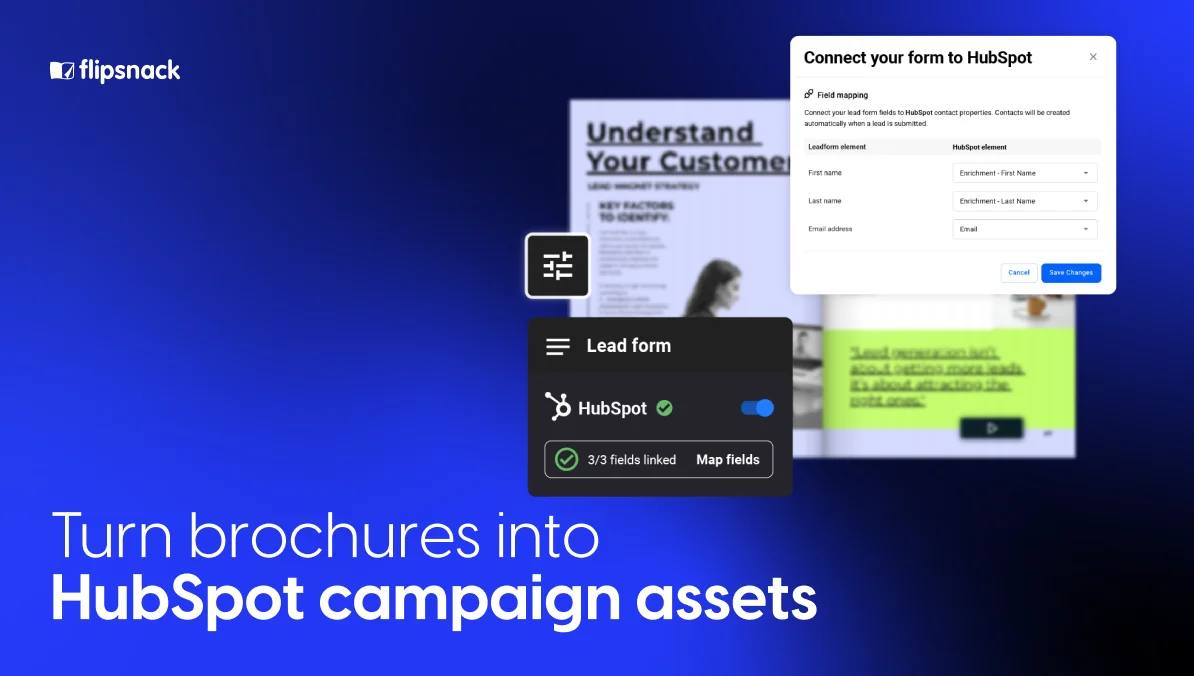
Add a form to your flipbook, and every submission is sent to HubSpot as a clean contact record, no manual exports, no extra tools. You can build instant lead lists from flipbook submissions, route leads to the right owner by source, and eliminate the manual work of moving contacts between platforms. To set it up: enable a form inside your flipbook, connect HubSpot, and map your fields to the right contact properties, then publish and confirm submissions are appearing correctly in your CRM.
Track engagement through Google Tag Manager
Beyond lead capture, Flipsnack integrates with HubSpot via Google Tag Manager, letting you track flipbook activity alongside your other marketing assets. Add your GTM container ID in Flipsnack’s Customize area, create a Custom HTML tag in GTM with the HubSpot tracking code set to fire on all pages, then publish your container. Once live, you unlock:
- Flipbook views and activity tracked inside HubSpot
- Per-contact activity logs showing which flipbooks a contact viewed and clicked
- Attribution data so you can add flipbooks to HubSpot campaigns and measure their pipeline impact
- Support for HubSpot chat widgets embedded directly inside flipbooks
- Cookie consent banners displayed within the flipbook for compliant tracking
How to connect Flipsnack brochures to a HubSpot campaign
Here’s the practical end-to-end workflow, from brochure creation to campaign reporting.
Step 1: Create your brochure in Flipsnack
Upload your existing brochure design or build one directly in Flipsnack’s editor. Focus on making the content experience compelling. Interactive elements like clickable CTAs, embedded video, and product hotspots increase time-on-page and signal stronger buyer intent when that data reaches HubSpot.
Step 2: Add a lead form or embed your HubSpot form
Decide where lead capture fits into your content experience. For top-of-funnel awareness brochures, place the form at the end, let readers consume the content first, then ask for their details. For high-value mid-funnel assets, consider gating the content upfront. Embed your existing HubSpot form directly into the publication so all submissions route cleanly into your CRM without any duplication of effort.
Step 3: Generate a tracked campaign URL
In HubSpot, create a tracking URL for the brochure link using the Tracking URL Builder. Tag it with your campaign name, source, and medium. This is what connects a brochure visit back to a specific campaign in HubSpot’s reporting. If you’re sharing the brochure via QR code, at an event, on printed collateral, or in a direct mail piece, use a unique tracked URL for each channel so you can compare attribution across touchpoints.
Step 4: Publish and distribute
Share the Flipsnack brochure link (with your HubSpot tracking parameters appended) across your campaign channels: email, LinkedIn, sales outreach, event materials, or paid campaigns. The tracked URL ensures every visit is logged against the correct campaign source in HubSpot.
Step 5: Sync leads into HubSpot
As readers submit the embedded form, contacts are automatically created or updated in HubSpot. Depending on your setup, you can tag these contacts with a specific campaign, list, or lifecycle stage, making it easy to segment them for follow-up and attribute them to the right campaign in reporting.
Step 6: Enroll leads in HubSpot nurture workflows
Set up a HubSpot workflow triggered by form submission from your brochure. The immediate follow-up action matters: send a confirmation email, notify the relevant sales rep, enroll the contact in a nurture sequence, or update their lead score. The brochure interaction conveys meaningful information about buyer intent; your workflow should act on it while that intent is fresh.
Step 7: Measure engagement and campaign impact
In HubSpot, use campaign reporting to track how many contacts came through the brochure, how they’re progressing through the funnel, and what pipeline value they represent. Cross-reference with Flipsnack’s engagement data, views, time spent, and interaction rates to understand which content sections are driving conversions and which ones need improvement.
Real-world example: How Benifex engages 10,000+ leads in a year with interactive B2B reports
Benifex, an employee benefits platform supporting more than five million employees across 3,000 organizations worldwide, faced a challenge familiar to most B2B marketing teams: they were producing a high volume of content, reports, guides, and eBooks, but had limited visibility into how readers were actually engaging with it, and no efficient way to personalize content for ABM or tie it to sales follow-up.
Their previous platform made design time-consuming, lacked real-time engagement data, and didn’t give the team the flexibility to move quickly. Personalization for ABM was manual and slow. Without reliable analytics, optimizing campaigns was largely guesswork.
After switching to Flipsnack, the results were significant:
- Their flagship 2024 Big Benefits Report achieved 1,712 unique viewers, 2,158 total impressions, and an average read time of over six minutes
- The report drove traffic from 33 countries, reflecting the global reach of their campaigns.
- A single campaign generated over 300 leads.
- Production workflows became 50% faster, saving the equivalent of one full designer’s workload over the course of a year.
For ABM and sales enablement, the Benifex team created 51 personalized flipbooks, each with a unique trackable link. Sales reps could send a tailored interactive report to a key prospect and see exactly how that contact engaged, which pages they read, how long they spent, and what they clicked. That engagement data surfaced high-intent leads and gave sales a clear signal for follow-up timing.
The analytics Flipsnack provided, average read time, scroll depth, download rates, and click-through behavior, became central to how the team evaluated content performance and planned future campaigns.
“It’s making sure the content we’re putting out is high quality and super engaging. Getting people to download is one thing, but making sure they actually engage with it is what Flipsnack does really well.” — Natasha Hemmings, Content Manager, Benifex
Best use cases for Flipsnack and HubSpot together
This workflow is particularly well-suited to a handful of B2B marketing scenarios:
- Events and trade shows: Replace printed handouts with QR codes pointing to interactive Flipsnack brochures. Each QR code can carry a unique tracking URL, so you know exactly how many booth conversations turned into captured leads.
- Product launches: Gate a detailed product brochure behind a HubSpot form to capture interested buyers early. Use Flipsnack engagement data to see which features are drawing the most attention.
- Sales enablement: Give sales reps a Flipsnack link to send in outreach emails. When a prospect opens the brochure and submits the form, the rep gets a HubSpot task, and the contact is flagged as high-intent.
- Direct mail and field marketing: Printed materials with a QR code bridge offline campaigns to online engagement tracking. The Flipsnack brochure becomes the digital landing experience, and HubSpot captures the attribution.
- Account-based marketing: Create custom brochures for high-priority accounts and share them with tracked links. Engagement signals from named accounts can feed directly into ABM workflows in HubSpot.
- Gated content programs: Build a library of gated Flipsnack publications, buyer’s guides, industry reports, and technical overviews that steadily generate inbound leads and feed your nurture pipeline throughout the year.
Start with one asset and build from there
The gap between content distribution and pipeline contribution is one of the most common frustrations in B2B demand generation. You’re producing material that takes real time and budget to create, but at the end of the quarter, you can’t clearly show what it contributed.
Connecting Flipsnack to HubSpot doesn’t solve that problem in theory; it solves it in practice by giving every brochure you publish a mechanism to capture leads, log engagement, and feed your campaign reporting automatically.
The most practical way to start is to pick one high-value asset, a product overview, an event handout, or a gated buyer’s guide, set up the HubSpot form integration and tracking URL, publish it, and run one campaign through it. The difference in what you can measure and act on will be immediate. From there, the workflow scales to every piece of content your team produces.
Your brochures already have the story. This is how you give them the infrastructure to make that story count.