14 Pitch Deck Template Examples to Secure Investments
Published on: November 8, 2024
Last update: April 21, 2026
Presenting business ideas clearly and compellingly has never been more crucial. Securing investments and funding for a startup you just began or introducing new products to gain stakeholder approval for an already-established business requires a well-designed pitch deck presentation.
With a proper pitch deck template, businesses can streamline the process of creating visually appealing and impactful presentations. In this article, we will explore a variety of professional pitch deck templates designed to help you showcase your business’s strengths, articulate your vision, and, ultimately, win over your audience and investors.
Let’s start from the basics.
What is a pitch deck?
A pitch deck is a short presentation used to give an audience a quick overview of your business, idea, or project. Startups use them to raise funding. Sales teams use them to close deals. Internal teams use them to get buy-in on new initiatives. The goal is always the same: explain what you do, why it matters, and what you’re asking for, in as few slides as possible.
How to make an effective pitch deck
Lead with the problem. Every good pitch starts with a pain point your audience recognizes. If they don’t care about the problem, they won’t care about your solution. Make it specific and relatable.
Follow with your solution. Explain what you offer and how it solves the problem. Keep it simple. If your audience needs a glossary to understand your solution, you’ve lost them.
Show traction. Numbers talk. Revenue, users, growth rate, partnerships, pilot results. Whatever proves that your idea works in the real world, put it front and center.
Know your audience. A pitch deck for investors looks different from one for potential clients or internal stakeholders. Adjust the depth, language, and ask based on who’s in the room.
Stick to one idea per slide. Cluttered slides kill attention. Each slide should make one clear point. If you’re squeezing three ideas onto one slide, split them up.
Keep it short. Most effective pitch decks are 10 to 15 slides. Anything longer and you’re losing your audience before you get to the ask.
Design matters. A poorly designed deck undermines your credibility before you say a word. Use consistent branding, clean layouts, and visuals that support your story rather than distract from it.
End with a clear ask. Don’t leave your audience guessing. Whether you’re asking for funding, a partnership, or a decision, spell it out. Tell them exactly what you need and what the next step is.
Quick comparison: choose your ideal pitch deck template
| Template Name | Primary Department | Best For (Company Size) | Main Focus | Key Benefits |
|---|---|---|---|---|
| Personalized Startup Pitch Deck Presentation Template | Founders / Leadership | Startups | Company introduction, value proposition, financial projections | Captions, videos, pie charts; built-in statistics (clicks, views, time spent); Google Analytics integration; brand customization. |
| Personalized Sales Pitch Deck Design | Sales / Marketing | All sizes | Product features, pricing, testimonials, case studies | Go-to-page buttons, embedded videos, photo slideshows; shopping buttons and product tags; company overview, comparison, and growth plan sections. |
| Interactive Franchise Pitch Deck Example | Franchise Operations | Franchise owners and operators | Franchise model, market opportunities, financial forecasts | Videos, spotlight effects, go-to-page buttons, GIFs; collaboration tools with workspace invites; part of a business kit (proposal, scope of work, invoice). |
| Insurance Pitch Deck Template | Insurance / Financial Services | All sizes | Company vision, core strengths, insurance packages | Pie charts, captions; quizzes, questions, contact forms for lead capture; part of a kit (business proposal, invoice, scope of work); full-view link and website embed. |
| Digital Venture Capital Pitch Deck Example | Founders / Leadership | Startups seeking VC funding | Market opportunity, business model, financials, scalability, exit strategy | Sleek design; interactive elements for engagement; emphasis on scalability and growth plans; easy customization for non-designers. |
| Editable Investor Pitch Deck Template | Founders / Business Owners | All sizes | Business overview, market analysis, financial projections, growth strategy | Narrative-driven longer format; text in geometrical shapes; photo slideshows, captions, videos, shop buttons, product tags; suited for detailed investor presentations. |
| Interactive Competition Slide Pitch Deck Presentation Design | Founders / Startups | Startups and early-stage companies | Competitive landscape, market positioning, unique differentiators | USP, competitive advantage, market opportunity, team sections; brand kit integration with custom fonts, text styles, brand colors. |
| Interactive Market Pitch Template | Marketing / Strategy | All sizes | Market analysis, customer segmentation, trends, growth potential | Interactive charts (pie, line, bar) connected to data source; captions and tags; lead forms for data capture; data visualization focus. |
| Customizable Sale Deck Presentation Design | Sales | All sizes | Company value, product showcases, success stories | Bold, playful, colorful design; dynamic format; modeled on fictional B2B company (KARO) for inspiration; engaging and persuasive layout. |
| Digital Marketing Deck Presentation Template | Marketing | All sizes | Marketing strategies, campaign metrics, target audiences, results | General-purpose versatile template; company overview, products/services, financial highlights sections; drag-and-drop editing; reusable across multiple clients. |
| Corporate Deck Presentation Template | Corporate Communications / Executive | Mid-market to enterprise | Company overview, products/services, financial highlights, corporate strategy | Polished professional format; modeled on Thunder Corporate; adaptable for investors, partners, or internal teams; immersive digital experience. |
| Editable Internal Company Slide Deck Design | All departments | All sizes | Internal updates, strategies, performance reports, team goals | Clean professional layout; team introductions, project timelines, key metrics sections; drag-and-drop editing; no technical skills needed; brand alignment. |
| Interactive Business Deck Presentation Example | Leadership / Strategy | All sizes | Business plans, company overview, corporate strategy | Videos, photo slideshows, tags; company overview, products/services, financial highlights, corporate strategy sections; versatile across contexts. |
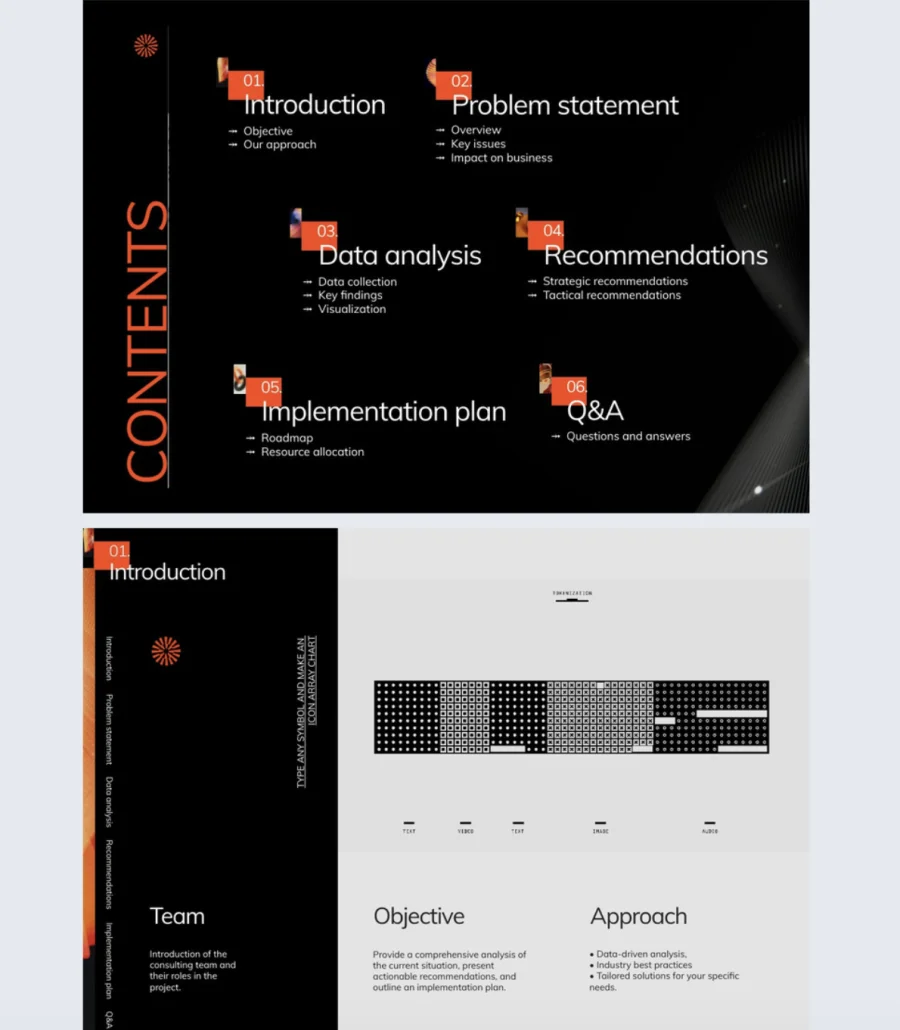
| Digital Consulting Slide Deck Template | Consulting / Advisory | All sizes | Problem statement, data analysis, recommendations, implementation plan | Go-to-page buttons for navigation; captions and tags for graph explanations; data visualization focus; public or private sharing. |
What customers say about Flipsnack templates
The best flipbook tool I have used
Flipsnack is easy to use and offers all the features a small business needs, at a very affordable price. There are plenty of templates to choose from to speed up the project. Each template is easily tailored to your needs. The support is good and fast through the chat function, and they also provide a phone number (infrequently these days) in case you prefer a phone call.
Leonardo Soto, President of SotoNets Cloud Solutions
Reviewed on G2
Best pitch deck template examples
Now, let’s look at some of the best pitch template examples. You’ll find something tailored to your business needs, from startup pitch deck examples, business pitch examples, and investor pitch deck designs to sales deck examples.
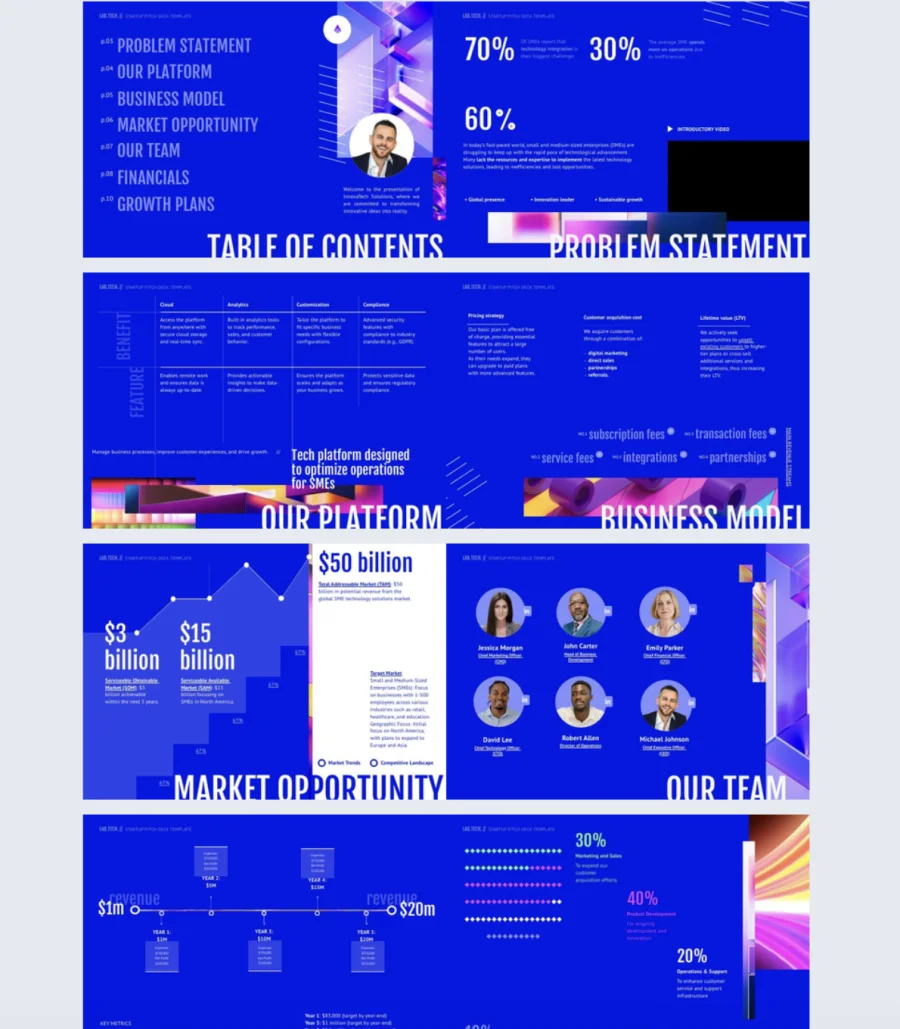
1. Personalized Startup Pitch Deck Presentation Template
Investors see hundreds of pitch decks. Most get skimmed in under two minutes. This template helps startup founders make those two minutes count with a clean, modern design and a structure that covers exactly what investors want to see.
Best for: Startup founders and entrepreneurs pitching to investors or strategic partners. Works for seed rounds, Series A, or partnership proposals.
Real-world application: A founder preparing for an investor meeting can use this template to walk through the business model, market opportunity, team, financials, and growth plans in a logical flow. Add captions to expand on complex ideas without cluttering the slide, embed a video to hook attention early, and include a pie chart to visualize financial projections. After the meeting, check Flipsnack’s statistics to see which slides the investor spent the most time on and adjust the deck before the next pitch.
Fully customizable in Flipsnack’s Design Studio. Tailor it to your brand identity and business needs. Key slides cover company introduction, value proposition, and financial projections. Add interactive elements like captions, videos, and pie charts. Track clicks, views, and time spent with built-in statistics or integrate Google Analytics for deeper insights.
Common mistake to avoid: Don’t overload your financial slides with every number you have. Investors want the highlights: revenue, burn rate, growth trajectory. Save the detailed spreadsheets for the follow-up. If your financials need five minutes of explanation on a single slide, simplify.

2. Personalized Sales Pitch Deck Design
A generic slide deck doesn’t close deals. This template is built specifically for sales teams that need to present their product, pricing, and proof in a format that moves prospects toward a decision.
Best for: Sales teams and business development professionals pitching to stakeholders, investors, or potential clients. Works for product demos, client proposals, and partnership presentations.
Real-world application: A sales team presenting to a potential client can walk through the company overview, show a product feature comparison against competitors, display pricing options, and back it all up with testimonials and case studies. Add shopping buttons and product tags so prospects can act on interest immediately instead of waiting for a follow-up email. Use go-to-page buttons so the presenter jumps to the right section based on where the conversation goes.
The template includes essential sections for company overview, product features and comparison, pricing, testimonials, case studies, and growth plans. Edit in Flipsnack’s Design Studio. Swap out photos and videos, add interactive elements like go-to-page buttons, embedded videos, and photo slideshows. Include shopping buttons and product tags to let your audience shop directly from the presentation.
Common mistake to avoid: Don’t lead with your company history. Your prospect cares about their problem first, your solution second, and your backstory last. Open with what’s relevant to them and save the “about us” slide for later in the deck.
Share via link, present live, or send privately to prospects for review at their own pace.
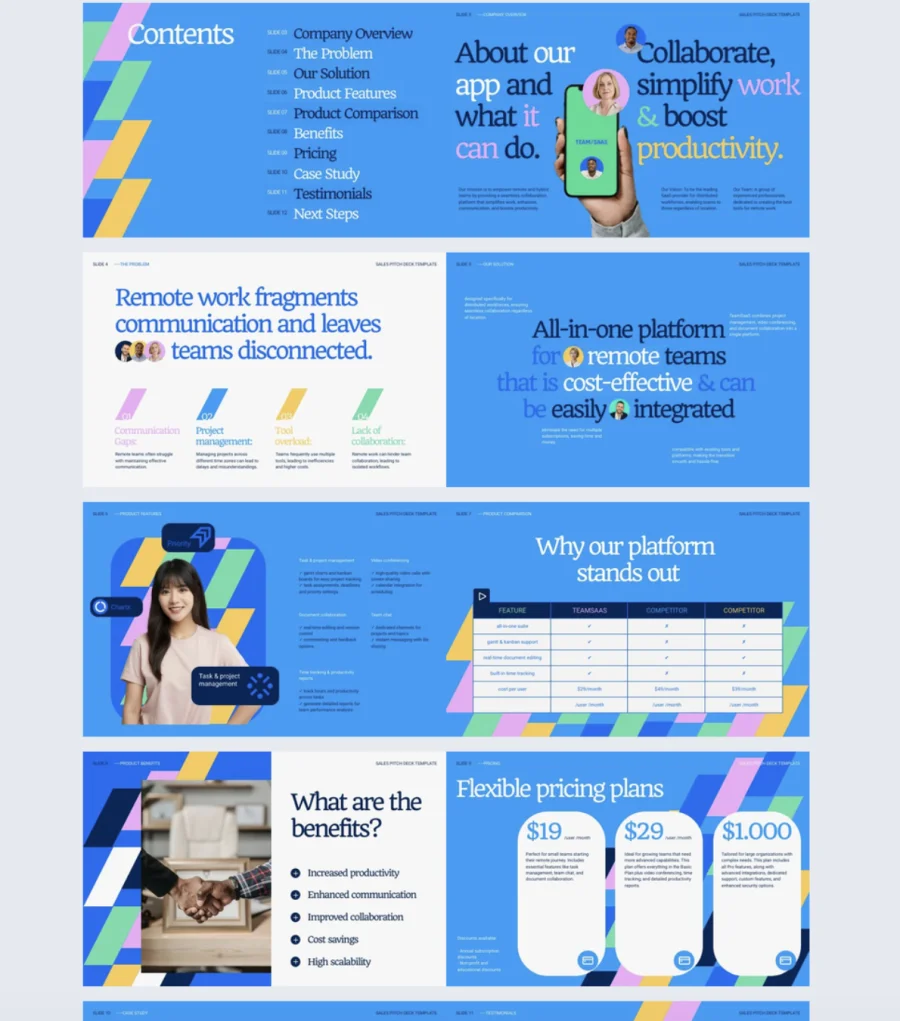
3. Interactive Franchise Pitch Deck Example
Franchise pitches need to balance big-picture opportunity with detailed financials. Get either one wrong and you lose the investor’s confidence. This template gives franchise owners a structured, interactive format to present the full picture without overwhelming the audience.
Best for: Franchise owners and operators pitching to potential investors, partners, or franchisees. Works for new franchise launches or expansion proposals.
Real-world application: A franchise owner expanding into a new region can use this template to present the franchise model, highlight market opportunities, and walk through financial forecasts. Embed videos of existing locations in action, use spotlight effects to draw attention to key metrics, and add go-to-page buttons so investors jump straight to the financials or market analysis. Invite the legal and finance teams into the workspace to review every detail before sending.
The clean, modern design is fully customizable in Flipsnack’s Design Studio. Replace images and text, add your logo, and adjust colors to match your brand. No design or tech skills needed. Add interactive elements like videos, spotlight effects, go-to-page buttons, and GIFs using drag-and-drop. Use Flipsnack’s collaboration tools to invite colleagues to your workspace and finalize the deck together. This template is also part of a business kit that includes a business proposal, scope of work, and invoice template, all available for free.
Common mistake to avoid: Don’t skip the unit economics. Investors evaluating a franchise want to see per-location revenue, costs, and margins. High-level projections without unit-level detail raise more questions than they answer.
Share publicly or privately via email, link, or present live. Fast, easy, and secure.
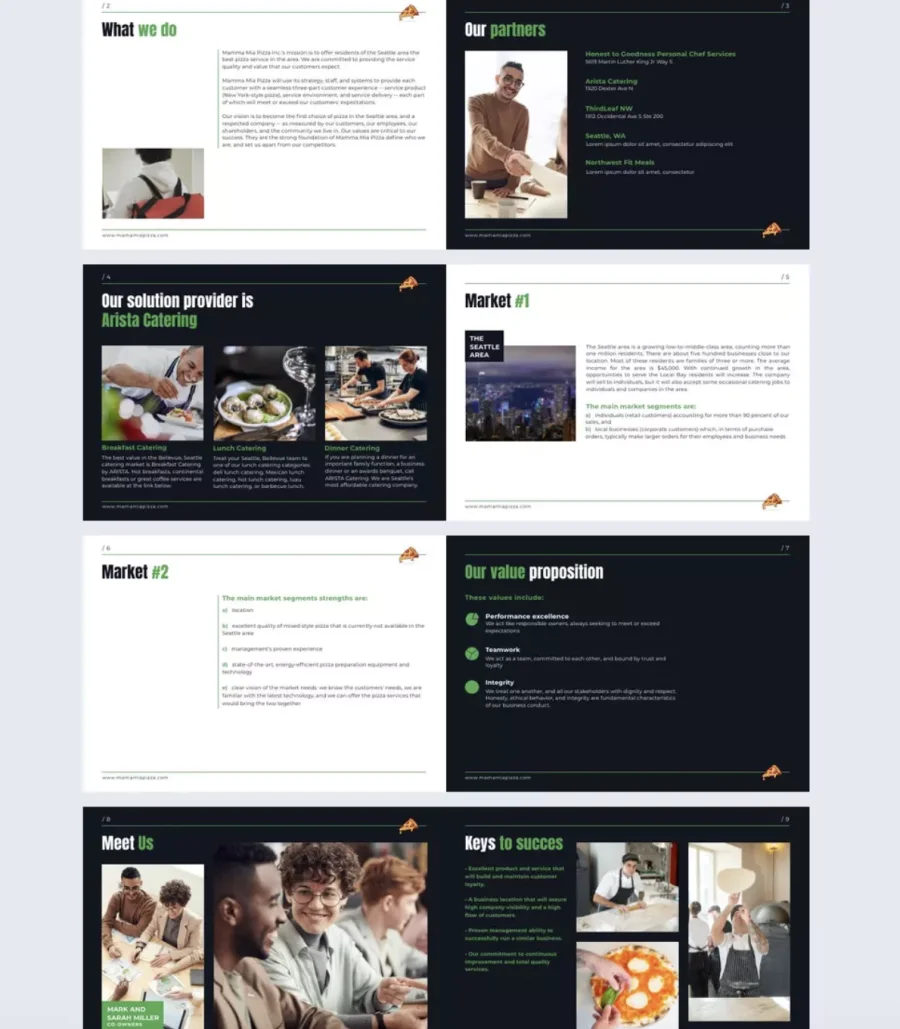
4. Insurance Pitch Deck Template
Insurance is a trust business. If your pitch deck looks outdated or generic, prospects question your professionalism before you even get to the offer. This template gives insurance companies a polished, interactive format to present their vision, strengths, and services with confidence.
Best for: Insurance companies and brokers pitching to prospects, partners, or corporate clients. Works for new business presentations, product launches, or company overviews.
Real-world application: An insurance broker pitching a corporate benefits package can use pie charts to visualize claims data and coverage breakdowns, add captions to explain complex policy details without crowding the slide, and embed a contact form to capture interested leads right from the deck. Include a quiz to help prospects identify which coverage tier fits their needs, turning a passive presentation into an interactive conversation.
Fully customizable in Flipsnack’s Design Studio. Edit text, colors, and shapes to align with your brand identity. Add interactive elements like pie charts, captions, quizzes, questions, and contact forms to engage your audience and collect leads. This template is also part of a kit that includes an insurance business proposal, invoice, and scope of work template.
Common mistake to avoid: Don’t bury your differentiators. Every insurance company says they offer “comprehensive coverage” and “great service.” Lead with what specifically sets you apart, whether that’s faster claims processing, industry-specific expertise, or pricing transparency. Generic claims get generic responses.
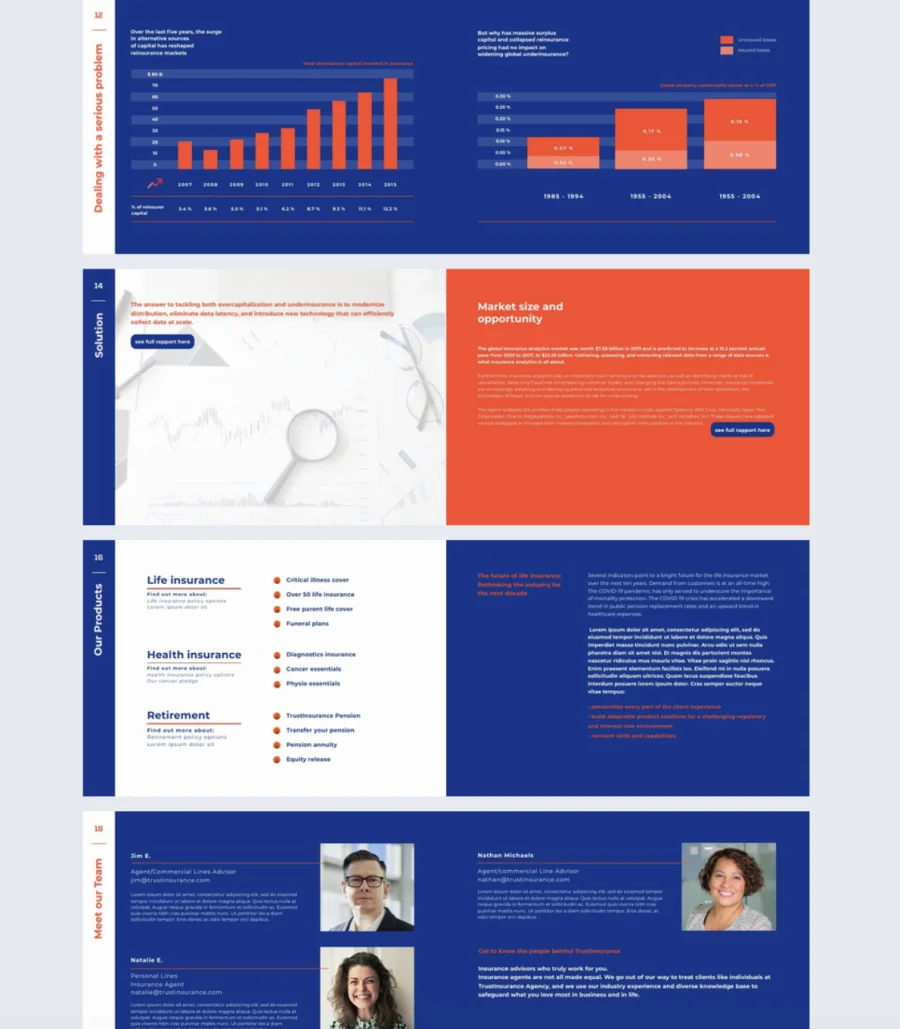
5. Digital Venture Capital Pitch Deck Example
VCs move fast. If your deck doesn’t communicate the opportunity clearly in the first few slides, you won’t get a second look. This template is structured around what venture capital firms actually want to see: market size, business model, financials, scalability, and a clear path to growth.
Best for: Startup founders seeking venture capital funding. Designed specifically for VC audiences, with added emphasis on scalability and exit strategy compared to a standard startup pitch deck.
Real-world application: A founder preparing for a VC pitch can use this template to lay out the market opportunity with data, walk through the business model, and present financial projections and growth plans in a logical sequence. The interactive elements like embedded videos, charts, and captions help highlight key metrics without overcrowding slides. After sending the deck, track which slides VCs spend the most time on and refine accordingly for the next meeting.
The sleek design is fully customizable in Flipsnack’s Design Studio. Replace text and photos with your own. No design experience needed. The template includes interactive elements that capture attention and make your pitch memorable. Add emphasis on the sections that matter most to your audience: market opportunity, business model, financials, scalability, and growth plans.
Common mistake to avoid: Don’t pitch the product without pitching the market. VCs invest in market size first, product second. If you spend eight slides on features and one on market opportunity, you’ve got it backwards.
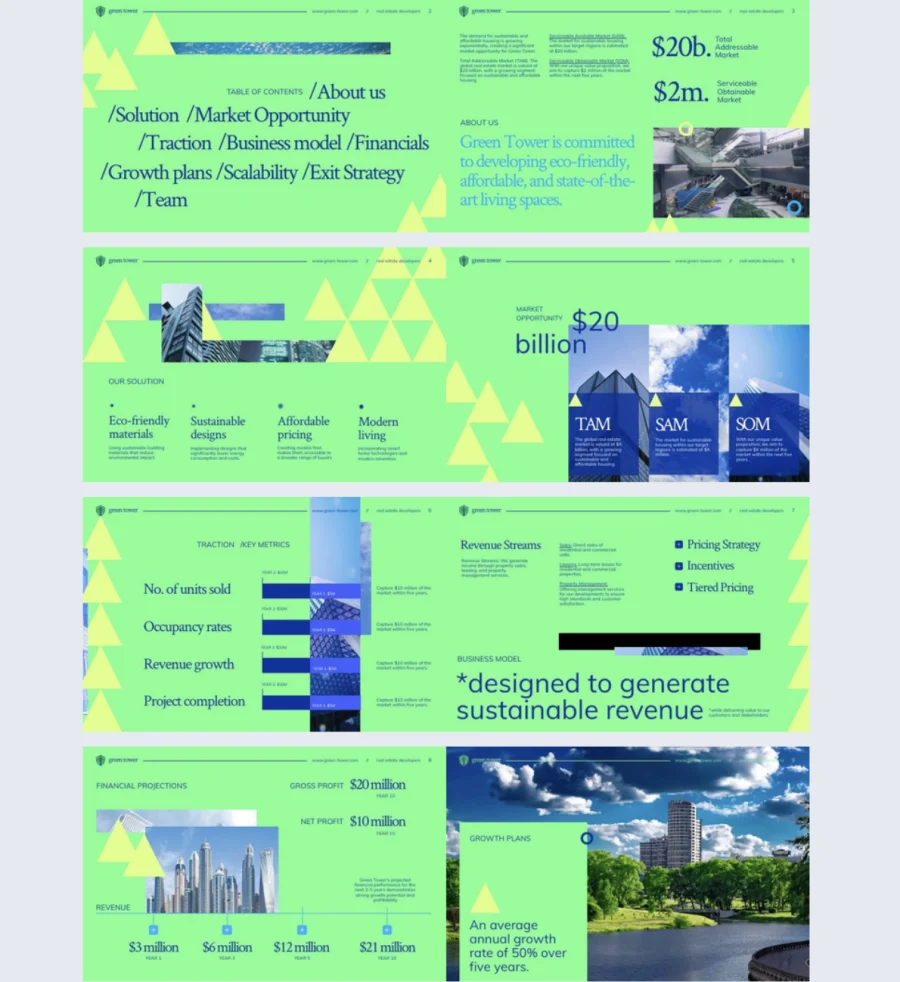
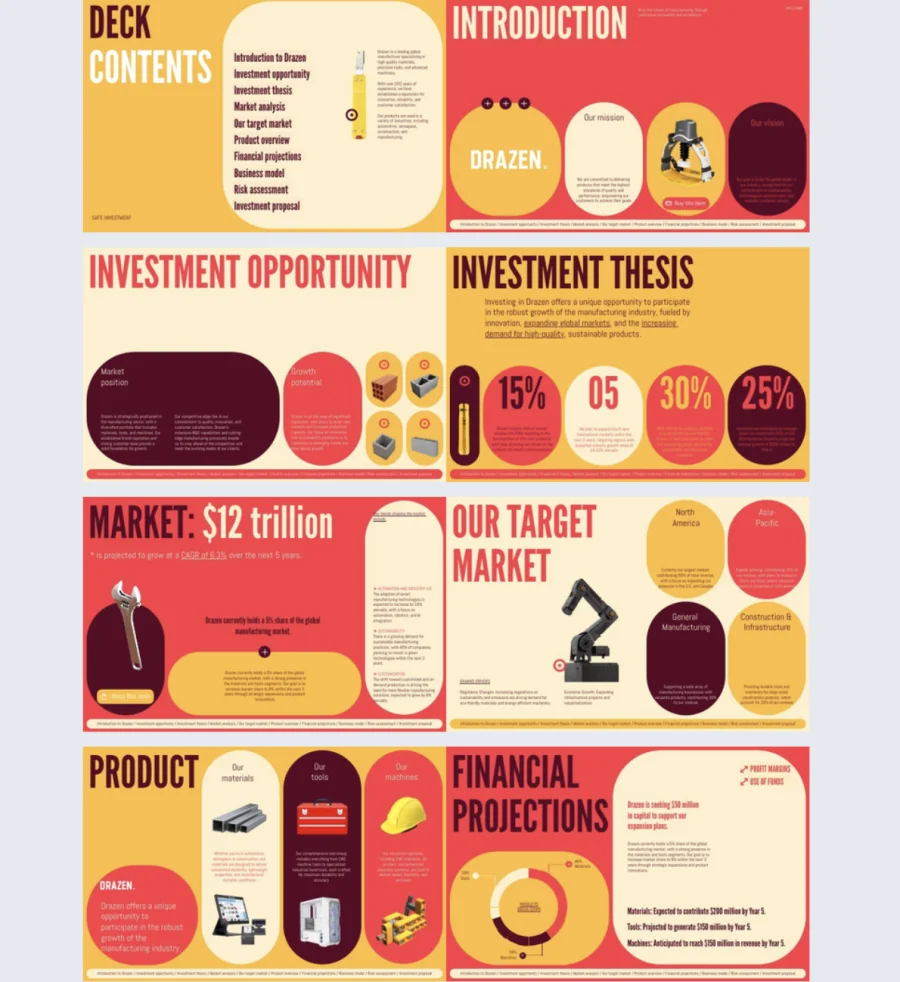
6. Editable Investor Pitch Deck Template
Not every pitch fits into 10 slides. Some businesses need more room to tell the full story, especially when the market is complex or the business model needs context. This template is built for longer, narrative-driven investor presentations that go deeper without losing clarity.
Best for: Business owners, fund managers, and entrepreneurs presenting detailed investment opportunities. Especially useful for manufacturers or businesses expanding across multiple product categories where a short deck wouldn’t cover the full picture.
Real-world application: A manufacturer pitching expansion across three product categories can use this template to walk investors through a thorough business overview, market analysis, financial projections, and growth strategy. The layout presents text inside geometrical shapes for a fresh visual approach to dense content. Add photo slideshows to showcase products, embed videos for factory tours or product demos, and use captions to expand on financials without cluttering the slides.
The professional, structured design is fully customizable in Flipsnack’s Design Studio. Despite covering a lot of ground, the layout keeps information clear and concise. Add interactive elements like photo slideshows, captions, videos, shop buttons, and product tags to break up text-heavy sections and keep investors engaged throughout.
Common mistake to avoid: Don’t use the same layout on every slide. When a deck runs longer, repeating the same design with different content becomes monotonous. Mix up the layouts between sections to maintain visual interest and signal transitions between topics.
7. Interactive Competition Slide Pitch Deck Presentation Design
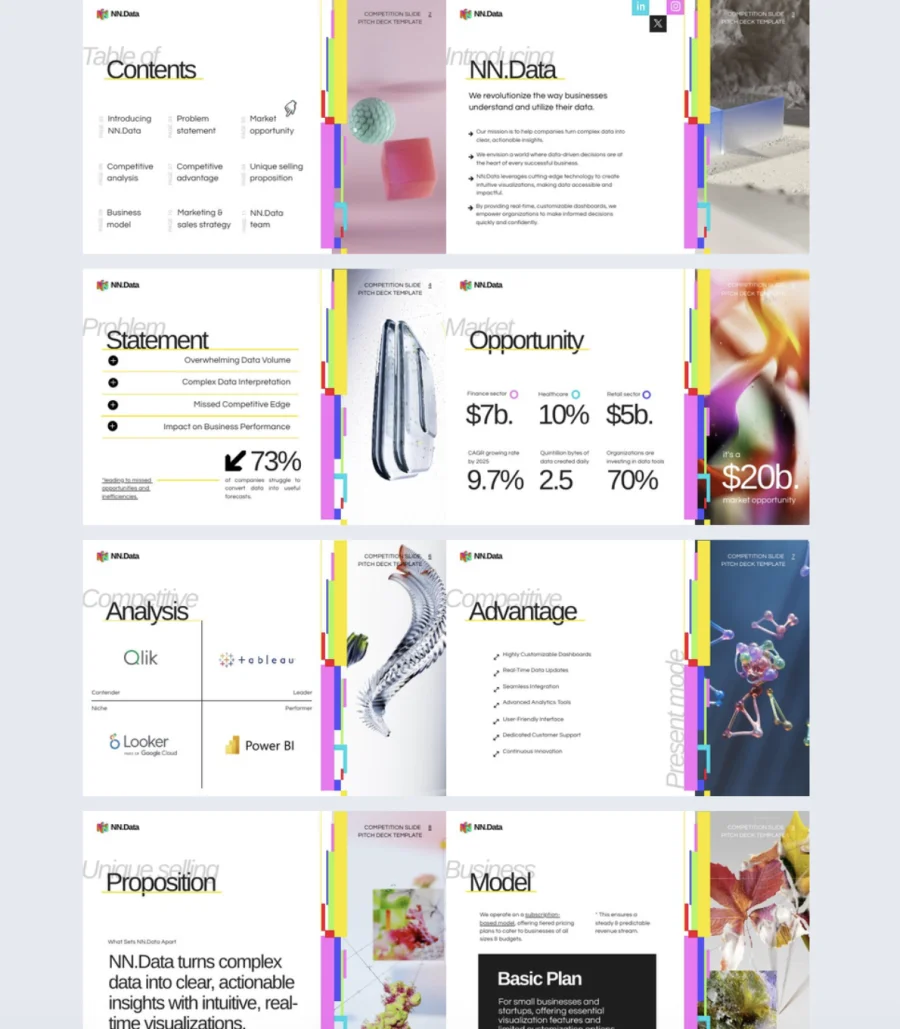
Investors always ask “who else is doing this?” If your deck doesn’t answer that question clearly, you look unprepared. This template is built around the competitive landscape, helping you show exactly where you stand and why you win.
Best for: Entrepreneurs and startup founders who need to position their business against competitors. Works for investor pitches, pitch competitions, or any presentation where differentiation is the core message.
Real-world application: A startup founder entering a pitch competition can use this template to map out the competitive landscape, highlight their unique selling proposition, and show market positioning in a format judges can grasp in seconds. The structure forces you to focus on the most crucial points instead of cramming in every detail of the business plan. That focus is what keeps attention during a short pitch window.
The template includes customizable slides for competitors, market positioning, unique differentiators, competitive advantage, market opportunity, and team. Replace text, photos, and colors in Flipsnack’s Design Studio. Upload your brand kit with custom fonts, default text styles, and brand colors so every slide stays consistent with your identity across all publications.
Common mistake to avoid: Don’t trash your competitors on the slide. Investors see right through it. Acknowledge what competitors do well, then clearly show what you do differently or better. Confidence beats arrogance in every pitch room.
8. Interactive Market Pitch Template
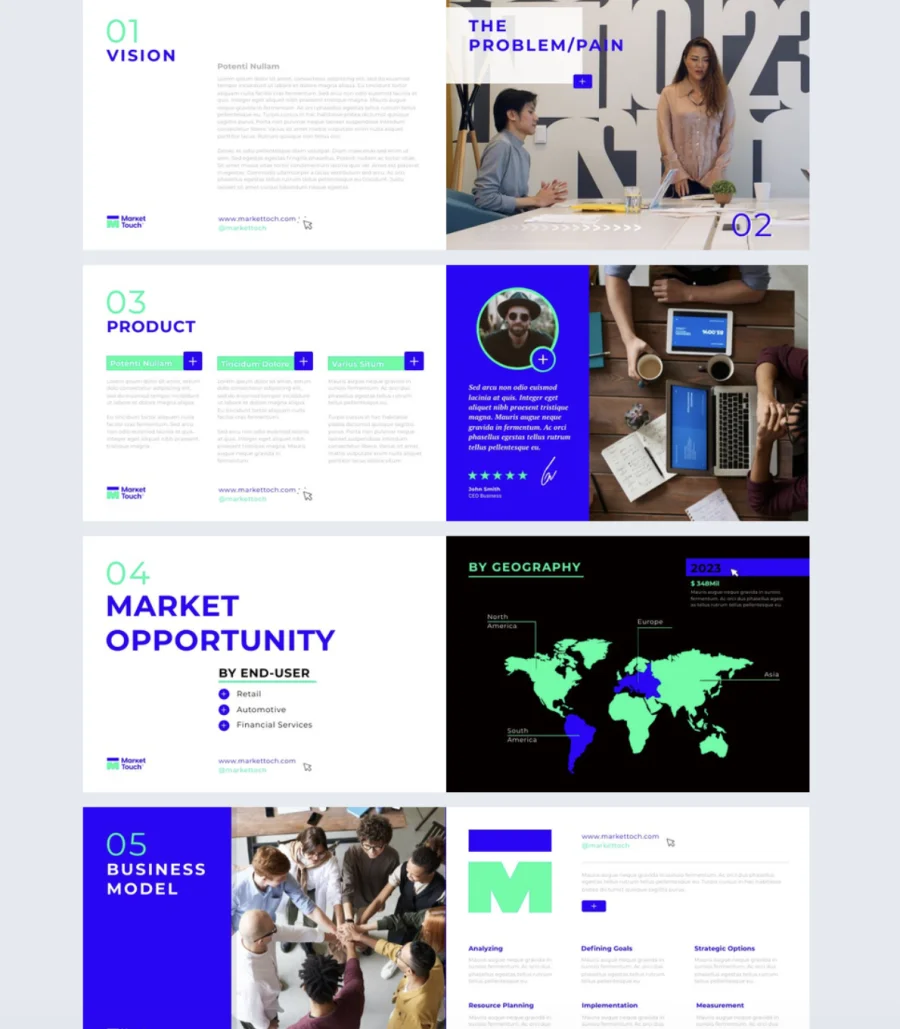
Market data without context is just numbers on a screen. This template helps you turn raw research into a narrative that guides investors or stakeholders toward the right conclusions about your market opportunity.
Best for: Businesses and founders who need to present in-depth market research to investors, stakeholders, or internal decision-makers. Ideal when market data is the backbone of your pitch.
Real-world application: A company entering a new market can use this template to present customer segmentation data, industry trends, and growth potential in a format that’s visual and easy to follow. Connect a data source to Flipsnack and add interactive pie, line, or bar charts that update with real numbers. Use captions and tags to include supporting details without cluttering the slides. Add a lead form to capture contact information from interested stakeholders during or after the presentation.
Fully customizable in Flipsnack’s Design Studio. The template includes slides for market analysis, customer segmentation, trends, and growth potential. Add interactive charts by connecting your data source and choosing from pie, line, or bar formats. Include captions and tags to layer in detail without overcrowding. Add a lead form to gather audience information and check statistics quickly.
Common mistake to avoid: Don’t present market data without a “so what.” Every chart and data point should tie back to why this market is the right opportunity for your business. If an investor has to connect the dots themselves, your pitch isn’t doing its job.
9. Customizable Sale Deck Presentation Design
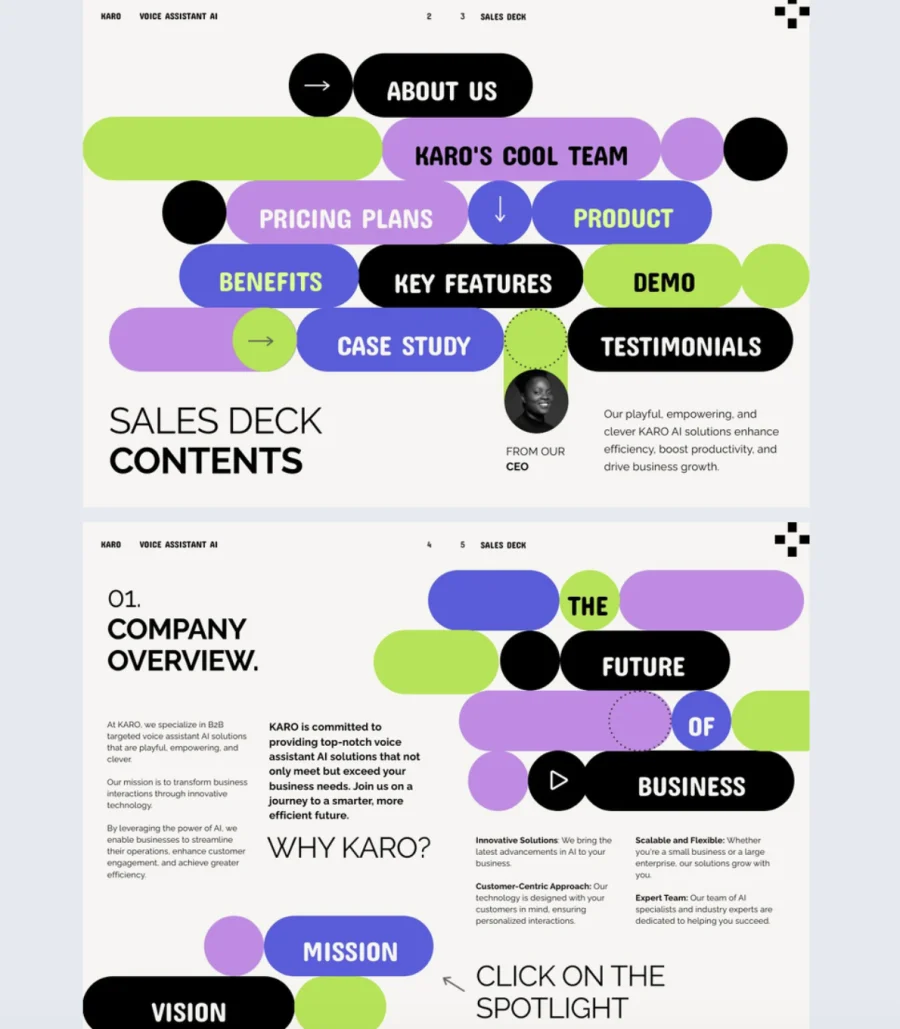
A forgettable sales deck gets a polite nod and no follow-up. This template is designed to do the opposite. The playful, colorful design captures attention instantly while the structured format keeps your audience focused on what matters: your value, your strengths, and your offer.
Best for: Sales representatives and account managers who need a bold, visually engaging deck to present products or services to potential customers. Works especially well for B2B companies that want their personality to come through in their pitch.
Real-world application: A sales rep presenting a new product to a prospect can use this template to tell the full story, not just the features but the journey behind building it. The deck is modeled around a fictional B2B voice assistant AI company called KARO to show different interactions at play. Use it as inspiration, swap in your own brand, and let the dynamic format do the heavy lifting in keeping your audience engaged from the first slide to the close.
The template features a bold, colorful design with a structured, dynamic format. Fully customizable in Flipsnack’s Design Studio. Replace text, images, and branding to make it yours. The layout is built to be both engaging and persuasive, helping you showcase solutions, highlight success stories, and drive the conversation toward a decision.
Common mistake to avoid: Don’t play it safe with your sales deck design. If your deck looks like every other one your prospect has seen this week, it blends in and gets forgotten. A bold visual identity signals confidence in your brand and makes your pitch stick.
10. Digital Marketing Deck Presentation Template
Not every pitch fits a niche template. Sometimes you need a flexible deck that adapts to whatever you’re presenting this week. This general-purpose template works for marketing strategies, campaign reports, client presentations, or internal reviews, and adjusts to your needs without locking you into a rigid structure.
Best for: Marketing agencies and professionals who need a versatile deck for multiple use cases. Works for pitching new strategies, reporting on campaign performance, or delivering marketing insights to clients and stakeholders.
Real-world application: A marketing agency juggling multiple clients can use this template as a reusable base. Swap in different campaign metrics, target audience data, and results for each client presentation. The flexible structure means the same template covers a strategy pitch on Monday and a performance report on Friday without rebuilding from scratch every time.
The sleek design includes customizable slides for company overview, products or services, marketing strategies, campaign metrics, target audiences, financial highlights, and results. Edit in Flipsnack’s Design Studio with simple drag-and-drop. Add, replace, or remove elements in minutes. The platform is user-friendly and intuitive.
Common mistake to avoid: Don’t use a general-purpose template as an excuse to be vague. Flexibility means you can adapt the structure, not skip the specifics. Every slide should still have a clear point tailored to the audience in the room.
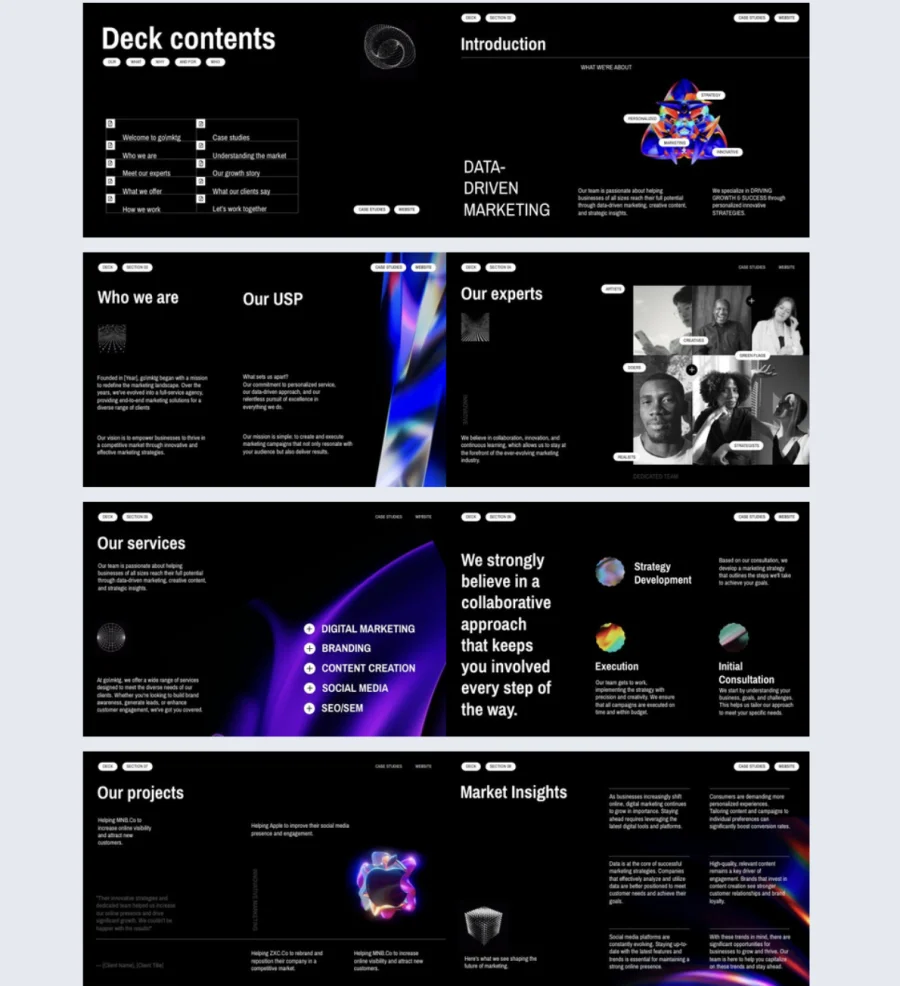
11. Online Corporate Deck Presentation Template
When you’re presenting to investors, partners, and internal teams, you need a deck that looks the part. This corporate deck template gives executives and communications teams a polished format to present company information with clarity and confidence.
Best for: Corporate communications teams and executives who present to multiple stakeholder groups. Works for investor updates, partner meetings, board presentations, or internal strategic reviews.
Real-world application: An executive team preparing for an annual stakeholder meeting can use this template to walk through the company overview, highlight key products and services, present financial performance, and outline corporate strategy. The same deck adapts for different audiences: trim the financials for an internal town hall, expand them for an investor meeting. One template, multiple contexts.
The template is modeled around a fictional company called Thunder Corporate to showcase what a comprehensive corporate deck looks like. It includes key sections for company overview, products and services, financial highlights, and corporate strategy. Fully customizable in Flipsnack’s Design Studio. Replace content, branding, and visuals to match your company’s identity and strategic vision.
Common mistake to avoid: Don’t present the same level of detail to every audience. Investors want financials and growth trajectory. Internal teams want strategy and priorities. Partners want alignment and opportunity. Adjust the depth per audience even if the structure stays the same.
Share via link, present live, or distribute privately to specific stakeholders for an immersive digital experience.
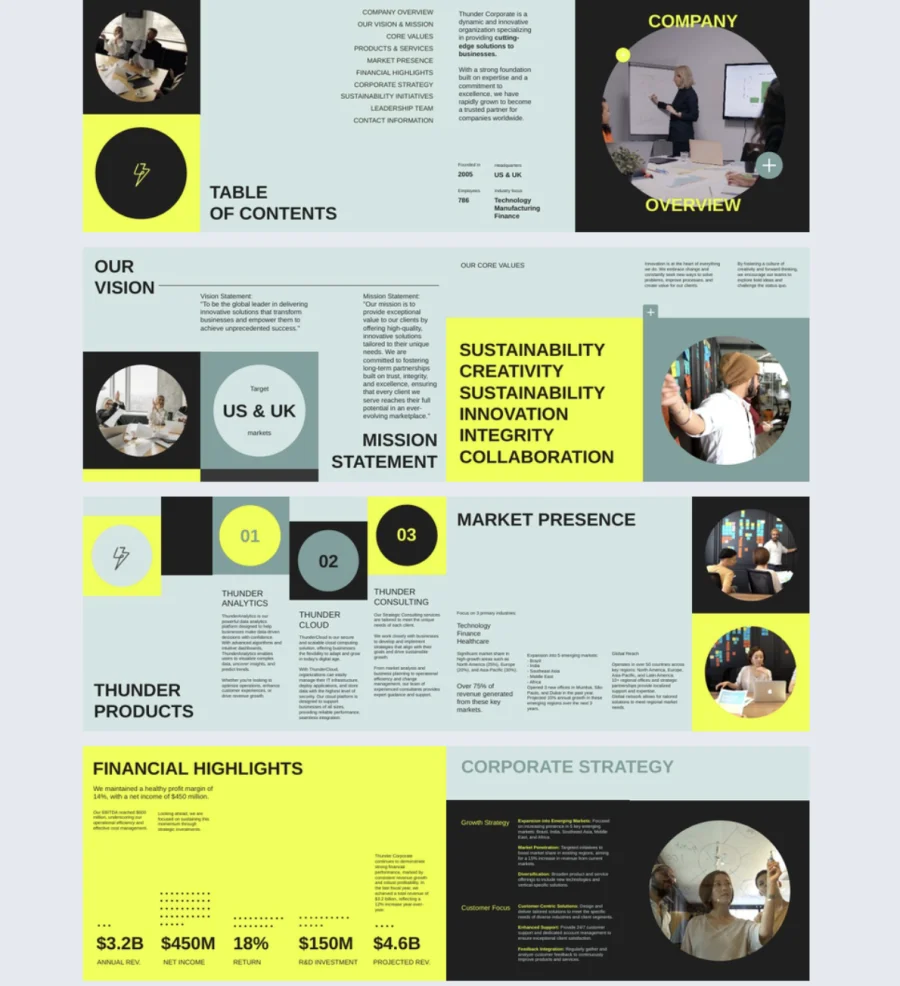
12. Editable Internal Company Slide Deck Design
Internal presentations shouldn’t look like they were thrown together the morning of the meeting. This template gives teams a clean, professional format for communicating updates, strategies, and performance reports without spending hours on design.
Best for: Employees, managers, and executives who need structured internal presentations. Works for team meetings, quarterly reviews, company updates, project reports, or strategy alignment sessions.
Real-world application: A consulting firm running quarterly reviews can use this template across departments. Managers present project timelines and key metrics, executives share strategy updates, and team leads introduce new hires or outline goals. The consistent format means every internal presentation looks polished and professional regardless of who built it.
The template includes fully customizable slides for team introductions, goals, project timelines, key metrics, company updates, and strategy plans. Edit in Flipsnack’s Design Studio with drag-and-drop. No technical skills needed. Align it with your branding to keep internal communications consistent across every department and level of the organization.
Common mistake to avoid: Don’t treat internal decks as low priority just because the audience is your own team. Sloppy internal presentations signal that communication isn’t valued. A clean, structured deck shows respect for your team’s time and keeps everyone aligned.
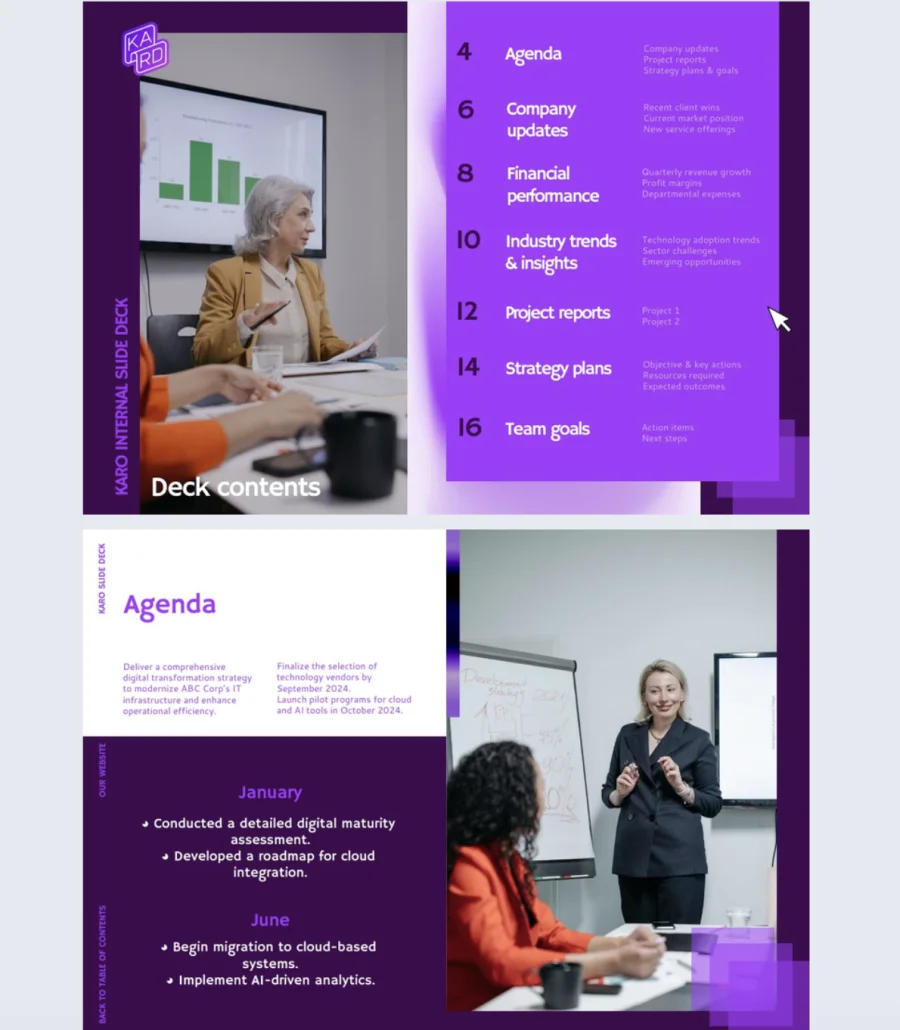
13. Interactive Business Deck Presentation Example
A static business plan gets read once and filed away. An interactive one gets explored, shared, and remembered. This template helps you present your business plan in a format that matches the energy of a forward-thinking company.
Best for: Entrepreneurs, business managers, and executives who need a versatile deck for pitching to investors, sharing strategic insights, or showcasing business growth. Works across multiple contexts.
Real-world application: A business manager presenting a growth plan to the board can use this template to combine the company overview with embedded videos of product demos, photo slideshows of recent milestones, and tags that layer in supporting details without overcrowding the slides. The interactive format keeps the board engaged through the full presentation instead of flipping ahead to the financials.
The template includes sections for company overview, products and services, financial highlights, and corporate strategy. Fully customizable in Flipsnack’s Design Studio. Add dynamic elements like videos, photo slideshows, and tags to balance text with visual engagement and keep your deck professional and impactful.
Common mistake to avoid: Don’t add interactive elements just to impress. Every video, slideshow, or tag should support the point you’re making on that slide. If it doesn’t add clarity or context, it’s a distraction, not an upgrade.
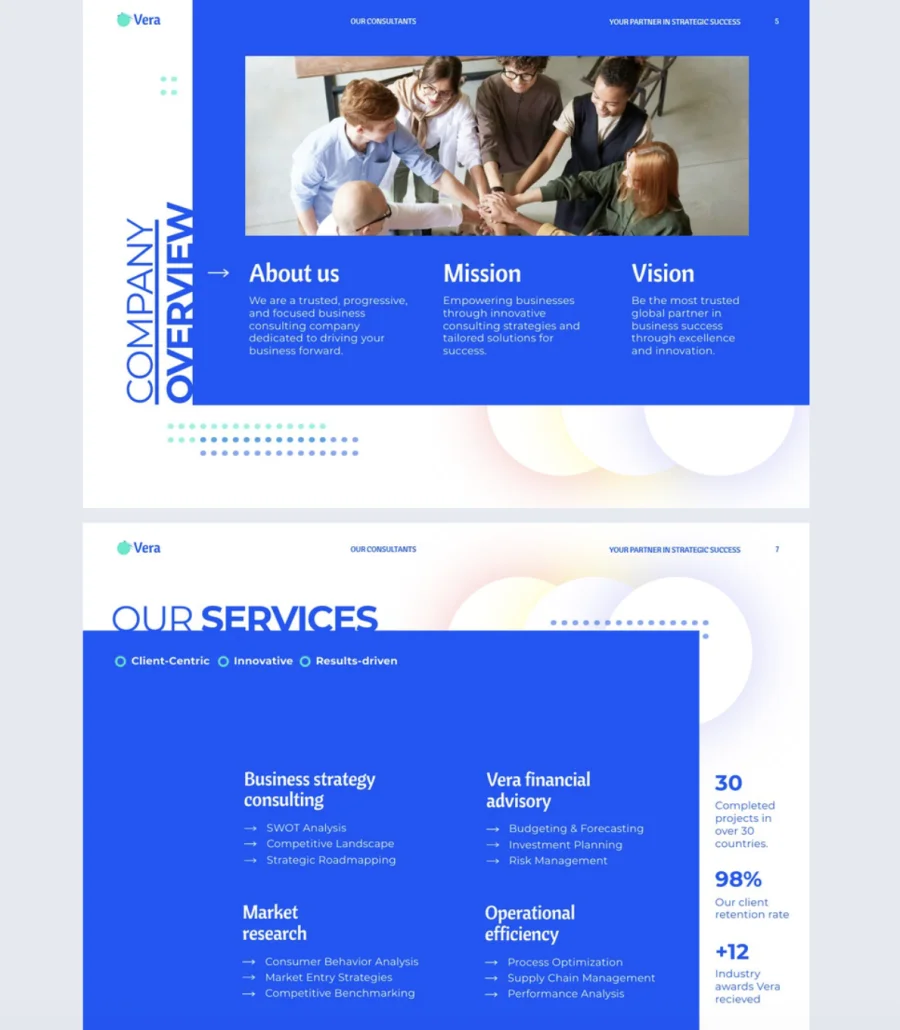
14. Digital Consulting Slide Deck Template
If your audience has to do the math themselves, you’ve already lost them. This template helps consultants present complex analysis through clear data visualization so clients walk away understanding the insight, not squinting at a spreadsheet.
Best for: Consultants, advisory firms, and professionals who present analysis, recommendations, and action plans to clients, stakeholders, or prospects.
Real-world application: A consulting firm delivering a strategic review to a client can structure the deck around the problem statement, walk through the data analysis with visualized graphs, present recommendations, and close with a clear implementation plan. Use captions and tags to explain what the graphs mean without cluttering the slides. Add go-to-page buttons so clients navigate directly to the section they care about most during or after the presentation.
The template includes sections for problem statement, data analysis, recommendations, and implementation plan. Fully customizable in Flipsnack’s Design Studio. Replace content and visuals with a few clicks or drag-and-drops. Add go-to-page buttons for easy navigation, captions and tags to explain graphs, and other interactive elements to keep your audience focused on the data that matters.
Common mistake to avoid: Don’t present raw data without interpretation. Every chart or graph needs a clear takeaway. If you show a trend line, tell the audience what it means and what they should do about it. Data without direction is just noise.
How to create a pitch deck in Flipsnack’s Design Studio
1. Upload PDF, pick a template, or start from scratch. Log into Flipsnack and open the Design Studio. Upload an existing PDF or PPTX file and Flipsnack converts it into an interactive deck. Or choose a ready-made pitch deck template from the library. If you want full control, start with a blank canvas and build slide by slide.
2. Add interactivity. This is where your deck stops being a static slideshow. Add videos, photo slideshows, charts (pie, line, or bar), captions, clickable links, quizzes, contact forms, or go-to-page buttons. Use the drag-and-drop editor to place everything exactly where you want it. No design skills needed.
3. Add branding. Set up your brand kit with your logo, color palette, fonts, and text styles so every slide stays consistent. Lock elements like the cover layout, legal footer, or CTA block so they stay untouched across future editions. One brand kit, every deck on-brand.
4. Share and track. Publish your deck and share it privately via password-protected link, present it live, or send it to specific investors for async review. Your deck gets a persistent link that stays the same even after edits. Use Flipsnack’s built-in statistics to see who viewed it, how long they spent on each slide, and where they clicked. Integrate Google Analytics for deeper insights.
To sum things up
In conclusion, pitch deck templates are invaluable tools for businesses looking to streamline the creation of compelling presentations for investors, partners, or clients. They provide a structured, visually appealing format that ensures all critical elements, such as the value proposition, business model, market opportunity, and financial projections, are clearly communicated.
By utilizing customizable templates, startups and companies can save time, maintain consistency, and focus on delivering a persuasive narrative that captures the interest of their audience. Choosing a suitable pitch deck template can make all the difference in achieving business goals.
FAQs on pitch decks
A strong pitch deck typically includes:
– Problem statement
– Your solution
– Market opportunity and size
– Business model
– Traction or key metrics
– Team overview
– Financial projections
– A clear ask (funding, partnership, decision)
A pitch deck is designed to sell the business itself, usually to investors or partners. A sales deck is designed to sell a product or service to potential customers. Different audience, different goal, different content.
Most effective pitch decks are 10 to 15 slides. Longer decks can work for detailed investor presentations or narrative-driven pitches, but only if every slide earns its place. If you’re padding to hit a number, cut it down.
To customize a pitch deck template:
– Replace placeholder content with your actual data
– Add your branding (logo, colors, fonts)
– Adjust slides to match your specific business model
– Include interactive elements like videos, charts, or links
– Tailor the depth and language to your audience
Common mistakes include:
– Leading with your company history instead of the problem
– Cramming too much information onto each slide
– Skipping traction or proof that the idea works
– Using generic visuals that don’t support the message
– Ending without a clear, specific ask