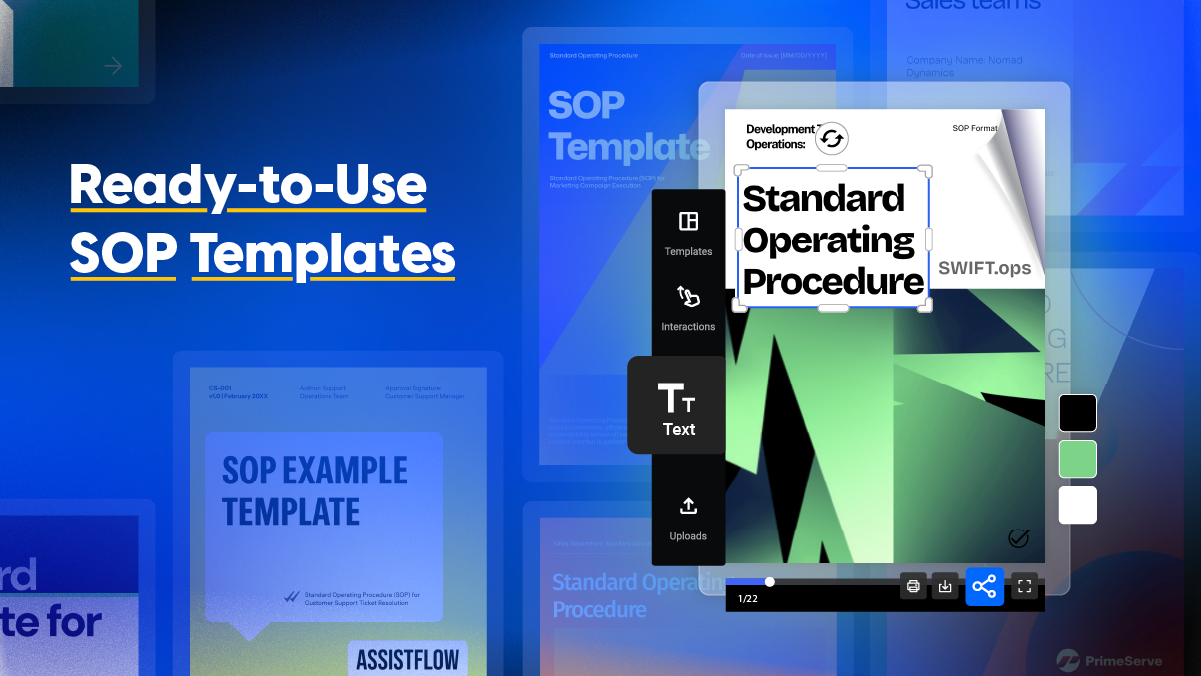
Ready-to-Use SOP Templates to Standardize Operations
Published on: May 8, 2025
Last updated: April 16, 2026
What is a standard operating procedure?
A standard operating procedure is a structured document that defines how a team or organization completes a specific, recurring task in a consistent and repeatable way. Presented in a flip book format, it breaks down processes into clear steps, assigns responsibilities, and sets the standards teams need to execute without relying on individual memory or judgment.
Unlike a general policy document, an SOP focuses on execution — serving as a single source of truth that reduces errors, speeds up onboarding, and ensures quality stays consistent regardless of who’s doing the work.
Table of contents
- What is a standard operating procedure?
- What customers say about Flipsnack templates
- Professional SOP templates to customize
- 1. Customizable Standard Operating Procedure Manual
- 2. Digital SOP Format Template
- 3. Interactive SOP Example Template
- 4. Engaging SOP Content Team Template
- 5. SOP Open Enrollment Template
- 6. Standard Template for SOP
- 7. Sample SOP Template
- 8. Standard Operating Procedure Template
- 9. Standard Operating Procedure Sales Guide
- 10. Standard Operating Procedures Template
- How to create an SOP template that actually gets used
- Take your standard operating procedures to the next level with Flipsnack
- Frequently asked questions
Find how to build an SOP that actually gets used
Most teams know they need documented processes. The harder question is why so many SOPs end up ignored — too long, too static, or buried somewhere nobody thinks to look. And we, at Flipsnack, can confirm that with our own data.
The difference between an SOP that collects dust and one teams actually follow comes down to how clearly it defines steps, responsibilities, and expected outcomes — and how easy it is to access and update. In this guide, you’ll find ten professional SOP templates you can start customizing today, each built to remove the friction that usually gets in the way of documenting operations properly.
| Template name | Primary department | Best for (company size) | Main focus | Key benefits |
|---|---|---|---|---|
| Customizable SOP Manual | Operations / All departments | All sizes (50–500+ employees) | Cross-departmental process documentation, compliance, quality control | Full-scope manual; centralized policies and workflows; scalable structure; digital sharing with engagement tracking |
| Digital SOP Format Template | Operations / IT / Retail | Small to mid-size (10–200 employees) | Workflow standardization, foundational SOP building | Minimal, flexible layout; covers core SOP components; easy to duplicate across procedures; works across industries |
| Interactive SOP Example Template | Any department | All sizes | Process documentation with pre-filled guidance | Pre-filled content blocks; logical section flow; adaptable for complex or simple tasks; saves formatting time |
| SOP Content Team Template | Marketing / Creative | Small to mid-size (5–150 employees) | Editorial workflows, campaign execution, brand consistency | Built for creative teams; supports review cycles and approval workflows; embeds links to calendars and tools |
| SOP Open Enrollment Template | HR / Benefits | Mid-size to enterprise (100–1000+ employees) | Benefits enrollment procedures, compliance documentation | Clear eligibility and deadline structure; reusable annually; reduces HR bottlenecks during enrollment periods |
| Standard Template for SOP | Any department | All sizes | Quick process documentation, broad applicability | Lean, no-frills layout; fast to deploy; easy to duplicate across workflows; ideal for teams new to SOP documentation |
| Sample SOP Template | Any department | Small to mid-size (10–300 employees) | Repeatable process documentation, new hire training | Clean design; flexible sections; supports embedded training videos and feedback forms |
| Standard Operating Procedure Template | Operations / Healthcare / Compliance | Mid-size to enterprise (100–1000+ employees) | Regulated industry documentation, compliance audits | Formal and polished; supports digital sign-offs, QR codes, and audit trails |
| SOP Sales Guide | Sales | Growth-stage to enterprise (50–500 employees) | Lead qualification, pipeline documentation, sales handoffs | Sales-specific structure; supports CRM navigation visuals and updated quotas; reduces missed steps in fast-moving teams |
| Standard Operating Procedures Template | Operations / All departments | All sizes | Centralized SOP library, cross-departmental documentation | Modular and repeatable; easy to clone per department; supports version control and secure publishing |
What customers say about Flipsnack templates
The best flipbook tool I have used
Flipsnack is easy to use and offers all the features a small business needs, at a very affordable price. There are plenty of templates to choose from to speed up the project. Each template is easily tailored to your needs. The support is good and fast through the chat function, and they also provide a phone number (infrequently these days) in case you prefer a phone call.
Leonardo Soto, President of SotoNets Cloud Solutions
Reviewed on G2
Professional SOP templates to customize
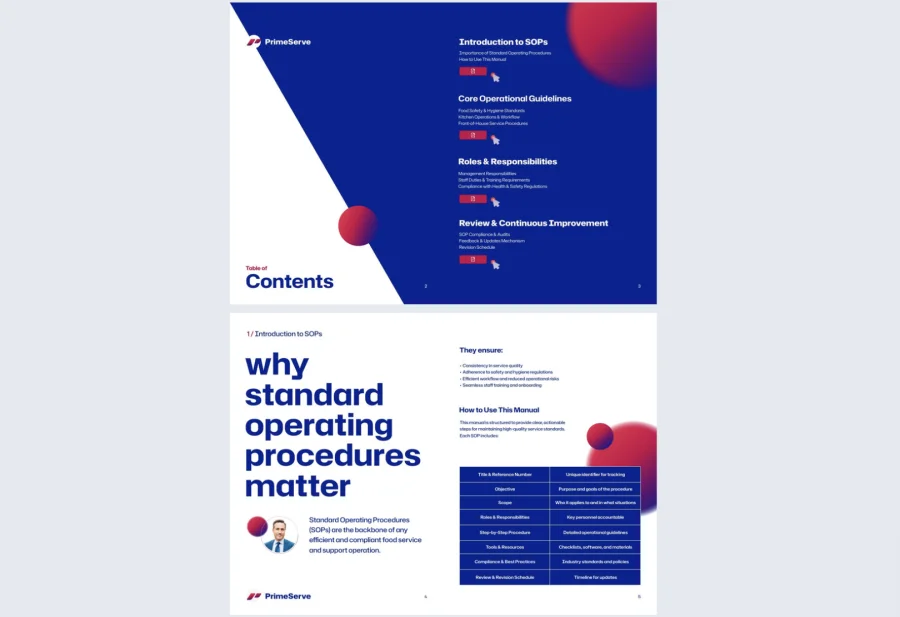
1. Customizable Standard Operating Procedure Manual
Complex organizations can’t afford ambiguity. This customizable standard operating procedure manual goes beyond a simple checklist — it maps out policies, responsibilities, workflows, and standards in one centralized resource. Whether you’re documenting cross-departmental protocols, safety procedures, or quality controls, this template eliminates the guesswork that slows teams down and creates compliance risks.
Best for: Mid-size to large organizations (50–500+ employees) across regulated industries — healthcare, logistics, manufacturing, or any enterprise where process consistency is tied to compliance. Ideal if your team currently relies on scattered Word docs or outdated PDFs, and you need one structured, accessible document that scales as the organization grows.
Real-world application: One of the latest Flipsnack customers is a mid-sized logistics company with 280 employees that used this template to standardize safety and compliance training across multiple warehouses. By adding interactive quizzes and acknowledgment forms, they reduced onboarding-related incidents by 41% within the first year and improved their compliance audit scores significantly.
Customize every section through Flipsnack’s Design Studio. From the table of contents to individual process steps. Upload custom icons, insert explainer videos, or embed links to related assets and internal tools. Use Flipsnack’s analytics to track which sections get the most views, so you always know where teams need more clarity.

Common mistake to avoid: Don’t try to document everything at once. A manual that covers every edge case across every department becomes too heavy to maintain and too overwhelming to read. Start with your highest-risk or most frequently broken processes, and build from there.
Share digitally as a flipbook via a secure private link, embed on your company intranet, or store in a virtual bookshelf for organized, on-demand access across teams.
2. Digital SOP Format Template
Not every team needs a full-scope manual. This SOP format template is built for departments that want to standardize workflows quickly — covering the essentials (objectives, scope, procedures, responsibilities) without unnecessary complexity. Clean, minimal, and easy to duplicate across multiple processes.
Best for: Small to mid-size teams (10–200 employees) just starting to formalize their operations, or departments that need a lightweight, reusable structure they can adapt across different workflows without rebuilding from scratch each time.
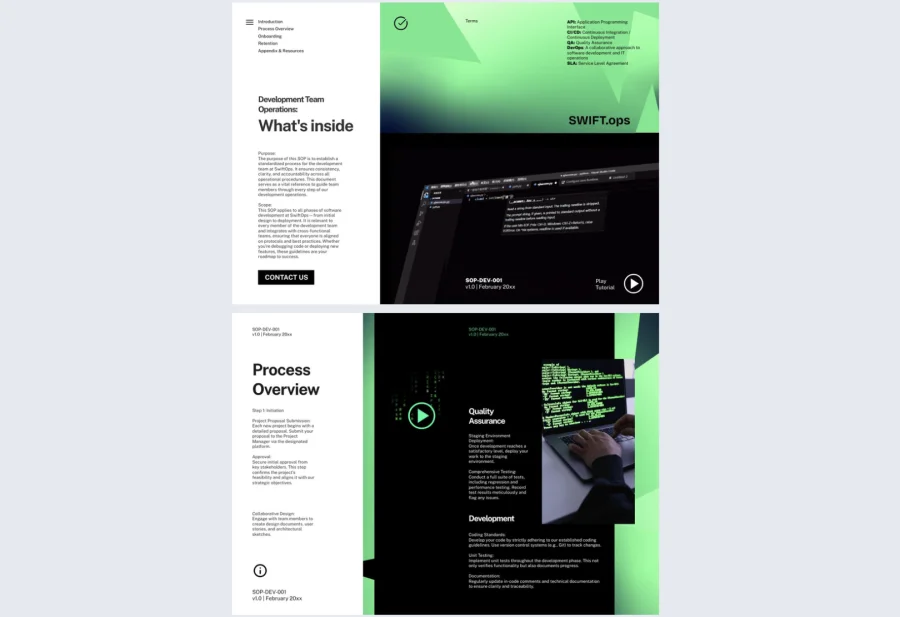
Real-world application: One of the latest Flipsnack customers is an IT team at a 90-person company that used this template to document their troubleshooting and ticketing procedures for the first time. Escalation requests to senior staff dropped by 35% within two months, as team members could reference clear, step-by-step guidance instead of relying on informal knowledge.
Update fonts and colors to match your brand, embed links to internal systems like Google Drive or Asana, and duplicate the template to build an entire procedural library from a single starting point. Use Flipsnack’s branded templates feature to lock in your visual identity across every SOP you create.
Common mistake to avoid: Don’t treat this as a one-time setup. The simpler the format, the easier it is to update — so schedule quarterly reviews and assign a clear owner for each procedure to keep content accurate as workflows evolve.
Share via a private link, embed in your internal wiki, or export as a PDF for offline access.
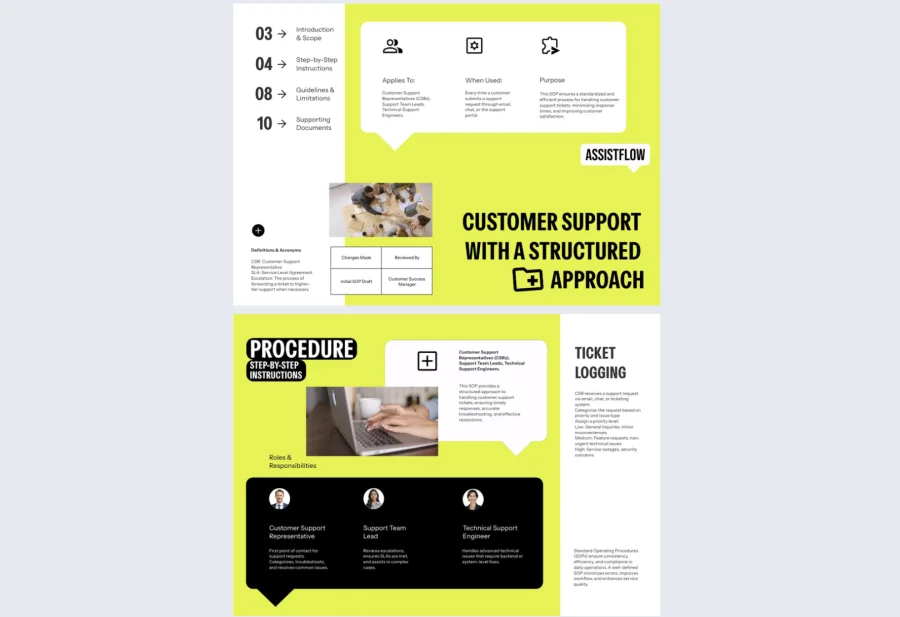
3. Interactive SOP Example Template
Some teams don’t just need a blank structure, they need to see what a well-written SOP actually looks like before they can build their own. This SOP example template comes with pre-filled content blocks and a clearly defined flow: title, purpose, scope, responsibilities, and procedural steps. So teams can model their own documentation on something that already works.
Best for: Teams new to SOP documentation, or managers onboarding staff who need to understand both the format and the standard before adapting it for their specific role or department.
Real-world application: One of the latest Flipsnack customers is an operations lead at a 60-person e-commerce company who used this template to train three new department heads on how to document their own team processes. Having a concrete example to reference cut the time spent on SOP creation by half and produced more consistent results across departments.
Replace placeholder content with department-specific language, swap in your brand elements, and expand any section with flowcharts, attachments, or embedded videos for steps that are easier to show than explain.
Common mistake to avoid: Don’t just fill in the blanks and call it done. Use the pre-filled content as a quality benchmark — if your real procedures are significantly more vague than the example, that’s a signal to go deeper before publishing.
Share via a secure private link or store alongside your other process documentation in a virtual bookshelf.
4. Engaging SOP Content Team Template
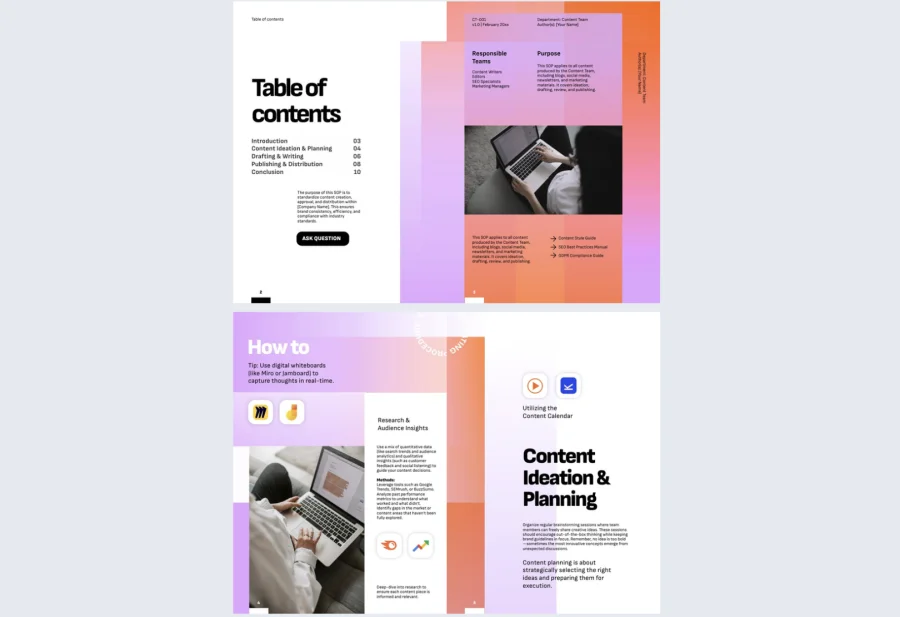
Creative teams move fast — and inconsistency shows up quickly when there’s no shared framework for how work gets reviewed, approved, and published. This SOP content team template gives marketing and content departments a dedicated space to document repeatable workflows, from editorial calendars to campaign execution and social media review cycles.
Best for: Marketing and creative teams at small to mid-size companies (5–150 employees) where speed and brand consistency both matter. Particularly useful if your team has grown quickly and informal processes that used to work are now causing bottlenecks or missed steps.
Real-world application: One of the latest Flipsnack customers is a content team at a 45-person agency that used this template to document their client approval and publishing workflow for the first time. Revision cycles shortened by two rounds on average, and new team members were able to work independently within their first week instead of relying on senior staff for guidance.
Add embedded links to editorial calendars and project management tools, insert feedback forms for approvals, and include step-by-step breakdowns for recurring campaign tasks. Flipsnack’s collaboration features let editors and managers review and annotate directly within the document.
Common mistake to avoid: Don’t document your ideal workflow — document your actual one. SOPs that describe how things should work in theory get ignored by teams who know they don’t reflect reality. Start with what’s happening now, then use the SOP as the baseline for improvement.
Share via private link or embed in your team’s project management hub for easy reference during active campaigns.
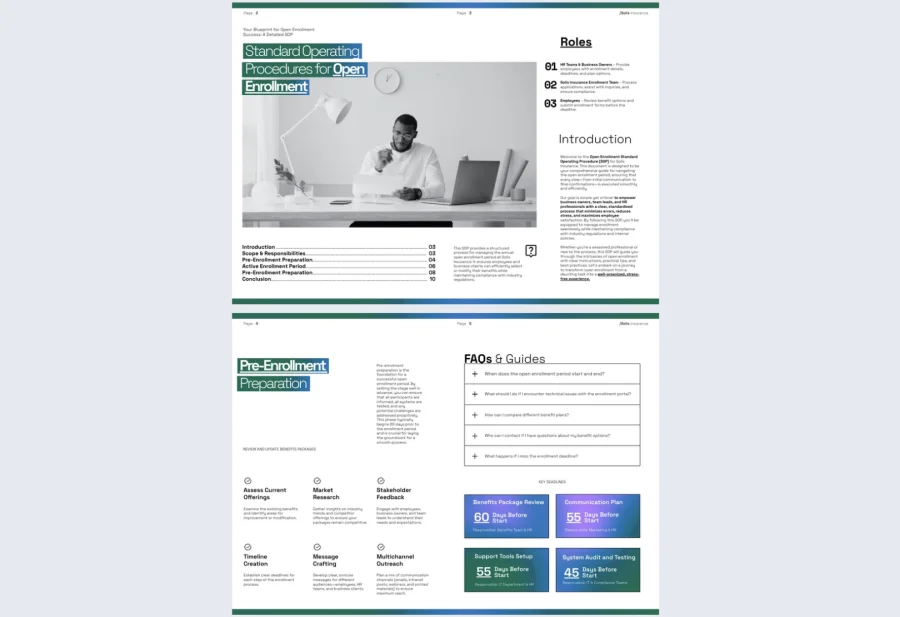
5. SOP Open Enrollment Template
Open enrollment periods are high-stakes and time-sensitive — and inconsistent communication is one of the most common reasons employees miss deadlines or make uninformed benefits decisions. This SOP open enrollment template gives HR teams a clear, reusable framework that outlines key dates, eligibility criteria, required documentation, and communication protocols in one professional document.
Best for: HR teams at mid-size to enterprise organizations (100–1000+ employees) managing annual benefits enrollment, especially those juggling multiple plan options, provider changes, or a distributed workforce where communication consistency is harder to control.
Real-world application: One of the latest Flipsnack customers is an HR team at a 400-person company that used this template to replace a fragmented enrollment process — previously spread across emails, PDFs, and a shared drive — with a single interactive document. Employee questions to the HR helpdesk during enrollment dropped by 40%, and submission errors fell significantly after staff had a clear, step-by-step guide to reference.
Add plan comparison tables, submission checklists, and links to provider portals. Because enrollment procedures change year to year, the template is easy to update and republish without rebuilding from scratch. Use Flipsnack’s analytics to track which sections employees are spending the most time on — a reliable signal of where confusion is highest.
Common mistake to avoid: Don’t publish this once and assume it’s been read. Use Flipsnack’s engagement tracking to confirm who has actually opened the document, and follow up directly with employees who haven’t — especially in the final week before deadlines close.
Share securely via SSO authentication for enterprise access control, or distribute via a private link to all eligible employees at the start of the enrollment period.
6. Standard Template for SOP
Sometimes the most effective solution is the simplest one. This standard template for SOP strips process documentation back to the fundamentals — who does what, when, and how — in a lean, professional format that’s fast to deploy and easy to duplicate across workflows.
Best for: Teams of any size that need broad applicability without the overhead of a full manual. Particularly useful for organizations documenting a high volume of processes across different departments, where speed and consistency matter more than visual complexity.
Real-world application: One of the latest Flipsnack customers is an operations coordinator at a 130-person retail company who used this template to document 18 different in-store procedures in under two weeks. Having a single, repeatable structure meant each SOP looked and read consistently — making it easier for staff to navigate across documents and reducing the time managers spent answering process questions on the floor.
Plug in tasks, define responsibilities, and duplicate the template for each new workflow. Flipsnack’s Design Studio lets you update branding once and carry it across your entire SOP library without redesigning each document individually.
Common mistake to avoid: Don’t underestimate this template because of its simplicity. The most common reason SOPs fail is over-engineering: teams build elaborate documents that are too time-consuming to maintain. A lean, consistently updated SOP will always outperform a comprehensive one nobody touches.
Share via private link, embed in your internal knowledge base, or organize across departments in a virtual bookshelf.
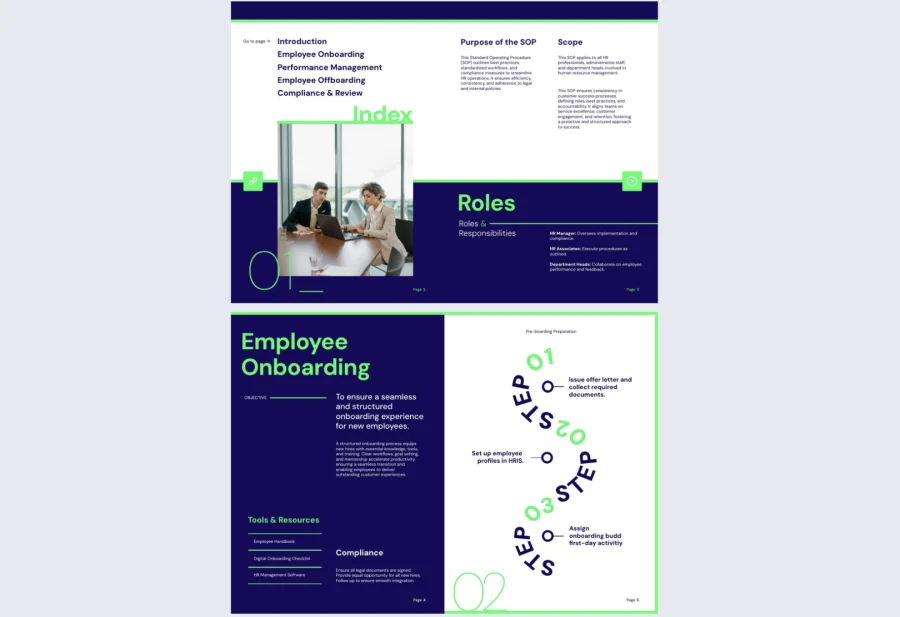
7. Sample SOP Template
For teams that want to establish operational consistency without overcomplicating the process, this sample SOP template offers a straightforward, ready-to-use structure with clearly labeled sections that walk users through best practices for documenting procedures that actually get followed.
Best for: Small to mid-size teams (10–300 employees) that need to systematize repeatable processes quickly, without the learning curve of more complex formats. A solid starting point for departments building their first SOP library or standardizing processes that have historically been undocumented.
Real-world application: One of the latest Flipsnack customers is a customer service manager at a 75-person SaaS company who used this template to document their support escalation and ticket resolution process. New hires reached full independence two weeks faster than before, and the team saw a measurable drop in inconsistent responses to common customer issues within the first month.
Swap colors to match your brand, rewrite steps to fit your workflow, and embed interactive elements like training videos or feedback forms to make the document more engaging. Flipsnack’s analytics let you track which sections get the most repeat views, helping you identify where teams need additional guidance.
Common mistake to avoid: Don’t write this from memory alone. The most accurate SOPs are built by observing the process as it actually happens, not as you think it happens. Shadow your best performer, document what they do step by step, and use that as your source of truth.
Share via a secure private link, embed in your onboarding portal, or store in a virtual bookshelf alongside related training materials.
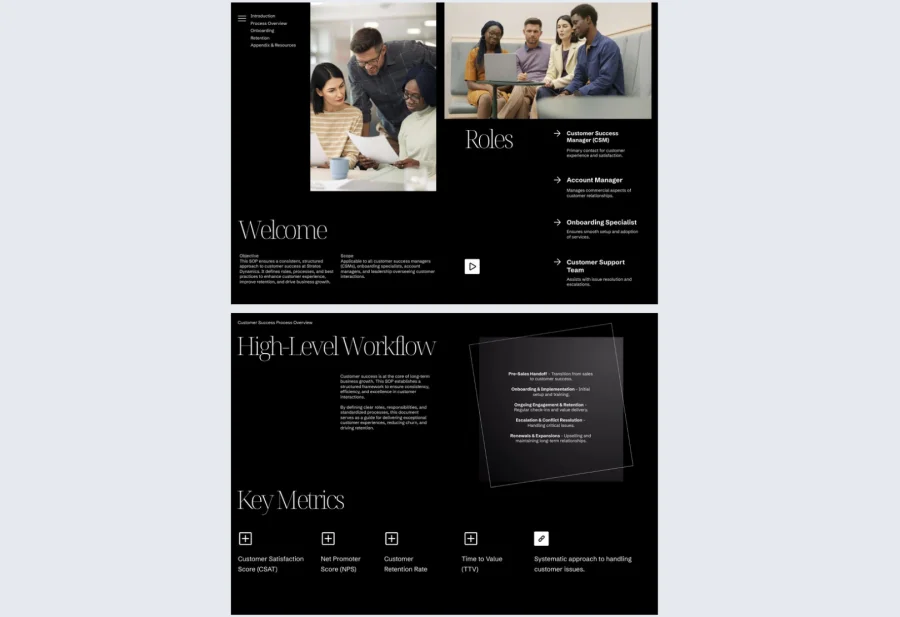
8. Standard Operating Procedure Template
For teams operating in regulated environments or high-accountability roles, presentation and precision both matter. This standard operating procedure template offers a visually polished framework that walks users through the why, who, and how of any recurring process, making it well suited for compliance documentation, healthcare operations, or corporate audit preparation.
Best for: Mid-size to enterprise organizations (100–1000+ employees) in regulated industries where documentation needs to be both thorough and auditable. Ideal if your SOPs need to hold up under external review, not just serve as internal reference guides.
Real-world application: One of the latest Flipsnack customers is a compliance team at a 220-person healthcare organization that used this template to consolidate their patient intake and data handling procedures into one structured, shareable document. Audit preparation time dropped by three weeks, and the team used digital sign-off checklists to confirm staff had read and acknowledged updated procedures across all locations.
Add QR codes for mobile access in the field, insert digital sign-off checklists, and link directly to relevant tools, forms, or regulatory references. Flipsnack’s privacy options give you full control over who can access each document and when.
Common mistake to avoid: Don’t let formality get in the way of usability. A beautifully structured SOP that reads like a legal document will go unread. Write procedural steps in plain language, use visuals where possible, and test comprehension with the people who will actually be following it before publishing.
Share via SSO-authenticated links for secure access control, or embed in your compliance management system for centralized tracking.
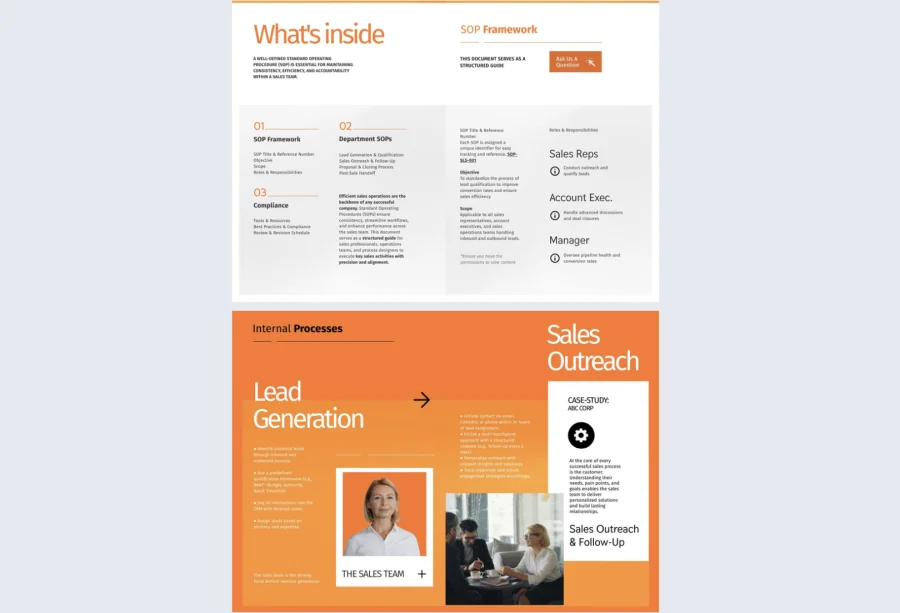
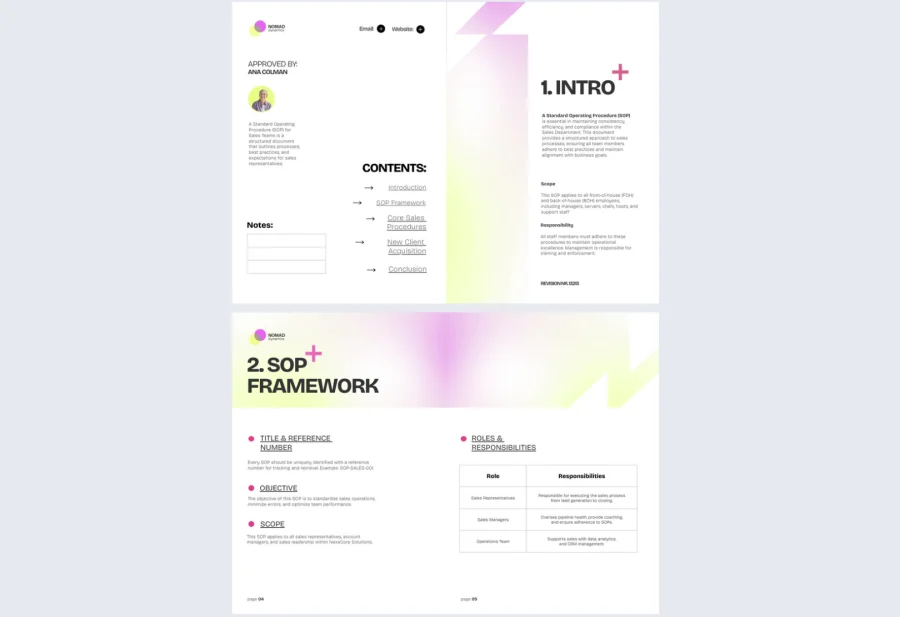
9. Standard Operating Procedure Sales Guide
Sales teams move fast and handoffs break down quickly without a shared framework. This standard operating procedure sales guide helps revenue teams document lead qualification criteria, pipeline stages, proposal approvals, and client communication protocols in a format built for real-world usage, not just reference.
Best for: Sales teams at growth-stage to enterprise companies (50–500 employees) dealing with inconsistent handoffs, high rep turnover, or frequent onboarding. Particularly valuable when your top performers’ process lives only in their heads and needs to be captured before it walks out the door.
Real-world application: One of the latest Flipsnack customers is a sales operations manager at a 160-person B2B company who used this template to document their full sales cycle for the first time. New rep ramp time dropped from 10 weeks to 6, and the team reported fewer deals lost at the proposal stage after a clear approval and follow-up protocol was established and accessible to everyone.
Customize with CRM navigation visuals, updated quota frameworks, client-facing scripts, and embedded links to your sales tools. Use Flipsnack’s collaboration features to keep sales managers and operations aligned on updates as your process evolves.
Common mistake to avoid: Don’t build this document in isolation. If your top reps aren’t involved in defining what goes in here, the guide will reflect theory rather than what actually closes deals. Co-create it with your best performers, then use analytics to see which sections newer reps return to most.
10. Standard Operating Procedures Template
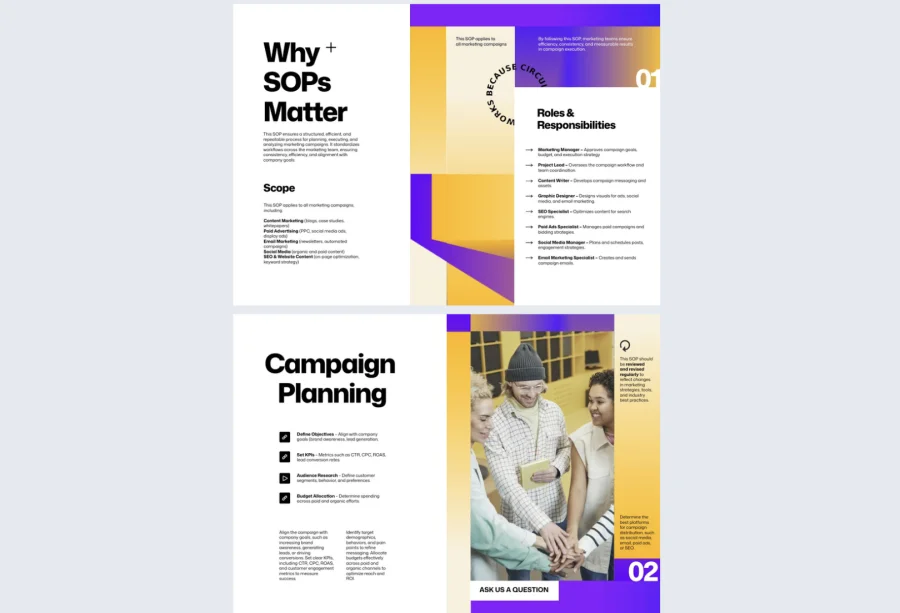
For organizations ready to move beyond one-off documents and build a proper SOP library, this standard operating procedures template offers a modular, cross-departmental format that works as well for finance as it does for facilities. Each section is designed to be cloned, adapted, and maintained independently, so your documentation grows with your organization rather than becoming outdated the moment it’s published.
Best for: Operations teams and department leads at organizations of any size that are building a centralized process library for the first time, or replacing a fragmented collection of legacy documents with something structured and scalable.
Real-world application: One of the latest Flipsnack customers is an operations director at a 350-person company who used this template as the foundation for a company-wide SOP initiative spanning seven departments. Within one quarter, the team had documented over 30 core processes in a consistent format, and managers reported a significant reduction in the time spent answering repetitive process questions from their teams.
Personalize instructions for specific roles, integrate analytics to track readership across departments, and publish securely with version control so teams always know they’re working from the most current procedures. Flipsnack’s virtual bookshelf lets you organize your entire SOP library in one place, accessible via a single link.
Common mistake to avoid: Don’t try to document everything at once. A phased approach works better: start with your highest-risk or most frequently broken processes, get those right, and expand from there. An SOP library built gradually and maintained well is far more valuable than a comprehensive one nobody trusts.
How to create an SOP template that actually gets used
A well-structured SOP ensures consistency, reduces errors, and gives teams a reliable framework to execute without guesswork. With Flipsnack’s intuitive platform, you can build a professional, fully customized standard operating procedure in just a few steps.
Note: You can start with a free trial to explore most premium features. We also have a free plan if you only need basic PDF interactivity and up to three flipbooks.
1. Choose a template that fits your process
Start by selecting a template that matches your use case. Whether you need a compliance-focused manual, a lightweight format for quick deployment, or a department-specific guide for sales or HR, Flipsnack offers a range of professionally designed SOP templates to choose from. Each one comes pre-structured with the essential sections, so you’re not starting from a blank page. If your needs are highly specific, you can also build from scratch using Flipsnack’s Design Studio.
2. Customize it with your branding, content, and interactive elements
Once you’ve chosen your template, open it in Flipsnack’s Design Studio and make it your own. Update colors, fonts, and logos to align with your brand identity, then replace placeholder content with your actual procedures, responsibilities, and standards.
To increase engagement and usability, consider adding:
- Embedded videos or GIFs to walk through complex steps visually
- Clickable links to internal tools, forms, or knowledge bases
- Interactive checklists for step-by-step task completion
- Go-to-page buttons to help users navigate long documents quickly
- Feedback forms to collect input from the people following the procedures
3. Collaborate with the people who know the process best
The most accurate SOPs are built with input from the people doing the work, not just the people managing it. Flipsnack’s collaboration tools let you invite team members and assign roles based on their level of involvement:
- Owners have full control over design and publishing
- Editors can update content, add media, and revise steps
- Contributors can leave comments and suggestions without altering the core document
Use comments and annotations to gather feedback directly within the document, keeping the review process fast and centralized without lengthy email threads.
4. Publish and share with the right people
Once your SOP is finalized, Flipsnack gives you multiple ways to distribute it depending on your audience and security requirements:
- Private sharing via password-protected or SSO-authenticated links for internal use
- Embed codes to integrate your SOP into a company intranet, LMS, or internal wiki
- Virtual bookshelf to organize multiple SOPs in one centralized, accessible library
- PDF export for teams that need an offline or printable version
5. Track engagement and keep content current
Publishing your SOP is the beginning, not the end. Use Flipsnack’s built-in analytics to monitor how teams are interacting with it: which sections get the most views, where readers drop off, and which steps generate the most repeat traffic. Use that data to identify gaps, simplify confusing sections, and prioritize which procedures need updating first. Schedule regular reviews and assign clear ownership so your SOPs stay accurate as workflows evolve.
Take your standard operating procedures to the next level with Flipsnack
Inconsistent processes are expensive. They slow down onboarding, create compliance risks, and force teams to reinvent the wheel every time something goes wrong. A well-built SOP eliminates all of that.
Flipsnack gives you the tools to create SOPs that are professional, interactive, and actually used — not filed away and forgotten. From drag-and-drop customization and real-time collaboration to secure sharing and engagement analytics, everything you need to build and maintain a high-performing process library is in one place.
Browse the templates, start customizing, and give your team the clarity they need to execute consistently — every time.
Frequently asked questions
An SOP defines what needs to happen and who is responsible within a broader process. A work instruction goes deeper, providing step-by-step guidance for a single task within that process. SOPs set the framework; work instructions handle the detail.
As long as the process requires and no longer. A simple procedure might need two or three pages; a complex, multi-department workflow will naturally require more. The real measure is whether someone unfamiliar with the process could follow it without asking for clarification.
The people closest to the process should write them, with a manager or department lead reviewing before publishing. Ownership should be assigned explicitly so there is always one person accountable for keeping the content accurate and up to date.
Yes, and they are often more critical for remote teams than office-based ones. Without the ability to observe a process in person, distributed teams rely heavily on written documentation to stay aligned. Digital SOPs accessible via private links and trackable through analytics are particularly well suited to remote environments.