How to Create a Shoppable Magazine in Flipsnack: Formats, Checkout Options, and Examples
Published on: January 29, 2026
A good magazine does more than showcase products. It sets a scene, builds a mood, and pulls readers through a story page by page.
Now imagine that same experience, but with a simple twist.
When something catches the reader’s eye, they can click it and go straight to the product page without leaving the flow.
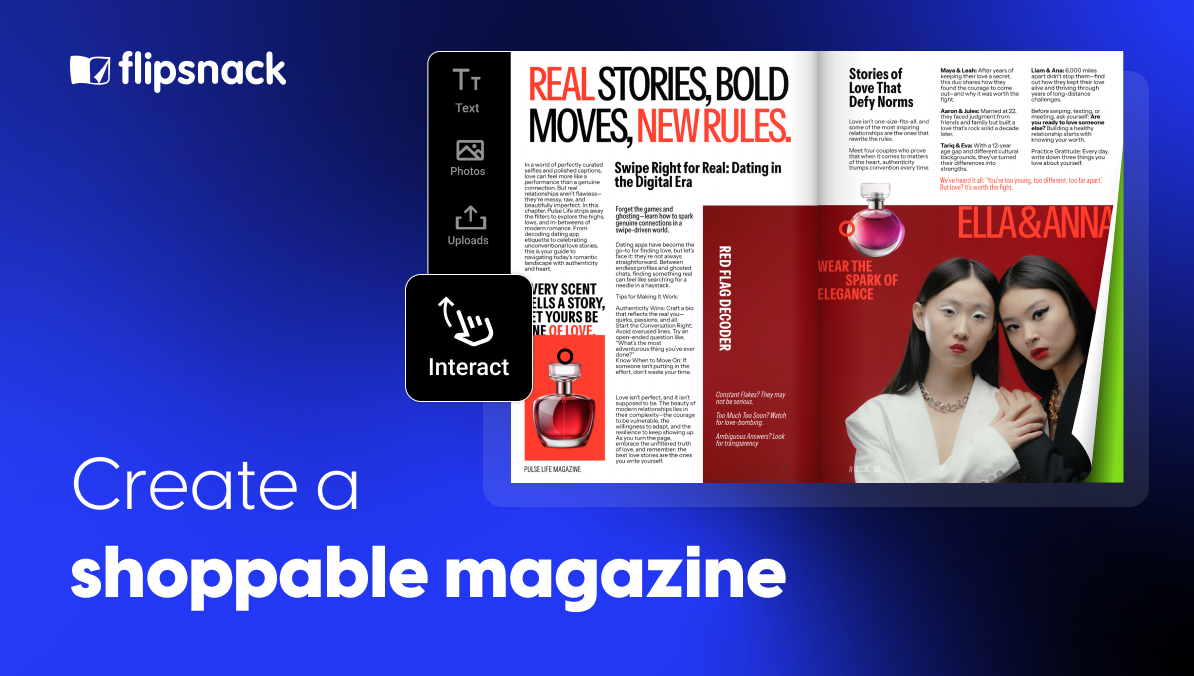
That’s what a shoppable magazine does. It combines an editorial layout with clickable products, so inspiration and action sit side by side instead of living in two separate places.
In this article, you will learn what makes a magazine truly shoppable, the formats that work best, and how to create one with a flipbook app like Flipsnack. You will also see where to share it and what results to look for once it is live.

Table of contents
What makes a magazine shoppable?
A magazine is shoppable when readers can click a product while they read and reach the right place to buy it. The key is clarity. People should see what they can click, understand what it is, and know what will happen next.
A shoppable magazine usually includes:
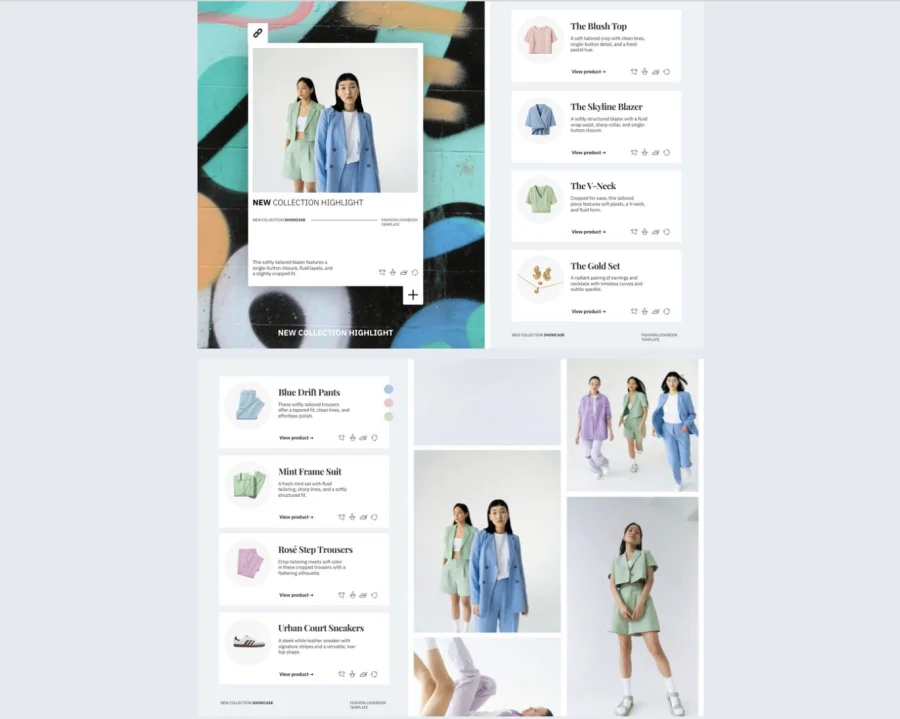
- Clickable product elements, like hotspots or buttons placed on images or next to product blocks. They should look consistent across pages so readers learn the pattern fast.
- Product information on the page, such as the name, price, and a short description. This helps readers decide without extra steps.
- A clear path to purchase, most often by opening the product page in your online store. One click should take the reader to the exact item, not to a category page or a search result.
Shoppable magazine formats and examples
There are a few magazine types for which the shoppable feature should be non-negotiable. You can create all of them in Flipsnack, but more on this later.
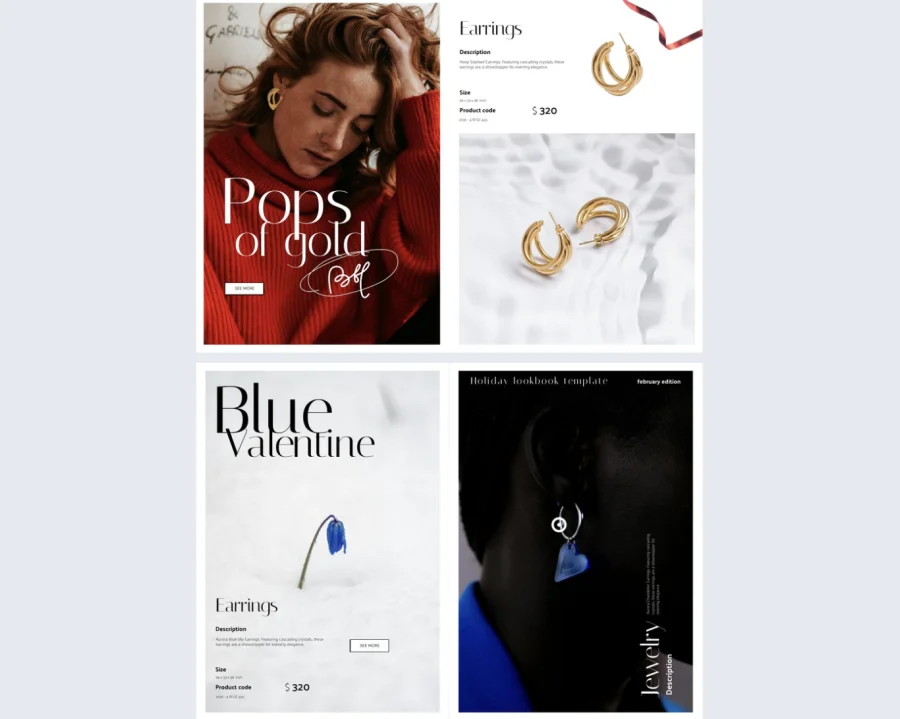
1. Lookbooks for new collections and seasonal drops
These are visual pages that focus on styling. You show how items look together in outfits, sets, or full scenes, then link each product so the reader can shop the exact pieces. This format is best when the look matters as much as the item.
Why it works: it turns inspiration into action while the reader is still focused on the full look.

2. Gift guides for holidays and promotions
These are curated selections built around common buying questions, like who it is for, what the budget is, or what the occasion is. You can also add quick notes like “best for small spaces” or “great starter option” to help people choose faster.
Why it works: it removes the mental work of sorting and comparing, which makes decisions easier.
3. Editorial style catalogs
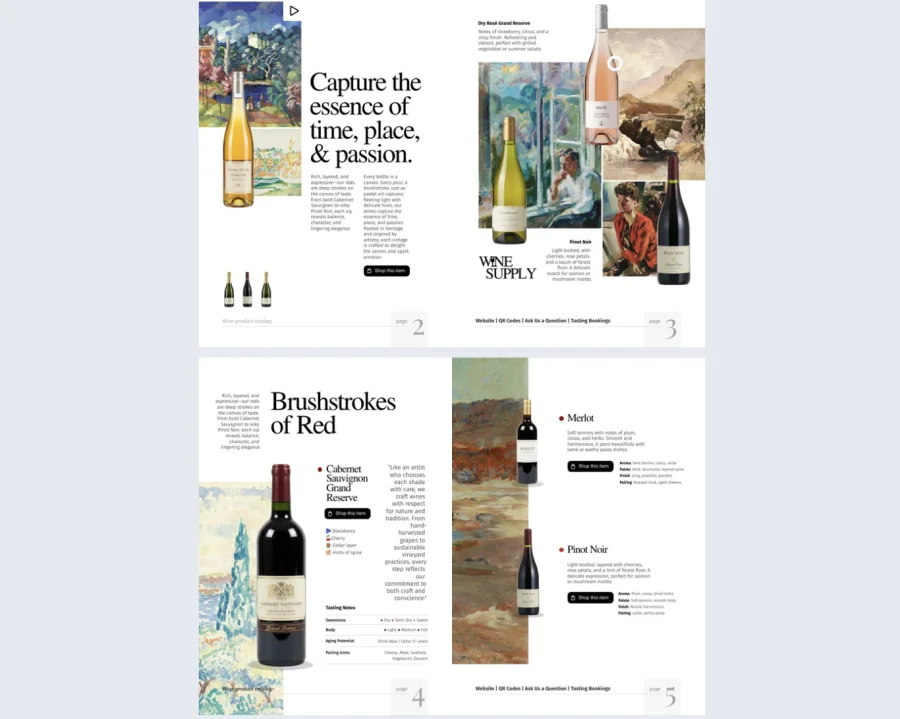
This is a catalog that reads like a magazine. It uses themes, chapters, and short copy to give products context, instead of showing endless grids. It works well for larger inventories because it helps you spotlight what matters most.
Why it works: it guides attention, so readers do not feel like they are browsing a warehouse.
4. Brand stories with product moments built in
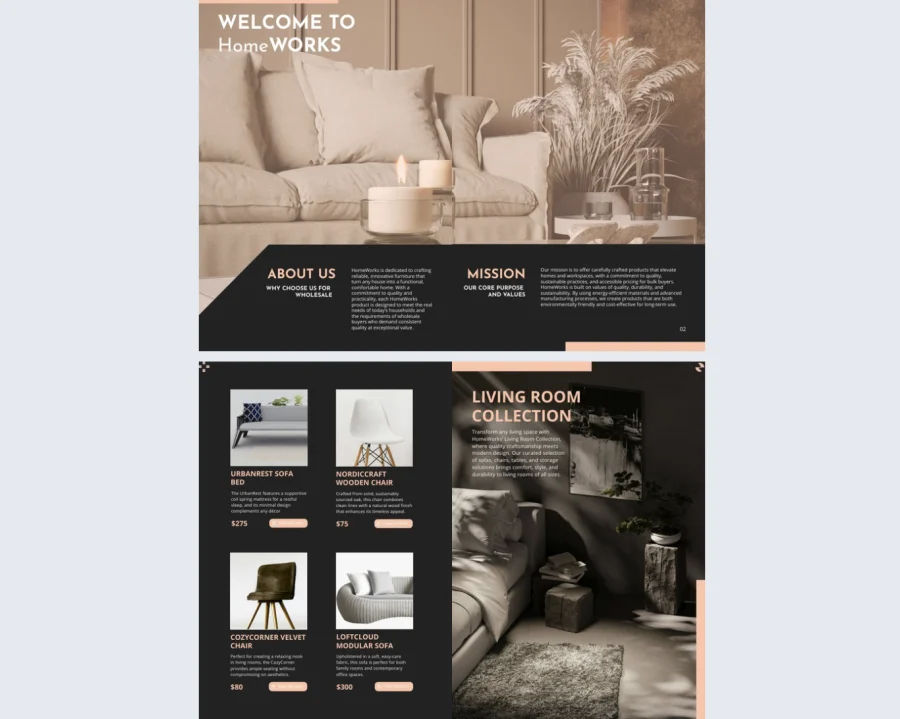
These issues lead with narrative. You can focus on craftsmanship, materials, founder stories, customer use cases, or the lifestyle around the brand. Products appear naturally inside the story, linked at the moment they are shown or mentioned.
Why it works: it earns attention first, then offers the product when the reader is already engaged.
5. B2B catalogs and line sheets for wholesale buyers
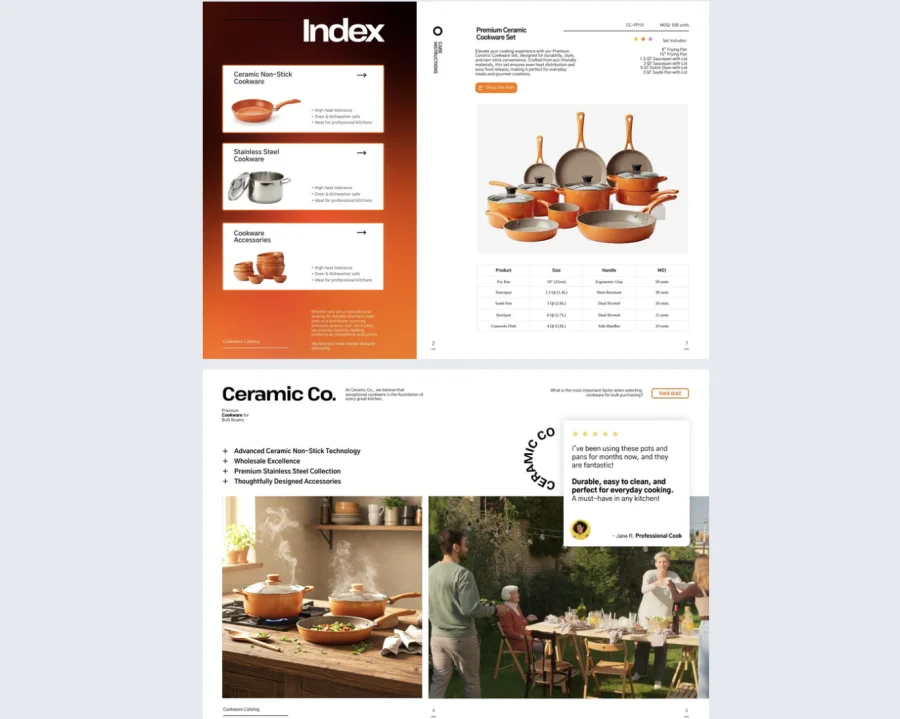
These are built for buyers who need to review the range quickly and make purchase decisions with confidence. You can organize by collection, category, or margin-friendly bundles, and link each item to a product page with specs or ordering details. It also works well as a follow-up asset after a sales call.
Why it works: it shortens the path from review to order, without forcing buyers to ask for every detail.
Benefits of shoppable magazines
A shoppable magazine works best when people need context to decide. Here’s when it makes the most sense, and what you gain from it.
1. Show products in context, not in isolation
You can show complete looks, sets, or bundles and link each item right where it appears. Instead of presenting products as isolated listings, you place them inside a narrative that gives them meaning — a styled outfit, a curated room, a seasonal edit. That makes the click to shop feel natural rather than forced, and helps readers connect what they see to real use before they buy.
2. Guide the buyer toward a confident decision
You can add short notes, tips, and recommendations that help people choose faster and feel more confident. Many shoppers hesitate online because they lack context — a magazine gives your brand space to explain choices, show products in use, and reduce doubts before people drop off. The result is a reader who arrives at the product page already persuaded.
3. Lead readers through the content like a sequence
You can structure the magazine around themes or chapters, then place product links at the exact moment interest peaks. Readers do not have to stop, search, or remember product names — they click what they like while they are still engaged with the page. Because there is more to explore than a standard product listing, they often stay longer and come back more often.
4. Send clicks straight to your product pages
Each product link opens the exact page you choose — whether that is a Shopify product, a collection, or a landing page — which keeps the buying path short and predictable. There is no extra navigation step between interest and purchase, and no risk of readers losing the thread.
5. Publish and share across multiple channels
A single magazine can work across your website, email campaigns, B2C promotions, and B2B sales follow-ups. You produce it once and adapt where it appears, which makes it more efficient than creating separate content for each channel.
6. Measure engagement and improve over time
Track signals like product clicks, time spent per page, and repeat visits, then adjust the themes, product order, and page layout based on what people actually interact with. Unlike a static lookbook, a digital shoppable magazine gives you data you can act on — so each edition performs better than the last.
How to make a shoppable magazine with Flipsnack
1. Create your catalog
Start with the content you already have, or build from a template.
If you have a finished design, upload your PDF and turn it into a flipbook. If you want to start from scratch, pick a template and design directly in Flipsnack.
If your PDF includes visible SKUs and you work with many products, you can also speed things up by linking a product feed and using SKU-based detection to make the catalog shoppable faster.
2. Customize and brand it
Make the catalog feel like your brand before you add shopping.
Set the cover, add your logo, and keep fonts and colors consistent. Then build a clear reading flow with sections, short descriptions, and product groupings that make sense for the buyer.
If you plan to show product details inside the catalog, decide what you want to display, like name, price, short description, and a clear button label. Product tags support these details and can also include multiple product images.
3. Add checkout options
This is the point where browsing turns into buying. These are the checkout options you can offer to transform your magazine into a sales tool:
- Receive orders by email: Let buyers send orders or wishlists to your inbox, straight from the catalog.
- Let buyers order on WhatsApp: Buyers can send pre-orders through WhatsApp, which works well when conversations and quick confirmations matter. Businesses can also follow up with updates, reminders, or promotions using Bulk messages on whatsapp, making it easier to communicate with multiple customers while keeping the buying process smooth.
- Collect quote and preorder requests: This is built for B2B catalogs, where partners want to request a quote instead of checking out like a consumer.
- Send buyers to your webshop with external links: Add shopping links or buy buttons that take readers to your online store pages.
- Let buyers download a product list as PDF or CSV: Buyers can download their selected items and use the file to submit quotes or place orders through their process.
- Let buyers save wishlists for later: Buyers can create wishlists and email them to you, or to a store, for later pick up
4. Share your magazine
Once it is ready, publish it and make it easy to access.
A shoppable magazine only works if people actually see it. These are the ways you can share your magazine:
- Embed it on your website
Add it to collection pages, landing pages, and campaign hubs, where visitors are already in discovery mode. It works well as a richer alternative to a long product grid, especially for seasonal edits and new arrivals.
- Send it in email campaigns
Use it in product drops, gift guides, and promotions. Email gives you intent, so the magazine becomes the next step, not a random link. One strong cover visual and a clear call to action usually beat listing ten products in the email.
- Share it with sales teams for B2B outreach
Give reps a single link they can send after a call, attach to follow-ups, or include in outreach sequences. It helps buyers review the range on their own time, then click through when they need details.
- Use QR codes in stores, booths, and packaging
Put QR codes on signage, printed lookbooks, product tags, inserts, and event materials. This is an easy way to connect offline interest to online product pages, without asking people to type or search.
- Promote it on social with a strong preview page
Social users decide fast. Lead with a strong cover, a clear theme, and a simple promise, like “Shop the full lookbook.” Then link to a page that loads quickly and makes it obvious how to click and shop.
5. Track your magazine
Treat your magazine like a performance asset. Check how people interact with it, then improve the next issue based on real behavior. Flipsnack analytics can help you track metrics like views, time spent, clicks, and downloads, so you can see what pages and products drive action.
Publish your shoppable magazine and start selling
If your products need context to sell, a shoppable magazine gives you that space. You can guide people through a story, show items in real use, and still make buying only a click away.
Create one issue to start. Pick a lookbook or a gift guide, make it shoppable in Flipsnack using the checkout option that fits your flow, then publish and share it through your main channels. Once it is live, check the clicks and engagement, and use that data to improve the next edition.
FAQs on shoppable magazines
How do I make a digital magazine shoppable? To make a digital magazine shoppable, you add interactive layers to your design. Using Flipsnack, you can overlay shopping hotspots, “Buy” buttons, or product tags. These elements allow readers to add items to an integrated shopping list (cart) within the magazine. From there, they can either send their order directly to you (via email or WhatsApp) or click through to your website’s checkout page to complete the payment.
The “integrated cart” in Flipsnack functions as a Shopping List. It allows readers to select multiple items as they browse the magazine. Once they are finished, the reader can send that list to the merchant via email or WhatsApp, or download it as a PDF/CSV. It does not process credit card payments directly; the final payment happens on your website or through direct communication.
You can connect your Shopify product feed to Flipsnack using a CSV or Google Sheets sync. This automatically imports your product titles, SKUs, and prices. While the content stays synced, the “Buy” button functions as a bridge: it directs the user from the flipbook to the corresponding Shopify product page to process the payment securely.
For B2B or wholesale, the “Request a Quote” feature is the most effective. Instead of a direct “Buy” button, buyers add items to their shopping list and submit it to the sales team. This allows for bulk pricing, custom shipping calculations, and formal invoicing outside of a standard consumer checkout flow.
Yes. Shoppable magazines created in Flipsnack are responsive. When shared via link, they open in a mobile browser where product tags and buttons remain clickable. This makes them ideal for “Link in Bio” social media strategies, though the reader will still be redirected to your website to finalize a purchase.