How to Automate Personalized Sales Decks From One Master Template
Published on: November 11, 2026
AI has quietly taken over the first draft of many sales decks. ChatGPT and Claude turn rough notes into structured slides faster than most reps can open a template.
The trouble starts after the draft. Fonts drift and versions multiply across accounts and languages. Nobody knows whether the buyer ever reached the pricing page.
That’s why more teams now send sales presentations as tracked links instead of files. Below, we’ll look at where AI helps, where it stops and how to keep every deck on brand and measurable.

Table of contents
- What is presentation automation?
- Can ChatGPT or Claude create a sales presentation?
- Why personalized sales decks break down as teams grow
- Compare presentation automation tools for each step
- How to automate personalized sales decks from one master template
- Step 1: Draft your sales deck content with ChatGPT or Claude
- Step 2: Build your master sales deck template and lock the brand
- Step 3: Create one personalized sales deck for each account
- Step 4: Translate each sales deck for its market
- Step 5: Share every sales deck with the right access
- Step 6: Track how buyers read your sales deck and follow up
- Publish and check sales decks from ChatGPT or Claude
- Generate hundreds of account decks with the Flipsnack API
- Avoid these presentation automation mistakes
- FAQ about presentation automation
What is presentation automation?
Presentation automation is the use of templates, AI and integrations to create, update and distribute presentations with less manual work, so every version stays accurate, consistent and on brand.
For sales teams, it means one approved master deck that turns into a tailored version for each account. Reps change what matters to the buyer. Marketing keeps control over everything else.
Can ChatGPT or Claude create a sales presentation?
ChatGPT and Claude can both draft a sales presentation and turn it into slides. What neither can do alone is keep that deck on brand, control who opens it or show you what the buyer actually read.
Here’s where AI earns its place in the workflow:
- Fast first drafts. Paste your discovery notes and get a structured outline in minutes instead of an afternoon.
- Persona rewrites. Ask for the same story reframed for a CFO, an IT lead or the people who’ll use the product daily.
- Sharper arguments. AI is good at spotting where a narrative is weak, crowded or missing proof.
And here’s where it falls short:
- Generic design. Without a template, AI slides look like every other AI deck your buyer received this week.
- Unchecked claims. AI can invent a metric or misdescribe a feature. Someone has to verify every claim before it reaches a buyer.
- No signal after sending. A PPTX attachment can’t report who opened it or which page held their attention.
AI gives your reps their afternoons back. Judgment still belongs to them, from picking the right proof to catching a wrong number. What decides the deal, though, is what happens after you hit send.
Why personalized sales decks break down as teams grow
Personalization works when one rep sends five decks a week. With 40 reps across three markets, the same habits create real risk.
- Brand drift. Each rep edits the master deck a little. By the fourth reuse, fonts, colors and claims no longer match what marketing approved.
- Stale versions. Old pricing and outdated case studies keep circulating because nobody can recall a file already sent.
- Silence after sending. Reps can’t tell a buyer who read every page from one who never opened the email.
None of these problems start with the reps. They start with the format. A file ends at the download. A link keeps reporting.
That difference matters more every year. Gartner found that 61% of B2B buyers prefer to buy without talking to a sales rep. Your deck often has to make the case on its own, with nobody in the room to explain it.
Compare presentation automation tools for each step
No single tool owns the whole workflow. This table shows which type of tool handles each step well and where each one runs out of road.
| Step | AI assistants: ChatGPT, Claude | Slide tools: PowerPoint, Google Slides, Gamma | Flipsnack | Watch out for |
|---|---|---|---|---|
| Draft the content | Strong | Varies; some have built in AI | Connects to ChatGPT and Claude through its apps | Every AI claim still needs a human check |
| Lock a brand template | No | Themes and master slides; reps can still override them | Brand kit plus element locking and team roles | Locks only help if the master itself is current |
| Create a version per account | Manual copy and paste | Duplicate the file | Copy the flipbook; each copy gets its own link and stats | Naming discipline matters once you have dozens |
| Translate for each market | Strong for text | Varies by tool | AI translation into 29+ languages inside the editor | Longer translated text can shift layouts |
| Generate decks at scale | Possible with custom scripts | Add ins and scripting | API fills named template fields per account | Needs a developer to set up |
| Control who opens it | No | File permissions only | Password, invited people, passcode, SSO, watermark | Strict access adds a step for the buyer |
| Track what buyers read | No | Limited or none for files | Per recipient links, page stats, open alerts | A forwarded link still reports under the original name |
| Send leads to your CRM | No | Rarely | HubSpot, Salesforce and Zapier | Map fields before the first campaign |
AI assistants win the drafting step, and slide tools remain the familiar choice for teams built around PowerPoint. Flipsnack covers everything after the draft: brand control, versions, translation, access and tracking. The same deck also works live, since full screen mode turns any flipbook into a presentation for the meeting room.
How to automate personalized sales decks from one master template
Here’s the workflow we’d set up if we were starting from zero. You won’t need a developer for any of it, just a chat window, one good template and a little discipline about naming files.
Sending hundreds of decks a month? The API section further down picks up where these steps end.
Step 1: Draft your sales deck content with ChatGPT or Claude
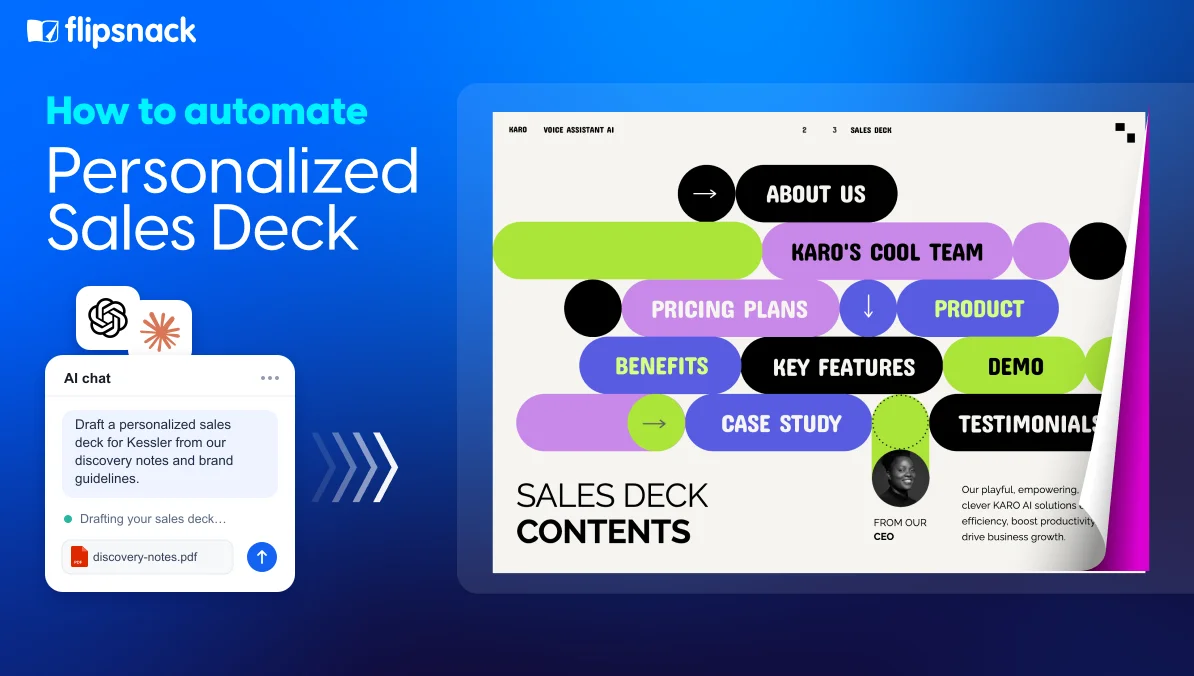
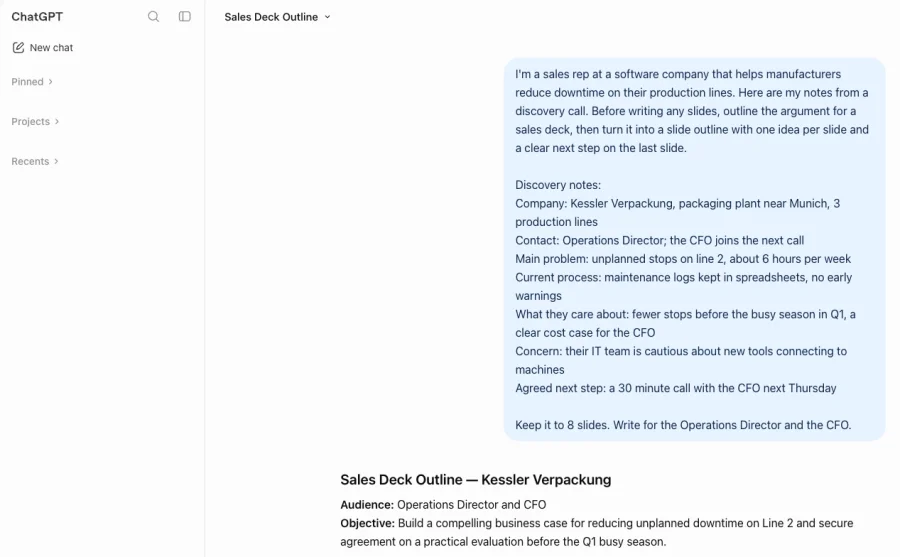
Start with the argument, not the slides. Give the AI your discovery notes, the buyer’s role and the outcome you want, then ask it to outline the case before writing any slide copy.
Ask for one idea per slide and a clear next step on the last page. Then read every line. Check each number, product claim and customer reference against a source you trust.
Step 2: Build your master sales deck template and lock the brand
Move the approved content into one master template in Flipsnack’s Design Studio. Add your fonts, colors and logos to the brand kit so every teammate pulls from the same library.
Next, decide what reps may change. Advanced lock can freeze an element’s position and size, its style or its content. Lock the logo, legal text and layout. Leave the customer name, pain points and proof sections editable.
Team roles add one more layer of protection. Contributors can edit but need approval before publishing, so nothing off brand goes live by accident.
Already have a PowerPoint deck? You can edit an existing PDF or PowerPoint deck online and turn its text and images into editable elements. The feature is still in beta, but the edited deck can already serve as your master, ready to copy for each account.

Step 3: Create one personalized sales deck for each account
Make a copy of the master for every account. Each copy gets its own link and its own statistics, so engagement from one buyer never mixes with another’s.
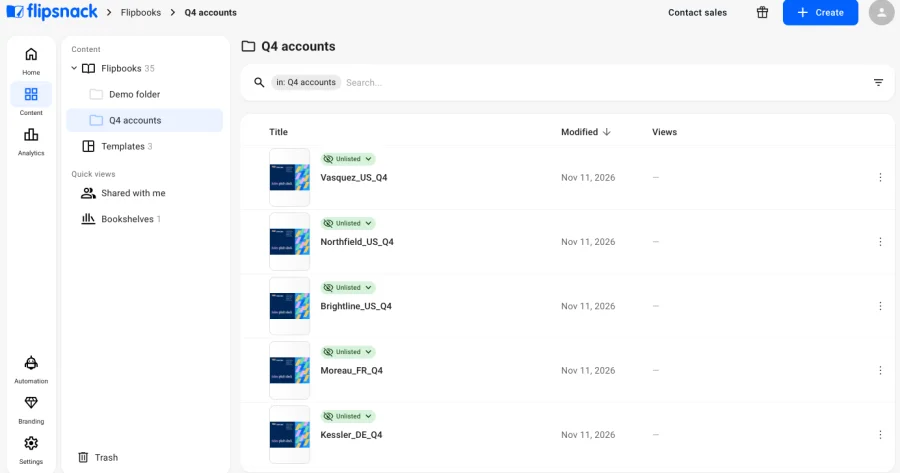
Use a naming pattern your whole team follows, such as “Account_Market_Quarter”. It keeps a folder of 80 decks searchable. Then fill in the editable fields with what you learned in discovery.
The buyer’s challenge, the most relevant proof and a clear next step are usually enough to turn a copy into an interactive sales presentation built for one account.
Step 4: Translate each sales deck for its market
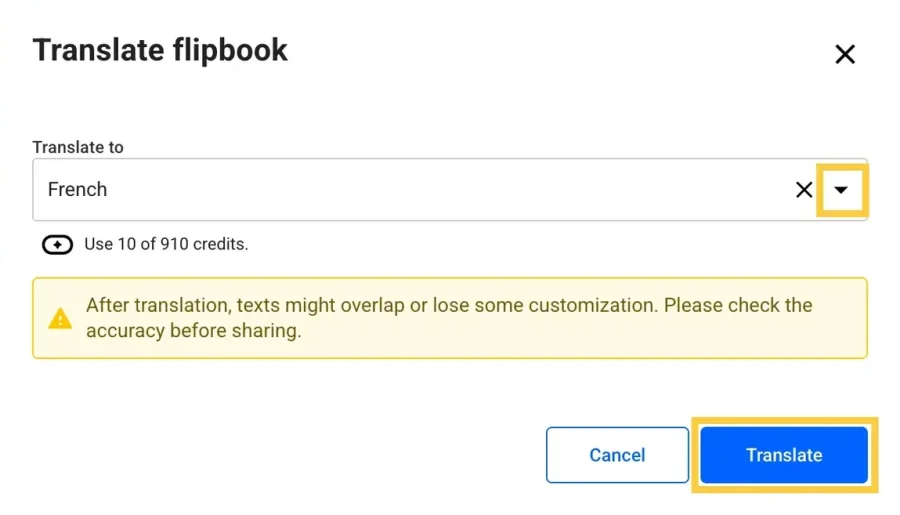
International accounts deserve a deck in their own language. Flipsnack’s AI translation inside the editor converts a whole flipbook or selected text boxes into more than 29 languages.
Order matters here. Translation replaces the original text, so always translate a copy. Changes you make later to the master won’t carry over to translated versions, which means the master should be final first.
After translating, review each page. German and French often run longer than English and can push text out of its box.
Step 5: Share every sales deck with the right access
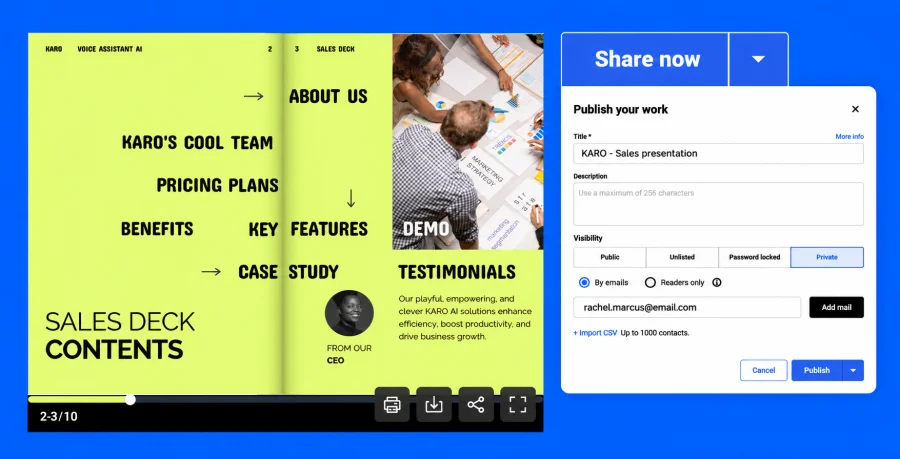
Different deals need different doors. Match the sharing option to the sensitivity of the deck:
- Unlisted link. Anyone with the link can open it, but it stays out of search. Good for early conversations.
- Password. One shared password for a small buying group.
- Invited people or a one time passcode. Only named email addresses get in. With a passcode, readers don’t need a Flipsnack account.
- Viewer SSO. For large accounts whose IT team wants sign in through their own identity provider.
- Leak protection watermark. Shows the reader’s email across every page, which discourages forwarding screenshots.
- Inactive date. Switches the deck off on a set date, ideal for quotes and time limited pricing.
Spotted a mistake after sending? Fix it in the editor and the same link shows the corrected version. No resend, no “final_v3” in the buyer’s inbox. That’s one reason teams choose to share digital presentations as live links rather than attachments.
Hosting decks on your own custom domain also helps buyers trust a link from someone they met only last week.
Step 6: Track how buyers read your sales deck and follow up
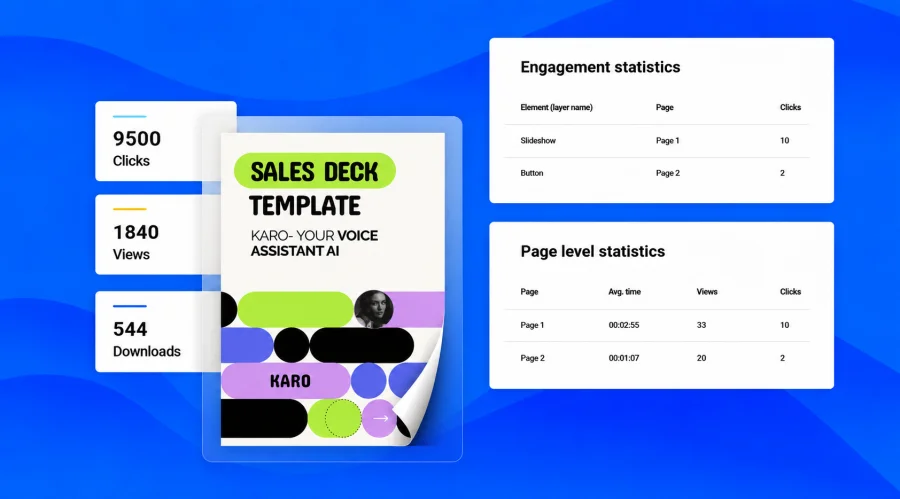
Create an individual trackable link for each recipient on the same deck. Name links after the people or teams you send them to, and each one reports its own engagement.
Turn on notifications for the first open, or for no open by a date you choose. Then check page level statistics for views, clicks and reading time. Insights can summarize that data in plain language when you don’t have time to dig.
Be honest with yourself about forwarding. If a champion forwards their link, the activity still appears under the champion’s name. When identity matters, invite named people instead.
To close the loop, lead form submissions can flow into HubSpot or Salesforce, and Zapier can trigger a follow up task when new statistics arrive on a trackable sales deck.
Publish and check sales decks from ChatGPT or Claude
Your team already drafts in ChatGPT or Claude. Now the deck can go live without leaving the conversation.
With the Flipsnack app for ChatGPT, you can ask the chat to turn a PDF into a flipbook, change its title, description or visibility, generate an embed code and pull the latest statistics. ChatGPT asks you to confirm before it creates, updates or deletes anything.
Claude works the same way through the Flipsnack connector in Claude’s directory. You sign in with your Flipsnack account, and Claude can search, create, update, share and embed flipbooks or fetch their analytics. Claude also checks with you before any destructive action.
The sales use is simple. Right before a call, ask for the latest numbers on that account’s deck and walk in knowing what they read.
A few limits to plan around:
- A workspace admin has to connect the app.
- In ChatGPT, the PDF needs a public URL; files uploaded straight into the chat can’t be converted yet.
- The connection works with your default Flipsnack workspace.
Generate hundreds of account decks with the Flipsnack API
Copying the master by hand works for a few dozen accounts. Beyond that, the template API takes over.
The idea is straightforward. You give the fields in your master template clear names, such as CompanyName, HeroImage or IndustryProof. Once a developer connects your systems, each account’s values, for example from your CRM, reach the API automatically. It then creates a flipbook for every account from your template.
The setup is a one time project, so this route suits teams with steady, high volume. Beyond decks, the same Flipsnack API can convert PDFs, sync product data and pull reader statistics into your own systems.
Every CRM and sales process is different, so it helps to map which fields each deck needs before any code gets written. Flipsnack’s sales team can review that map with you.
Follow one sales rep through presentation automation
Meet Dana, a rep at a software company that sells to manufacturers in the US, Germany and France. Dana and her company are fictional, but every move she makes uses features from this guide.
On Monday, Dana has a discovery call with a packaging plant near Munich. Back at her desk, she opens the master deck her enablement team drafted with Claude. The logo, legal footer and layout are locked, so she can’t break the design even on a rushed afternoon.
She makes a copy, names it “Kessler_DE_Q4” and fills in the three sections that matter: the plant’s bottleneck, proof from a similar factory and the next step agreed on the call. Then she translates the deck into German with Flipsnack. ChatGPT flags one awkward phrase, and Jonas from the Berlin office gives it a final read.
The pricing pages are sensitive, so only the three people Dana invites from the buyer’s side can open the deck. The link switches off at the end of the quarter, together with the discount.
On Thursday, right before the follow up call, she asks ChatGPT how the deck is doing. Most of the reading time went to the pricing page, so Dana knows exactly where the conversation will start.
Two weeks later, marketing corrects a figure in the master. Dana updates her copy in a minute, and the buyer sees the fix under the same link, with no new email.
Once the company passes a few hundred accounts, that same master becomes the API template. New decks can then appear as soon as a deal enters the CRM.
Avoid these presentation automation mistakes
Automation saves sales teams real time, but a few small habits can quietly cancel those gains. These are the ones worth watching for from the first week.
- Sending unchecked AI claims. One invented statistic can undo months of trust. Verify before anything leaves your team.
- Translating too early. Translated copies don’t update when the master changes. Finalize first, translate second.
- Sharing one link with every account. You lose the ability to see which buyer is engaged. Give each recipient a named link.
- Over personalizing. Buyers notice relevance, not trivia. Personalize the problem and the proof; standardize everything else.
Start presentation automation with one master deck
You don’t need an API to begin. One locked master template, a copy per account and a named link per recipient already put you ahead of teams still emailing attachments.
The tools will keep changing. ChatGPT and Claude keep getting better at drafting, and that’s good news for your reps’ calendars. What stays the same is the work only your team can do: choosing the right proof, checking every claim and sensing when a buyer is ready for the next conversation.
So start with one master. Draft the words with AI, then create your master sales deck in Flipsnack and share your first tracked version this week.
Selling in several markets? Add translation from day one. If your team already manages hundreds of accounts, the API can create a version for each one automatically.
AI writes the first draft. Your team owns everything that follows.
FAQ about presentation automation
Yes, ChatGPT can draft a sales pitch and generate PowerPoint slides from it. You’ll still need to apply your brand, verify every claim and decide how to share and track the deck once it’s sent. Presentation automation tools handle those steps after the draft.
Yes, Claude can draft presentation content and build slides. It can also connect to Flipsnack through the Flipsnack connector, so you can publish a deck as a flipbook, share it and pull its analytics from the same conversation.
Yes, with the Flipsnack app for ChatGPT. Give it a public PDF link and it creates a flipbook, then returns the link. You can also change visibility, get an embed code or check statistics from the chat. A workspace admin needs to connect the app first.
Share the deck as a link instead of a file. When you edit a published flipbook in Flipsnack, the same link shows the updated version, so buyers always see the current pricing and claims. For decks that should expire, set an inactive date.
You can import an existing PowerPoint and use it as your master. Flipsnack’s Edit PDF turns the text and images of a PDF or PowerPoint file into editable elements. The feature is still in beta, and imported files can’t be saved as templates yet, but you can copy the edited deck for each account.
Send each prospect an individual trackable link and turn on first open notifications. Page level statistics then show views, clicks and reading time. If the link gets forwarded, activity still appears under the original recipient, so invite named people when identity matters.
Presentation automation scales well for large sales teams because the master template stays under central control. Locked elements and team roles keep hundreds of reps on brand, while the API creates a version for each account from your CRM data. Viewer SSO and passcode access protect sensitive decks, and lead data can flow into HubSpot or Salesforce.