Sales One-Pager Examples and a Template That Gets You the Meeting
Published on: November 25, 2026
Every sales team needs a sales one-pager, and almost every team has a complicated relationship with theirs. Reps want something they can send today. Marketing wants something that stays on brand, carries real proof and doesn’t get rebuilt for every new prospect.
Those two goals pull in opposite directions. What usually comes out is a crowded page that tries to say everything and earns a polite “thanks, we’ll take a look.”
Page length is rarely the real issue. Purpose is. A sales one-pager that wins a meeting does one thing well: it gives a busy buyer one reason to keep talking.
Below, you’ll find six real sales one-pagers that B2B teams published on Flipsnack, the platform many companies use to create interactive sales presentations. Each example comes with notes on what it gets right and what we’d add to turn interest into a conversation. You’ll also get a simple structure, a template and an honest answer to the PDF versus link question.
Table of contents
- What is a sales one-pager?
- How long should a sales one-pager be?
- What should a sales one-pager include?
- Sales one-pager and sell sheet examples to learn from
- 1. Ambu: a single-page sales one-pager built on evidence
- 2. Phosphorus: a technical sell sheet that ends with a demo request
- 3. Timilon: a partner one-pager with a call invitation and QR code
- 4. EWISE: a services one-pager that sells a consultation
- 5. Advanced Wireless: a solution brief with a strong problem statement
- 6. Rotunda: a product comparison sell sheet
- Compare the sales one-pager examples at a glance
- What is a sell sheet?
- When should you send a sales one-pager?
- Pair your sales one-pager with your sales deck
- Should you send your sales one-pager as a PDF or a link?
- Create a sales one-pager with Flipsnack
- See how Benifex tracks sales content engagement with Flipsnack
- Adapt this sales one-pager template
- Make your next sales one-pager earn the meeting
- Frequently asked questions about sales one-pagers
What is a sales one-pager?
A sales one-pager is a short sales document, usually a single sheet, that explains a buyer’s problem, how your product or service solves it, the proof behind that claim and the one next step you want the buyer to take.
Reps send it before or between meetings, hand it out at events or give it to a champion who passes it on internally. Its job isn’t to close the deal. Its job is to earn the next conversation.
How long should a sales one-pager be?
A sales one-pager should fit on one sheet. That sheet can be single or double-sided, and many strong B2B examples use the back for a diagram, a use case or extra proof.
In practice, many B2B teams treat a front-and-back sheet as a one-pager, and several examples below use both sides.
Scan time matters more than page count. If a buyer can’t tell what you do and why it matters after skimming the headline and one section, a second page won’t rescue it.
- Front only works for cold outreach, trade show handouts and a quick introduction.
- Front and back works when a technical buyer needs a diagram, specifications or a short scenario before agreeing to a call.
What should a sales one-pager include?
A sales one-pager should include one buyer, one problem, relevant proof and one next step. Everything else is optional, and most of it belongs in a later document.
Here’s the order that works for most B2B teams:
- A headline about the buyer’s problem. Name a situation your buyer recognizes instantly, not your company’s mission.
- A one-sentence value proposition. Say what changes for the buyer, in plain words.
- How it works, in three points or fewer. Short blocks, icons or a simple diagram help the buyer understand the solution without a demo.
- Proof that fits the buyer. One named result, a short customer quote or a recognizable logo row beats a long list of claims.
- One next step. Ask for a 15-minute call, a demo or a reply. Pick one.
- A real contact. Add a named rep, an email address and a booking link or QR code so nobody has to hunt for it.
If colleagues want to add pricing tiers, security details or a full feature list, that information probably belongs in your proposal or sales deck.
Write your sales one-pager for the people your champion forwards it to
A sales one-pager rarely stays with the person you sent it to. Your champion forwards it to finance, IT or a manager who never heard your pitch.
That’s why every line should make sense to the second reader. Supered’s sales playbook on one-pagers makes the same argument: the document has to make your case in rooms your rep never enters.
In practice, swap internal jargon for outcomes. Then check that your proof answers the question a skeptical approver will ask: “Has this worked for a company like ours?”
Sales one-pager and sell sheet examples to learn from
These six examples come from B2B teams that publish their sales documents on Flipsnack. They cover medical devices, cybersecurity, building technology, marketing services, construction and automotive equipment.
For each one, we asked three questions. Is the buyer’s problem obvious? Is there proof the buyer trusts? Is there one clear next step?
1. Ambu: a single-page sales one-pager built on evidence
Ambu introduces its aScope RhinoLaryngo Slim through a user evaluation. The Ambu user evaluation one-pager pairs a product-in-use photo with a prominent headline result, and charts summarize what clinicians reported.
Why it works: Specialist buyers trust evidence from their peers. The two-column layout keeps the product and the results clearly apart, so a clinician gets the point at a glance.
What we’d add to get the meeting: The QR code leads to more product information. A line like “See it in your department: book a 15-minute call” would turn that interest into a conversation. Treat the evaluation figures as Ambu’s own reported findings.
2. Phosphorus: a technical sell sheet that ends with a demo request
Phosphorus, a Dragos company, opens its firmware management data sheet with the risk of vulnerable device firmware. It then explains how automated remediation removes that risk, and product screenshots make each capability concrete for CISOs and IT leaders.
Why the CTA works: The second page closes with “See Phosphorus in action” and “Request a demo today” in a bright panel nobody can miss. The ask matches the moment, because a security team that just read about a risk wants to see the fix.
3. Timilon: a partner one-pager with a call invitation and QR code
Timilon’s indoor air quality sensor one-pager speaks to channel partners who serve commercial buildings. It connects gaps in building management to a sensor and dashboard solution, then supports the opportunity with deployment figures and customer logos.
Why the CTA works: “Schedule a call with our team today” sits next to a QR code at the bottom of the second page. A partner holding a printed copy at an event can book that call from a phone in seconds.
4. EWISE: a services one-pager that sells a consultation
EWISE, a marketing agency, leads its agency one-pager with marketing profitability instead of a list of services. It groups its services into scannable categories and adds a testimonial plus its awards. A free consultation offer with a phone number sits in the footer of both pages.
Why the CTA works: Selling a service is harder than selling a product, because buyers can’t see it. A low-risk first step like a free consultation gives readers an easy yes.
5. Advanced Wireless: a solution brief with a strong problem statement
Advanced Wireless Communications opens its construction radio gateway one-pager with a problem every construction manager knows: communication gaps across a large jobsite. It introduces ONE Mobile with Radio Gateway and separates what the product is from what it does. The second page adds a connection diagram and a real jobsite scenario.
Why it works: The problem, solution and benefit structure is the clearest of the six. A site manager could forward it to a project director without adding a word.
What we’d add to get the meeting: The page has no prominent contact or call to action. A named rep and a “Request a jobsite walkthrough” button would complete it.
6. Rotunda: a product comparison sell sheet
Rotunda places diagnostic laptops and bundles side by side in its laptop comparison sell sheet, using color to separate “Better” and “Best” options. Product images and a website prompt complete the page.
Why it works: It’s a true sell sheet, one page that helps an interested buyer compare options fast. Because it assumes the buyer already knows the category, it suits a dealer conversation better than a cold introduction.
Compare the sales one-pager examples at a glance
| Example | Format | Proof | Next step |
|---|---|---|---|
| Ambu | Single page | Clinician evaluation results | QR code to product information |
| Phosphorus | Double-sided | Product screenshots | Request a demo |
| Timilon | Double-sided | Deployment figures and customer logos | Schedule a call, with QR code |
| EWISE | Double-sided | Testimonial and awards | Free consultation by phone |
| Advanced Wireless | Double-sided | Jobsite scenario and diagram | None |
| Rotunda | Single page | Product comparison table | Website prompt |
The pattern is clear. The examples with a specific, low-commitment ask make the next step easy, while the others leave the buyer to work out what happens next.
What is a sell sheet?
A sell sheet is a one-page sales document that summarizes a product’s features, benefits and specifications, often printed for trade shows, retailers or distributors. In most B2B teams, a sell sheet and a sales one-pager share the same format with a slightly different focus.
Sell sheets lean on product detail, like the Rotunda comparison above. Sales one-pagers lean on a buyer’s problem and how you solve it.
You’ll also hear this document called a solution brief, product sheet, datasheet or fact sheet. In formal RFP responses, the one-page summary usually becomes an executive summary instead.
| Sell sheet | Sales one-pager | |
|---|---|---|
| Focus | Product features, specifications and options | Buyer problem and solution |
| Typical reader | Retail buyer, distributor or trade show visitor | B2B decision maker or champion |
| Usual format | Often printed | Shared as a link or a PDF |
| Next step | Compare, order or request a quote | Book a call or a demo |
If your buyer already knows the category and needs to choose a model, build a sell sheet. If your buyer still needs a reason to talk to you, build a sales one-pager.
When should you send a sales one-pager?
Send a sales one-pager when a buyer needs a reason to give you time, not after you already have it. These are the moments where it earns its place:
| Moment | What the one-pager does | What to send next |
|---|---|---|
| Cold outreach | Gives a stranger a fast reason to reply | A short follow-up with one question |
| After a first call | Recaps the problem you heard and asks for the next meeting | Your sales deck |
| Trade show or event | Leaves a printed reminder with a QR code to book a call | A personal follow-up within a few days |
| Champion forward | Helps your contact explain you to their team | Proof tailored to each stakeholder |
After a demo, the job changes. Buyers then need a recap of the whole pitch, and a sales presentation your reps can reuse, update and track handles that better than a single sheet.
Sometimes a one-pager isn’t the answer at all. If a rep wants one so a VP will understand your product, a short call between that VP and your product team may move the deal faster.
Pair your sales one-pager with your sales deck
A sales one-pager and a sales deck do different jobs. The one-pager earns attention. The deck holds it.
| Sales one-pager | Sales deck | |
|---|---|---|
| Length | One sheet | A full set of slides |
| Timing | Before or between meetings | During or right after the meeting |
| Goal | Earn the meeting | Explain, persuade and move the deal forward |
| Reader | Often a stakeholder who missed the pitch | People who joined the conversation |
The simplest pairing uses two links that tell one story. Your rep sends the one-pager first and keeps the full deck for the conversation or the follow-up right after it.
Keep the headline, proof and visual style identical in both, so the buyer recognizes the deck the moment it arrives. Teams that build the deck as an interactive sales presentation can share it from the same account as the one-pager. A digital presentation that opens in any browser also saves your champion from forwarding a heavy file.
If the deck itself needs work, start with the fundamentals of building a business presentation that holds attention.
Should you send your sales one-pager as a PDF or a link?
Send your sales one-pager as a link by default, mainly because a link tells your rep whether the buyer read it. Keep a PDF ready for the moments that need a file. Neither format wins every time, so the choice depends on what happens after your rep hits send.
A PDF is familiar and works offline. The weakness is version control: once a rep attaches it, that copy lives in inboxes long after your pricing or specifications change.
A link stays current. When you update the document, everyone who opens the link sees the latest version, and your rep can see whether the buyer opened it.
- Print and procurement. A PDF wins when the buyer needs a file to print, upload to a portal or archive.
- Offline reading. A PDF wins at events with unreliable Wi-Fi.
- Current information. A link wins when prices, specifications or contacts change.
- Buyer signals. A link wins when your rep needs to know when to follow up. A PDF goes silent the moment it leaves your outbox, while a link shows who opened it, which parts held their attention and when. Your rep can then follow up while interest is still fresh.
Create a sales one-pager with Flipsnack
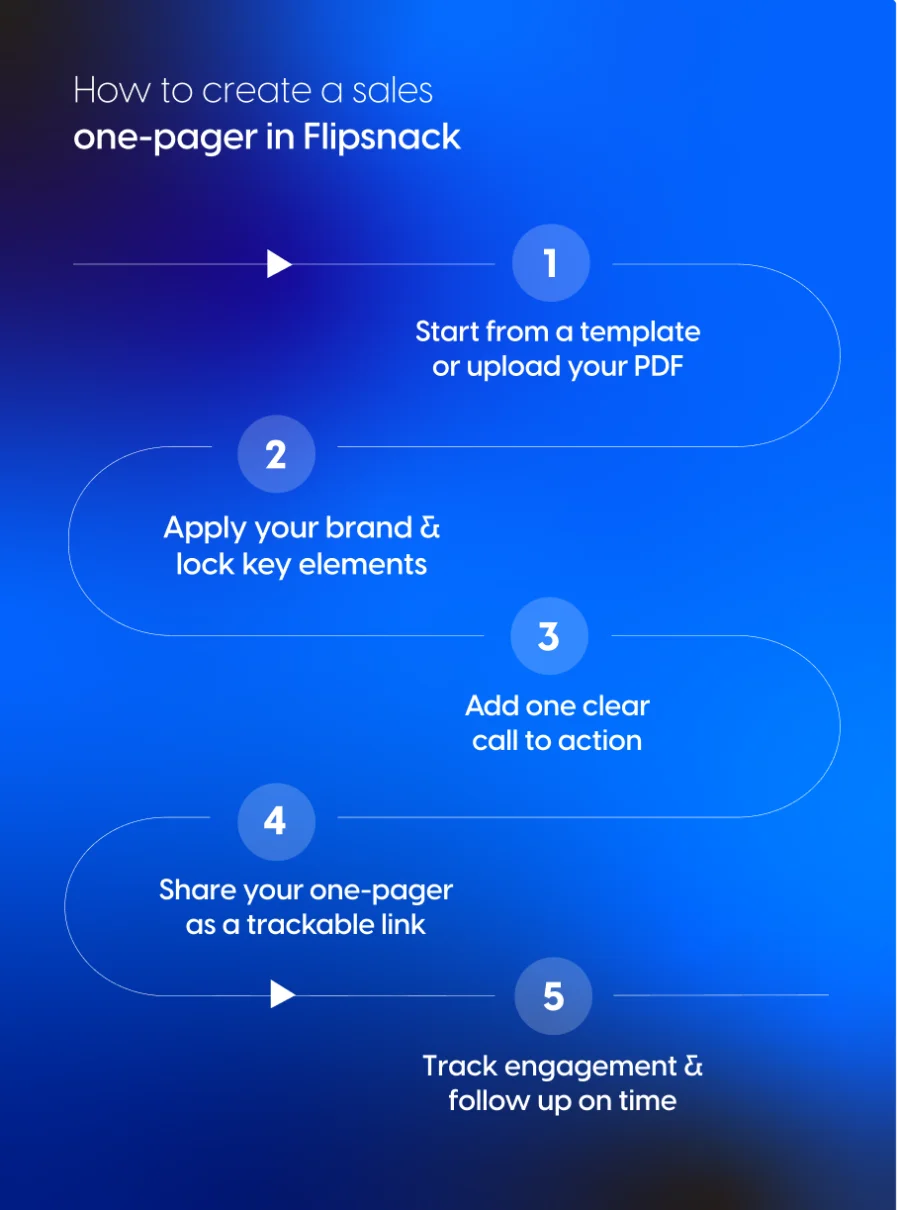
Flipsnack’s sales collateral tools let your team build a sales one-pager once, share it as a trackable link and still offer a PDF when a buyer asks for one. Here’s the workflow.
Step 1: Start from a template or upload your PDF
Build the layout above from a blank page in Design Studio, or upload the PDF your designer already made. When copy needs changes later, your team can edit the PDF directly in Flipsnack and republish it on the same link.
Step 2: Apply your brand and lock what reps shouldn’t change
Add your logo, fonts and colors from your brand kit. With branded templates your team can reuse, marketing locks the layout and brand elements, so reps only change the buyer name, the proof and the call to action.
Step 3: Add one clear call to action
Add a button that opens your booking page, a link to your full deck or a contact form. For printed copies, place a QR code that opens the live version.
Step 4: Share your sales one-pager as a link
Publish your one-pager and share the link by email, LinkedIn or your CRM. With Flipsnack’s sharing and access options, you decide who can open it, and you can offer a PDF download when a buyer needs a file.
Step 5: See who engaged and follow up at the right time
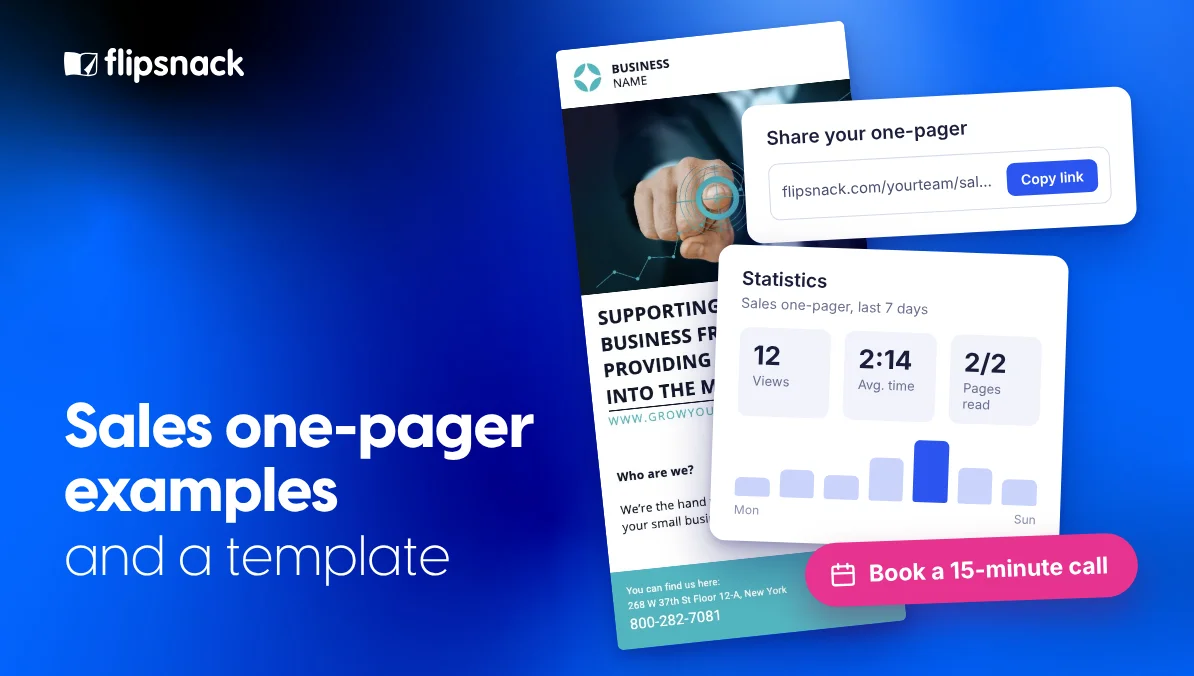
Open your publication statistics to see views, time spent on each page and clicks. For key prospects, create a separate trackable link for each contact, so your rep knows who opened the one-pager and when to follow up.
See how Benifex tracks sales content engagement with Flipsnack
Benifex is an employee benefits technology company with 501 to 1,000 employees. It supports more than five million employees in over 3,000 organizations, and its marketing team publishes new campaign and sales content every month.

Before switching, the team used a tool where everything had to be designed inside the platform. It offered no easy way to personalize content for ABM or sales and no real-time tracking to improve campaigns.
With Flipsnack, Benifex created 51 personalized documents, each with its own trackable link. When a sales rep asked for content for a key prospect, the team delivered an interactive document and tracked exactly how that prospect engaged with it.
“It’s really useful to be able to see how users are engaging with our content – which elements they’re clicking, and how far through the documents they’re reading.”
Lauren Lee, Senior Marketing Executive, Benifex
The results across its content program:
- 10,000+ leads engaged in a year
- 300+ leads from a single campaign
- 50% faster production workflow
- 6:07 min average read time on its flagship 2024 publication
The Benifex customer story shows how the team built its ABM workflow around personalized links.
Adapt this sales one-pager template
A fixed layout saves your team from the blank page and keeps every rep’s version consistent. This sales one-pager template puts the six parts covered earlier on a single page: a problem headline, a one-sentence value proposition, up to three outcome blocks, a proof strip and one call to action with a named contact. Build it once in Flipsnack’s Design Studio, and your reps can adapt it for every account.
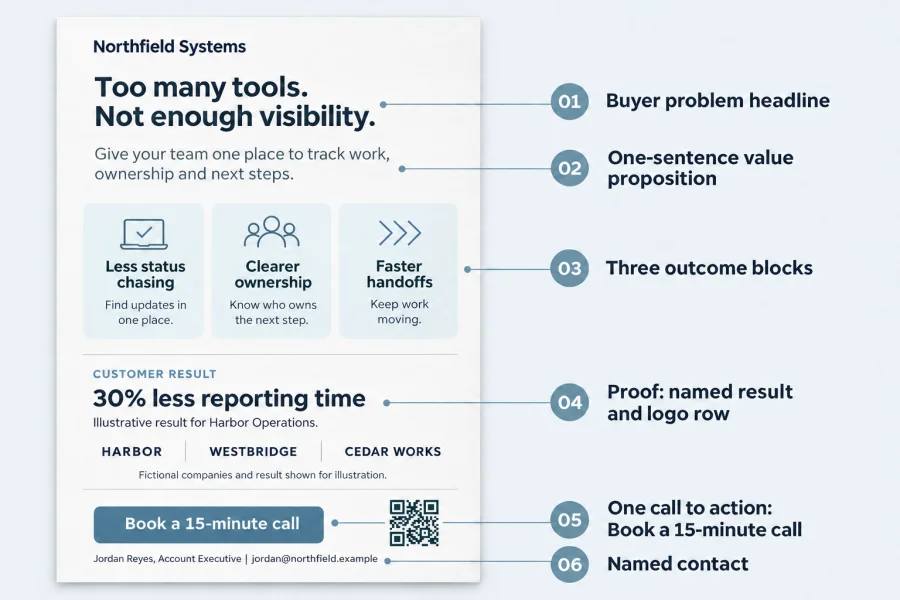
To turn that structure into a real one-pager, start from Flipsnack’s Free Digital Business Flyer template. It’s a double-sided layout with a large headline, a short introduction and a contact footer on the front, then three numbered benefit points and two testimonial areas on the back.

That already gives you room for five of the six parts, so your team mainly needs to rewrite the copy and add one booking button.
Best for: Sales enablement and product marketing teams that need one approved layout every rep can adapt.
Real-world application: Rewrite the front headline around one buyer problem and turn the introduction into your value proposition. On the back, swap the three benefit points for outcomes and replace the sample testimonials with approved customer proof. Then add a booking button as the only call to action and save the finished version as a branded template, so every rep starts from the same approved layout.
Common mistake to avoid: Keeping the template’s company-centered copy. Buyers scan for their own problem first, so the front should talk about them, not about your company. And if you only have two strong outcomes, delete the third and give the proof more room.
Make your next sales one-pager earn the meeting
A sales one-pager doesn’t need to say everything. It needs to give one buyer a reason to talk to you again.
Once a sales one-pager is live, the work shifts from writing it to improving it. These habits keep it earning meetings:
- Count meetings, not opens. Track how many one-pagers lead to a booked call, because an open with no reply tells your rep very little.
- Watch where readers stop. If page statistics show most buyers never reach the proof, move that proof higher on the page.
- Test one headline against another. Send two versions to similar accounts for a few weeks and keep the one that books more meetings.
- Swap proof by industry. Keep one core layout and change only the customer result, so a manufacturer sees a manufacturing result.
- Retire versions nobody opens. Unpublish old copies so reps can’t send a one-pager your team stopped updating.
With Flipsnack, your team runs these improvements from one place instead of chasing files.
Marketing builds the one-pager once in Design Studio and saves it as a branded template. Reps adapt the proof and call to action for each account, share a trackable link and see which pages each buyer read. When pricing changes, your team updates the one-pager once, and everyone with the link sees the new version.
Ready to try it? Create your first sales one-pager with Flipsnack and test it on your next prospect.
Short gets read. Specific gets the meeting.
Frequently asked questions about sales one-pagers
A sales one-pager is one sheet, printed on one side or both. Most B2B teams use the front for the problem, solution and next step, and the back for a diagram, specifications or proof. If you need more space than that, a sales deck or booklet is probably the better format.
Teams also call a sell sheet a sales sheet, sales one-pager, product sheet, solution brief, datasheet or fact sheet. The names overlap, but sell sheets usually focus on product details, while sales one-pagers focus on a buyer’s problem and the next step.
A sales one-pager earns a meeting, while a sales booklet recaps it. The one-pager is a single sheet sent before or between meetings. A booklet is a multipage document sent after a demo, so your champion can share the full story internally.
The best call to action for a sales one-pager is one specific, low-commitment step, such as “Book a 15-minute call” or “Request a demo.” Add a named contact and a booking link or QR code. Two or three competing asks force the reader to choose, and most readers choose nothing.
ChatGPT and other AI tools can draft headlines, summaries and value propositions for a sales one-pager. They can’t know your buyer’s real problem, your strongest proof or the right next step for a specific deal, so a person still needs to decide those. Use AI for a first draft, then design and share the final version in a tool your team controls.
Share your sales one-pager as a trackable link instead of an attachment. Flipsnack shows views, time spent on each page and clicks, and a separate link for each contact shows who opened it. Benifex uses personalized trackable links to see how individual prospects engage with its sales content.