Clienteling and Endless Aisle: How Retail Stores Sell Beyond the Shelf
Your stores can only carry part of your range, but shoppers and loyal clients expect all of it.
When a shopper asks for a size the shelf doesn’t hold, most stores still lose the sale. When an associate wants to follow up with a valued client, the only tools at hand are a text message, a screenshot, or a link to a generic product page. Neither moment looks like your brand, and neither leaves data your team can act on.
Endless aisle and clienteling were built for exactly these two moments. Endless aisle lets in-store shoppers order products the store doesn’t stock. Clienteling turns associates into personal advisors who stay in touch between visits.
Most retail teams already own pieces of both: a POS, a CRM and tablets on the floor. What’s usually missing is the thing associates actually show and send. That means a complete, current, on-brand view of your products, ready in minutes rather than days.
This guide explains both strategies, how they work together, and what each one needs. You’ll also see how Pandora France gave 130 stores a faster way to show the full range.
Table of contents
- What is clienteling in retail?
- What is an endless aisle?
- How do endless aisle and clienteling work together?
- What systems do you need to run clienteling and endless aisle?
- What works and what doesn’t in clienteling
- What works and what doesn’t in endless aisle
- How Pandora France made product lookup 3x faster across 130 stores
- How to build an in-store endless aisle catalog with Flipsnack
- Sell what’s not on the shelf, then sell again
- FAQ about clienteling and endless aisle
What is clienteling in retail?
Clienteling in retail is a selling approach where store associates build long-term relationships with individual clients. They use purchase history, preferences, and personal notes to recommend products and reach out at the right moment. Done well, clienteling turns one-time shoppers into repeat clients and makes store teams a measurable sales channel.
The word comes from “client.” Shoppers stop being anonymous buyers and become named people with a history. Luxury houses ran this playbook for decades from paper client books, logging sizes, birthdays, and favorite designers by hand.
Mobile devices changed the scale. In 2014, Saks Fifth Avenue put a clienteling app on iPads for more than 3,500 associates (Wikipedia). Specialty, beauty, footwear, and home retailers now use the same approach.
Customer service solves today’s visit. Clienteling plans the next one.
What is an endless aisle?
An endless aisle is a retail strategy that gives in-store shoppers access to a retailer’s complete product range, including items that are out of stock or not carried locally, so they can order them in the store for delivery or pickup.
Stockouts make the case on their own. IHL Group puts the global cost of out-of-stocks at $1.2 trillion in 2025 (IHL Group). AlixPartners found that two-thirds of consumers will shop with another retailer when the item they want isn’t available (Shopify).
Furniture and home retailers use a close cousin called showrooming: floor samples in the store, the full range on a screen, delivery from the warehouse.
How does an endless aisle work?
- A shopper asks for a size, color, or model the shelf doesn’t hold.
- The associate opens the full assortment on a tablet, or the shopper scans a QR code.
- The system checks availability across warehouses, other stores, and suppliers.
- The order is placed in the store, often in the same basket as in-hand items.
- The product ships home or to a chosen store, and the sale is credited to the store that saved it.
How do endless aisle and clienteling work together?
Endless aisle and clienteling cover two halves of one omnichannel client relationship. Endless aisle rescues the sale during the visit by opening the full range. Clienteling brings the client back by sending a personal selection afterward. Both rely on the same asset: a complete, current, on-brand view of your products.
Picture the camel coat again, handled well. The associate finds the size 6 in the regional warehouse and ships it home. She notes the client’s size and her taste for structured outerwear. Three weeks later, the new season lands, and the client receives a short, branded selection built around her. She books a fitting.
Endless aisle saves the sale in the store. Clienteling earns the next one after the client leaves.
| Endless aisle | Clienteling | |
| Goal | Recover a sale the shelf can’t fill | Grow repeat visits and order value |
| Trigger moment | During the visit | Between visits |
| Who acts | Associate or shopper, on the floor | Associate, by message, email, or appointment |
| Data it needs | Live inventory across locations | Client profile and purchase history |
| Main asset shown | The full product range | A personal product selection |
| Typical KPI | Endless aisle orders per store | Repeat purchase rate, AOV |
What systems do you need to run clienteling and endless aisle?
Clienteling and endless aisle each run on four layers: a retail CRM or clienteling app, a POS, inventory and order management, and a product content layer. The first three handle data, payment, and fulfillment. The content layer decides what the client actually sees, and it’s the layer most assisted selling projects underfund.
| Layer | What it does | Example tools | Where Flipsnack fits |
| Clienteling app / retail CRM | Client profiles, outreach, associate attribution | Tulip, Endear, Salesforce, Clientbook | Not a CRM. Lookbooks are shared through your existing channels. |
| POS | In-store checkout and mobile payments | Shopify POS, Lightspeed | Doesn’t take payments |
| Inventory and order management | Stock visibility, order routing, fulfillment | NewStore, Shopify, Salesforce | Doesn’t manage stock |
| Product content layer | The catalog or lookbook the client browses | Webshop pages, PDFs, digital catalogs | Branded catalogs and lookbooks generated from your product feed |
Let’s be direct about the first three rows. Endless aisle is an operating capability, not a catalog on a screen. Without accurate stock across locations, an associate can’t promise a delivery date (Kyanon Digital). If you’re comparing systems for that job, start with our guide to clienteling software.
The content layer is the one most retailers never plan for. So associates show whatever is at hand:
- A webshop page shows one product at a time. It was built for online shoppers, not for a conversation on the shop floor.
- A PDF catalog goes out of date the moment a price changes, and nobody knows whether the client opened it.
- A screenshot looks off-brand and leads nowhere.
A digital catalog generated from your product feed fixes all three. It shows the whole range by category, updates when prices change, and works on a store tablet or a client’s phone.
Which in-store interface works best: kiosk, tablet or QR code?
Associate-held tablets work best for high-consideration purchases where advice matters. Self-service kiosks suit wide assortments with few staff on the floor. QR codes are the cheapest way to start, and they work for quick lookups and campaigns. Many retailers combine a tablet for associates with QR codes for shoppers who prefer to browse alone.
| Interface | Best for | Watch out for |
|---|---|---|
| Associate tablet | Luxury, jewelry, furniture, specialty apparel | Needs trained associates and enough devices per floor |
| Self-service kiosk | Big-box stores with wide ranges and lean staffing | Hardware cost, and the experience can feel impersonal |
| QR code on shelves or counters | Quick lookups, promotions, multilingual stores | Content must read well on a small phone screen |
The interface matters less than what loads on it. A tablet showing a cluttered webshop slows the conversation down. A tablet showing a clean, searchable catalog keeps the client’s attention on the product.
Why self-service kiosks often underperform
When Walmart piloted out-of-stock kiosks, several retail experts on a RetailWire panel doubted that sending in-store shoppers to a web terminal improved the brand experience (RetailWire). Their concern still holds. A shopper who hits an empty shelf wants help, not a browser.
The fix is a person plus a better screen. Keep the associate in the moment and give shoppers who prefer self-service a QR code to the same content.
What works and what doesn’t in clienteling
Clienteling works when associates send a short, personal selection based on what the client actually likes, at a moment when it’s relevant. It stalls when outreach is generic, slow to prepare, or off-brand, and when associates get no credit for the sales they create. Most of the gap sits in the content associates send.
| Area | What doesn’t work | What works | How Flipsnack improves it |
|---|---|---|---|
| Outreach content | Screenshots, generic product links, mass promotional texts | A short, personal selection built around the client’s taste and history | Hand-pick products in Catalog Generator and drop them into a branded lookbook template |
| Prep time | An hour of copying photos and prices for each client | A selection ready in minutes from data the business already maintains | Names, prices, and images come straight from your product feed, so nothing is retyped |
| Follow-up timing | Chasing every client the same way, days later | Following up on what the client actually looked at | Statistics show views, time spent, and clicks per page |
| Brand and privacy | Public links forwarded around, designs edited by each associate | Private sharing, locked design, personal note | Share with specific people by email (Business and Enterprise plans); associates edit words, not layouts |
| Client knowledge and credit | Paper client books that leave with the associate; no sales attribution | Client profiles and associate attribution in a CRM or clienteling app | The lookbook link travels through the clienteling app you already use. |
What works and what doesn’t in endless aisle
Endless aisle works when an associate or a QR code opens a clear, current view of the full range, and the shopper can order on the spot. It stalls on generic kiosk screens, outdated catalogs, unreliable stock data, and stores that get no credit for the sale. Flipsnack fixes the content side; your inventory and checkout systems handle the rest.
| Area | What doesn’t work | What works | How Flipsnack improves it |
|---|---|---|---|
| What the shopper sees | A generic webshop on a kiosk, hard to browse without help | Clear categories, strong images, and full product details, shown by an associate | Branded catalogs by category, with product tags for price, photos, and variants |
| Keeping content current | Printed catalogs and stickers updated by hand | One source that updates every store at once | Catalogs generated from your product feed, updated under the same link and QR code |
| Self-service access | Kiosks with queues and hardware costs | A QR code on shelves, counters, or trays | A Bookshelf groups every catalog behind one QR code |
| Ordering | “Check our website later” | The order placed in the store, in the same conversation | Cart integration sends products to your webshop cart (Enterprise plans), or a shopping list sends the order to your inbox |
| Stock and store credit | Promising items that aren’t available; sales credited online only | Live inventory across locations and store attribution | Not Flipsnack’s job. Your OMS and POS own stock, checkout, and attribution |
Lightspeed’s own endless aisle guidance stresses high-quality images, detailed product information, and clear categorization (Lightspeed). That’s a catalog brief, and most retailers try to meet it with a webshop page never designed for the shop floor.
Pandora France shows what changes when the catalog is built for stores. Before, staff searched a 300-page printed catalog. After, product lookup runs at least 3x faster, and a Valentine’s campaign drew 2,750 QR scans in a few days.
How Pandora France made product lookup 3x faster across 130 stores
Pandora France runs 130 retail locations for the global jewelry brand. Its Retail Excellence Team owns store operations and in-store catalogs.
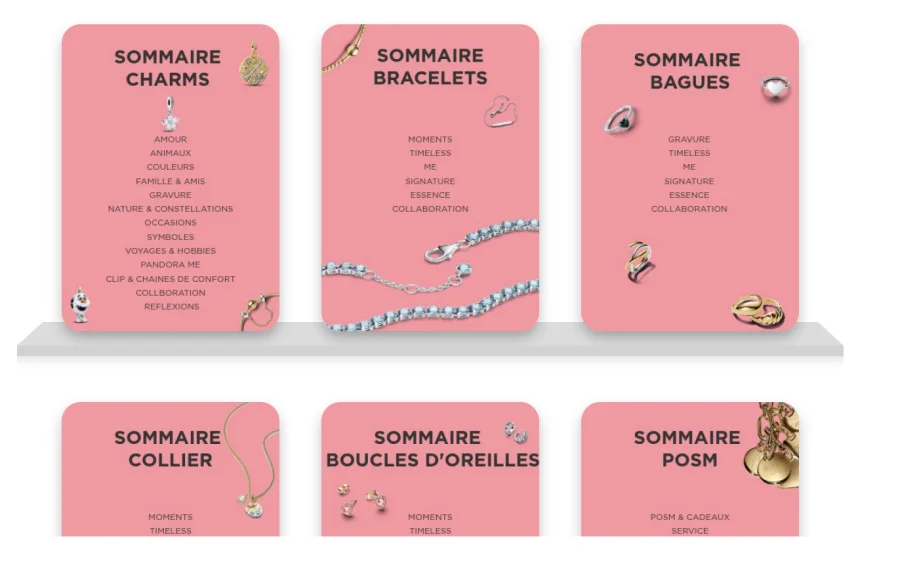
The before state. Store teams worked from PowerPoint catalogs printed and mailed to every store. Staff searched a 300-page printed catalog or ran POS keyword searches that returned 500+ variations for a single word like “love.” Collection updates meant changing stickers by hand six times a year, across 1,500+ engraving variations.
What they built:
- Interactive engraving and collection catalogs for shoppers, opened through multilingual QR codes on sales trays and store stickers
- Staff catalogs on store tablets, with barcodes for instant product lookups and a digital ring size guide
- Catalogs generated automatically with Catalog Generator from Google Sheets data, grouped in one Bookshelf behind a single counter QR code
“Now, we update the catalogs once, and it’s instantly available everywhere. Store staff just scan and see the latest version.” Carla Michel d’Annoville, Retail Excellence Team, Pandora
Results:
- Product lookup: from a 300-page print catalog and 500+ POS results per search to at least 3x faster digital lookup
- Collection updates: from manual stickers six times a year to one update, live in every store under the same QR code
- Shopper engagement: 2,750 QR code scans in a few days of the Valentine’s Day campaign, with 2.5 minutes average browsing time
That last number matters for both strategies. Shoppers browsed on their own, so associates had more time for the personal service clienteling depends on.
How to build an in-store endless aisle catalog with Flipsnack
Connect your product feed, generate branded catalogs automatically, add product tags and a way to order, then put one QR code and a tablet link on the floor. When prices or products change, you update once, and every store sees the new version under the same link.
Step 1: Connect your product feed
Start from the data you already maintain: names, SKUs, prices, barcodes, and images in a spreadsheet or product feed. No PDF is required.
Step 2: Generate on-brand catalogs
Use Catalog Generator to pour that feed into branded templates, one per category if you like. Every page follows your fonts, colors, and layouts, so a new collection doesn’t need a designer.
Step 3: Make every product actionable
Add product tags so a tap shows price, photos, and variants. Then choose how orders happen:
- Cart integration: products go straight into your webshop cart on Shopify, WooCommerce, Magento, BigCommerce, Salesforce Commerce Cloud, or a custom build (learn more).
- Shopping list: shoppers or associates collect items and send the order to your inbox (shopping list).
Step 4: Put it on the floor
Group catalogs in a Bookshelf so one link opens the full range. Load that link on associate tablets and print one QR code for counters, shelves, or sales trays.
Step 5: Update once, everywhere
When the feed changes, the catalogs update and the QR code stays the same. Check catalog statistics to see which products shoppers view and click, so merchandising can follow real demand.
Flipsnack doesn’t process payments or change your inventory. With cart integration, the sale happens in your own checkout, with your prices, stock, and promotions.
Step 6: See what shoppers look for
Catalog statistics show which products shoppers open in your stores, how long they browse, and what they tap. That’s demand data a shelf can’t give you. Use it to decide what to feature on the floor, what to stock in more stores, and what to restock first.
Sell what’s not on the shelf, then sell again
Clienteling and endless aisle aren’t competing projects. They’re two moments in one relationship, and both end with an associate showing a client the right products.
Choose your starting point by the gap you feel most:
- If stockouts send shoppers to competitors, start with endless aisle.
- If clients buy once and disappear, start with clienteling.
- If associates lack anything polished to show or send, start with the content layer both depend on.
The systems behind the screen matter. So does what’s on it. Your shelf has limits. Your catalog shouldn’t.
FAQ about clienteling and endless aisle
What is the difference between clienteling and CRM?
A retail CRM stores customer data for the whole business. Clienteling is the practice of store associates using that data in one-to-one relationships, usually through a clienteling app on the floor. Most clienteling programs run on top of a CRM rather than instead of one. Flipsnack works alongside both: the CRM tells associates what a client likes, and a Flipsnack lookbook shows it.
Is endless aisle worth it for smaller retailers?
Endless aisle is worth it when shoppers regularly ask for sizes, colors, or models you can’t stock, and when you can ship reliably from a warehouse or supplier. Smaller retailers often start with a QR code to a shoppable catalog and an associate-assisted order, before investing in kiosks or a full order management system. With Flipsnack, a small store can share its full catalog by QR code and collect orders through a shopping list, without a cart integration.
Does Flipsnack process orders or manage inventory?
No. Flipsnack creates the catalogs and lookbooks that shoppers and clients browse. With cart integration on Enterprise plans, products go into your own webshop cart, and the purchase happens in your checkout with your prices, stock, and payment methods. Without cart integration, the shopping list sends orders to your inbox.