Course Completion and Module Review Templates for Better Follow-Up
Published on: February 25, 2026
Finishing a course module is not the hard part. Proving it happened, checking what learners understood, and capturing feedback is where things often get messy. If you do not have a clear way to document completion, you end up chasing updates, guessing progress, or relying on notes that never get shared.
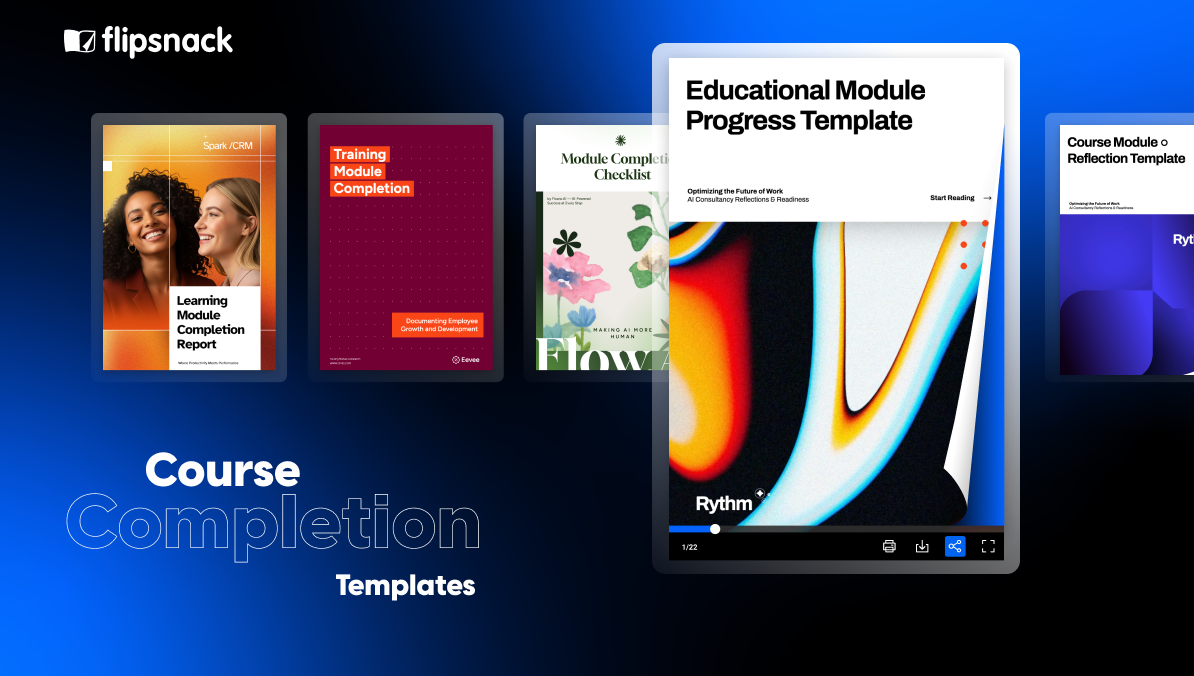
This roundup brings together learning module completion templates you can use right away. You will find options for reflection, completion summaries, checklists, progress tracking, completion reports, and assessments. Pick one template, adjust the wording to match your course, and you have a clean way to close the loop with learners, managers, or stakeholders.
Let’s see how you can make your training materials interactive.
Table of contents
- What is course module completion?
- How to build a course module completion that actually works
- Quick comparison: choose your ideal course module completion template
- Professional course module completion templates to customize
- How to create a course module using Flipsnack templates
- Make course completion simple to track
What is course module completion?
Course module completion is when a learner finishes the required activities in a module and meets the criteria needed to mark it as complete, such as viewing the content, submitting required work, and passing any required checks or assessments.
How to build a course module completion that actually works
A course module is not truly complete just because someone reached the last page. A completion flow works when it is clear, easy to follow, and leaves you with proof you can use later, like a checklist, a summary, a score, or a short reflection.
Here is a simple way to build one that holds up.
- Define what “complete” means. Decide the exact requirements, like viewing the content, submitting an assignment, passing a quiz, or completing a checklist.
- Keep the steps minimal. Every extra step lowers completion rates and adds admin work, so keep only what you need to confirm the module was finished.
- Pick your proof. Use a checklist for tasks, an assessment for understanding, and a reflection prompt for feedback and retention, depending on the module.
- Standardize the fields. Stick to the same basics every time, like learner name, module name, completion date, score, and notes, so tracking stays simple.
- Plan the next step. Completion should trigger something, like a certificate, manager sign-off, the next module, or follow-up support.
- Test it with one learner. If they hesitate or skip steps, your process is too heavy or unclear, so tighten it before you roll it out.
Quick comparison: choose your ideal course module completion template
| Template Name | Primary Department | Best For (Company Size) | Main Focus | Key Benefits |
|---|---|---|---|---|
| Course Module Reflection Example | L&D / Enablement | All sizes (10-5000+ employees) | Post module reflection, key takeaways, application prompts | Turns completion into learning action; supports honest feedback collection; can include quizzes for knowledge checks; interactive buttons for next steps and questions; helps trainers spot gaps and improve content. |
| Course Completion Summary Example | L&D / Compliance | Mid market to enterprise (50-5000+ employees) | Course wrap up, section review, key points recap | Clickable navigation for fast review; supports video and audio recap for reinforcement; works as a reusable reference after training; clarifies next steps and contact points; useful for audit friendly documentation when paired with tracking. |
| Editable Module Completion Checklist | HR / L&D | All sizes (10-2000+ employees) | Required tasks checklist, step by step completion | Removes ambiguity on what counts as done; can use form fields and checkboxes for submitted proof; supports internal links to jump to each task section; keeps cohorts consistent; reduces follow up and missed steps. |
| Learning Module Completion Report | L&D / Leadership | Mid market to enterprise (100-5000+ employees) | Completion reporting, progress snapshot, confidence signals | Stakeholder ready overview of training results; can link a call to action to a final quiz; supports learner confidence input through forms; pairs well with analytics for engagement signals; helps identify weak modules and next actions. |
| Module Completion Assessment Example | Compliance / HR | All sizes with compliance needs (25-10000+ employees) | Final assessment, verification of understanding, certification | Clear pass or fail verification via quiz; supports recap video before testing; certificate download link for documentation; consistent finish line for regulated training; reduces risk by proving knowledge not just attendance. |
| Interactive Training Module Completion | HR / Compliance | Mid market to enterprise (100-10000+ employees) | Completion documentation hub, training records, reporting and insights | Index based navigation to core sections; explains completion framework to prevent disputes; embeds video for quick orientation; includes an ask a question action tied to a form; central place to share records, totals, and trends. |
| Educational Module Progress Example | L&D / HR | All sizes (10-5000+ employees) | Progress tracking across modules, structured learning path | Makes progress visible and easy to understand; internal links help learners jump to the right module; supports question collection with a linked form; pairs well with end of module quizzes; reduces drop off by showing what is next and what unlocks. |
The best flipbook tool I have used
Flipsnack is easy to use and offers all the features a small business needs, at a very affordable price. There are plenty of templates to choose from to speed up the project. Each template is easily tailored to your needs. The support is good and fast through the chat function, and they also provide a phone number (infrequently these days) in case you prefer a phone call.
Leonardo Soto, President of SotoNets Cloud Solutions
Reviewed on G2
Professional course module completion templates to customize
1. Course module reflection example
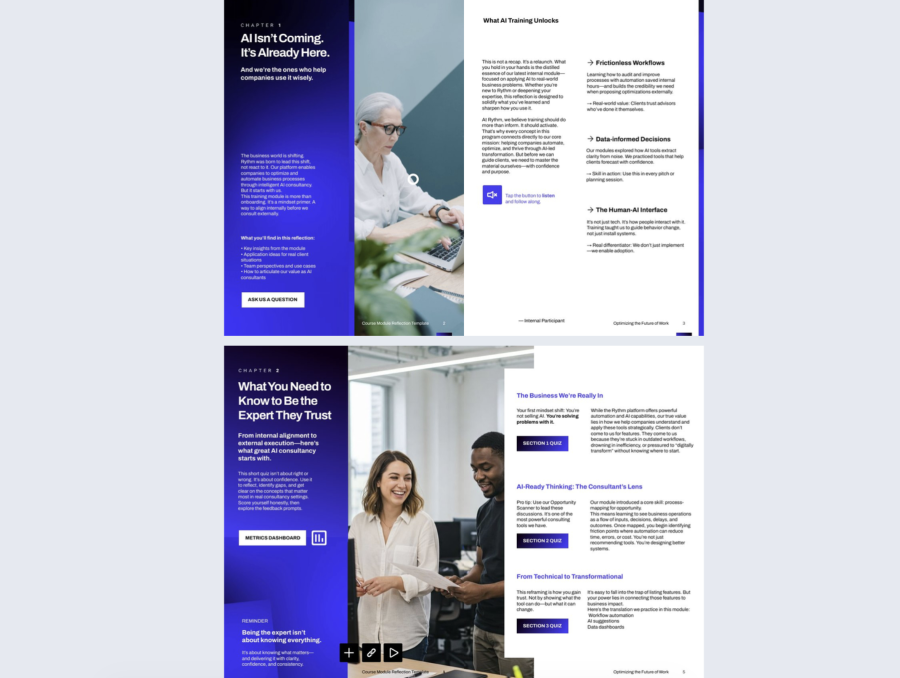

Course module reflection is useful when it captures what learners understood and what they will do next, without turning into a long survey. This example works because it mixes content recap with interaction, so you get both a guided review and measurable inputs. It feels like a short end-of-chapter experience, not a static handout.
Best for: L and D teams, enablement, and trainers who need proof of engagement plus feedback they can act on. It fits onboarding, internal academies, and any program where you want learners to practice decision-making, not just finish slides.
Real-world application: Publish the flipbook at the end of the module and share it as the final step. Learners listen to the short audio prompt, read the key ideas, and then take the section quizzes. After that, they click “Ask a question” to send blockers or clarifications while the content is still fresh. If you run cohorts, review quiz results before the next session, and address the top missed concepts.
The layout works because it is built for interaction. It sets context, adds an audio element for guidance, and places quiz buttons right next to the concepts they test. Build it in Flipsnack by adding an audio element where you want learners to slow down, then add quiz sections for each chapter and use buttons as clear calls to action. Link the “Metrics dashboard” button to your quiz results view so trainers can track patterns. Keep the “Ask a question” button persistent and connect it to a form, or link it to your preferred question intake page.
Common mistake to avoid: Do not publish this as a flipbook with no data capture. If learners can only read it, you have zero proof and zero signals. Make at least one interaction required, like a short quiz or a question prompt, and keep it short so people actually complete it.
2. Course completion summary example
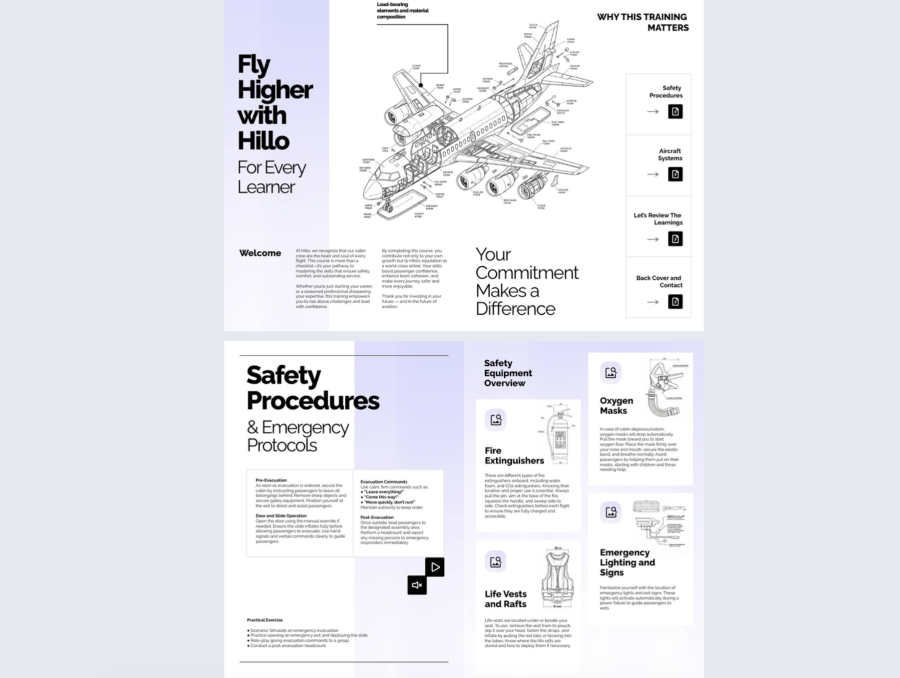
A course completion summary is useful when it gives people a clear record of what they finished, what matters most, and what to do next. This example treats the summary like a guided wrap-up. It helps learners revisit key sections, review critical points, and confirm readiness, instead of ending with a plain “completed” message. It works well when you need both a recap and a reference that people can return to later.
Best for: Training teams in regulated or high-risk environments, like safety, operations, or technical training, where completion needs to be documented and reinforced. It also fits onboarding programs where learners need a simple refresher they can open again after week one.
Real-world application: Share this summary right after the learner finishes the course. They use the clickable section menu to review the most important parts, then watch the short video recap and listen to the audio prompt to confirm they understood the key behaviors. If you use an LMS system, embed the flipbook there and ask learners to complete one quick action after reviewing, like confirming they read the summary or submitting one question for anything unclear.
The layout works because it is built for navigation and review. The right side menu works like a mini table of contents, so learners can jump to Safety Procedures, Aircraft Systems, a learning review section, and a contact page without scrolling. Build it in Flipsnack by adding buttons or shapes and linking each one to a specific page. Add video and audio elements where you want reinforcement, like a short recap or an instructor note. Use image hotspots or linked icons next to diagrams and equipment cards so learners can open extra details without cluttering the page. If you want proof of engagement, pair the summary with Flipsnack analytics so you can see viewing behavior.
Common mistake to avoid: Do not make the summary a static final page with no paths back to the key content. If learners cannot jump to the sections that matter, they will not use it again. Also, avoid overloading it with long text blocks. Keep it skimmable, use links for depth, and make the next step obvious, like who to contact or what to review if they missed something.
3. Editable module completion checklist
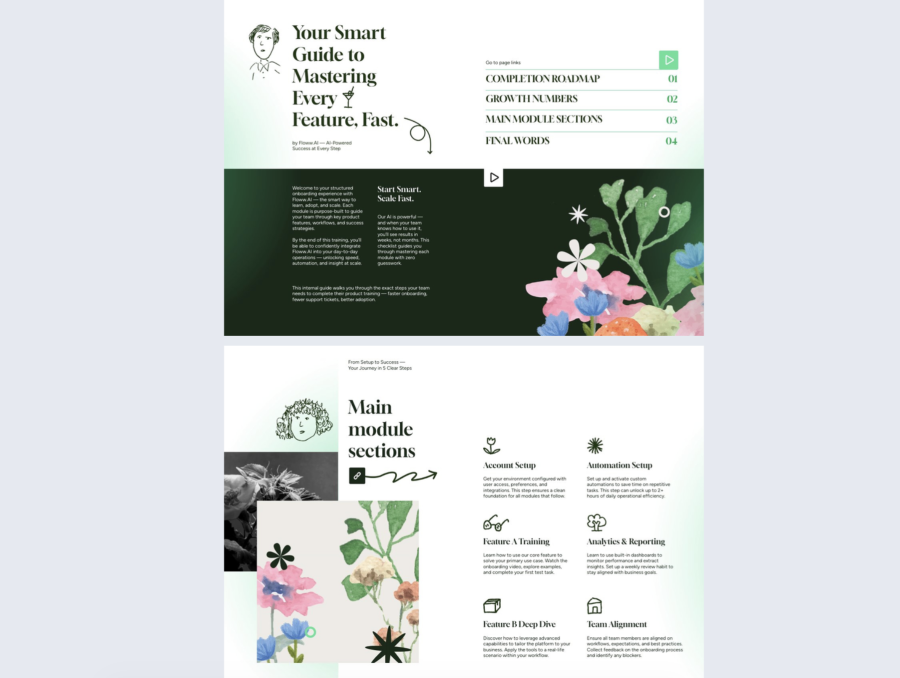
A module completion checklist is useful when it removes guesswork. People do not need motivation quotes. They need a clear list of what to finish, where to go next, and how to confirm they are done. This template is built like a guided checklist with quick jumps to each section, so learners can move through the module in order and review only what they need.
Best for: Product training, onboarding, and internal enablement where learners must complete specific steps, like setup tasks, practice exercises, and feature walkthroughs. It also fits any training that gets repeated across cohorts and needs a consistent completion standard.
Real-world application: Use this as the final asset for the module. Learners open the flipbook, follow the completion roadmap, and tick off each required task as they go. At the end, they submit the checklist to confirm completion, then either share it with a manager or save it as their own reference for the next week. If you are running a cohort, you can use it as a live progress guide during a workshop, so everyone stays aligned on what comes next.
It uses page links like a table of contents, so learners can jump straight to the section they are working on instead of hunting through pages. You can turn each checklist item into an interactive form field, so completion is not just visual. It becomes a submitted record. Add buttons that link to the right page for each task, and include a short audio or video cue on the intro page if you want to guide learners through the flow.
Common mistake to avoid: Do not publish this as a static checklist that people “mentally complete.” If there is no interaction, you cannot confirm anything. Add checkbox fields through a Flipsnack form, keep the list short enough to finish in one sitting, and make the last step clear, like submit the checklist or share it with a manager.
4. Learning module completion report
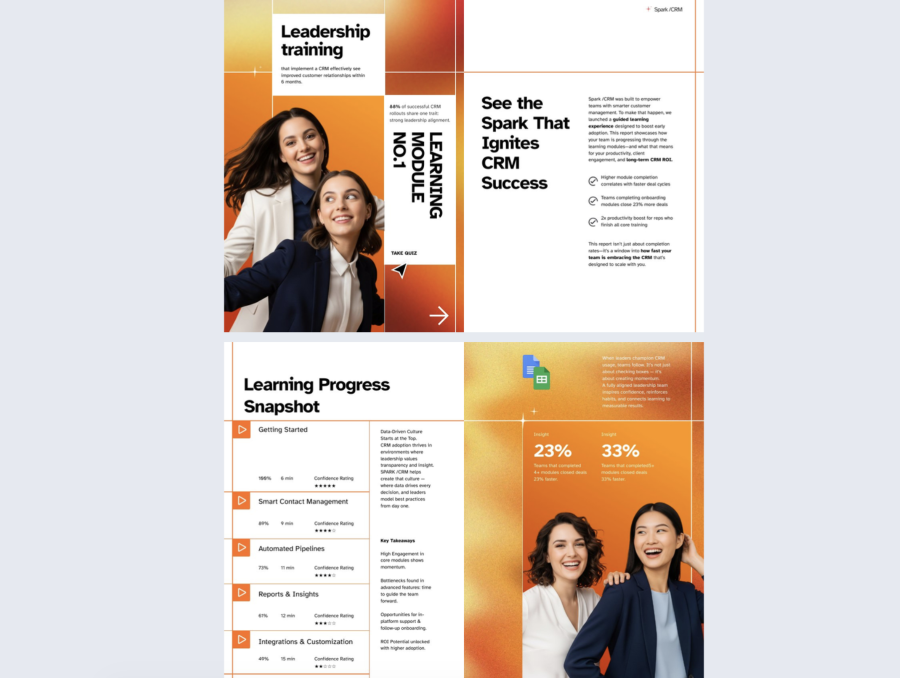
A learning module completion report is useful when it gives you proof of progress you can share with stakeholders, not just a list of who finished. This template frames completion as a snapshot that includes module-by-module progress, time spent, confidence ratings, and a couple of outcome metrics. It works well when you need to show what was covered, what landed, and where learners struggled.
Best for: L and D teams, enablement managers, and team leads who report training results to leadership. It also fits product training and onboarding programs where you need a repeatable way to show adoption progress and learner readiness.
Real-world application: Use this at the end of a cohort or after a training deadline. Share the flipbook report link with managers, then use the “Take quiz” call to action to collect a final knowledge check from learners who have not completed it yet. In your next check-in, managers can use the progress snapshot to spot gaps, like modules with low confidence ratings, then assign a short refresher or a follow-up session for those topics.
This format works because it combines a clear narrative with interactive checkpoints. Build it in Flipsnack by adding a quiz element and linking the “Take quiz” button to it, so the report is tied to a measurable action. Use form fields for the confidence rating so learners can submit feedback instead of just reading. Add internal page links from each module row to the related section, and use Flipsnack analytics and quiz results to back up the numbers you present in the snapshot.
Common mistake to avoid: Do not treat the report like a slide you publish and forget. If you do not collect quiz results or confidence input, you are left with surface-level signals. Also, avoid vague metrics with no context. Define what your percentages mean and keep the report focused on the decisions someone can make next.
5. Module completion assessment example
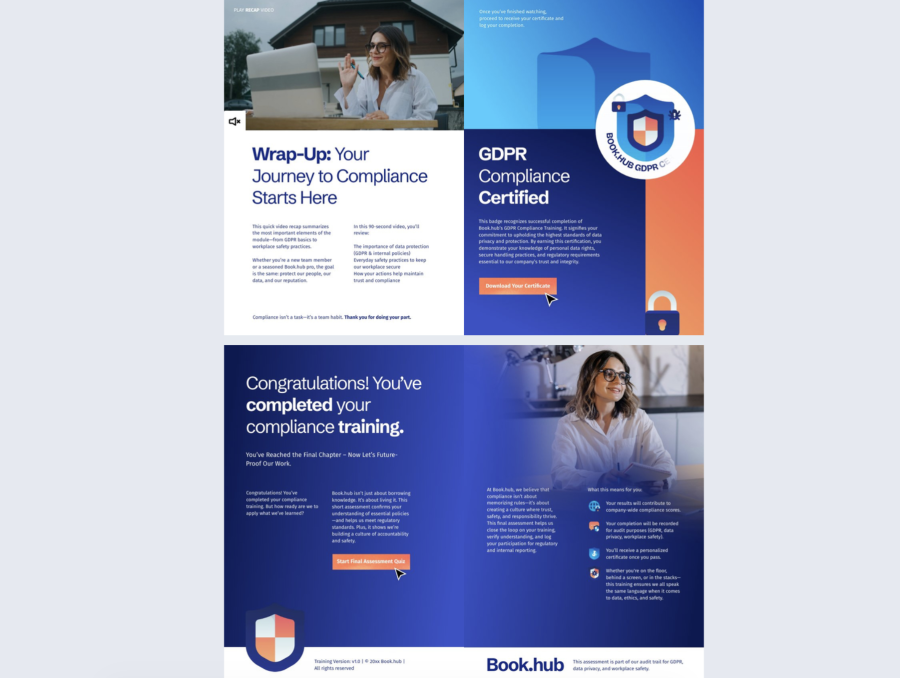
A module completion assessment is useful when you need real proof that someone understood the training, not just that they reached the end. Many educational institutions use assessment platforms such as AssessPrep to streamline assessment delivery, grading, and performance tracking throughout the learning process. This template frames the assessment as the final step in a compliance-style flow, so learners review the essentials, take a final quiz, and then earn a certificate they can keep or share. It works well when you want a clear finish line that includes both verification and documentation.
Best for: Compliance training, security and privacy training, workplace policies, and any program where you must show who completed the module and whether they passed. It also fits onboarding modules that need a sign-off moment before someone gets access to tools or processes.
Real-world application: A practical way to use this is at the end of a GDPR or policy course. Learners watch the recap video to refresh key points, then click the button to start the final assessment quiz. If they pass, they download a certificate and submit it to HR or their manager. If they do not pass, you can send them back to the relevant pages and have them retake the quiz after a short review.
This format works because it puts the actions in the right order and makes them hard to miss. Build it in Flipsnack by embedding the recap video on the wrap-up page, then adding a quiz element as the final assessment and linking the “Start final assessment quiz” button to it. Add a certificate download button that links to a PDF certificate or a hosted certificate page, and place it after the assessment step so it feels earned. If you need visibility, use Flipsnack analytics and quiz results to track participation and completion behavior.
Common mistake to avoid: Do not hand out the certificate without a pass condition, or learners will treat the quiz as optional. Also, do not make the assessment so long that people rush it. Keep the quiz focused on the few behaviors that matter, and make the retake path clear so learners know exactly what to review.
6. Interactive training module completion
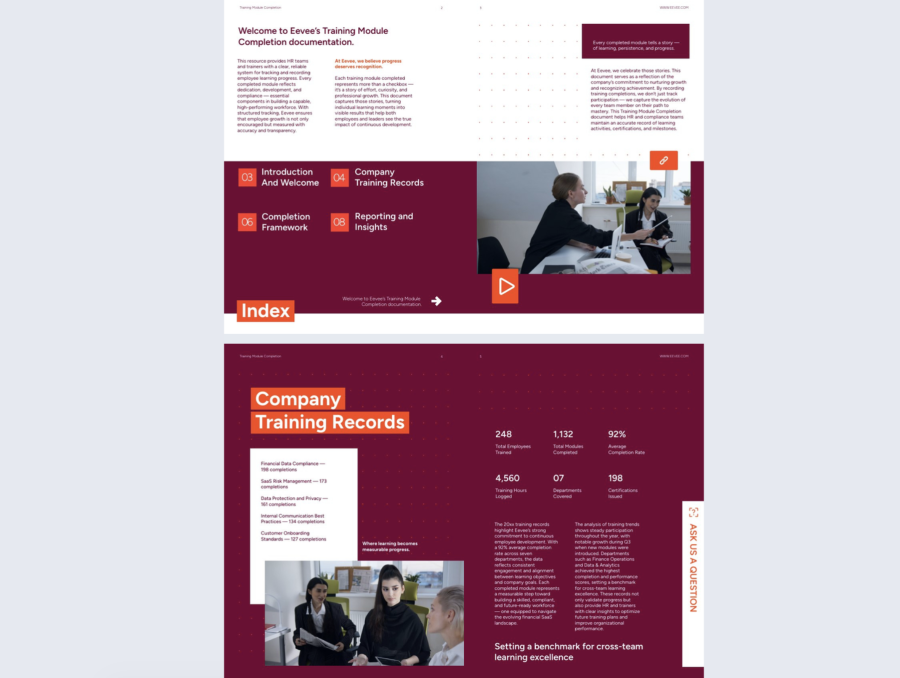
Interactive training module completion is useful when you need more than a one-line completion note. You need a clear record of what was completed, how completion is defined, and what the training data says across teams. This template frames completion as documentation, not a celebration page, so it works as a single place where HR and training owners can explain the framework, show records, and share reporting in a format people will actually open and navigate.
Best for: HR teams, compliance owners, and L and D teams that track training across departments and need a consistent completion process. It also fits companies that run recurring internal training and want a repeatable way to show totals, completion rates, certifications, and participation trends.
Real-world application: A practical way to use this is as your internal training hub for a quarter or a year. Publish it and share it with managers as the reference for how training completion is counted, where records live, and what the current numbers look like. When someone asks “what counts as complete” or “where do I find the latest results,” you point them to this flipbook. Add an “Ask us a question” action so employees can flag missing completions, request help, or ask for exceptions in one step.
This format works because it is built around interaction and fast navigation. The index page can link to each section with internal page links, so people jump straight to Introduction, Training Records, Completion Framework, and Reporting and Insights. The video element gives you a quick explainer without adding more text, and the persistent “Ask us a question” button can link to a Flipsnack form that collects the exact details you need, like employee name, module name, issue type, and a screenshot upload link. Build it in Flipsnack by turning each index item into a clickable button linked to the right page, embedding a short video on the index or intro page, and adding a form behind the question button, so requests come in structured instead of scattered across email and chat.
Common mistake to avoid: Do not treat this as a brochure with big numbers and no definitions. If you show completion rates without explaining the completion rules, people will challenge the data, and you will waste time defending it. Also, avoid a generic question button that collects no context. Make the form specific so you can act on requests without back-and-forth.
7. Educational module progress example
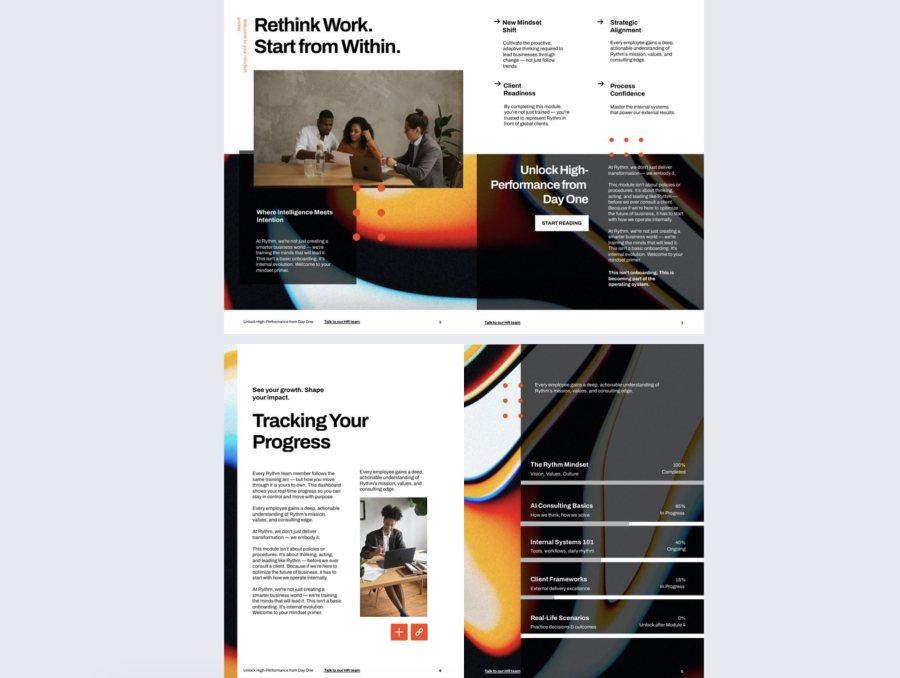
An educational module progress tracker is useful when it helps learners see where they are, what is next, and what is still locked. This template frames progress as a clear path, so the module feels manageable instead of overwhelming. It works well when you want learners to move through training in the right order and understand what “in progress” versus “completed” actually means.
Best for: Onboarding programs, internal academies, and role-based training where people complete multiple modules over time. It also fits teams that need a shared progress language, like managers who want quick visibility without chasing updates.
Real-world application: A practical way to use this is as the first page learners open each week. They click “Start reading” to begin the next section, then return to the progress page to see what changed. If a module is still “in progress,” they use the progress list to jump back to that section, finish the key pages, and complete the end-of-module quiz or task. Managers can use the same flipbook link in check-ins and ask one simple question based on the tracker: what is blocked and what support is needed to finish the next module.
This format works because it combines guided navigation with a visible progress snapshot. Build it in Flipsnack by adding buttons that link to each module section, then place a progress tracker page that lists every module and its status. Use internal page links on each progress item so learners can jump straight to the right chapter. Add a “Talk to our HR team” button that links to a Flipsnack form, so learners can submit questions with context, like which module they are stuck on and why. If you want measurable signals, pair the tracker with a short quiz at the end of each module and use Flipsnack analytics to see who opened the content and how far they got.
Common mistake to avoid: Do not treat the progress tracker as decoration. If the percentages never change or do not link to the actual sections, people stop trusting it fast. Keep the statuses tied to real actions, like finishing a section and completing a quiz, and make it obvious what unlocks the next module.
How to create a course module using Flipsnack templates
1. Pick a template and edit it in Design Studio
Choose a template that already matches your format, then replace the copy and pages inside the editor. The goal is to keep the structure and swap the content, not rebuild layouts from zero.
2. Add interactions that create proof and input
This is where the module becomes more than a flipbook.
You can add:
- Quizzes to test knowledge and track results inside the flipbook.
- Contact forms to collect questions or feedback without pushing readers out of the module.
- Lead forms if you want to gate a page until a reader fills in details.
- Links and a table of contents so learners can jump to the right chapter fast. Flipsnack can import a TOC from PDFs, or you can build one for the flipbook.
- Videos, slideshows, GIFs
- Captions, tags
3. Brand the template properly
Branding in Flipsnack is not just “add a logo”. It has two layers: your saved brand kit and the flipbook level branding and player settings.
Set up your brand kit first:
- Upload logo variations from Branding > Logos.
- Save your color palette in Branding > Colors so you can reuse exact values.
- Add your fonts and typography so your modules stay consistent across templates.
Then apply branding to the flipbook itself from the Customize page:
- Add your logo, set background color or background image, and choose accent colors for the player UI.
- Add a preloader with your logo so the loading screen matches your brand.
- If you need deeper control, Flipsnack also supports advanced branding, like a custom domain and removing Flipsnack branding.
- If you collaborate with a team, you can lock template elements to enforce brand rules so people do not accidentally change core blocks.
4. Publish and share it the right way
Pick the publishing option based on how controlled the access needs to be. Flipsnack supports options like Public, Unlisted, Password-locked, Private, and more advanced access controls like OTP and SSO only.
If you use password protection, share the password separately, not in the same message as the link.
5. Track metrics and tighten the module
Use Flipsnack Statistics to see what happened: impressions, views, clicks on interactive elements, average time spent, downloads, and more.
If you need to report results, you can export stats in CSV, including lead form submissions.
Practical way to use this: find the biggest drop-off page, fix that page first, then recheck the next cohort’s stats.
Make course completion simple to track
A good course module is simple to run and easy to prove. Start with a template that matches your goal, then add one or two interactions that matter, like a quiz for understanding or a form for feedback. Brand it so it feels like your training, share it with the right access settings, and check the metrics so you can fix what slows people down.
If you do those five things, you stop guessing. You get a module that learners can navigate, managers can trust, and teams can improve over time using real data.