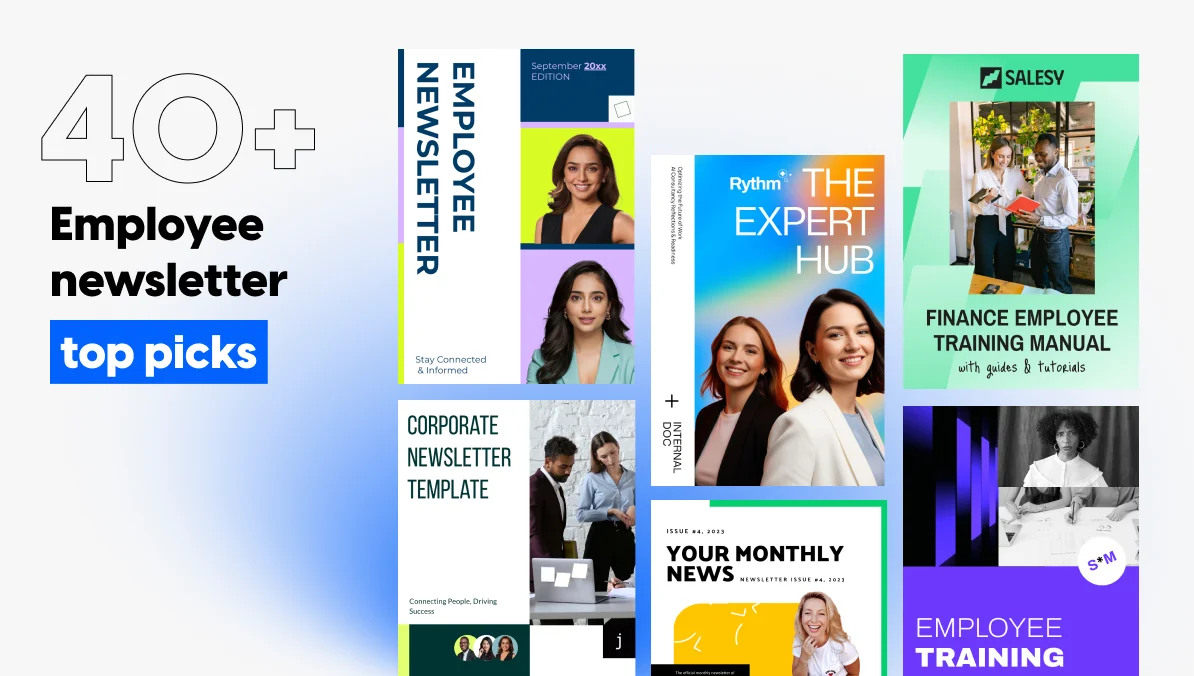
40+ Employee Newsletter Ideas HR Teams Actually Use
Most internal comms teams don’t struggle with the tool, whether that’s a simple email client or a dedicated newsletter maker. They struggle with the blank page every single month: what goes in issue twelve when issues one through eleven already covered the obvious wins. Recognition posts run dry. Leadership updates start repeating themselves. Someone asks for “something fresh” three days before send day, and the whole newsletter turns into a scramble.
This list solves that specific problem. Below, you’ll find more than fifty employee newsletter ideas, grouped by category so you can pull from whichever bucket fits this month’s gap, plus a short framework for choosing the right ones for your team, guidance on cadence, and a way to measure whether any of it is landing.
Why most employee newsletters stop getting read
Employee newsletters usually stop getting read for three reasons: the content repeats itself, nothing in it is personal to the reader, and the subject line gives no reason to open it over the dozen other emails waiting. A newsletter that reads like a status report gets treated like one, skimmed once and archived.
Fixing the content is half the job. The other half is cadence and subject lines, which the sections ahead cover directly. Many messages get lost before anyone writes them, because no one decides which channel carries what. That gap sits in the structure behind internal corporate communication, not in the newsletter itself.
How to pick the right ideas for your team
Before pulling from the list, answer these questions:
| Question or situation | What to decide or do |
|---|---|
| Who reads this? | Frontline staff, office-based teams, or both |
| Where do they work? | Mostly remote, mostly on-site, or split |
| How often can you realistically publish? | A cadence you can keep without it becoming a burden |
| What’s the one outcome the newsletter needs to drive? | Engagement, retention, or simply keeping people informed during a change |
| Fully remote company | Lean hardest on the remote-specific ideas in Section 11 |
| Fast-growing company, hiring every week | Lean on onboarding content in Section 6 |
Employee newsletter ideas for your team
Forty-plus ideas, split into eight categories so you can jump straight to whichever gap needs filling this month. Pull three from recognition, skip onboarding entirely if nobody new started this quarter. None of it works as a single checklist to copy start to finish.
| If your constraint is… | Start with these ideas | Why they work |
|---|---|---|
| Under 15 minutes | Work anniversaries (Section 4), manager-nominated praise (Section 4), upcoming events calendar (Section 8), referral program reminder (Section 9), wellness program reminders (Section 10), onboarding resource reminders (Section 6) | The material already exists in a list, a calendar, or a one-line submission. You assemble, you don’t create. |
| No design support | New-hire welcome (Section 6), team wins (Section 4), CEO or leadership message (Section 7), all-hands recap (Section 8), learning resource of the month (Section 9), skill-share feature (Section 9) | Text-led formats. One short block and, at most, one photo fit any template without a designer. |
| Frontline and deskless staff | Above and beyond recognition (Section 4), peer-to-peer shoutouts (Section 4), work anniversaries (Section 4), day-in-the-life features (Section 5), team traditions (Section 5), all-hands recap (Section 8), async-friendly event recaps (Section 11) | Short, readable on a phone, and none depend on attending a meeting or sitting at a desk. They also put frontline roles in the spotlight instead of leaving them as the audience. |
“Flipsnack is easy to use, fast to upload and great for customizing booklets and newsletters. We love having the ease of being able to distribute a clean and technologically advanced product to our constituents.”
Jennifer Bullock – Director of Admissions and Marketing at Hope Academy
1. Recognition and celebration ideas
Employee spotlight. Feature one person per issue: their role, one thing they’re proud of, and a question with a personal answer. Keep it short enough to read in under a minute.
Work anniversaries. List everyone hitting a milestone that month, grouped by years rather than buried in a single sentence.
Peer-to-peer shoutouts. Open a simple form where colleagues nominate each other, and publish a handful of entries each issue.
Team wins. A closed deal, a shipped feature, a resolved client issue: whatever counts as a win in your org, name the people behind it.
“Above and beyond” recognition. Reserve a recurring slot for the moments that don’t fit a standard award: someone who covered a shift, mentored a new hire, or caught a mistake before it became a problem.
Manager-nominated praise. Ask managers to submit one line about someone on their team each month. It takes them thirty seconds and gives you content you didn’t have to chase.

2. Culture and belonging ideas
Day-in-the-life features. Walk through what a specific role actually looks like, hour by hour, from someone who holds it.
Employee resource group updates. Give each active group a recurring slot to share what they’re planning and how to join.
DEI initiative check-ins. Report on a program’s actual participation or outcomes rather than just announcing that it exists.
Team traditions. Document the small rituals: a weekly trivia question, a rotating desk plant, a running joke that outsiders wouldn’t get.
“Ask us anything” from leadership. Collect anonymous questions ahead of time and publish honest answers, not just the easy ones.
Wellness program reminders. Keep enrollment windows and resources visible instead of mentioning them once at launch and never again.
Values in action. Instead of restating a company value, describe one specific moment where someone lived it out.
3. Onboarding and new-hire ideas
New-hire welcome. Name, role, start date, and one fact that isn’t on their résumé.
Buddy program shoutouts. Recognize the people guiding new hires through their first weeks, not just the new hires themselves.
First-90-days check-in. Ask someone three months in what surprised them about the role, and publish the honest version.
Meet-the-team roundups. Instead of one spotlight, group four or five short bios from a single department so readers learn a whole team at once.
Onboarding resource reminders. Point new hires back to where benefits, tools, and policies actually live, since most of it doesn’t stick the first time it’s explained.
4. Leadership and company news ideas
CEO or leadership message. A short, personal note, not a press release. One real update, in the leader’s own words.
Department deep dives. Rotate through teams so readers eventually understand what every part of the company actually does.
Milestone announcements. A funding round, a product launch, a client win worth naming publicly.
Leadership Q&A. Collect real questions from staff and answer them without corporate hedging.
Strategy updates in plain language. Translate the quarterly goals leadership already shared into what it means for day-to-day work.
5. Events and milestones ideas
Upcoming events calendar. List what’s coming with dates attached, not a vague “stay tuned.”
All-hands recap. For the people who couldn’t attend live, three takeaways in under a hundred words.
Town hall highlights. Pull the one or two moments worth remembering from a longer meeting.
Company anniversary. Mark the organization’s own founding date with a short look back, not just a logo change.
Volunteer or community event recaps. Show what the team actually did, with a photo or two, rather than just announcing that an event happened.
6. Learning, growth, and referral ideas
Learning resource of the month. One course, book, or internal training worth a reader’s time, with a sentence on why.
Internal mobility spotlight. Someone who moved teams or got promoted, and what that path looked like.
Referral program reminder. Current open roles plus the referral bonus, refreshed instead of copy-pasted from last issue.
Skill-share feature. Someone on the team teaching a tip from their own work, two or three sentences, practical over polished.
Career development Q&A. One question from a real employee about growth paths, answered by someone in HR or leadership.
7. Feedback and two-way ideas
Pulse survey results. Share what the last survey found, even when the news isn’t flattering, and name one thing changing because of it.
“Ask me anything” column. A recurring space where one leader or team answers whatever questions came in.
Suggestion box follow-up. Close the loop publicly on an idea someone submitted, so people see that feedback goes somewhere.
When the real problem is bigger than any single newsletter section, like onboarding gaps or information that never reaches the right people, this guide to overcoming internal communication challenges walks through eleven common ones and how to fix them.
8. Ideas built for remote and hybrid teams
Virtual coffee chat sign-ups. A simple way to pair people across time zones who’d never otherwise cross paths.
Home office spotlight. A quick look at where and how remote teammates actually work, which does for distributed teams what a photo of the office kitchen does for an on-site one.
Async-friendly event recaps. Written and video versions of the same update, since not everyone can watch a live stream during their working hours.
Time-zone-aware event scheduling notes. When you list an event, show it in two or three relevant time zones rather than one default.
Remote-only recognition categories. A shoutout specifically for people who keep communication strong despite never sharing a physical room with their team.
“Flipsnack has helped us to create an internal flipbook and share it with the whole company, no matter where the employees were located.”
Jennifer Bullock – Director of Admissions and Marketing at Hope Academy
What to keep in mind
What to keep in mind: a few of the ideas above work best with a small tweak. Here’s a quick guide to getting the most out of each.
- Pulse survey results. Publishing results nobody acts on teaches readers that answering makes little difference. Name one change per result, with an owner and a date, or hold the results until you have one.
- “Ask me anything” column. Answers that are visibly sanitized read as a dodge, and questions stop coming. Publish the hard questions too, and say plainly when something can’t be answered yet and why.
- Contests. A contest only office staff can physically enter tells everyone else the newsletter wasn’t written for them. Design entries that work from a phone on any shift, or skip the contest.
- Recognition. When the same few people keep appearing, readers conclude visibility is about proximity, not contribution. Track who has been featured, and draw nominations from every team and shift.
- DEI initiative check-ins. Announcing a program without outcomes reads as box-ticking. Report real participation or results, even when the numbers are modest.
- CEO or leadership message. A message that reads like a press release gets skimmed and archived. Keep it to one real update, in the leader’s own words, with the corporate phrasing cut.
How often to send an employee newsletter
Most organizations land on monthly, often enough to stay relevant without becoming background noise. A fast-changing environment, like a company going through a merger or a major product shift, can justify biweekly. Weekly rarely works unless a dedicated person owns it full time, since that pace outruns most teams’ real supply of content.
Whatever cadence you pick, consistency matters more than frequency. A newsletter that arrives reliably on the first Tuesday of the month trains readers to expect it. One that shows up whenever someone finds the time trains them to ignore it.
Building the newsletter, not just filling it
A list of ideas only helps if there’s somewhere easy to put them. That’s usually where internal comms teams lose time they don’t have: fighting a template that wasn’t built for this, or waiting on a designer who has four other things queued ahead of an internal newsletter.
Flipsnack handles the design side directly:
- Brand kits: lock in your colors and fonts once, so every new issue inherits them automatically instead of being rebuilt from a blank page.
- Interactive elements: embedded video, clickable links, and image carousels let readers engage with a spotlight or an event recap instead of scrolling past a wall of text.
- Trackable newsletters: get real open and click data on which categories above are actually landing with your team, not a guess.
Our template library for company newsletters includes layouts built specifically for internal communication, HR updates, and employee-focused content, so starting issue one doesn’t mean starting from a blank page either. If you’d rather start from one specific layout, this interactive newsletter template is built for exactly this format. And for HR teams who want to take the format further than a single newsletter, our guide to digital employee magazines covers the broader use case.
“When researching new HR communication solutions, Flipsnack caught the eye due to its features, customization abilities, product support, and value.”
Alisha VanTiem – Sr. Benefits Administrator at Keywords Studios
Measuring whether the ideas are working
Three numbers tell most of the story: open rate, click rate on anything linked inside the issue, and how long readers actually spend on it. A recognition section with a high click rate is worth repeating. A leadership update nobody opens is worth shortening or dropping.
Reporting this upward doesn’t need to be complicated. A simple month-over-month view of open rate alongside one or two qualitative notes, like “the remote-team spotlight got more replies than any other section”, gives leadership something concrete instead of a vague sense that comms are “going fine.”
Turn newsletter ideas into issues employees actually read
Forty-plus ideas across eight categories give every issue something worth opening, from peer shoutouts to pulse survey results. The ones that hold attention share a pattern: they name specific people, answer questions employees actually asked, and close the loop on feedback. Pick by gap each month instead of working through a checklist, and rotate categories so no section goes stale.
What ideas can’t fix on their own is a newsletter that’s slow to build and impossible to measure. Flipsnack lets you start from an internal communication newsletter template and share a digital newsletter through one link, with page-level analytics showing which sections employees read.
Ideas fill an issue. Data tells you which ones to keep.
For teams managing more than internal updates, our guide to business update newsletter templates covers the adjacent case of keeping external stakeholders informed too.
“Since using Flipsnack, we’ve seen a significant increase in our newsletter subscriptions. I believe people are more willing to sign up from a catalog than from a website.”
Hugh Cameron
Founder of Chez Pluie
FAQs about employee newsletter ideas
Something specific to your company beats something generic. A name built from an internal nickname, a shared phrase, or even the company name itself tends to outlast a borrowed template name like “The Weekly Scoop.”
A one-off email update covers a single announcement. An employee newsletter is recurring, has a consistent structure readers learn to expect, and usually mixes several types of content: recognition, news, and culture together rather than one topic alone.
Long enough to cover three or four sections well, short enough to finish in under five minutes. If an issue regularly runs past that, split it rather than trimming every section into a fragment.
Usually one person owns the structure and deadline, internal comms or HR, but the content itself works best pulled from several contributors: a line from a manager here, a submission from a peer-nomination form there.
Yes. Remote and hybrid employees miss the hallway version of company news, so the newsletter has to carry context that on-site staff picks up incidentally.
Build in contributions from outside leadership every issue: a peer shoutout, a team-submitted photo, an answer to a question staff actually asked. A newsletter written entirely by one department reads like one, even when the content is good.