How to Create a University Program Magazine That Attracts and Informs Students
Most university program pages do not fail because the information is wrong. They fail because the experience is weak.
Students land on a page, skim a few lines, click around, and still leave with basic questions. What does this program actually feel like? What will I study? Who is it for? Where could it lead? A standard web page often answers these questions in pieces. A brochure PDF is not much better. It’s static, easy to ignore, and rarely built for real engagement.
That is where a university program magazine makes sense.
A university program magazine gives institutions one focused, visual format for presenting a single academic program. Instead of spreading key details across multiple pages, emails, and downloads, it brings them together in one place. Students can move through the story of the program in a more natural way. They can see the highlights, understand the structure, and get a clearer sense of what makes that program worth considering.
This matters because prospective students are not only comparing facts. They are comparing options. They are trying to picture themselves in one program rather than another. That decision is shaped by more than a course list. It is shaped by clarity, trust, and presentation.
In this article, we’ll see how to make an interactive university program magazine that attracts and informs students.
Table of contents
What is a university program magazine?
A university program magazine is a digital publication built around one academic offering. It is more focused than a general university prospectus and more engaging than a standard brochure. Its job is simple. It should help a student understand the program quickly, see its value clearly, and know what to do next.
At its best, a university program magazine combines practical detail with proof. It can include:
- a program overview
- course highlights
- faculty introductions
- student stories
- campus life
- internship opportunities
- career outcomes
- admissions information
- call to action
That mix is important. Students need the facts, but they also need context.
Why universities need program magazines
Universities often have all the right information about a program, but not always in the right format. A course page may cover the basics. A brochure may add more detail. A landing page may support recruitment. But students still have to piece the full picture together on their own.
That creates a problem. Prospective students are not just looking for facts. They are trying to answer bigger questions:
- What is this program really about?
- What kind of experience does it offer?
- Is it right for me?
- What happens after graduation?
A program magazine helps answer those questions in one place. It gives universities a format that brings structure, context, and proof together. Instead of presenting information as separate fragments, it turns it into a more complete story.
A university program magazine can help institutions:
- explain a program more clearly
- show what makes it different
- combine academic details with a student-focused context
- present proof through testimonials, outcomes, and examples
- create a more consistent impression of the program
There is also a branding benefit. A well-made program magazine gives universities more control over how a program is presented. It creates a consistent experience that can reflect the institution’s identity without feeling like another generic marketing asset. That matters in a crowded higher education market where many programs start to sound the same.
In simple terms, a program magazine helps universities move beyond listing information. It helps them shape that information into something students can understand, compare, and remember.
What to include in a university program magazine
A university program magazine should help a reader understand the program fast. It should answer the main questions a prospective student is likely to have without forcing them to hunt for details. That means the content needs to be useful, clear, and well-ordered.
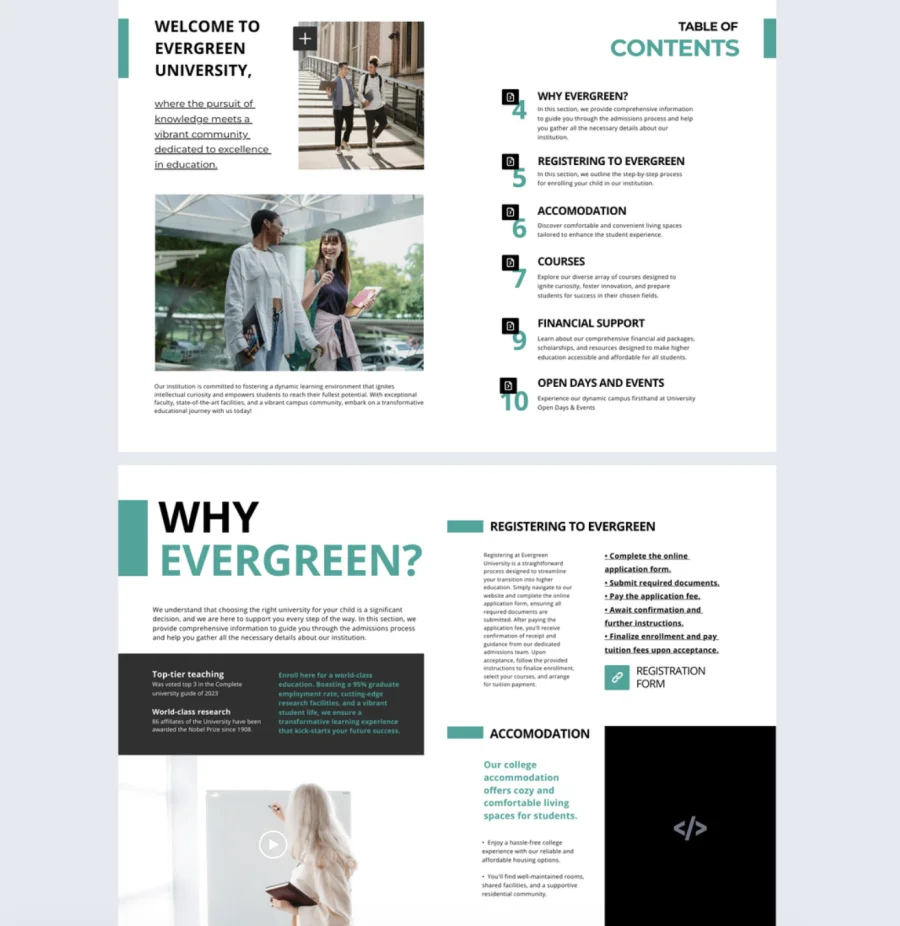
Here is a simple checklist to follow:
1. Cover page
Include the program name, the university name, and a strong visual. The cover should make it obvious what the magazine is about.
2. Welcome message
Add a short introduction from the department, faculty lead, or program director. This helps set the tone and gives the publication a human voice.
3. Program summary
Explain what the program is, who it is for, and what students can expect from it. Keep this section clear and direct.
4. Key modules or curriculum snapshot
Give readers a quick view of the subjects they will study. This does not need to be a full course catalog. A useful summary is enough.
5. Student experience
Show what life in the program looks like. This can include class format, projects, campus life, support services, or student quotes.
6. Faculty highlights
Introduce a few lecturers, mentors, or researchers. This helps students see who they may learn from.
7. Internship or research opportunities
If the program offers placements, labs, fieldwork, or research projects, include them. These details often have a big impact on student interest.
8. Graduate outcomes
Show where the program can lead. This could include job paths, further study options, industry links, or alumni examples.
9. Tuition or application basics
Keep this simple. Readers usually want the main facts, not every policy detail.
10. Contact or apply now sectionEnd with a clear next step. Give readers an easy way to get in touch or start an application.
Why digital works better than print or static PDFs
Once the content is in place, the next question is format. A university program magazine can work in print, but digital usually makes more sense. It gives universities more flexibility, more control, and more ways to keep the publication useful after it is published.
A printed brochure is fixed the moment it goes out. A static PDF is not much better. It may be easy to export, but it still creates limits. It is harder to update, less engaging to browse, and often treated like a file to download rather than a resource to explore.
A digital format solves a lot of that.
With a digital university program magazine, teams can:
- update content more easily when program details change
- create mobile-friendly and responsive magazines
- share the publication through email, landing pages, and social channels
- add interactive elements like links, buttons, and videos
- create a more branded reading experience
- track how readers engage with the content
This is where a platform like Flipsnack fits naturally. Universities can turn existing PDFs into flipbooks, edit PDFs (currently in Beta), build publications from scratch, or start from a template in the Design Studio. They can also add interactivity, customize branding, publish online, and measure engagement through analytics.
If the goal is to create a university program magazine that looks professional, feels easy to browse, and works across digital channels, a flipbook format is a practical choice.

How to create a university program magazine in Flipsnack
Once you know what to include in your program magazine, the next step is building it in a format that is easy to publish, share, and update.
1. Upload PDF or create from scratch
There are two main ways to create a university program magazine in Flipsnack.
Upload an existing PDF
This is the faster option if your team already has a brochure, prospectus, or course guide. Flipsnack lets you convert a PDF into a flipbook, and its newer PDF editing flow can turn vector PDF text, shapes, and images into editable elements inside Design Studio. This feature is currently in Closed Beta and can be enabled on request.
Start from scratch or use a template
If you want more flexibility, you can create the magazine directly in Flipsnack’s Design Studio. The current workflow supports starting from a blank page or picking an editable template from the template gallery and customizing it in the drag-and-drop editor.
2. Add interactive elements
This is where the digital format becomes more useful than a static document. In Flipsnack, you can add interactive elements inside Design Studio.
For a university program magazine, useful additions might include:
- Forms so that students can fill them out right inside the university magazine. You can also add quizzes and questions
- Clickable buttons that send readers to application or inquiry pages
- Links to course pages, admissions resources, or scholarship details
- Embedded videos such as campus tours, welcome messages, or student testimonials
- Slideshows or extra visuals to showcase facilities, student projects, or events
- Captions, tags, and maps to add more context without overcrowding the page
- Table of contents for easy navigation
This is also a good stage to think about accessibility. Flipsnack supports accessible university flipbooks and is ADA, Section 508, and WCAG-compliant, with features such as screen reader support, keyboard navigation, and page-level accessibility descriptions or summaries.
3. Apply university branding
A university program magazine should look like part of the university’s wider brand, not like a disconnected file.
Flipsnack’s branding tools let teams store and apply logos, colors, fonts, and typography presets through the brand kit, while the Customize area lets them adjust flipbook branding and player settings.
That means you can align the magazine with your institution by using:
- university logos
- custom colors
- custom fonts or typography presets
- customized player appearance, such as accent colors, backgrounds, and other viewing settings
- custom domain
💡Tip: Create branded templates to have a solid starting point with each university program magazine. This means you can design one from scratch or turn your PDF into a reusable template.
4. Publish and distribute it across channels
Once the university program magazine is ready, you can share it through multiple public or private options.
It can be used in places like:
- email campaigns
- admissions follow-ups
- embed on landing pages
- department pages
- QR codes for fairs, campus tours, and events
6. Track engagement analytics
This step is especially useful for marketers and admissions teams. Flipsnack Analytics tracks how readers engage with digital publications and includes dashboard reporting, while additional reports can be downloaded as CSV files.
You can track metrics such as:
- views
- clicks
- average time spent
- device and country data
- downloads
- page-level activity and engagement data
Flipsnack also offers heatmaps in higher-tier plans and supports Google Analytics integration for more detailed event-based tracking.
Final thoughts
A university program magazine gives institutions a better way to present academic offerings with more clarity, context, and impact. Instead of asking students to piece information together from different pages and files, it brings everything into one experience that is easier to explore and easier to remember.
With Flipsnack, universities can turn that content into an interactive, branded, and accessible publication that supports both student engagement and recruitment goals. The result is not just a better-looking program guide. It is a more useful one.
FAQs on university program magazines
There is no fixed length, but it should be long enough to answer key questions without feeling heavy. For most programs, a concise magazine with focused sections will work better than a long document packed with every possible detail.
Usually, this includes marketing, admissions, and the academic department. Marketing can shape the structure and presentation, admissions can make sure the content supports recruitment, and faculty can help with program accuracy.
Not always. If programs are very different and need their own message, separate magazines make sense. If several programs are closely related, a broader faculty or department publication may be more practical.
It should be reviewed whenever there are important changes to curriculum, tuition, admissions requirements, deadlines, or career outcomes. At a minimum, it is worth checking before each new recruitment cycle.
Too much text, vague claims, weak visuals, and no clear next step. If readers finish the magazine without understanding the value of the program or what to do next, it is not doing its job.
They focus too much on what they want to say and not enough on what students need to understand. A good program magazine should answer student questions clearly, not just promote the institution.