How to Create a Newsletter Online: A Complete Guide for Companies
Last updated: Septemeber 2nd, 2026
A good company digital newsletter does more than deliver information, it keeps employees, customers, and subscribers connected to what matters. From company updates and team achievements to industry news and useful resources, the right content can turn a simple email into something people actually want to read.
Creating one doesn’t have to be complicated, either. A company newsletter template can give you a polished starting point, while the right company newsletter ideas can help you find fresh ways to keep readers interested. You can use the same approach for a corporate newsletter, adapting the content and style to suit your audience and goals.
But what should you actually include? Looking at successful company newsletter examples can help you find inspiration, understand what works, and build a format that feels right for your brand. In this guide, we’ll explore practical ideas, design tips, and examples to help you create a newsletter that’s useful, engaging, and worth opening.
How to create a newsletter online
Creating a newsletter online can be done in a few simple steps:
- Decide who your newsletter is for.
- Decide what information you want to share.
- Choose a newsletter creator.
- Choose a template and customize the design.
- Add your text, images, links, and other content.
- Make sure the newsletter works well on mobile devices.
- Share or publish your newsletter online.
- Track views, clicks, and other results.
What Is a digital newsletter?
A digital newsletter is a publication shared with an audience through the internet. It can be used to share company news, updates, resources, promotions, or other useful information with employees, customers, or subscribers.
Table of contents
- How to create a newsletter online
- What Is a digital newsletter?
- What is a company newsletter?
- Why have a company newsletter?
- How Keywords Studios got 10K+ impressions on internal news
- What to put in a company newsletter
- What makes a good newsletter?
- How to create an online newsletter for your company
- 1. Start with your audience in mind – Who is reading?
- 2. Choose only content that matters for your business – What should you include?
- 3. Hook them early with a catchy subject line – How do you get attention?
- 4. Choose a newsletter design – How should it look?
- 5. Make your corporate newsletter mobile-friendly – Can people read it on phones?
- 6. Share and track what works – How do you publish and measure it?
- What is a flipbook newsletter?
- How to create your corporate newsletter in Flipsnack
- Popular corporate newsletter formats and templates to start with
- Online newsletter checklist
- FAQ
- How to write a good newsletter: final thoughts
What is a company newsletter?
A company newsletter is a digital publication that an organization sends on a regular basis to share updates, news, and announcements. It can be internal, sent to employees to align teams and reinforce company culture, or external, sent to clients, partners, or leads.
Internally, it’s usually created by HR, internal comms, or the marketing team. It keeps everyone on the same page without clogging inboxes with one-off announcements.
Externally, it might be sent through an email marketing tool, either to warm leads or as part of a cold outreach campaign. In this case, it supports thought leadership, keeps prospects engaged like Sender, or promotes new products or services. To make sure these newsletters actually reach the inbox and not spam, teams often rely on an email warm up solution that gradually builds sender reputation before scaling sends.
Whether internal or external, a good company newsletter needs to be clear, engaging, and well-designed. If it looks like a Word doc from 2009, people will scroll right past it. Starting with customizable, professional newsletter templates makes the whole process faster and lets you focus on what matters: the message.
💡Tip: If you send your newsletters externally as an outreach campaign, you can do so by sourcing contacts through a LinkedIn email finder or using LinkedIn InMail templates.
Why have a company newsletter?
We’ve already mentioned it a bit, but let’s take a closer look at the benefits of writing a company newsletter. A company newsletter can also be created online using a newsletter maker. These tools make it easier to create professional newsletters with templates, images, links, and other interactive elements without having to design everything from scratch.
1. Centralizes important information
Instead of scattered messages or one-off emails, newsletters bring all the important updates into one place. From policy changes to product news, everyone knows where to look.
2. Reinforces mission and values
A well-written newsletter reminds employees of the company’s purpose and priorities. It’s a subtle but consistent way to reinforce values and culture without repeating a corporate mantra.
3. Improves internal communication
Especially in larger organizations or remote teams, internal communication helps departments stay aligned. Everyone sees the same information at the same time. It’s even better when you use Flipsnack’s Design Studio to create interactive newsletters that are easy to edit, brand, and share.
4. Celebrates people and progress
Company wins, team shoutouts, work anniversaries—newsletters give you a space to recognize contributions and build morale. People feel seen, not just managed.
5. Strengthens external relationships
For customers and partners, a company newsletter is a simple way to stay top-of-mind. Whether it’s updates, thought leadership, or product launches, it keeps your brand relevant and your audience informed.
6. Supports transparency and trust
When people feel informed, they feel included. A regular company newsletter helps build a culture of openness by sharing updates, decisions, and even challenges the company faces. It shows teams that leadership isn’t hiding behind closed doors.
A company newsletter can also be created online using a newsletter maker. These tools make it easier to create professional newsletters with templates, images, links, and other interactive elements without designing everything from scratch.
That kind of communication builds trust and trust keeps people engaged.
How Keywords Studios got 10K+ impressions on internal news
The HR team at Keywords Studios (US) ditched bulky email attachments and static PDFs in favor of something better—interactive flipbooks. They needed a more engaging and secure way to connect with 750 employees.
Flipsnack delivered. Read the full Keywords Studios story.

What changed:
- Employees now spend 10+ minutes reading HR updates
- Over 4,500 views and 10,000 impressions in one year
- Password-protected access replaced open PDFs
- Global rollout followed after the US team saw results
Alisha VanTiem, Sr. Benefits Administrator, said that the ability to add videos, pop-ups, and links gave their internal updates a new life. It didn’t just look better—it worked better.
Now, let’s see a few popular approaches to creating a company newsletter.
What to put in a company newsletter
What you include in a company newsletter depends heavily on its purpose (internal, external, or both) and your target audience.
The thing is, a company newsletter content should inform, engage, and maybe even entertain people a little. The goal isn’t just to “update.” You can also keep people interested and connected to whatever happened in a certain month or how often you send your company newsletter. When you create an online newsletter, choose content that is useful and relevant to your audience. A good company newsletter can include company news, employee updates, project highlights, events, useful resources, and interactive content.
What makes a good newsletter?
A good newsletter is useful, easy to read, visually appealing, and relevant to its audience. It should have a clear purpose, organized content, a strong subject line, a simple design, and a clear next step for the reader.
Here’s what you can include to make that happen:
1. Company news that actually matters
Product launches, big wins, policy updates, or changes in leadership. This is the stuff people need to know. Keep it short and clear.
2. Team spotlights and shoutouts
Recognize achievements. Welcome new hires. Celebrate milestones. It makes the newsletter feel more human and less like a memo.
3. Project or department updates
Let teams share what they’ve been working on. It builds cross-team visibility and helps break down silos, especially in larger companies.
4. Upcoming events and deadlines
From internal training to product releases or team-building events—this is where people check what’s coming up. It saves you from sending five separate reminders.
5. Resources and tools
Share helpful templates, process updates, or how-to content that makes daily work easier. Think “internal enablement,” not corporate spam.
6. A quick message from leadership
A short note from a CEO or team lead can add weight to the newsletter. It shows people at the top are tuned in.
7. Something fun
A quiz, meme of the month, or behind-the-scenes photo. Not everything has to be serious. A little personality goes a long way.
Also, quizzes turn passive readers into active participants, which helps people remember what they’ve read.
With Flipsnack, you can embed interactive quizzes directly into your flipbook. Use them to test knowledge, gather feedback, or track results. It’s a simple way to measure engagement and learning without sending people elsewhere.
How to create an online newsletter for your company
So, let’s cover the whole process of how to write a newsletter for a company and how to make it as effective as possible.
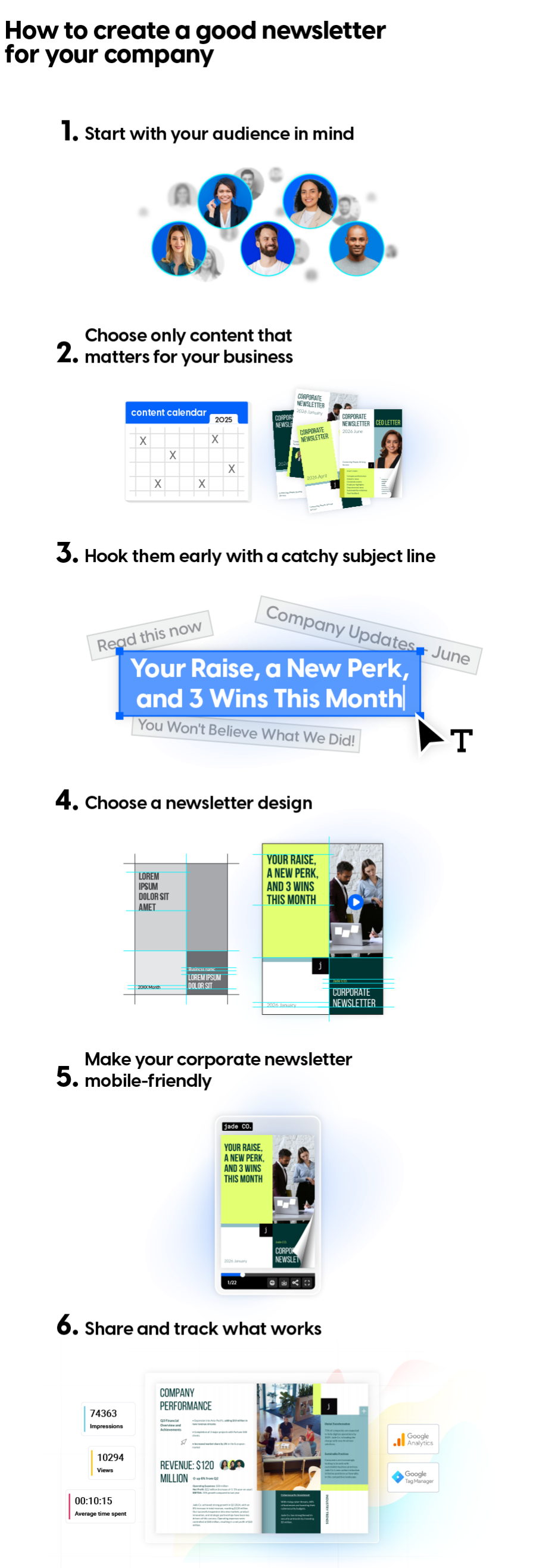
1. Start with your audience in mind – Who is reading?
Before you create anything, ask yourself: who is this for?
Is your audience made up of remote employees, in-office teams, HR leaders, C-level execs, or clients? Each group has different needs and expectations. Your content should reflect that.
Create a few reader personas. For example, if your audience includes content writers or virtual assistants, focus on updates that help them do their job better. If your HR team is managing remote workers, include reminders about policies, absence management policies, or internal initiatives.
Remote teams often miss the hallway chat or office posters. A newsletter helps fill that gap. Use it to make them feel informed and involved.
For in-office teams, include recaps of workshops or office events. Use photos and follow-up stories to create a sense of community and recognition.
💡Tip: For internal corporate newsletters, work with HR or check your company’s HR software to understand your team structure. This helps you avoid sending one-size-fits-nobody content.
2. Choose only content that matters for your business – What should you include?
Good content doesn’t just appear out of nowhere. You need a plan.
Start by creating a simple content calendar. Decide how often you’ll send the newsletter: monthly, quarterly, whatever fits your team. Then map out the core sections you’ll repeat in each edition. This could be a leadership note, internal news, project highlights, or team wins.
You don’t need to fill it all yourself. Ask team leads, HR, or department heads to pitch in. Set deadlines and build a simple workflow: who writes, who reviews, who designs, who hits publish.
Try to keep a running doc or spreadsheet with newsletter ideas. That way you’re not starting from scratch each time. And if something isn’t time-sensitive, save it for a slower month.
The goal is to avoid last-minute scrambles. With a bit of planning, your newsletter becomes a channel for effective communication.
3. Hook them early with a catchy subject line – How do you get attention?
The subject line is your first (and sometimes only) shot at getting people to open the newsletter. So make it count.
Keep it short. Make it specific. Give people a reason to care. A vague “Company Updates – June” won’t cut it. But “Your Raise, a New Perk, and 3 Wins This Month” might.
Avoid anything clickbaity or misleading. If you promise something in the subject, deliver it in the content. Otherwise, you risk losing trust fast.Think of it as your newsletter’s headline. Would you open it?
4. Choose a newsletter design – How should it look?
Your newsletter should be easy to read and visually appealing. Don’t try to impress with overly complex layouts. Keep it clean and structured.
Here’s what works:
- Clear headers and short, skimmable paragraphs
- Strong visual elements (photos, charts, graphics)
- One clear call-to-action
Each newsletter should guide the reader toward something.
Maybe it’s a new policy they need to read. Or a survey to fill out. Or a blog post worth checking out.
Don’t cram in five different CTAs. Pick one. Make it clear. And give it space to stand out.
5. Make your corporate newsletter mobile-friendly – Can people read it on phones?
Most people check emails on their phones. If your company newsletter looks weird or loads slowly, they’ll close it fast.
Use responsive templates. Test on multiple devices before sending. Avoid walls of text and make sure buttons are easy to tap.
6. Share and track what works – How do you publish and measure it?
With a traditional newsletter provider like Mailchimp, you can check your email stats: opens, clicks, or unsubscribes. Handy, sure, but that’s where the story ends.
These statistics may not give you the information you need to improve your company newsletters. You don’t see which page grabs attention, where readers drift off, or how long they stick around.
Plus, the traditional newsletter doesn’t allow much room for interactivity.
To get a more detailed view and better engagement you’d need a flipbook newsletter format.
Which takes us to the next step –
What is a flipbook newsletter?
A flipbook newsletter is a digital version of your newsletter that looks and feels like a real magazine or brochure. Instead of sending a long email with blocks of text, you design your newsletter as a visual, interactive document, then share it as a flipbook. Readers flip through it like pages in a book, right from their browser or phone.
What’s great about a flipbook newsletter:
- It looks more polished than a plain-text email.
- You can embed videos, links, forms, and even product buttons.
- You can share it using a simple link or via email.
- You get detailed analytics.
- Private share it through SSO.
For internal newsletters, a flipbook gives your content more life. Instead of a dry list of updates, you offer something your team actually wants to flip through. You can keep it short and punchy, or turn it into a monthly magazine-style recap of everything happening in the company.
Also, when creating a flipbook using the right platform, you also get analytics, so you can track who opened it, what pages they spent time on, and what they clicked. That’s useful if you want to see what kind of content actually lands with your team.
This is where Flipsnack comes in.
How to create your corporate newsletter in Flipsnack
Your content deserves a home that feels just as good as the work you put into it. That’s where Flipsnack comes in. You’ve got a few options to create your corporate newsletter, depending on what you already have.
Only the first step changes — the rest of the process stays the same.
Option 1: Upload a ready-made PDF
If your newsletter is already designed, just upload the PDF into Flipsnack. It’s easy to turn it into a flipbook.
💡Tip: Make sure your PDF is built with interactivity in mind. Leave space for links, videos, or other add-ons. See how to create a PDF in InDesign that supports interactivity.
Option 2: Start from a template
Flipsnack has ready-made corporate newsletter templates you can customize. Pick one that fits your company, update the content, drag in your visuals, and you’re good to go. We’ll have a dedicated section later on for these templates
Enhance your newsletter with interactive elements
With Flipsnack, your newsletter doesn’t have to be just words on a page. You can add life to it with interactive elements like videos, clickable links, forms, slideshows, GIFs, and more. Whether it’s a message from the CEO or a behind-the-scenes peek at a recent project, it’s easy to embed rich content that feels dynamic and personal right inside your newsletter template.
When designing your company newsletter, just drag in the interactive features you need. Want feedback? Add a quick quiz. Want to guide readers to more info? Link out to other pages or resources.
You can also adjust the flipbook player: change the colors, add your logo, and make sure every newsletter stays on-brand.
To top it all off, keep every issue on-brand with a shared logo, colors, and locked templates across all communications.
Share your corporate newsletter
Now that your corporate newsletter looks great and is packed with relevant content, it’s time to share it.
Flipsnack lets you:
- Share via private, unlisted links; you control the privacy options
- Email to a custom reader list
- Use SSO
- Share it publicly
Check how your employees/customers interact with the newsletter
Hitting “send” isn’t the end of the road. The real value comes after, when you look at how the company newsletter performed and what that tells you.
This can make such a difference in how you approach the next newsletter. If you tried including a new section or made a bold choice design-wise, it’s very useful to know the outcome and how your readers received it.
Flipsnack’s statistics offer valuable insights for your interactive company newsletters, to help improve your publications. Some examples include:
- Which pages people spent the most time on
- What sections they skipped entirely
- Which CTAs got the most clicks
- How many people made it all the way to the end
- What different teams or departments engaged with most
For a more in-depth look, readers’ statistics will only show results for readers you have in your workspace. As opposed to general statistics, where you can access insights on everyone who reads your publication. Use these statistics to find out which elements need to be removed, added, or rearranged in order to achieve better results.
And just like that, we answer the question on how to make a company newsletter.
Popular corporate newsletter formats and templates to start with
Some of the best company newsletters might come from a template that inspires you. So, let’s see a few corporate newsletter templates to help you build your next one.
1. Interactive employee newsletter template
This interactive employee newsletter template is built for internal comms teams who want to keep things clear, clean, and actually read. It includes space for company news, employee shout-outs, policy changes, and upcoming events—all in a layout that doesn’t overwhelm.
It’s fully editable, so you can swap in your own text, images, and videos. You can even add slideshows, captions, or short clips from recent team events to make it feel more alive. Basically, it does the job without being boring.

2. Corporate newsletter template
Designed with large organizations in mind, this company newsletter template example covers all the formalities: company performance updates, leadership notes, industry news, and event announcements.
The structure of this digital corporate newsletter template keeps things professional, but you can still add interactive elements like videos, captions, or even a Google Form to get quick feedback from your teams. It works great if you’re trying to strike a balance between looking serious and keeping people engaged.
3. Personalized electronic newsletter template
This editable electronic newsletter template is made for businesses that want to keep their updates sharp and easy to digest. Use this newsletter format for your company to share promotions, announcements, or behind-the-scenes content.
The layout is modern and mobile-friendly, with spots for videos, slideshows, links, buttons, and even a survey. It’s a simple way to make your newsletter feel personal and interactive. Just edit, share, and you’re good to go.
4. Interactive company newsletter example
If your team runs on visuals, this company newsletters example is for you. It’s made for designers who want their newsletters to look as good as the work they’re sharing.
The layout of this interactive graphic newsletter example plays well with Flipsnack’s stickers, GIFs, and illustrations, and it’s easy to brand it your way. Add your logo, fonts, and color palette to keep it cohesive. Whether you’re sharing work in progress or launching a creative campaign, this template lets the visuals lead the way.
5. Employee business newsletter template
This organizational newsletter template is built for interactivity from the start—think go-to-page buttons, embedded slideshows, subtle animations, and videos from team events. Once you’ve set up the layout, bring in your branding: logo, fonts, colors, and more.
You can even add a custom domain to this employee business newsletter template for cleaner links when sharing it through your company’s SSO for viewers. It’s a smarter, more engaging way to keep employees in the loop. Plus, it gives you some more staff newsletter ideas.
Online newsletter checklist
Before publishing your newsletter, check that:
- The content is relevant to your audience.
- The newsletter has a clear purpose.
- The subject line is clear and engaging.
- The design is easy to read.
- Images and links work correctly.
- The newsletter is mobile-friendly.
- The branding is consistent.
- The newsletter has been proofread.
- Tracking is enabled when available.
FAQ
1. How do I create a newsletter online?
To create a newsletter online, choose your audience, plan your content, select a newsletter maker, choose a template, customize the design, add your content, and publish or share the newsletter.
2. What is the best way to create an online newsletter?
The easiest way to create an online newsletter is to use a newsletter creator with ready-made templates and simple editing tools. This allows you to customize the design, add content, and publish your newsletter without creating the layout from scratch.
3. What should I include in a company newsletter?
A company newsletter can include company news, employee updates, project highlights, upcoming events, useful resources, leadership messages, images, links, and interactive content.
4. What is a newsletter maker?
A newsletter maker is an online tool that helps you create and design newsletters. Most newsletter makers provide templates and editing tools for adding text, images, links, and other content.
5. What should I look for in online newsletter software?
When choosing online newsletter software, look for easy-to-use templates, customizable designs, mobile-friendly layouts, sharing options, interactive features, and analytics for tracking newsletter performance.
6. How often should I send a company newsletter?
The best newsletter frequency depends on your audience and how much useful content you have to share. A consistent schedule is more important than sending newsletters too often.
7. How do I make a newsletter look professional?
Use a clean newsletter design, clear headings, readable fonts, relevant images, consistent branding, and enough white space. Starting with a professional newsletter template can also make the design process easier.
8. How can I measure the success of my newsletter?
You can measure newsletter performance by tracking metrics such as views, clicks, engagement, and other available statistics. These results can help you understand which content your audience finds most useful.
How to write a good newsletter: final thoughts
A good company newsletter should be useful, easy to read, and relevant to its audience. Whether you create a newsletter online for employees, customers, or subscribers, focus on clear goals, valuable content, and a simple, professional design.
Using a newsletter maker or online newsletter software can make it easier to create, customize, publish, and track your newsletter. Start with a clear purpose, choose content that matters to your audience, and use a newsletter design that makes the information easy to understand.
With the right content, design, and newsletter creator, your company newsletter can do more than share information, it can keep your audience informed, engaged, and interested in the next edition.

Good luck :)