Automate Digital Magazine Publishing for Every New Issue
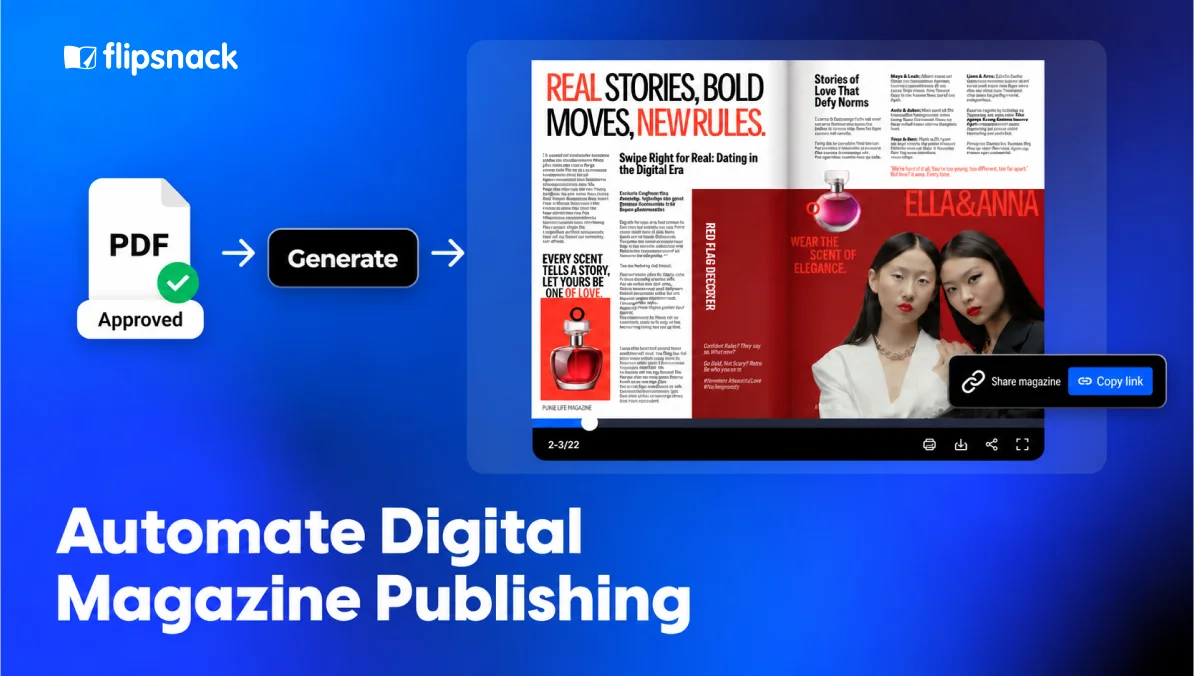
Every issue has an editorial plan. What happens after approval often doesn’t.
Final approval arrives. Someone still has to upload the issue, add its title, update the archive and prepare the launch email. The same work returns next month or next quarter, but it rarely appears on the editorial calendar.
Some teams already automate parts of this process without calling it automation. A scheduled email, a website rule or a shared workflow may already move an issue forward. Other teams still copy every link by hand.
Automation simply means that a repeated step follows a clear trigger. Publishing a finished issue is different from document generation, where magazine pages are built from raw content. For teams publishing a digital magazine, that trigger is often final approval. This article shows what can happen next. It also explains what should stay with your team and where to start.
Table of contents
- What can you automate in digital magazine publishing?
- How Flipsnack customers automate digital magazine publishing
- Plan your digital magazine publishing workflow
- Leave editorial decisions to your magazine team
- Start automating digital magazine publishing one handoff at a time
- FAQ about automating digital magazine publishing
What can you automate in digital magazine publishing?
Start with the repeated steps that follow final approval. You can move the approved file, create the online edition, add issue details, update the archive and prepare the announcement. Your team still controls the content, audience and timing.
| Publishing stage | What can happen automatically? | What should stay with your team? |
| Confirm the final issue | Move the approved file into the publishing flow | Confirm the correct file and version |
| Create the digital edition | Upload and prepare the issue for online reading | Check that every page appears correctly |
| Add issue details | Apply a consistent title, date and description | Approve the wording and access choice |
| Update the archive | Add the new cover and link in the right place | Check the issue order and labels |
| Prepare the announcement | Place the issue link into an email or post draft | Approve the message and audience |
| Collect reader data | Record views, reading time and clicks | Decide what to improve next time |
The content changes from issue to issue. The final publishing steps often do not.
Start there. A predictable handoff is easier to automate than an editorial decision.
How Flipsnack customers automate digital magazine publishing
Reusable branded templates give recurring magazines a consistent starting point. Teams can automate repeated content updates within that structure, then review each issue before it goes live.
My Resource Library: A repeatable workflow for Delve magazine
My Resource Library runs the commercial design industry’s leading digital resource platform, connecting more than 40,000 professionals across manufacturing, design and education. Its monthly magazine, Delve, used to ship as a static PDF. Nobody could track how it performed, and once an issue was sent, it could not be revised.
Working with the agency B.Digital, the team now creates Delve directly in Flipsnack. Instead of starting from scratch, the team duplicates the previous edition. Branded, locked templates keep logos, colors, navigation and layouts consistent while the content changes for each issue. This structure supports partial automation and helps contributors focus on their own sections.
The team then fine-tunes the design, and the editor-in-chief completes the final review before publication.
“We’ve had a few moments after publishing when someone spots a small error, maybe a number off or a typo in an article. With Flipsnack, it’s no stress. We just jump in, make the edit, and it’s fixed in seconds.” Brandi Sandage, Founder and CMO at B.Digital Agency
The September issue shows what that consistency produces:
- 11,000+ impressions across email, web, app and embedded placements
- 1,600+ views from a targeted industry audience
- 1,387 clicks, driven by interactive elements, product requests and navigation
- 5 minutes 20 seconds average time spent per reader
Once published, Delve’s editions sit together in a magazine library. Readers can browse current and past issues in one place, without searching for separate links.
Worth being precise about what this is. Duplicating an issue is manual work made repeatable, not a workflow that runs without anyone. The template is the part that repeats reliably, and that is usually where a magazine team should start. Read the full My Resource Library story.
Plan your digital magazine publishing workflow
Four decisions shape every recurring publishing workflow. How much automation the magazine actually needs, what triggers the next step once an issue is approved, how corrections differ from new editions, and how each issue gets named, stored and shared. Answer these before connecting anything, because a workflow built on unclear rules just repeats the confusion faster.
How much automation does your magazine need?
More automation is not always better. The right amount removes repeated work without creating a system that takes more effort to maintain.
| Your publishing pattern | A practical starting point |
| One quarterly or annual magazine | Keep the upload manual and use a clear launch checklist |
| A monthly magazine | Automate one handoff, such as the archive update or email draft |
| A designer-led magazine | Connect the design and publishing steps where possible |
| Several titles, regions or languages | Consider a custom connection for the repeated publishing work |
| A private staff or member magazine | Automate delivery, but keep the audience choice with a person |
A quarterly magazine may save more time with a checklist than with a custom setup. Does every issue start in Adobe InDesign? An InDesign flipbook workflow may remove the separate export and upload handoff.
Teams publishing every week or managing several titles may need a deeper connection. The same applies when approved files already arrive through a CMS or internal portal. One option is Flipsnack API, which simply lets two systems pass approved information or files between them. Your editors do not need to manage how it works. They need to define what the workflow should do.
Build the workflow around final magazine approval
Imagine an association publishes a member magazine every month. Once the editor marks the October issue as final, the approved file moves into the publishing account. The issue receives its title and date, then its link goes to the magazine archive.
The same link can appear in an email draft for members. A person still opens the issue on a phone and desktop, checks the pages and approves the announcement.
That is magazine publishing automation in practice. The software moves the issue between repeated stages. The team keeps control of quality and timing.
The tools behind the handoff may have technical names, but the planning does not need to be technical. Your team only needs to answer three questions:
- What tells the workflow to begin?
- What should happen next?
- Who steps in if something fails?
The connection may come from a built-in option, Zapier or another Flipsnack integration. The useful question is not whether your team needs complex tools. It is which step should stop depending on someone’s memory.
Separate new magazine issues from published corrections
A correction and a new issue are two different jobs.
Perhaps a published issue contains a wrong caption or outdated credit. A correction may involve replacing the original PDF while keeping the issue link. The same URL lets you keep hosting the digital magazine online without rebuilding its embeds or access setup.
A new monthly, quarterly or annual issue usually needs its own link. It gains a clear place in the archive. Its reader data also stays separate from earlier issues.
Replacing a page fixes the September issue. Publishing the October issue creates the next edition.
Set naming, archive and access rules
Automation works better when every issue follows the same naming and archive rules. Decide how titles, dates, regions and language versions should appear before connecting anything.
A simple name might follow this pattern:
Magazine title | October 2026 | US edition
The new issue can then move to the right archive page. No one has to decide its label each time. Back issues can also sit together on a virtual bookshelf, the way Delve’s editions do.
Readers can move between editions without searching for old links.
Consistent naming also helps search engines tell your editions apart. Older issues often keep outranking the newest one for a while, because they have had longer to gather links and crawl history.
Decide the access level per issue as well. Public, unlisted, password protected and SSO restricted are four different choices, and a workflow applies whichever one you configured rather than the one this edition needs.
Private magazines need the same structure. This matters when digital magazines support HR communication across offices or regions. The new issue might go to a member portal or company intranet, but each team still needs clear rules for access and back issues.
A workflow can place an issue in the right location. Your team still decides who can read it and how long it stays available.
Leave editorial decisions to your magazine team
Automation handles repetition. Editors handle judgment.
- Final approval. A person should confirm that the correct edition is ready to publish.
- Cover and story order. Software should not decide which article leads the issue.
- Brand consistency. A person should protect the magazine’s cover style, fonts and branding across editions.
- Reader access. Your team knows whether an edition belongs on a public website or inside a private staff portal.
- Quality checks. Someone should open the issue on mobile and desktop, test its links and check important pages.
- Launch message. A draft can be prepared automatically, but a person should approve the final wording and timing.
- Performance decisions. Data can be collected automatically. Your team decides what the numbers mean for the next issue.
Removing these decisions would not make the process smarter. It would only make mistakes travel faster.
Start automating digital magazine publishing one handoff at a time
Use your next issue as a simple workflow review.
After approval, write down every action before readers receive the magazine. Mark the steps that repeat. Then mark the decisions that need a person and the points where the issue usually waits.
Then choose one handoff. You might move the approved PDF, update the archive or prepare the launch email with the new link. Test the change with one issue before adding another.
This approach also keeps the project focused. Automation should support running an online magazine, not distract the team from its content, audience and publishing goals.
You can create your next edition with a free Flipsnack account or begin with a magazine template. Do several titles or teams share one process? You can talk to the Flipsnack sales team about a setup that fits your schedule.
Readers should remember the issue. Your team should not have to remember every handoff.
FAQ about automating digital magazine publishing
Automating digital magazine publishing means letting repeated steps happen after an issue receives final approval. Those steps may include creating the online edition, updating an archive or preparing an announcement. Your team still reviews the issue and controls when it goes live.
No. Many teams use built-in connections or workflows without working with an API. If you need a custom connection, your editors only define the trigger and result. They also choose who will check it.
Yes, if you start with a built-in option or a no-code connection. A developer helps when an internal system must send the magazine through a custom workflow.
Usually, yes. A separate link makes each issue easy to archive, share and measure. A corrected issue can keep its current link, so readers can still use it.
Yes. The repeated publishing and delivery steps can still be automated for a private staff, member or client magazine. A person should continue to approve the audience and access settings for every issue.
It becomes more useful when you publish often or manage several titles, regions or languages. Do you publish only once or twice a year? A clear checklist may save more time than a custom setup.