How To Turn Your Product Catalog Into a B2B Ordering Portal
Last updated: September 25, 2026
A purchasing manager at a hardware store opens your supplier catalog, scrolls through 60 pages, and copies 14 SKUs into an email. Your rep reads the message, spots two discontinued part numbers, and calls to clarify. Later, someone retypes the whole order into your ERP.
Nothing went wrong, exactly. Three people simply handled one order the buyer could have placed alone.
If you’re a manufacturer, wholesaler, or distributor, you’ve probably been told the fix is a full portal, with logins, price lists, and checkout. Sometimes that’s the right call. Many teams want something lighter: the advantages of a B2B eCommerce platform without the overhead of a full launch.
The gap isn’t a missing portal. It’s the distance between where buyers browse and where they order.
This guide explains what a B2B ordering portal does, where a digital catalog fits, and who gets the most from catalog ordering. It also covers three ways to set it up, from a catalog that takes orders by itself to one that feeds the CRM or checkout you already run.
What is a B2B ordering portal?
A B2B ordering portal is a private online platform where business customers log in to browse products, see account-specific pricing, place repeat orders, and track them, while each order flows directly into the seller’s ERP or inventory system.
Portals replace the phone, fax, and email orders that consume inside-sales hours. Vendors such as OrderEase, B2B Wave, and SparkLayer build their products around this model.
A product catalog plays a different role. Catalogs are where buyers discover and compare products, and in most B2B companies, they still live outside the portal as PDFs.
Is a digital catalog the same as a B2B ordering portal?
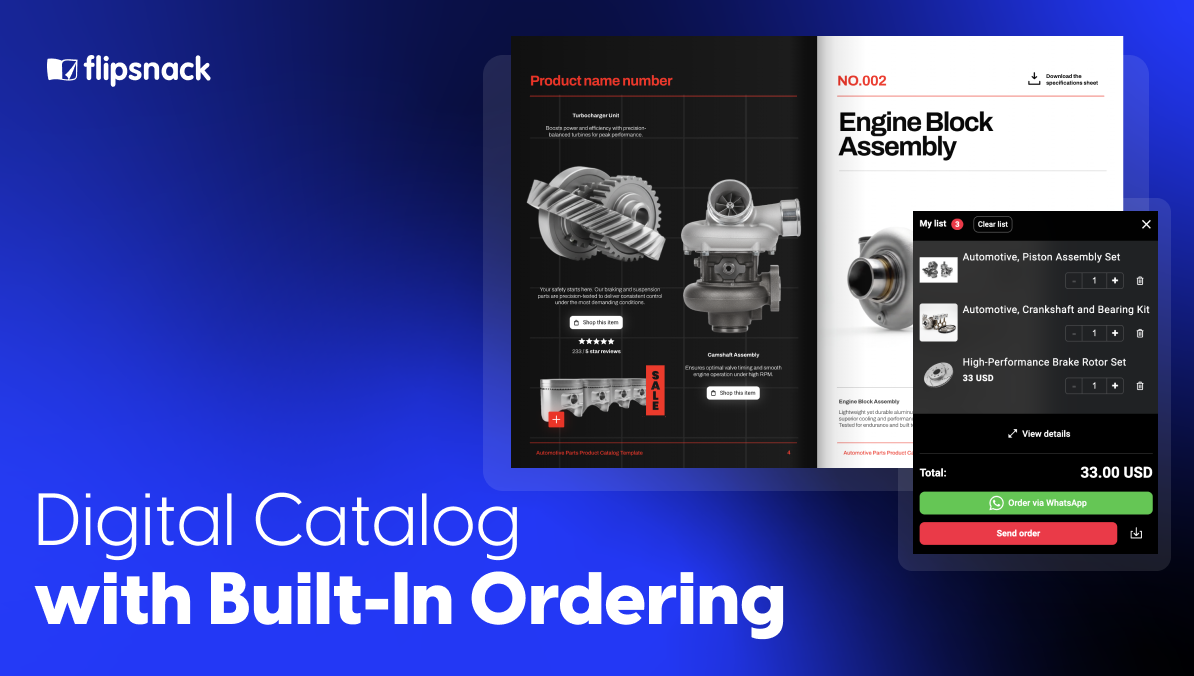
The short answer: No. A portal manages accounts, pricing, and order records. A catalog helps buyers find and choose products. Once connected, a digital catalog becomes the browsing layer of your ordering process, and in many cases, it can take orders on its own.
| What buyers and sellers need | PDF catalog | B2B ordering portal | Flipsnack catalog with ordering |
| Enjoyable browsing | ✓ | ✗ (search and product grids) | ✓ |
| Ordering in a few clicks | ✗ (email, phone, fax) | ✓ | ✓ |
| Pricing per customer group | One price list per file | ✓ | Separate private catalogs per group |
| Order history and reorders | ✗ | ✓ | ✗ (stays in your portal or ERP) |
| Orders reach your CRM or sales tools | Retyped by hand | ✓ | ✓ (with cart events) |
| Price updates | New file, new send | Edit in the portal | Same link, updated instantly |
| Knowing who’s interested | ✗ | Login records | Viewer and product analytics |
Portals win on account management. Catalogs win on discovery. The strongest setups use both. The catalog handles the moment a buyer decides, and the portal handles everything after it.
Flipsnack was built for that first moment: a catalog buyers actually enjoy browsing, which also knows how to take an order.
Who is catalog ordering built for?
Catalog ordering fits B2B companies whose buyers browse before they buy: wholesalers and distributors, manufacturers with dealer networks, brands selling to retailers, field and trade show sales teams, and sales operations teams that live in a CRM.
Wholesalers and distributors
You carry thousands of SKUs, and your customers reorder by email, phone, and photos of old price lists. A private Flipsnack catalog gives each customer group its own range and prices, and every order arrives complete, with codes and quantities. Your inside-sales team stops decoding emails and starts confirming orders.
Manufacturers with dealer and reseller networks
Dealers need the latest range, accurate specs, and a simple way to order. Instead of mailing a new PDF every season, you publish one catalog link that updates itself. Dealers order from the page they’re already reading, and you see which product lines each region actually pushes.
Brands selling to retailers
Fashion, home, beauty, and food brands sell to boutiques and chains that expect a polished lookbook, not a spreadsheet. Your line sheet becomes a branded, shoppable catalog. Retail buyers build their order while browsing, then send it by email or WhatsApp in one tap.
Sales reps and trade show teams
Reps present from one link in the meeting, and the buyer keeps that same link afterward. The catalog becomes where the order starts, so nobody rebuilds the conversation from notes.
How Radioshuttle replaces checkout with structured sales conversations
Radioshuttle®, a global provider of automated pallet handling systems, uses Flipsnack as a central sales interface rather than a checkout replacement. Their sales teams rely on interactive digital brochures during meetings, trade shows, and distributor conversations to explain complex warehouse systems, showcase use cases, and guide buyers through options.
Instead of pushing buyers toward immediate purchase, the catalog helps formalize interest. Prospects can explore products at their own pace, review videos and case studies, and leave meetings with a single, shareable link that captures the full context of the conversation. This allows internal stakeholders on the buyer side to review materials, align internally, and continue discussions without restarting the process.
As Gabrielle McCarthy, Digital Marketing Manager at Radioshuttle®, explains:
“In the small window of time you have to talk to a customer, they immediately understand the story. And afterward, it’s just a link. They can revisit it, share it internally, and come back with better questions.”
For Radioshuttle®, this model has proven far more effective than forcing transactions upfront. Their interactive catalogs are now used across sales, distributors, and training teams, helping close major deals by improving clarity, confidence, and follow-through, not by accelerating checkout.
Why do B2B buyers still send orders by email?
The short answer: Email is universal, and a portal is one more login. Buyers who order from dozens of suppliers only adopt a new portal when it’s clearly easier than typing a message.
Convictional, a B2B commerce company, made a blunt case: rolling out a portal often adds one more intake channel next to fax, phone, and email instead of replacing them. In their view, large buyers lean toward EDI and small ones toward email. (Source)
Adoption is a behavior problem too. In one kitchenware brand’s rollout, portal usage stalled at 30% while staff kept accepting manual orders. Only after the team stopped did the large majority of orders start arriving untouched. (Source)
Where portals struggle:
- Login fatigue. Buyers juggling many suppliers forget credentials and default to email.
- Weak browsing. Product grids work for reorders but poorly for discovering new lines.
- Long rollouts. Integration and account setup delay the first digital order.
Where catalogs help:
- No new login. A private link or one-time passcode opens the catalog instantly.
- Visual discovery. Buyers flip through ranges the way they already read catalogs.
- Structured orders. Every submission arrives with SKUs, variants, and quantities filled in.
The lesson: meet buyers in channels they already use, and make the digital path easier than the old one.
Where does Flipsnack fit in B2B ordering?
Flipsnack is the catalog layer of your ordering process. Teams generate branded catalogs from product spreadsheets, share them privately with each buyer group, and collect structured orders. With Flipsnack shop cart analytics, the catalog can also tell your CRM, website, or existing portal exactly what each buyer adds.
What that looks like day to day:
- One link, always current. Update prices in your spreadsheet and sync, so buyers never order from an outdated PDF.
- Brand control at team scale. Locked templates and a shared brand kit keep every catalog consistent, whichever rep builds it.
- Private by default. Passwords, one-time passcodes, and SSO mean only approved buyers see your wholesale pricing.
- Buying signals you can act on. Analytics and cart activity show sales which products each account considered and ordered.
What are the three ways to take B2B orders from a Flipsnack catalog?
The short answer: You can let the catalog take orders on its own, send every cart to your CRM, or connect the catalog to the checkout you already run. All three start from the same catalog, so moving up a level doesn’t mean rebuilding anything.
| Option | Best for | Where orders go |
| 1. Take orders in the catalog | Teams moving off PDF catalogs and email orders | Your inbox, Slack, or WhatsApp |
| 2. Send every cart to your CRM | Sales teams that want buying signals, not just orders | Your inbox or Slack, plus your CRM |
| 3. Connect to your own checkout | Companies with an existing portal or online store | Your own cart and checkout |
Option 1: Take orders directly in your Flipsnack catalog
Buyers open a private catalog link, pick variants and quantities, and submit. You decide how orders arrive:
- Shopping list or wishlist. Buyers save selections and finalize details with sales later.
- Purchase order or quote request. Selected products and quantities go straight to your team.
- Email order forms. Custom fields collect the delivery and account details you need.
- WhatsApp or Slack. Orders reach reps or internal channels instantly. See our guide to catalog ordering on WhatsApp.
No setup beyond the catalog itself. For details, compare checkout options for digital catalogs and integrated digital order forms.
Option 2: Send every cart to your CRM
We built cart events for teams whose orders already arrive in good shape but whose CRM never hears about them. Buyers still order exactly as in option 1. Behind the scenes, your catalog reports each product added, changed, or removed, plus every submitted order.
That turns browsing into buying signals your sales team can use:
- Follow up on real interest. Reps see which products an account added, even before an order is sent.
- Recover abandoned carts. A buyer who builds a cart and walks away becomes a warm follow-up, not a lost sale.
- Plan smarter ranges. Product managers see what gets added most, by customer and by catalog.
Option 3: Connect your catalog to your own checkout
Already run a B2B portal or online store? Keep it. Your buyers browse the Flipsnack catalog, and every Add click drops the product into your own cart, where your pricing, terms, and order history already live.
Buyers get the catalog experience they prefer. You keep the checkout you’ve invested in. And unlike catalog apps built for one storefront, Flipsnack cart events work with the store or portal you already have.
How to you build an ordering catalog in Flipsnack
Step 1: Organize your product data
List products in Excel, CSV, or Google Sheets, with names, descriptions, SKUs, variants, prices, images, and availability. Keep your product codes in the file, so orders match your own system.
Step 2: Generate the catalog
Upload the file to the Product Catalog Generator. Products drop into layouts styled with your Flipsnack brand kit (logo, fonts, and colors), and variants are handled automatically.
Step 3: Add ordering buttons
Add shopping list buttons so buyers can pick variants and quantities while reading. Then choose how orders are submitted: email form, Slack, or WhatsApp.
Step 4: Share the catalog privately
Publish as unlisted, add a password, send one-time passcodes, or email specific buyers from a CSV list. Enterprise teams can require SSO, and access can be revoked anytime.
Step 5: Connect your CRM or checkout (optional)
For options 2 and 3, embed the catalog on your website or portal and ask our team to enable cart events. When prices change later, sync the spreadsheet, and the catalog updates under the same link.
Privacy, access, and accountability in B2B sharing
In B2B, catalogs are rarely public. Pricing, product ranges, and availability often need to be shared only with specific customers, partners, or internal teams. A digital catalog must be easy to access for the right people and locked down for everyone else.
Flipsnack offers several secure sharing options so companies can control exactly who sees each catalog.
How you can share B2B catalogs securely
With Flipsnack, you can share your B2B catalog in the following ways:
- Publish catalogs as unlisted, so they’re hidden from search engines and public pages
- Password-protect catalogs to limit access to approved viewers
- Share via one-time passcodes (OTP) sent by email, without requiring accounts
- Send catalogs to specific people by email, including large lists uploaded via CSV
- Revoke access at any time when a catalog should no longer be available
For enterprise or internal use, Flipsnack also supports Single Sign-On (SSO), allowing access through your company’s existing identity system.
Visibility without friction
Even with private sharing, vendors keep full visibility. Orders are linked to identifiable customer information, and tracking links show how different clients or partners interact with the catalog. This ensures accountability, without adding steps or complexity for buyers.
Final verdict: catalog, portal, or both?
- Choose option 1 if your orders arrive by email and your team can process them manually for now.
- Choose option 2 if your sales team wants buying signals in the CRM without changing how orders are taken.
- Choose a full portal if you need live stock, per-account pricing, reorders, and invoices. Then add option 3 so buyers browse a catalog instead of a product grid.
Most distributors don’t need to pick one forever. With Flipsnack, they start with a catalog that takes orders and connect deeper as volume grows, without changing the link buyers already use.
Buyers decide in the catalog. Let the order start there too.
Frequently asked questions about B2B ordering portals
What is Flipsnack used for in B2B ordering?
Flipsnack is a digital publishing platform that manufacturers, wholesalers, and distributors use to turn product data into interactive catalogs buyers can order from. Buyers select products and quantities inside the catalog and submit orders by email, Slack, or WhatsApp. With Flipsnack cart events, teams can also send cart activity to their CRM or connect the catalog to their own checkout.
Who benefits most from ordering inside a digital catalog?
Wholesalers, distributors, manufacturers with dealer networks, and brands selling to retailers benefit most, because their buyers browse large ranges before ordering. Sales reps and trade show teams also gain a single link that works in the meeting and afterward. Sales operations teams get buying signals in their CRM through cart events.
What is a B2B ordering platform?
A B2B ordering platform is software that lets business customers place orders online, usually behind a login, with account-specific pricing, order history, and integration into the seller’s ERP. It replaces orders sent by phone, fax, or email. Some companies pair a platform with a digital catalog so buyers can browse visually before ordering.
What is the difference between a B2B customer portal and a digital catalog?
A B2B customer portal manages accounts, pricing, orders, and invoices for logged-in customers. A digital catalog presents products visually so buyers can discover and choose them. With ordering features, a digital catalog can take orders directly or pass products to a portal’s cart.
Can a digital catalog replace a B2B ordering portal?
For some companies, yes. If orders arrive by email and are processed manually, a Flipsnack catalog with built-in ordering can collect structured orders by email, Slack, or WhatsApp. If you need per-account pricing, live stock, or reorder history, keep a portal and use the catalog as its browsing layer.
Can a Flipsnack catalog work with my existing online store or portal?
Yes. With cart events, buyers browse your Flipsnack catalog and every product they add goes straight into your own cart and checkout. It works with the store or portal you already run, so you keep your pricing, terms, and order history. Cart events are enabled per account by the Flipsnack team.
How do I get catalog orders into my CRM?
Turn on Flipsnack cart events and embed your catalog on your website. Every product added and every order submitted is then reported to your systems, so your CRM can log interest and create follow-ups automatically. A web developer handles the one-time connection using the Flipsnack cart events guide.