How to Create a Brochure with ChatGPT
Published on: July 20, 2026
Writing brochure copy is harder than it looks. You’ve got a few panels, barely any space, and you need to explain what you do, why it matters, and convince someone to act. All this without sounding like every other brochure in the rack. It’s easy to end up staring at a blank page, unsure where to even start.
This is where ChatGPT comes in handy. Used the right way, it works like a copywriting assistant: it helps you gather your thoughts, structure your content, and draft copy for every panel, so you’re editing instead of starting from zero. It lets you focus on what matters most: creating a brochure that connects with your audience.
That said, it’s also important to know where ChatGPT excels and where it doesn’t. AI can generate compelling content, but it cannot replace a professional digital brochure maker that helps you design, publish, and share beautiful, interactive brochures.
In this guide, we’ll show you how to use ChatGPT to create brochure content, share ready-to-use prompts, and explain how to transform your AI-generated copy into a polished digital brochure with Flipsnack.
Why use ChatGPT to create brochure content?
According to McKinsey research, 76% of employees now use AI at work to improve productivity and complete tasks more efficiently. Creating brochure content is one area where AI can make a real difference.
Used as your writing assistant, ChatGPT helps you organize information, draft copy, and refine your messaging faster. Rather than writing everything from scratch, you can focus on reviewing, improving, and tailoring your brochure to your audience.
Here’s where ChatGPT adds the most value.
Gets you past writer’s block
ChatGPT can generate headlines, opening paragraphs, value propositions, product descriptions, or calls-to-action based on just a few details about your business. Instead of staring at a blank document, you’ll have a strong first draft to build upon.
Adapts your message for different audiences
With the right prompt, ChatGPT can rewrite your content for a new audience, industry, or buyer type. It also keeps your core message the same, simplifying tech terms, adding a luxury tone for premium products, sounding more casual, or shifting to a B2B voice for decision-makers.
Builds a steady brand voice
When several people write brochure copy, the tone tends to drift. Describe your brand personality such as professional, friendly, bold, playful, premium, or educational and ChatGPT will keep every panel on-voice, from the cover to the back page.
Generates multiple versions in minutes
Marketing rarely fits one template. Maybe you need a short version for a tri-fold and a longer one for a digital brochure, or different calls to action for different campaigns. ChatGPT can write several versions almost instantly, making it easy to test different versions and tailor each one to a campaign.
Turns tech specs into customer benefits
Many businesses list features instead of explaining what those features mean for the customer. ChatGPT is good at making that switch. It helps transform features into customer benefits, making your brochure easier to understand and more persuasive.
Saves time without sacrificing quality
Brochure copy usually goes through several rounds of drafting and edits. ChatGPT won’t replace strategy or creativity, but it speeds up the first draft a lot leaving more time for marketing, sales, and design teams to refine ideas instead of starting from scratch.
What it won’t do on its own is lay out, design, or publish the brochure. That part still needs a design and publishing tool.
Generate your brochure content with AI [Prompts Included]
Gather all your information before getting started
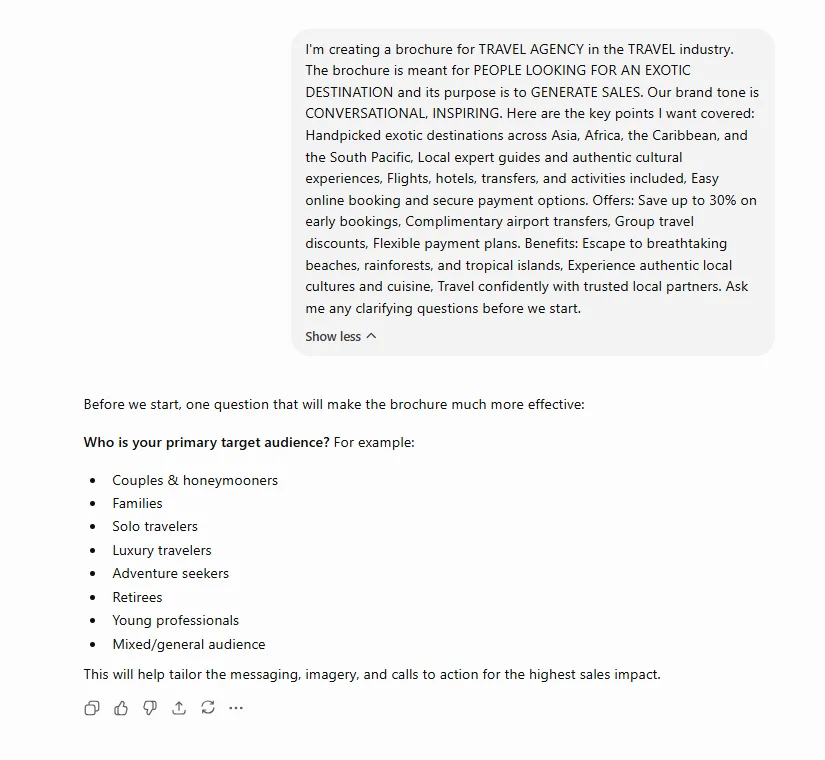
Before you ask ChatGPT to write your brochure, spend a few minutes gathering the information it needs. AI can only work with the details you provide, so the more context you share, the better your brochure copy will be.
Start by defining the basics:
- What you’re promoting? Is it a product, service, event, company, or organization?
- Who is the brochure for? Think beyond age or job title. Consider their goals, challenges, level of knowledge, and what would motivate them to take action.
- The purpose of the brochure? Are you trying to generate leads, introduce a new product, promote an event, or educate potential customers?
- Your industry or niche. Is it real estate, travel, restaurant, nonprofit?
- What makes your offer unique? List your key benefits, selling points, offers, or proof points that should appear in the brochure.
- What action should readers take next? Include your call to action, such as visiting your website, booking a demo, scanning a QR code, or contacting your team.
If you already have supporting materials, gather those as well. Your website, product pages, testimonials, FAQs, brand guidelines, or existing brochures all give ChatGPT valuable context and help it generate more accurate content.
Pro tip: Letting ChatGPT ask clarifying questions first is a simple way to catch gaps in your brief before it starts generating content.
Ask ChatGPT to build your brochure structure
One of the biggest mistakes people make is asking ChatGPT to write an entire brochure in a single prompt. A better approach is to build the structure first.
Whether you’re creating a tri-fold brochure, bi-fold brochure, company brochure, or digital brochure, each panel has limited space. Planning the layout before writing helps you decide what information belongs where and prevents your brochure from feeling crowded.
ChatGPT can recommend the order of your sections, estimate how much copy each panel should contain, and suggest a logical flow that guides readers from the cover to your call to action.
This gives you an outline cover panel, “about us,” product/service breakdown, testimonials, contact/CTA panel sized appropriately for your fold count, before any copy gets written. It also keeps ChatGPT from generating a wall of text that will never fit in a physical panel.
Generate your brochure copy
Now that you have a structure, you can start writing each section.
Rather than generating the entire brochure at once, work through it one panel at a time. This approach gives ChatGPT more context, makes the copy easier to edit, and helps ensure each section stays within the space available. It also produces more focused, natural-sounding content. If your copy still rings a bit hollow, you might also want to consider using a tool that’s tailor-made to humanize ChatGPT content and make it more refined for your readers.
Ask ChatGPT to write:
- cover headlines
- introductions
- product or service descriptions
- feature and benefit sections
- customer testimonials
- FAQs
- calls to action
Keeping each section within its recommended word count will also make the design process much smoother later.
A few smaller prompts worth keeping in your back pocket:
- Write 5 headline options for a brochure promoting [PRODUCT/SERVICE], each under 8 words.
- Write a short tagline that captures [BRAND]’s value proposition in one sentence.
- Write 3 versions of a call-to-action for this brochure, ranging from soft (“learn more”) to direct (“book now”).
Pro tip: Don’t publish AI-generated copy without reviewing it first. Read it out loud, remove repetitive phrases, and make sure it sounds like your brand. A quick editing pass can make the difference between content that feels generic and content that feels authentic. If the AI-generated copy still feels robotic or overly generic, an AI humanizer can help refine the wording so it reads more naturally while keeping the original message intact.
Build a brand board for your brochure
Once your copy is ready, it’s time to think about the look and feel of your brochure. A consistent visual style makes your content easier to read and helps people recognize your brand.
Before opening your design tool, ask ChatGPT to help you define the creative direction for your brochure. It can recommend:
- A color palette that matches your brand
- Font pairings for headlines and body text
- A photography or illustration style
- Icon recommendations
- Mood keywords that describe the overall look
You can also ask ChatGPT to describe reference imagery or a mood board concept in words, which you can then hand off to a designer or use as a prompt for an image generator like DALL·E.
Improve or refine an existing brochure
Already have a brochure that isn’t performing, or feels dated? ChatGPT is just as useful as an editor as it is a first draft. You can paste in your existing text and ask it to:
- Rewrite sections for clarity or a different tone
- Shorten long paragraphs so they fit your brochure layout
- Simplify technical or jargon-heavy language
- Reorganize sections to follow a more logical flow
- Suggest a stronger headline or call to action
- Adapt the brochure for a different audience, market, or campaign
- Identify missing information or questions readers may still have
Pro tip: Before publishing, ask ChatGPT: “If you were my ideal customer, what questions would you still have after reading this brochure?” It’s a simple way to spot missing information, strengthen your value proposition, and make sure your brochure answers the questions that matter most.
Can you make a brochure using ChatGPT?
Not entirely.
ChatGPT is a text-first tool. It’s excellent at generating the words that go into your brochure from structure, copy, headlines, CTAs.It can even describe or generate reference images.
But creating the content is only part of the process. To turn that content into a professional brochure, you still need a tool that lets you design the layout, apply your branding, add interactive elements, and publish your work.
Instead of choosing one tool over the other, think of them as working together. ChatGPT helps you create better content faster, while a tool like Flipsnack helps you design, publish, share, and measure the performance of your brochure.
The table below shows which tool is best suited for each task.
| Task | ChatGPT | Flipsnack |
| Brainstorm brochure ideas | ✅ | — |
| Create headlines and brochure copy | ✅ | AI Assist for quick edits |
| Organize content | ✅ | Templates help with layout |
| Refine and rewrite copy | ✅ | — |
| Design the brochure | — | ✅ |
| Apply branding | — | ✅ |
| Add images, videos, links, and forms | — | ✅ |
| Export for print | — | ✅ |
| Publish and share online | — | ✅ |
| Track engagement | — | ✅ |
Turn your ChatGPT content into a digital and interactive brochure with Flipsnack
You’ve written and refined your brochure content with ChatGPT. Now it’s time to turn it into something people will actually enjoy reading. While ChatGPT helps you create compelling copy, Flipsnack comes in for designing, adding interactivity, publishing, and tracking your brochure.
Here’s how to do it:
- Start from a template or a blank canvas
Open Flipsnack’s Design Studio and choose a brochure template that matches your fold type (tri-fold, bi-fold) and industry, or start from scratch.
- Transfer your content using ChatGPT integration
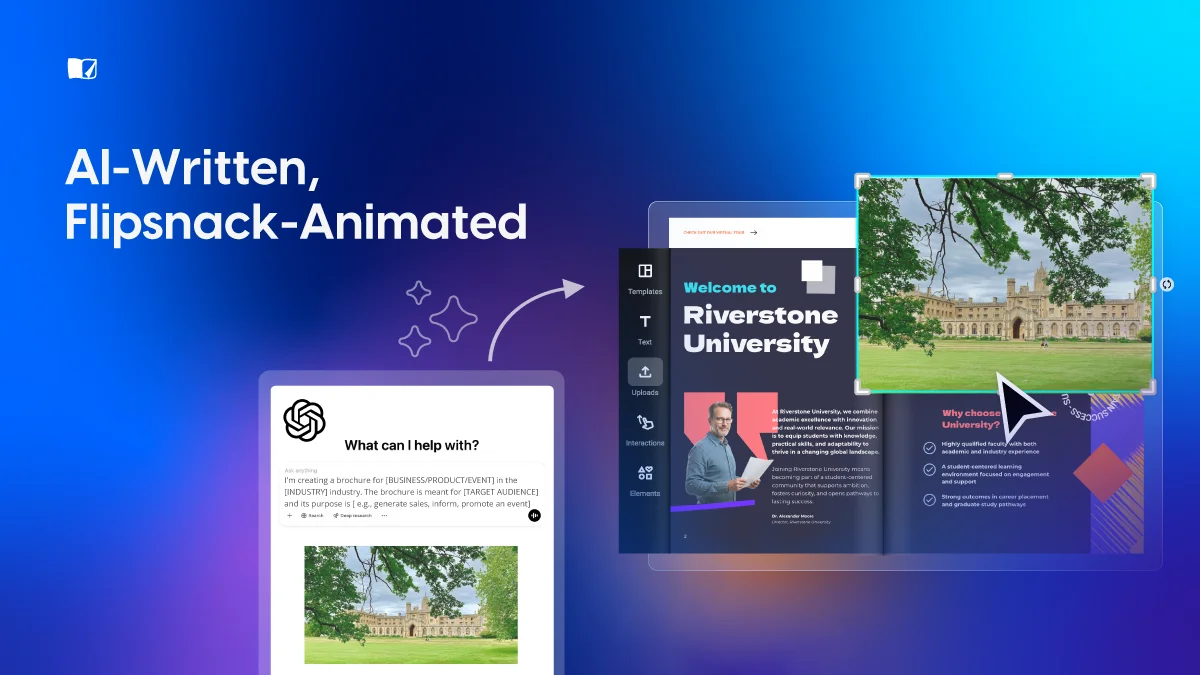
Send your ChatGPT-generated copy directly to your Flipsnack brochure, then review and fine-tune each section inside the editor.
- Apply your brand board
Add your logo, brand colors, and fonts so the design matches the identity you defined earlier.
- Add your visuals
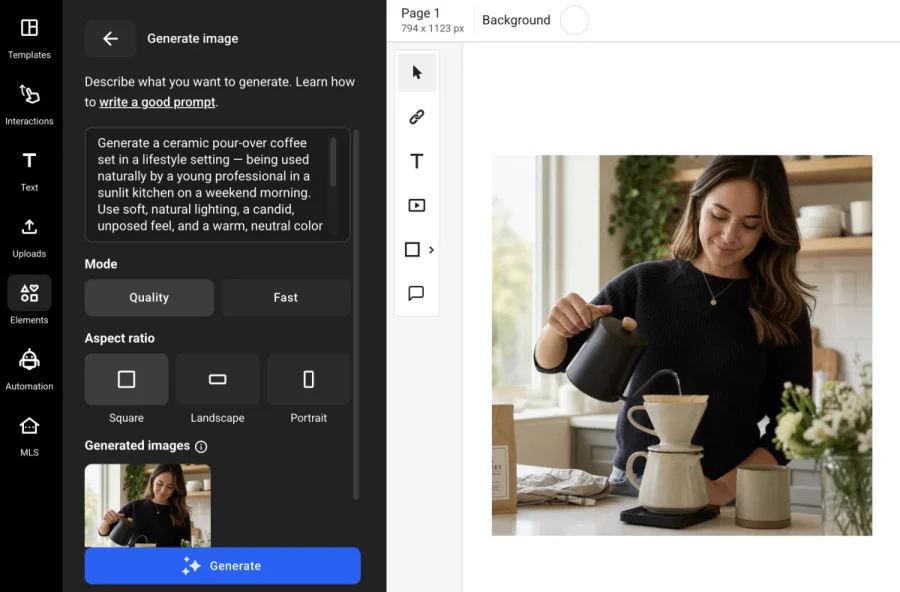
Upload your own product photography, illustrations, or brand assets. If you don’t have the right image, generate one directly in Flipsnack. Simply describe what you need, choose the image format, and add it to your brochure without leaving the editor.
- Make it interactive
Add clickable links, embedded videos, contact or “request a quote” forms, and pop-ups with extra details. You can even animate static images with AI Visuals in one click to create a more engaging experience.
- Publish and share
Get a shareable link, embed the brochure on your website, generate a QR code for print materials, or export a PDF for offline use.
- Track performance
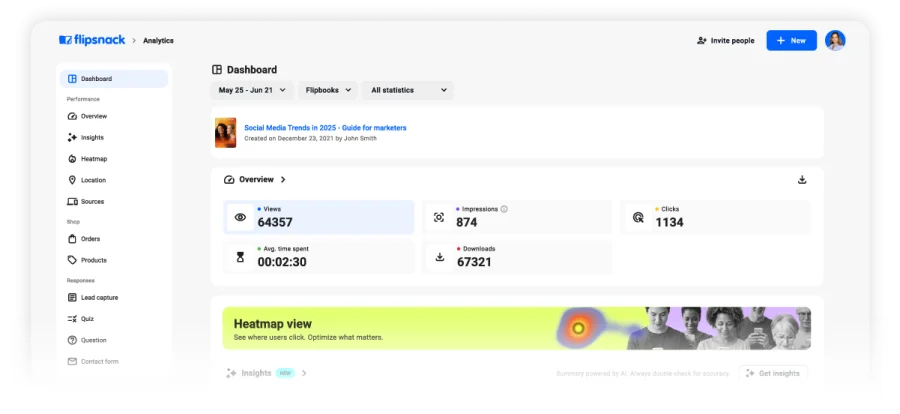
Learn how people engage with your brochure after it’s published. See how many views it gets, how long readers stay, and which sections capture the most attention, so you can make smarter improvements over time.
Follow the steps above to create your brochure, or watch the video for a complete walkthrough of the process in Flipsnack.
Pro tip: If you want to take one step further, you can connect the Flipsnack app inside ChatGPT to manage your brochures using simple prompts. You can review engagement analytics, update brochure details, generate embed codes, or organize your workspace without leaving ChatGPT.
Case Study: How Radioshuttle turned a static brochure into their best sales tool
Radioshuttle, a Sweden-based manufacturer of automated warehouse storage systems, needed a lighter, more engaging way to present its products than a 45-slide sales deck. Their presentation was too large to email and lost prospects’ attention long before the last slide. Using Flipsnack, they turned it into a single interactive digital brochure complete with a clickable table of contents, embedded product videos, and offline access for trade shows.
Since launching in December 2024, they’ve seen:
- 650% increase in engagement in the first month after launch
- 11+ minutes average viewing time per visitor
- 500 internal sales reps onboarded via one shareable link
- Reach across multiple countries, led by Canada and the US
The brochure is now considered Radioshuttle’s most competitive sales tool giving reps and distributors one consistent, always-current resource instead of an oversized slide deck, shareable by link, QR code, or email signature.
As Gabrielle McCarthy, Digital Marketing Manager at RadioShuttle, explains “At the end of the day, it’s just a link. You can email it. Our sales reps can easily share it directly with customers, but we also have it on our social media, and at the very top, we have a link to our digital brochure. It’s been fantastic.”
If ChatGPT helps you create better brochure content faster, Flipsnack ensures that content is presented in a format that’s easier to distribute, more engaging for readers, and far more effective as a sales tool.
Conclusion
Creating an effective brochure doesn’t have to mean spending hours staring at a blank page. By using ChatGPT as your writing assistant, you can brainstorm ideas, organize your content, draft persuasive copy, and refine your messaging much faster than writing everything from scratch.
But great content is only one piece of the puzzle. To turn that draft into a brochure people can actually open, click through, and engage with, you still need a design and publishing tool. Pairing ChatGPT’s copywriting speed with Flipsnack’s design, interactivity, and analytics gives you the fastest path from a blank page to a finished, trackable brochure in print or online.
FAQs
Can I create my own brochure template?
Yes. With a tool like Flipsnack’s Design Studio, you can start with a blank canvas and create a brochure that fits your brand. Choose your layout, fold type, fonts, colors, and other design elements. When you’re happy with the design, save it as a reusable template for future brochures. Using a template saves time, keeps your branding consistent, and makes it easier to create new brochures without starting from scratch.
What is the standard brochure size?
The most common brochure format is a tri-fold brochure printed on US Letter (8.5″ × 11″) or A4 (210 × 297 mm) paper. The sheet is folded into three equal panels, giving you six sections to organize your content. Another popular option is a bi-fold brochure, which uses the same paper sizes but folds the page in half to create four panels. The best brochure sizes depend on your content and how you plan to distribute the brochure. For example, brochures used at trade shows may need a different layout than those shared by email or viewed online.
What are the best practices for designing a brochure?
A well-designed brochure is easy to read and encourages people to take action. Here are some best practices to create a brochure that captures attention and communicates your message effectively:
- Start with a clear headline that explains the main benefit of your product or service.
- Keep your copy short and easy to scan. Focus on the most important information.
- Use headings, subheadings, and images to create a clear visual hierarchy.
- Leave enough white space so the layout feels clean and uncluttered.
- Use your brand’s colors, fonts, and tone consistently throughout the brochure.
- Include one clear call to action, such as visiting your website or booking a demo.
- Choose high-quality images that support your message and add value.
- Proofread your content carefully before publishing or printing to catch any errors.
Following these guidelines will help you create a brochure that looks professional, communicates your message clearly, and encourages readers to take the next step.