How Universities Use Flipbooks: What Top Schools Gain by Replacing PDFs and Print
Published on: June 19, 2026
If your university still emails prospective students a PDF viewbook or drops a printed catalog in the mail, you’re spending more and learning less than the schools you’re up against for applicants.
UCLA, Penn State, Stanford, Harvard, Cornell, Dartmouth, Columbia — they’ve all moved their publications to interactive flipbooks. And it’s not about looking modern. It comes down to why universities use flipbooks in the first place: they cost less, update in seconds, and finally show you who’s actually reading what.
This guide walks through exactly how university marketing, admissions, and communications teams put flipbooks to work across every department — with real examples — and why the format keeps beating both PDF and print on reach, engagement, and cost.
Table of contents
The overlooked limitations of PDFs and print
Print is expensive, and it’s out of date the moment it ships. A PDF is cheaper, but it was really made to be downloaded and printed, not read on a phone. So people end up pinching, zooming, and scrolling sideways just to get through it. And once you’ve sent either one, that’s it: you can’t change a word, and you have no idea if anyone even opened it.
That’s just the operational cost. The strategic one runs deeper: you can’t see what’s actually working. Which program pages people read, where prospects lose interest, which campaign sparked the inquiry — all of it stays invisible.
A flipbook closes both gaps. It’s a page-turning publication built from a PDF you already have, it opens in any browser from a single link, and it tells you who opened it, how long they stayed on each page, and what they clicked by section. And the shift is already happening: in the National Association of College Stores’ Faculty Watch report, e-book use climbed to 71% of faculty while print slipped to 63%, knocking print out of the top spot for the first time.
12 ways universities use flipbooks right now
Recruitment, admissions, and student resources
How do universities use flipbooks for digital prospectuses and viewbooks?
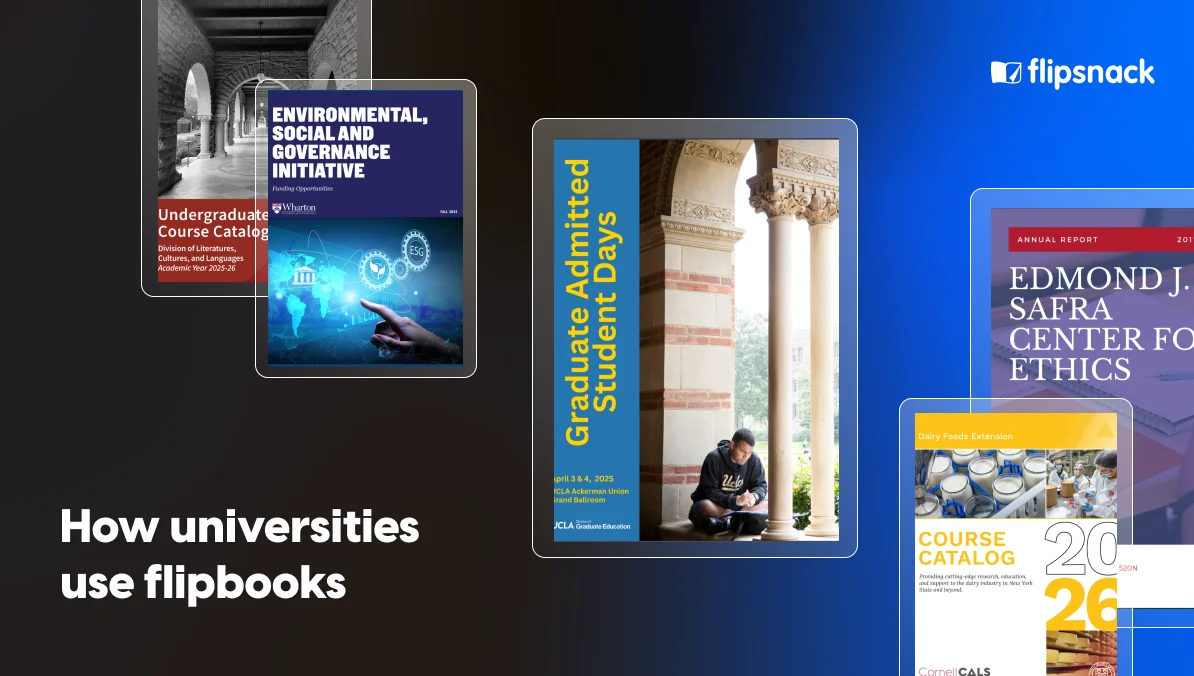
Universities use flipbooks to turn recruitment materials into interactive guides that open on a phone with one link. UCLA’s Division of Graduate Education publishes its graduate studies brochure as a flipbook.
It also publishes program booklets for its Graduate Admitted Student Days events. Newly admitted students can browse everything on any device and the team can update it right up to the event.
A flipbook can hold a campus tour video, link straight to a program page, or open an inquiry form with no download. The viewbook is often a student’s first impression. A flipbook makes that impression feel modern. It also shows recruiters which sections draw the most interest.
How do universities use flipbooks for course catalogs?
Universities use flipbooks to publish course catalogs that are easy to browse and always current. A printed catalog is out of date the moment a class changes, while a flipbook updates in seconds and keeps the same link. Cornell’s Institute for Food Science has published its extension catalogs this way twice a year since 2018, building a searchable archive that grows with every release.
Stanford’s Division of Literatures, Cultures, and Languages also publishes its undergraduate course catalog as a flipbook each year.
Students can jump to a department, click straight through to registration, and read the whole catalog on a phone without downloading anything.
How do universities use flipbooks for funding and opportunity guides?
Universities use flipbooks to break dense funding information into short, browsable guides. Instead of one giant PDF, each program gets its own booklet. Wharton’s creative team at the University of Pennsylvania does this.It publishes separate funding booklets for the ESG Initiative, the CEO program, and Analytics at Wharton. Students and faculty can find the right funding source fast. Each opens as a link, stays current, and can point straight to an application.
Splitting funding into one guide per initiative makes the information easy to share and far less overwhelming than a single long document.
Teaching and student experience
How do professors use flipbooks for class assignments?
Professors use flipbooks to turn student work into a polished, shareable publication instead of a flat paper handed in and forgotten. A student can build a digital booklet, portfolio, or magazine that looks professional and brings in images, diagrams, and links, all in one place.At Rowan University, the Henry M. Rowan College of Engineering publishes the annual Clinic Book as a flipbook. It showcases the real engineering projects student teams worked on that year.
Students take more care into their work when the result is public. They get a page turning publication they can show an employer or add to a portfolio.
How do universities use flipbooks for workshop and training materials?
Universities use flipbooks for lab guides, equipment instructions, and workshop handouts. This way, the material stays in one place and updates instantly. The Barnard Design Center, part of Barnard College at Columbia University, publishes a dedicated flipbook for each machine in its makerspace, from the laser cutter to the cyanotype station. A QR code next to the equipment opens the guide right on a student’s phone, and when something changes, staff can revise it without reprinting a thing.
This solves a daily problem. Instructions taped to a machine go stale, but a flipbook is always up to date.
How do universities use flipbooks for student handbooks and orientation guides?
Universities turn the handbook into a flipbook so incoming students can scroll through it on their phone the same way they’d browse Instagram, rather than wrestling with a long PDF that wasn’t built for a small screen. Michigan State University’s office for visiting international scholars publishes orientation materials as flipbooks. These include a campus scavenger hunt and arrival guide. The office even makes handbook versions in English, Chinese, and Korean. The link can be shared before arrival, used on arrival day, and kept as a reference all term.
A clickable table of contents helps students quickly find what they need. Instead of scrolling through a long PDF, they can open a single policy or map, in seconds.
Research, culture, and heritage
How do universities publish academic research as flipbooks?
Universities publish research reports, monographs, and journals as flipbooks to make dense work easier to read and share online. Take the White Levy program for archaeological publications. It has released more than 60 full monographs as flipbooks, some several hundred pages long. These include volumes from University of California, Berkeley excavations. Together they form an open access library readers can navigate like real books.
Academic work often sits behind a simple PDF download that few people open. A flipbook lowers that barrier and helps readers move through long material more comfortably.
How do university museums use flipbooks?
University museums use flipbooks for exhibition brochures, collection guides, and accessibility resources. Dartmouth College’s Hood Museum of Art goes beyond catalogs by maintaining flipbook archives of large-print gallery labels for visitors with visual impairments, along with downloadable coloring pages for educational outreach. Visitors can open any of these on their phone, at any zoom level, before or after their visit.
Museum content is highly visual, so images, artist videos, and audio guides can all be included within the pages. The large-print archive also adds real accessibility value, and it’s backed by the platform itself: Flipsnack follows WCAG 2.1, ADA, and Section 508 standards, with screen reader support, keyboard navigation, and alt text, which matters for any institution serving people with diverse needs.
How do universities digitize archives with flipbooks?
Universities digitize past publications as flipbooks so people can browse them online without handling fragile originals. Harvard University’s Edmond and Lily Safra Center for Ethics does this. It has digitized older annual reports, including its 2015 to 2016 and 2017 to 2018 editions, building a browsable multi year archive in one place.
Northern Michigan University has gone further back, publishing yearbooks from as early as 1910 as live flipbooks.
Once a document is a flipbook, anyone can read it from anywhere. The original stays protected in storage.
Events, athletics, and communications
How do university athletics departments use digital game programs?
University athletics departments use flipbooks to give fans a digital game day program they can pull up on their phone right from their seat in the stands.Penn State Athletics has turned this into a full production line. It publishes hundreds of game programs across football, men’s hockey, women’s basketball, volleyball, and wrestling, Each matchup gets its own flipbook. A QR code in the stadium opens the program, with rosters, stats, features, and clickable sponsor ads.
A less obvious benefit is sponsorship. Flipsnack’s analytics show advertisers how many fans opened the program and clicked their ad.
How do music schools use flipbooks for concert programs?
Music schools use flipbooks for concert and recital programs so audiences get program notes and performer bios on their phones instead of a paper handout. The Mead Witter School of Music at the University of Wisconsin Madison does this at scale. It publishes a new flipbook for nearly every concert and recital across the year, shared by QR code at the door.
Concert programs are made often and thrown away fast. A digital version cuts printing for every performance and it builds a permanent archive of each event.
How do universities use flipbooks for strategic plans, alumni magazines, and annual reports?
Universities use flipbooks to present long-form documents from leadership and advancement teams. These are image heavy and meant to impress, so a page turning format suits them. Adelphi University turns its annual President’s Report into a flipbook, packaging a year of institutional milestones, including a national championship win, into something prospective donors and alumni actually want to browse instead of a static PDF buried on a website.
Case Western Reserve University runs a whole portfolio of alumni magazines this way. That includes its flagship Think magazine and a separate medical alumni edition.
A printed annual report offers little insight, while a flipbook shows which sections donors and alumni actually read, helping shape the next campaign.
What the shift delivers for your team
None of these universities built from scratch. They started with PDFs they already had and converted them — which is exactly why the format spread so fast across so many departments. The lift is low and the return is immediate:
- Lower costs — no print runs, no reprints when content changes
- Greener — no paper, ink, or shipping, which adds up for teams producing catalogs and programs at scale
- Instant updates — fix a tuition figure or event date; the link stays the same
- Real analytics — opens, time on page, and clicks by section
- Mobile-native — reads on any device with no app or download
- Lead capture built in — embed inquiry forms directly on the pages
- Built for institutional review — supports FERPA compliance, SOC 2, and ISO 27001, plus GDPR for international programs, with private, unlisted, and password-protected options for sensitive material
From PDF to live flipbook in four steps
You can create a university flipbook in four steps: upload a PDF, brand it, make it interactive, then publish and share. Flipsnack turns it into a page-turning flipbook in minutes, no design skills needed.
Step 1: Upload your PDF
Upload the PDF you already have, whether it is a prospectus, catalog, handbook, or report, and it converts into a flipbook automatically.
Step 2: Brand it
Apply your university logo, colors, and fonts to each publication for a consistent, official look. Larger institutions can also host flipbooks on a custom domain for a fully branded experience.
Step 3: Add interactive elements
Step 4: Publish and share
Bring your colleagues into the same workspace
A flipbook rarely stays with one person. Admissions, marketing, and academic departments often touch the same publication at different stages. Flipsnack lets you invite teammates to your workspace and assign each one a role, so a communications coordinator can draft the content, a graphic designer can apply the branding, and a department head can review it before it goes live, all without sending files back and forth by email.
That’s it. Once a flipbook is live, you don’t have to start over to update it. You edit the file, the link stays the same, and readers always see the latest version.
Help students stay organized with private notes
Whether they’re browsing a course catalog, reading a study guide, or reviewing a student handbook, readers can add private notes directly inside the flipbook. Students can bookmark important deadlines, annotate course descriptions, or save personal reminders without switching to a separate notes app or marking up the original document.
See it working at your institution
From viewbooks and course catalogs to game day programs, alumni magazines, and century old yearbooks, universities are using flipbooks across nearly every department. The shared payoff is the same: lower print costs, instant updates, and real data on who reads what. Start with a PDF you already have, pick a university template to skip the design work, and turn your next publication into an interactive flipbook with built in lead capture.