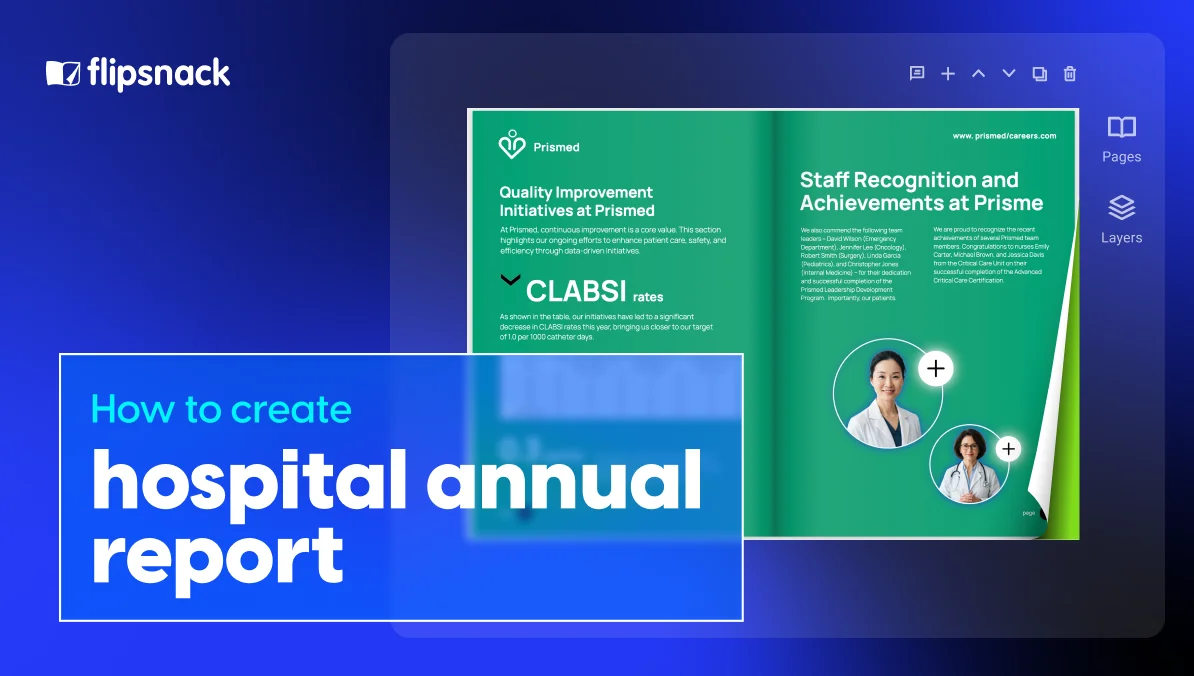
How to create a hospital annual report: complete guide with examples
Published on: 15 July, 2026
Every year, hospitals save lives, open new programs, and serve thousands of families. And every year, most of that work disappears into a hospital annual report nobody reads. Long, dense, built for internal approval instead of real readers, it gets published, filed, and forgotten.
Maybe you’re part of a hospital marketing team that publishes medical documents all year long. Maybe you work for a healthcare foundation, or you simply got handed this year’s report. Either way, this guide will help you break that cycle. The goal is a report people actually read: clear, human, accessible, and easy to share in any format. Let’s build it.

Table of contents
- 1. Johns Hopkins All Children’s Hospital Annual Report
- 2. CHAS Health Community Annual Report
- 3. MHANJ Annual Report
- 4. LUK Annual Report
- 5. Braden’s Hope Annual Report
- Interactive Healthcare Annual Report Template
- Interactive Foundation Annual Report Template
- Editable Nonprofit Impact Summary Template
- Humanitarian Foundation Annual Report Template
- Frequently asked questions
A hospital annual report is a yearly publication that sums up a hospital’s achievements, patient care, financial health, and community impact. It covers one fiscal year and ends with the priorities for the year ahead. The target audience is broad: donors, patients, board members, staff, and community partners.
How to create a hospital annual report with Flipsnack: Step-by-step guide
Creating a hospital annual report still begins with planning, even when you use a digital publishing platform. With Flipsnack, you can manage the design, team review, publishing, and distribution in one place. Upload an approved PDF, customize an annual report template, or start with a blank design.
Step 1: Define the goal, target audience, and theme
Start with one question: what should this report achieve? Common goals include donor engagement, financial transparency, community trust, and recruitment.
Then match the content to your target audience. A donor-facing report should lean on impact stories and giving outcomes. A board-facing report needs more financial and strategic detail.
Choose one theme for the year too, such as growth, access to care, innovation, or resilience. It will guide the stories, visual style, and tone throughout the report.
Step 2: Choose how to start in Flipsnack
Flipsnack gives you three starting points:
- Upload an approved PDF if the report has already been designed.
- Customize an annual report template if you need a ready structure and visual direction.
- Start with a blank design if you want complete control over every page.
Whichever option you choose, you can add your hospital’s fonts, colors, logo, photography, and other brand elements.
Step 3: Gather the content and collaborate with your team
Collect the raw material early. Ask departments for their key results, gather financial statements and foundation data, and request photos, leadership quotes, and potential patient stories.
Use Flipsnack’s collaboration feature to invite the people involved in the report. Finance can verify the numbers, leadership can review its message, and the communications team can keep the content and design consistent.
Allow enough time for this process. A hospital annual report typically takes two to four months once data collection, writing, design, reviews, and approvals are included.
Step 4: Build the report structure
To decide what is included in an annual report, pick the sections that support the goal from in Step 1. The core components of an annual report for a hospital commonly include:
- A CEO or leadership message with a human tone
- Mission and the annual theme
- Key achievements and milestones
- Patient stories
- Community benefit and outreach
- Data and patient outcomes
- Financial highlights for the fiscal year
- Donor and volunteer recognition
- Priorities for the year ahead
- A clear call to action
You do not need every component in every report. Use the Flipsnack’s Design Tool to arrange the sections into one clear story, not a series of disconnected department updates.
Step 5: Write and design for scanning
If you are researching how to write an annual report, the central rule is simple: write for readers, not for internal approval. Good annual report writing uses plain language, active voice, short paragraphs, and clearly explained acronyms.
In Flipsnack, combine that copy with descriptive headers, pull quotes, infographics, and enough white space. Turn important numbers into visual highlights. Carry the annual theme through the colors, typography, and imagery.
Step 6: Add interactivity and review accessibility
Add elements that help readers explore the report. Embed a patient or leadership video, link the call to action to a donation page, create clickable navigation, or use photo slideshows for community programs.
Before publishing, complete the final reviews:
- Patient consent and privacy
- Financial accuracy
- Page descriptions and reading order
- Descriptive link text
- Color contrast
- Brand consistency
- Leadership approval
Flipsnack’s accessibility feature support keyboard and screen reader navigation. Still, check the report’s content and design before you publish.
Step 7: Publish, distribute, and track engagement
Choose the visibility settings that suit your audience, then publish the report. You can embed it on the hospital website, send it through email, share it on social media, or add a QR code to printed copies. A single shareable link can be used across your digital channels.
After publication, track how readers engage. Monitor views, time spent, and page level activity. These insights show which stories attract attention and help you improve next year’s report.

How to integrate patient stories into a hospital annual report
Numbers prove your impact. Stories make people feel it. That is why patient stories are the strongest section in any hospital report, and the one readers remember. Here is how to integrate patient stories into a hospital annual report the right way.
- Start with consent. Get written permission before you share any patient’s name, photo, or story. Respect privacy at every step, and let patients review how their story appears. This is not just a legal step. It builds trust with the very people your report celebrates.
- Pair one story with one metric. “12,000 patients served” is a fact. One family’s journey through those doors turns that fact into meaning. Match each big number with a single human story. Both become stronger.
- Use the patient’s own words. Short, direct quotes beat polished paraphrase every time. A single honest sentence from a patient carries more weight than a paragraph written about them.
- Show the care team too. Include the physicians, nurses, and volunteers behind each story. This humanizes both sides of care. It also doubles as recognition for your staff.
- Place stories with intention. Spread them between data heavy sections instead of grouping them in one chapter. Stories give readers room to breathe. They keep people moving through the report.
- Pick the right format for each story. Some stories work best as a written journey. Others shine as a photo essay. In a digital report, you can go further. Embed a short video interview directly in the page, so readers hear the patient’s voice without leaving the report.
5 best hospital annual report examples
The fastest way to plan your own report is to study what works. The hospital annual report examples below are real publications from hospitals, clinics, and healthcare nonprofits, all created and shared through Flipsnack. Each one takes a different angle, and that angle is the lesson.
1. Johns Hopkins All Children’s Hospital Annual Report
This report earns trust with numbers: one spread per division, from 50,168 clinic visits down to a 2% readmission rate. What keeps all that data warm is the photography. Real doctors and young patients appear on every page. Now imagine those numbers talking literally: an interactive tag that opens the patient story behind a stat, or a short video message from the director.
2. CHAS Health Community Annual Report
CHAS Health, a network of community health centers, builds its report around one theme: “Expanding Access, Empowering Communities.” The report proves it with substance, from 126,349 patients served to a page dedicated to the 89 languages those patients speak. Warm colors and real patients and providers carry the message on every spread. Better yet, the report walks the talk: it is published in an accessible format. With Flipsnack’s accessibility feature, any report can offer the same experience:
- Full keyboard navigation, so readers can move through pages without a mouse
- Screen reader support, with clear labels on every button and control
- Custom titles and descriptions for each page, read aloud for every reader
- An ADA and Section 508 compliant player, aligned with WCAG 2.1 AA standards and backed by a VPAT document
3. MHANJ Annual Report
MHANJ organizes its entire report around action verbs: We Advocate, We Educate, We Support Recovery, We Support Families. It is a simple structural trick any hospital can borrow. A list of programs becomes a statement of identity.
This report also uses interactivity where it counts. Helpline numbers are tap-to-call links, so a reader in need is one touch away from its Call Center, which answered over 80,000 contacts last year. The natural next move would be a clickable table of contents built on those same verbs.
4. LUK Annual Report
LUK, a multi-service agency from Central Massachusetts, runs the same winning formula on every spread: one client story, one outcome stat, one service explained. Ann’s journey to her own apartment sits next to the 86% of clients who made progress on managing their emotions.
Every story carries a privacy note confirming names were changed. That is consent and storytelling done right. To take it further, a short video tour of a program like TREK would let readers see the kayaks, not just read about them.
5. Braden’s Hope Annual Report
Braden’s Hope, a childhood cancer research foundation, shows what donor storytelling looks like when it closes the loop. The clinical trial treatment Clara received is now the first-line treatment for her cousin. One donation becomes the next child’s standard of care. Every child pictured is credited as a Hope Hero, with a name and an age.
The only thing missing is a donate button on the story pages themselves, so readers can act in the exact moment the story lands.
What strong hospital annual report examples have in common
Five organizations, five different angles, and yet the same four ingredients show up every time.
- One clear theme. Whether it is access at CHAS Health or hope at Braden’s Hope, a single idea runs through every page and decides what makes the cut. The reports that stick are never the ones that tried to say everything.
- People before numbers. Every example pairs its data with a face: a patient, a doctor, a Hope Hero with a name and an age. The stat proves the impact. The person is what readers remember.
- A design style that matches the brand voice. Johns Hopkins looks rigorous and warm. MHANJ looks like a movement. LUK looks approachable. None of them look like a template, because the design follows who they are, not a trend.
- A digital format built for sharing. Each report opens in any browser, reads on any device, and travels through a single link. That is what turns an annual report from a document you file into one your community actually passes around.
Hospital annual report templates to start from
Want your report to look this good without starting from a blank page? Pick a template below, swap in your content and brand colors, and the section structure is already done.
Interactive Healthcare Annual Report Template
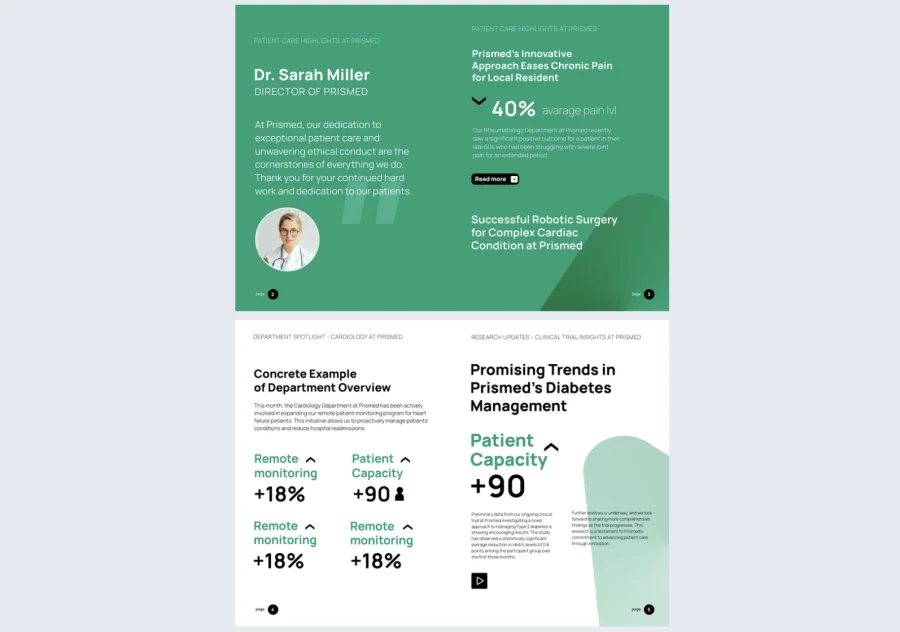
This healthcare annual report template puts results front and center: big stat callouts, department spotlight pages, and a ready-made quality improvement table, all in a calm medical design style.
Best for: hospitals, clinics, and health systems that want an interactive report without building the interactivity. Video pop-ups, “Read more” links, and mailto buttons come already placed.
Real-world application: one spotlight page per service line, your outcome stats in the callouts, and the video button as the home for your director’s message.
Common mistake to avoid: don’t fill every stat placeholder just because it exists. Five meaningful numbers beat fifty.

Interactive Foundation Annual Report Template
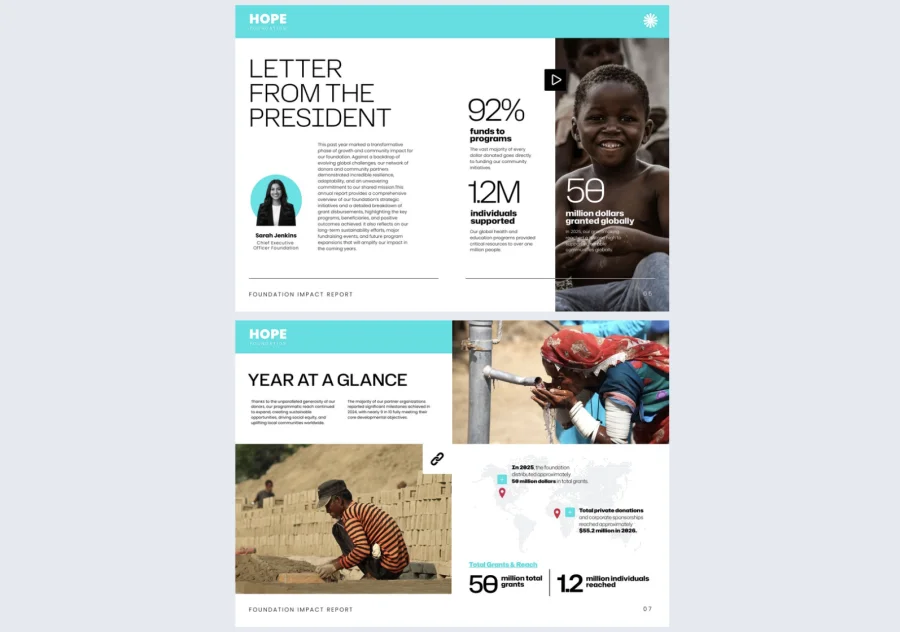
This interactive foundation annual report template is built around storytelling through motion: a video-backed table of contents, pop-up videos, and “learn more” captions layered right into the imagery, all in a warm, documentary-style design.
Best for: nonprofits and foundations that want a scroll-and-click experience without coding it themselves. Embedded videos, contact forms, and social media buttons come already placed.
Real-world application: your annual highlights video behind the TOC, a director’s message pop-up video on the letter page, and the contact form/social icons doing double duty as a donation touchpoint on the closing page.
Common mistake to avoid: don’t stack video after video just because the format supports it. One well-placed pop-up (like the president’s letter) says more than five scattered across every page.
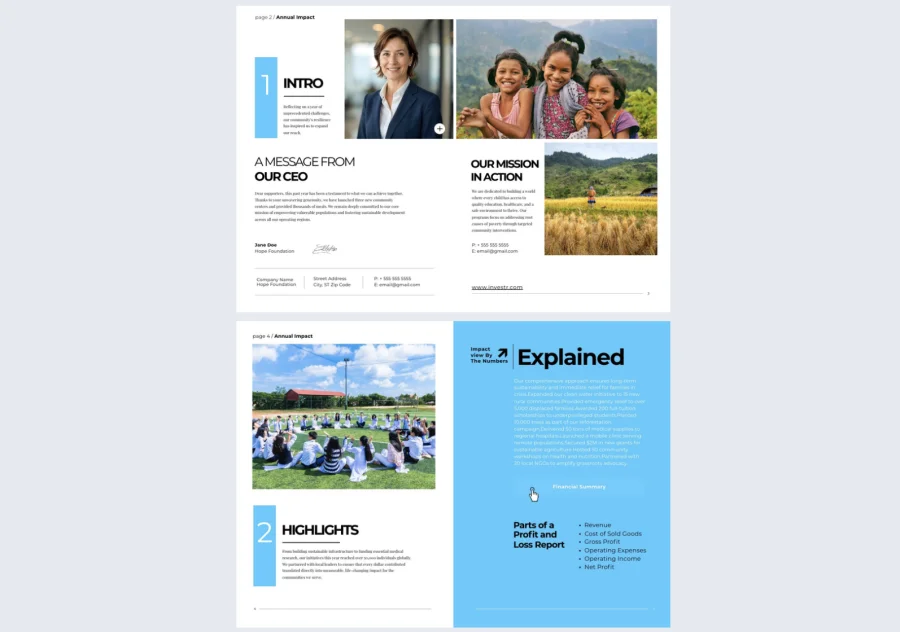
Editable Nonprofit Impact Summary Template
This editable nonprofit impact summary template is built to walk donors through your story in numbered sections, with caption links that connect readers to program details or financial breakdowns on click.
Best for: nonprofits and NGOs that want to pair strong storytelling (quotes, beneficiary photos) with clear financial transparency, without a heavy dashboard feel.
Real world application: a numbered “Highlights” section for your top achievements, a caption link on your director’s photo leading to the full financial summary, and a full bleed quote page from a volunteer or beneficiary to close out the impact story.
Common mistake to avoid: don’t bury your financial transparency behind a link and call it done. Pair it with a short visible summary too, since not every donor will click through.
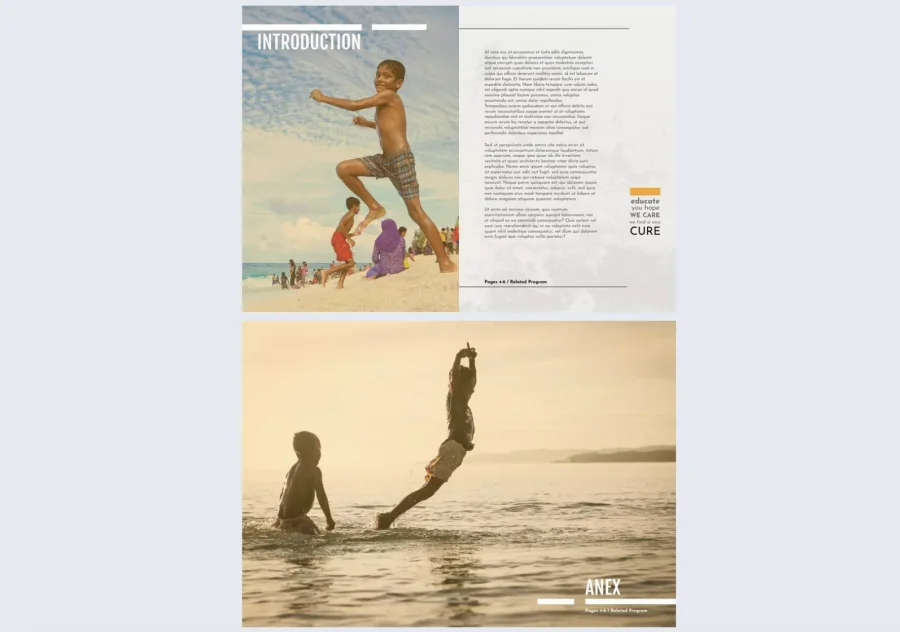
Humanitarian Foundation Annual Report Template
This humanitarian foundation annual report template leans fully into photography: full bleed images, minimal copy, and a simple page number table of contents, where you can still add your own interactive elements like descriptive captions or a contact form.
Best for: foundations that want a report that feels more like a photo essay than a dashboard, where the story is carried by the images, not by stats or clickable features.
Real world application: your strongest documentary style photos as full page spreads, a short keyword collage (like “educate,” “cure,” “we find a way”) to reinforce mission language, and a clean numbered TOC for easy navigation.
Common mistake to avoid: don’t force interactivity onto this template just because your other examples have it. Its strength is restraint. Adding pop ups or forms here would fight the minimalist design.
Printed vs digital hospital annual reports
Should your report live on paper or on screens? For most hospitals the honest answer is both. Each format earns its place differently.
When a printed report makes sense
Print still wins in the room. A well made printed report works at donor events, board meetings, and community gatherings. It signals care and permanence, which matters in major gift stewardship. Handing someone a beautiful report creates a moment a link cannot.
When a digital report works better
Digital wins everywhere else. A digital report reaches every distribution channel at once: email, social media, your website. You can update it after publishing, add interactive elements like video and links, and track how people read it. It also costs far less per reader. One file serves your entire audience.
Accessibility requirements tip the scale toward digital
For US hospitals, accessibility is a legal requirement, not a nice to have. Every hospital falls under the ADA. Those that receive federal funding, including Medicare and Medicaid, must also meet WCAG 2.1 AA standards under the HHS Section 504 rule. The compliance deadlines are May 2027 for larger organizations and May 2028 for smaller ones.
A static PDF is one of the most common failures here. Scanned pages, missing alt text, and no logical reading order make it invisible to screen readers. Flipsnack’s flipbook player is ADA, WCAG and Section 508 compliant. It supports full keyboard and screen reader navigation, and it lets you add descriptions to every page. Your report stays readable for every member of your community.
Here is the comparison at a glance:
| Printed report | Digital report | |
|---|---|---|
| Distribution | Handed out at events, mailed | Link, email, social, website |
| Cost | Per copy printing cost | One production, near zero per reader |
| Updates | Fixed once printed | Can be refreshed anytime |
| Interactivity | None | Video, links, clickable contents |
| Analytics | None | Views, time spent, most read pages |
| Accessibility | Depends on print run | Screen reader ready, WCAG friendly |
| Best for | Donor events, board packets | Broad audiences, ongoing distribution |
Why many hospitals do both print and digital reports
Hospitals usually run both formats for a few clear reasons:
- Print serves key stakeholders. Board members, donors, and executives often expect a physical copy for meetings or archives.
- Digital reaches everyone else. Staff, patients, and the wider community can access it instantly through a single link.
- A QR code bridges the two. Add a QR code to the printed copy that links to the digital format, so the two versions work together instead of competing.
- One file, two outputs. With Flipsnack, you upload the same PDF you send to the printer and get an interactive digital report: the familiar page by page reading experience, one shareable link, embedded video, and built in analytics. One design, two formats, no extra production work.
Design tips to make your hospital annual report engaging
You already know the basics: clean layout, consistent branding, real photography. These five tips go a step further, and they make the difference between a report that looks good and a report that gets read.
- Build the annual theme into a visual system. Do not stop at a themed cover. Carry one recurring color, icon set, or visual motif through every section. The report should feel like one story, not ten departments stapled together.
- One stat and one story per spread. Cap each page at a single hero number paired with a human moment. Data dumps feel thorough to the team that made them. To everyone else, they feel exhausting.
- Design the pacing, not just the pages. Alternate data heavy sections with story driven ones so readers get room to breathe. White space is not empty space. It is a pacing tool that keeps people reading.
- Make accessibility real. Alt text alone is not enough. Check the color contrast on your charts. Keep a logical reading order for screen readers, and write descriptive link text in the digital version. An accessible flipbook report reaches the widest possible target audience, including readers with low vision.
- Design for the skimmer first. Most people will give your report two minutes. Every section should land its point through the header, one visual, and one pull quote alone. The full text is there for the second read, if you earn it.

Frequently asked questions
In most hospitals, the marketing or communications team leads the project. They gather input from leadership, finance, and the foundation, then shape it into one voice. Smaller hospitals sometimes bring in a freelance writer or a design agency for support.
Plan for a production timeline of two to four months. Gathering data and stories takes the first few weeks. Writing and design fill the middle. Reviews plus approvals take longer than most teams expect. Starting right after the fiscal year closes keeps the report timely.
No. This kind of report is a communications tool, not a legal duty. Nonprofit hospitals do file a Form 990 with the IRS, but that is a separate compliance document. The annual report exists because it builds trust, not because a regulator asks for it.
A financial report covers only the numbers for the fiscal year. A hospital annual report pairs those financial highlights with patient stories, outcomes, and community impact. It also speaks to a much broader target audience than accountants and auditors.
One clear theme, patient stories next to the data, honest financials, a design style people can skim, and a single strong call to action. If a reader can say what your year was about in one sentence, the report did its job.
Conclusion
A great hospital annual report is not the longest one. It is the one people actually read: a clear theme, real patient stories, data with context, and a format that meets readers where they are. Start from a strong example, follow the seven steps, and write for the skimmer as much as the studier.
Browse Flipsnack’s annual report templates to start from a proven structure. Or upload your finished PDF and publish it as an interactive community report. You can then share it with a single link.