How to Create a Sales Leave-Behind Booklet for Post-Demo Follow-Up
Published on: May 27, 2026
The demo ended well. The prospect asked good questions, the champion seemed engaged, and everyone agreed to “circle back next week.” Then two weeks pass, the excitement fades, and the deal stalls in someone’s inbox.
This is the moment a sales booklet earns its place in the deal cycle. A well-built sales booklet recaps the conversation, equips your champion to sell internally, and keeps momentum going while you wait for the next meeting. It does the selling when you are not in the room.
In this guide, you will learn what a sales enablement booklet actually is, what to include in one, which proposal booklet template to start from. And how to build an online sales booklet template you can personalize for every deal in a few minutes.
A sales booklet is a branded document that a sales rep shares with a prospect after a demo or sales meeting. It recaps what was discussed, reinforces the value of the solution, and gives the champion something concrete to share with other stakeholders involved in the buying decision.
You will also hear it called a sales leave-behind, a post-demo follow-up booklet, or a sales follow-up asset. The term comes from the pre-digital era, when reps would leave a printed brochure on the table at the end of a meeting. The format has evolved since then. Today, most sales teams use a digital sales enablement booklet that is shared as a link rather than a printed handout.
The shift to digital changes what the booklet can do. A digital sales booklet can be updated after sending, so a typo or a pricing change does not mean reprinting anything. It can include video, clickable links, and embedded case studies. And it gives the sales rep visibility into who opened it, which pages they spent time on, and whether the champion forwarded the link internally.
That last point matters most. The biggest risk after a demo is not that the prospect loses interest. It is that the deal goes quiet because your champion cannot answer the questions their CFO or VP is asking. A good sales booklet solves that problem before it starts.
What to include in a sales booklet
A sales booklet works when it reflects the specific conversation you just had. Generic content sent to every prospect is what kills momentum, not what saves it. Use these seven sections as the structure for every post-demo follow-up booklet you send.
1. Meeting recap
Open with the basics. Date of the call, who attended from both sides, and a short summary of what was discussed. Two or three sentences is enough. This anchors the booklet in the conversation and signals to anyone reading it later that the document is specific to this deal.
2. The problem in their words
Mirror back the exact pain points the prospect raised on the call. Use their language, not yours. If they said “our reporting takes three days every month,” write that, not “inefficient reporting workflows.” When the champion shares the booklet internally, this section is what other stakeholders will recognize and react to.
3. Your solution, tailored
Cover only the features and use cases that came up on the call. Skip the rest. A demo follow-up is not a product tour. If you discussed three specific workflows, cover those three. Leave the full catalog for a separate asset.
4. Proof
Include one or two case studies from companies in the same industry or of similar size. Lead with the measurable outcome, then explain how the solution delivered it. Short and specific beats long and generic every time.
5. Pricing or commercial summary
Recap what was discussed: package, terms, what is included, anything time-sensitive. This section is often the reason the champion needs to share the booklet internally, so make it clear and easy to forward.
6. Clear next steps
Name the owner, the date, and what needs to happen before the next meeting. Vague next steps are how deals stall. A booklet that ends with “we will follow up soon” is doing the opposite of its job.
7. Easy contact and sharing
Close with the rep’s calendar link, a way to forward the booklet internally, and a contact for technical or legal questions. If your booklet includes a QR code or a short URL, put it on the back cover.
One quick rule on what to leave out. A sales booklet is not a brochure. Skip the founding story, the full leadership team, and anything that did not come up on the call. Six to twelve pages is the right length. Long enough to cover the seven sections above, short enough that a busy stakeholder will actually read it.
What Flipsnack customers are saying
I like how flexible it is and how it allows us to adapt to different clients our marketing material and leave behinds. Flipsnack helps get out adaptable marketing material and leave behind ebooklets for our clients.
Terry Rubin, Co-Owner / Co – Founder
I like it for feature-rich interactivity tools with videos, GIFs and links to embed to my publications. I love it for effortless designing and publishing sleek digital booklets for my clients which their employees are so happy with their traction and engagement.
Hannah Meir, Account Manager
Our clients love the booklet! It’s extremely easy to use, takes just a few minutes to create a flipbook, and if corrections need to be made, I love that the QR code remains the same and updates are easily done.
Hope Nold, Account Manager
Sales booklet templates to start from
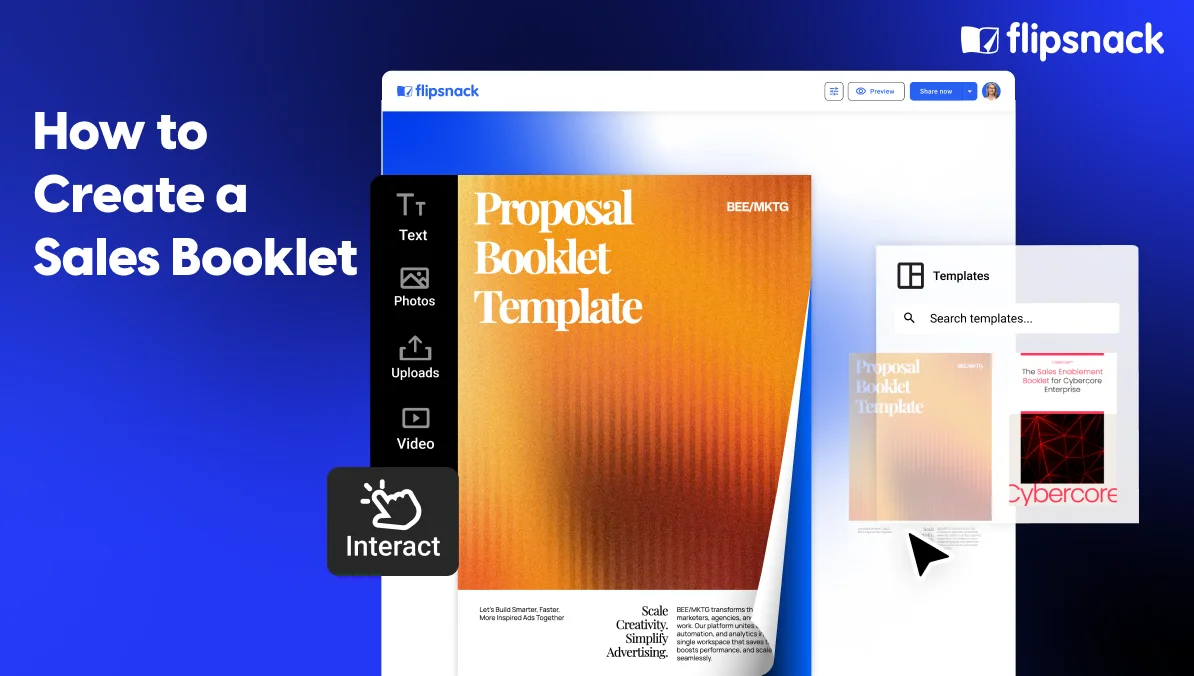
You do not need to build a sales booklet from scratch for every deal. The fastest path is to start with a structured online sales booklet template, customize it with your brand and the prospect’s details, and reuse the structure across your entire team. Here are three Flipsnack templates that cover the most common post-demo follow-up scenarios.
Online sales booklet template
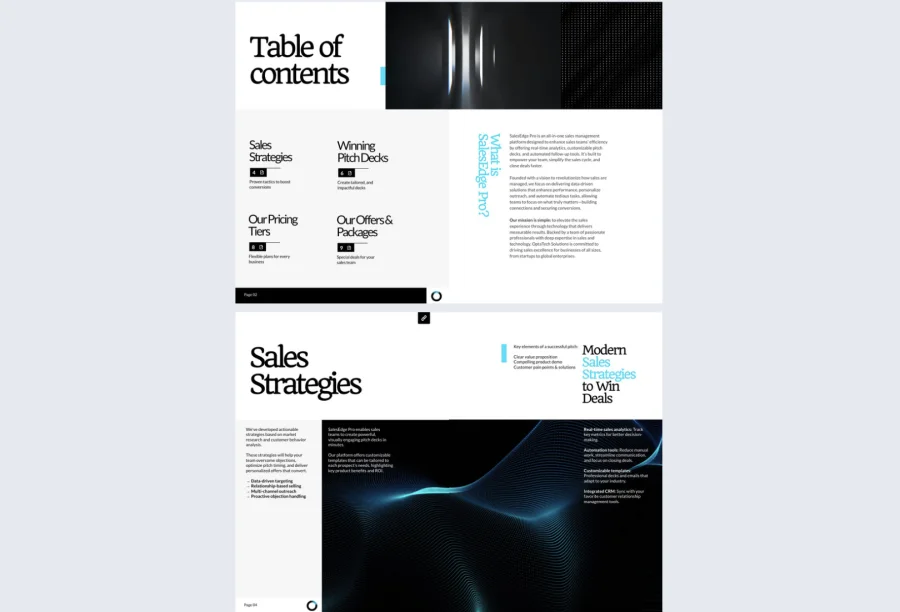
The online sales booklet template is a 10-page layout built for sales teams who need to add a layer of interactivity to their pitch and clearly convey offers to clients after a meeting. It includes structured sections for sales strategies, pitch content, and compelling offers, so you can drop in the recap of your demo and the tailored value points without rebuilding the layout.
Add go-to-page buttons for easy navigation, external links to relevant case studies, and embedded videos for the parts of the demo you want the champion to be able to replay. It is the best starting point when you want a general-purpose sales booklet that works across most deals in your pipeline.
Best for: post-demo follow-ups where you want a flexible, interactive recap of the pitch.

Sales enablement booklet template
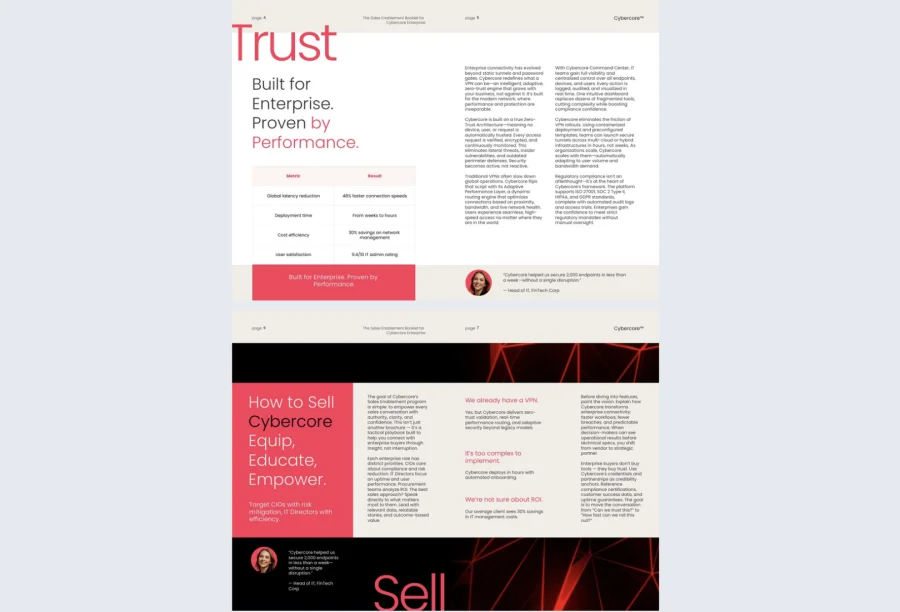
The sales enablement booklet is built for sales enablement and marketing teams that need to equip reps with persuasive content they can share with prospects. The 10-page template uses GIFs, charts, and videos to visually reinforce value propositions, ideal customer profiles, and objection-handling content.
Case studies can be highlighted with multimedia to boost credibility, which is exactly what your champion needs when they are forwarding the booklet to a CFO or department head who was not on the demo call. It is also useful internally for onboarding new reps, since it keeps messaging consistent across the team.
Best for: sales enablement booklets that need to handle objections and arm champions with strong proof points.

Proposal booklet template
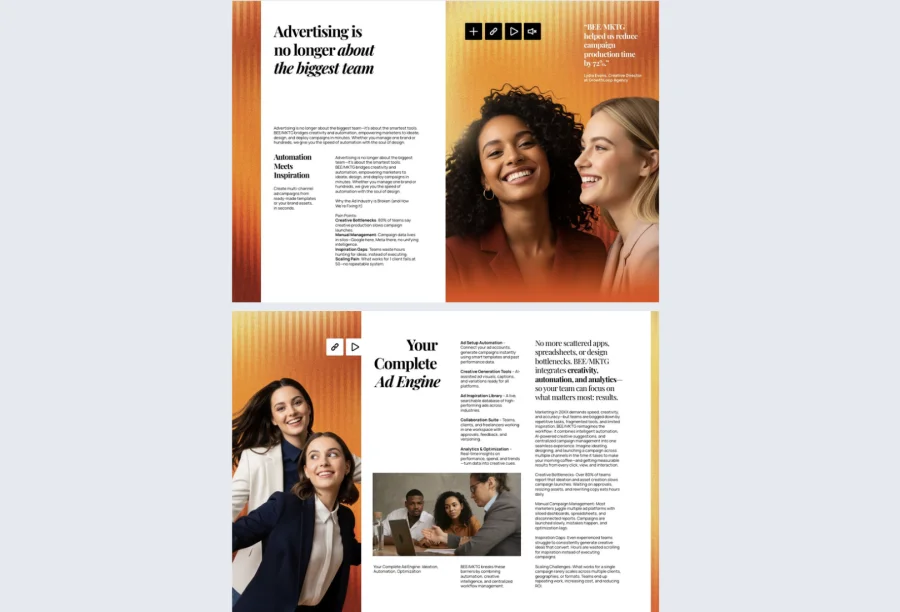
The proposal booklet template is the right starting point when the post-demo follow-up needs to function as a formal business proposal. The 10-page layout has clear sections for scope, pricing, timeline, solutions, and benefits, so the champion can scan the offer and forward it to procurement or finance without needing a separate document.
Interactive elements like GIFs, audio, video, links, and captions let reviewers see the approach in action and access supporting materials without leaving the booklet. Use this one when the deal has moved past discovery and the prospect is ready to evaluate a concrete commercial offer.
Best for: later-stage deals where the follow-up needs to double as a formal proposal with scope, pricing, and timeline.
How to create a sales booklet in Flipsnack
Building a sales booklet from one of the templates above takes about 15 minutes for the first one and far less for every booklet after that, once you have your branding and reusable sections set up. Here is the process from start to send.
1. Start from a template or upload your existing PDF
Open the template gallery and pick the layout that matches your deal stage. If your team already has a static sales deck or PDF you have been sending after demos, upload it to Flipsnack instead. The platform converts it into an interactive booklet automatically, so you do not lose the design work your team has already done.
2. Personalize the booklet for the prospect
This is the step that makes a sales booklet work. Update the cover with the prospect’s company name, logo, and the date of the demo. Edit the recap section with their specific goals and the exact pain points they raised on the call. Swap out the default case studies for ones from their industry or company size. The structure stays the same across every deal, but the content reflects the conversation you just had.
3. Add interactive elements
This is where a digital sales booklet pulls ahead of any PDF. Embed the demo recording so the champion can replay the parts they want to share. Add clickable links to relevant product pages, customer stories, and technical documentation. Include a calendar booking link on the next steps page so the prospect can schedule the follow-up call without leaving the booklet. If you have a video testimonial from a similar customer, drop it into the proof section.
4. Set sharing and access controls
Decide who should be able to see the booklet. Use a private link with password protection if the booklet includes pricing or commercial terms you do not want forwarded freely. Use a public link if you want the champion to share it broadly inside their organization. Generate a QR code if you are handing off the booklet in person at a follow-up meeting or trade show.
5. Track engagement and follow up at the right moment
Once the booklet is sent, Flipsnack’s analytics show you when the prospect opened it, which pages they spent the most time on, and whether the link was shared internally. This tells you two things: when to follow up, and what to focus on in the next conversation.
If the prospect spent five minutes on the pricing page and nothing on the case studies, your next email should address pricing questions directly.
Final thoughts
A strong sales booklet does the work your reps cannot do alone. It keeps the conversation alive after the demo ends and gives your champion something concrete to share with the rest of the buying committee.
It also turns a static follow-up into a trackable asset that tells you exactly when to step back in.
The hardest part is starting from a blank page, and you do not have to. Pick one of the templates above and customize it for the deal in front of you. Or upload the sales PDF your team is already using and let Flipsnack turn it into an interactive booklet in minutes.
Either way, you end up with a sales enablement booklet that looks polished, reads like it was built for the prospect, and gives your team the engagement data you need to close more deals.
Frequently asked questions
A sales deck is designed to be presented live by a rep. A sales booklet is designed to be read and shared without anyone in the room. The booklet includes more context, recaps the conversation, and equips the champion to sell internally, while the deck supports the rep during the call.
Six to twelve pages is the sweet spot. Long enough to cover the seven sections of a good sales booklet, short enough that a busy stakeholder will actually read it. The 10-page templates from Flipsnack land right in that range and are a useful default.
The structure stays the same; the content does not. Reuse the layout, the brand elements, and the boilerplate sections like company overview and case studies. Personalize the meeting recap, the pain points, the tailored solution, and the next steps for every deal. Most of the booklet is reusable, which is what makes the format scalable.
Yes. A digital sales booklet built in a platform like Flipsnack shows views, time spent per page, and shares. You can see when the prospect opened the booklet, which sections they engaged with, and whether the champion forwarded the link to other stakeholders. This visibility is one of the biggest reasons sales teams move away from PDFs.
Yes. Because the booklet is shared as a link rather than a file, any edits you make after sending are reflected the next time the prospect opens it. The link and any QR codes stay the same. This means a pricing change, a new case study, or a typo fix does not require resending anything.