Booklet Sizes: Standard Dimensions for Print & Digital (2026 Guide)
Published on: August 12, 2026
Someone in the design team asks what size the booklet should be. You pause. Every decision after that one — layout, page count, print cost, whether the file also works online — bends around your answer.
Standard booklet dimensions aren’t complicated. The catch is that the “right” size depends less on personal preference and more on where the finished booklet is going. A printer needs one thing. An inbox needs another. A file that has to do both needs a third.
This guide covers every standard booklet size in inches, millimeters, and pixels, plus which one fits which use case for print, digital, or both. Use the table below for a quick answer, then read on for the detail behind each format.
| If you need… | Recommended booklet size |
| A corporate report or catalog | US Letter or A4 |
| A compact promotional booklet | Half Letter or A5 |
| An event program or playbill | Half Letter or A5 |
| A premium lookbook | Square (8.5 × 8.5 in) |
| A pocket-sized handout | Pocket (4.25 × 5.5 in) or A6 |
| A product catalog for retail | US Letter or A4 |
| A digital-only booklet | A4 or US Letter, exported at 72 DPI |
Table of contents
What is a standard booklet size?
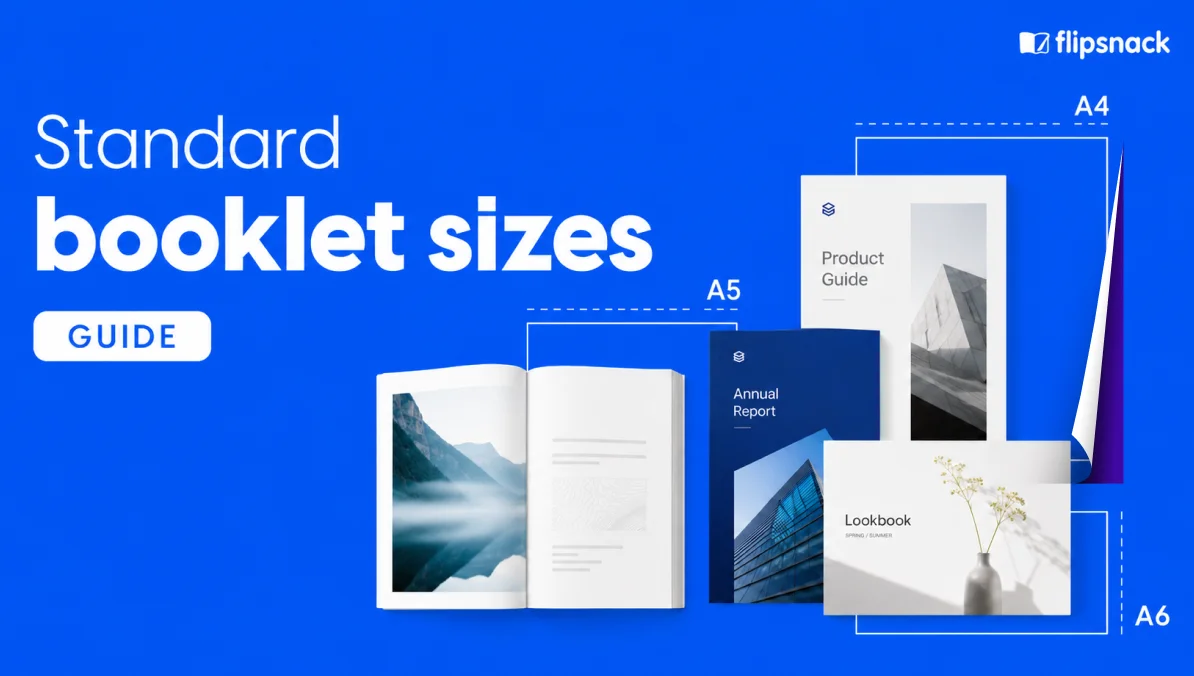
A standard booklet size is one of the pre-defined trim dimensions that commercial printers, design tools, and paper mills already support — the most common are US Letter (8.5 × 11 in), Half Letter (5.5 × 8.5 in), A4 (210 × 297 mm), and A5 (148 × 210 mm). These sizes print economically because they map cleanly onto standard press sheets.
Standard sizes exist because printers run their equipment on a fixed set of sheet dimensions. Design your booklet at one of them and the printer imposes multiple pages onto a single sheet, folds, trims, and binds without waste. Design at a custom size and you’re paying for the paper the press has to cut off.
Two dimensions matter when you’re setting up a booklet file. The trim size is the finished dimension after cutting — what a reader actually holds. The flat sheet size is the paper the printer starts with, usually double the trim on one axis so that folding produces two facing pages. Design at the trim size, add bleed past the edge, and the printer handles the rest.
For adigital booklet, the same trim size becomes the on-screen page dimension. Nothing gets folded, but the aspect ratio still shapes how readers experience the content on desktop and mobile.
What are booklet dimensions in pixels?
Pixel dimensions determine whether a booklet looks sharp or soft on the output medium. The math is straightforward: multiply the size in inches by the DPI (dots per inch) you’re exporting at.
Two resolution standards cover almost every booklet project:
- 300 DPI — the industry standard for commercial printing. Text stays crisp, photographs stay detailed, and the printer has enough data to produce accurate color.
- 72 DPI — the standard for on-screen viewing. Files stay light enough to load quickly on desktop and mobile, and readers don’t perceive the loss because screens display at lower physical densities than paper.
The pixel column in the master table above already covers both resolutions for every standard booklet size. Two examples for reference:
- A US Letter booklet at 300 DPI is 2550 × 3300 pixels. At 72 DPI, it’s 612 × 792 pixels.
- An A4 booklet at 300 DPI is 2480 × 3508 pixels. At 72 DPI, it’s 595 × 842 pixels.
Pro tip: design at 300 DPI even if the booklet will only ever appear online. Higher resolution files scale down cleanly for screens, but low-resolution files can’t scale up without losing quality. Design once at print resolution and you keep the option to print later — or publish the same file as a digital booklet for both media without re-exporting.
What are the standard booklet sizes for print and digital?
Most booklet projects use one of nine standard sizes. Four cover North American print, three cover ISO 216 international print, and two square formats show up when the booklet is primarily visual. All of them work for digital output too — you just change the export resolution.
The table below gives dimensions in inches, millimeters, and pixels at both print (300 DPI) and screen (72 DPI) resolution. Use the print column when the file is going to a commercial printer. Use the screen column when the booklet is going online.
| Booklet size | Inches | Millimeters | Pixels @ 300 DPI | Pixels @ 72 DPI | Best for |
| 4.25 × 5.5 | 108 × 140 | 1275 × 1650 | 306 × 396 | Journals, guides, packaging inserts | |
| Half Letter | 5.5 × 8.5 | 140 × 216 | 1650 × 2550 | 396 × 612 | Event programs, catalogs, handouts |
| 6 × 9 | 6 × 9 | 152 × 229 | 1800 × 2700 | 432 × 648 | Novels, self-published books, portfolios |
| US Letter | 8.5 × 11 | 216 × 279 | 2550 × 3300 | 612 × 792 | Corporate booklets, reports, catalogs |
| Square (large) | 8.5 × 8.5 | 216 × 216 | 2550 × 2550 | 612 × 612 | Premium lookbooks, art portfolios |
| A6 | 4.13 × 5.83 | 105 × 148 | 1240 × 1748 | 298 × 420 | Pocket booklets, notebooks |
| A5 | 5.83 × 8.27 | 148 × 210 | 1748 × 2480 | 420 × 595 | International event brochures, guides |
| A4 | 8.27 × 11.69 | 210 × 297 | 2480 × 3508 | 595 × 842 | International reports, catalogs, magazines |
| Square (small) | 6 × 6 | 152 × 152 | 1800 × 1800 | 432 × 432 | Photo booklets, small lookbooks |
Two things to note before you commit to a row. First, “best for” is a starting point, not a rule — a hospitality brand can absolutely publish an A4 lookbook, and a novelist can absolutely self-publish at Half Letter. Second, the pixel columns assume a portrait orientation; swap the numbers for landscape.
US Letter (8.5 × 11 in)
The default booklet size across the US and Canada. Print economics favor it — every commercial press runs Letter without setup adjustment — and readers already recognize the proportions from every report and manual they’ve ever held. Use it for corporate booklets, product catalogs with detailed specs, training manuals, and any content that needs room for both text and imagery. The trade-off is that a Letter booklet doesn’t slip into a pocket or a mailing envelope without folding.
Half Letter (5.5 × 8.5 in)
A Letter sheet folded in half. Half Letter is one of the cheapest booklet sizes to print because it uses standard paper efficiently — four booklet pages come out of each folded Letter sheet. Ideal for event programs, playbills, product guides, and any handout designed to travel with the reader. Fits inside a standard 6 × 9 envelope, which matters for direct mail.
6 × 9 inches
The trade paperback size. Feels more premium than Half Letter and less bulky than Letter, which is why self-published authors, portfolio designers, and small-run publishers reach for it. A common choice for guides that need to feel book-like on a shelf.
Square (8.5 × 8.5 in)
The square format signals premium before a reader opens the cover. Photographers, luxury brands, hospitality groups, and art-led catalogs use square booklets for the same reason they use square Instagram grids — the format compresses visual content without cropping it. The honest trade-off is cost: square booklets use paper less efficiently than rectangular ones, so short runs cost more per unit.
A4 (210 × 297 mm)
The international default under the ISO 216 standard. Close to US Letter but slightly taller and narrower, which affects layout when a designer is repurposing files across regions. Use A4 for booklets distributed outside North America — European printers stock A-series paper by default, and A4 files map to the rest of the A-series through halving (fold an A4 sheet and you have two A5 pages).
A5 (148 × 210 mm)
Half an A4. A5 is the European equivalent of Half Letter, though slightly taller. Popular for event brochures, travel guides, patient information booklets, and any compact publication meant to be carried. Works with standard European envelopes and mailing formats.
A6 (105 × 148 mm)
Pocket-sized. Half an A5. A6 is the smallest ISO format used regularly for booklets and covers the same use cases as the North American Pocket size — packaging inserts, small notebooks, tourist information, product tags with extra content. Some printers don’t offer A6 natively; the workaround is to print at A5 and trim.
How do you choose the right booklet size?
Four criteria shape almost every booklet-size decision. Work through them in order and the right size usually becomes obvious.
Your output medium
- Print only: the size determines your printer’s cost per unit, so pick a standard dimension that maps cleanly to a press sheet. US Letter, Half Letter, A4, and A5 all qualify.
- Digital only: any size works, but standard dimensions still help — readers on desktop and mobile are used to Letter and A4 proportions, and templates are easier to find.
- Both: design once at 300 DPI on a standard size, export a print-ready PDF, and publish the same file online. No re-export, no version drift. See our guide to digital booklet design for layout patterns that translate cleanly between media.
Distribution method
- Direct mail: Half Letter (fits a 6 × 9 envelope) or A5 (fits C5) keeps postage costs down.
- Event handout: portable formats — Half Letter, A5, or Pocket — travel with the reader.
- Trade show or showroom: Letter or A4 gives your visuals room to land.
- Digital-only: distribution is a link, so size stops constraining reach.
Content type and industry
- Retail catalogs and product guides: Letter or A4 gives you room for photos and specs; square works for photo-led lookbooks.
- Corporate reports and internal comms: Letter or A4 matches the format readers already associate with formal documents.
- Event programs, playbills, funeral programs: Half Letter or A5 fits the hand and the moment.
- Real estate brochures and property showcases: Letter or Tabloid gives listings the visual weight they need.
Budget and page count
- Saddle-stitched booklets need a page count that’s a multiple of four — 4, 8, 12, 16, and so on. That’s a hard rule set by how folded sheets bind together, not a preference.
- Custom sizes cost more than standard sizes. Sometimes noticeably more, since the printer trims off the paper the press has to waste.
- Digital booklets skip the multiples-of-four rule entirely. A printed booklet is built from folded sheets. A digital booklet is built from pages.
Create your booklet at any size with Flipsnack
Picking the right dimensions is only step one. Step two is producing the booklet without switching between three tools and losing a week to file conversions.
Flipsnack handles both steps in one workflow. Start from a pre-sized template in any standard booklet dimension — US Letter, Half Letter, A4, A5, or square — and design directly in the browser. If you already have a print-ready PDF, upload it and edit the file in place: swap images, update copy, adjust pricing, no re-export needed. See how it compares to alternatives in our roundup of the best digital booklet makers.
What you get from one file:
- A print-ready PDF at 300 DPI — export in seconds, send to your printer, get a physical booklet that matches the design on screen.
- A digital flipbook under a persistent link — publish the same booklet online, share the URL, and update the content anytime without breaking the link or losing analytics.
- Page-level engagement data — see who opened the booklet, how long they spent on each page, where they dropped off, and which links they clicked.
- Interactive elements inside the layout — embed videos, product tags, forms, and clickable table-of-contents entries, so the digital version does more than the print version can.
- Brand controls that scale across a team — lock templates, share a brand kit, and let colleagues customize without breaking the format.
The size decision you made in Section 3 stays consistent from the first draft to the printed catalog to the online flipbook. One trim size. One file. Two output media.
Frequently asked questions
In North America, the most common booklet size is US Letter (8.5 × 11 in). In Europe and most international markets, it’s A4 (210 × 297 mm). Half Letter (5.5 × 8.5 in) and A5 (148 × 210 mm) come next — both are compact formats produced by folding a Letter or A4 sheet in half, which makes them among the cheapest booklet sizes to print at scale.
• 6 × 9 envelope: Half Letter (5.5 × 8.5 in) fits without folding.
• #10 business envelope: US Letter (8.5 × 11 in) fits when folded in thirds; Half Letter fits when folded in half.
• C5 envelope: A5 (148 × 210 mm) fits without folding.
• DL envelope: A5 fits when folded in thirds; DL booklets (99 × 210 mm) fit unfolded.
Match the booklet size to the envelope before you print, not after. Retrofit costs add up quickly on direct-mail runs.
For saddle-stitched booklets, yes. Each folded sheet inside a saddle-stitched booklet produces four pages — a front, a back, and two inner sides — so the total page count has to divide by four. That means 4, 8, 12, 16, 20, and so on. If your content lands on 13 pages, the printer adds three blank pages to reach 16. Perfect-bound and wire-o booklets don’t have this constraint — pages bind individually. Digital booklets skip the rule entirely, since nothing is being folded.
Design and export at 300 DPI for any booklet going to a commercial printer. That’s the industry-standard resolution for sharp text and photographic detail on paper. For digital-only booklets — flipbooks, embedded documents, PDFs shared online — 72 DPI is enough, since screens display at lower physical densities than paper.
A booklet is bound. A brochure is folded. That’s the shortest honest answer, though the two overlap in the middle — a bi-fold “brochure” and a very short saddle-stitched “booklet” can look almost identical. In practice, booklets run 8 pages or more and use staples, glue, or coil binding; brochures are usually a single folded sheet with 4 to 6 panels.
Yes — if you design at 300 DPI on a standard booklet size, the same file exports as a print-ready PDF and publishes as a digital flipbook without re-work. Flipsnack builds this workflow into one platform: design once at the trim size, hit publish for the online version, hit export for the print version, and update the content later without breaking either link. One file, two outputs, one source of truth.