8 Education Brochure Examples + Free Templates
Published on October 28, 2026
Creating an education brochure that stands out starts with the right inspiration. Whether you’re promoting a school, showcasing university programs, or helping prospective students explore their options, a well-designed brochure can make information easier to understand and encourage readers to take the next step.
To help you get started, we’ve gathered 8 real education brochure examples from schools, colleges, and universities. We’ll explore what makes each one effective, highlight design ideas worth borrowing, and share practical tips for creating your own.
You’ll also find education brochure templates and guidance on what to include, which format to choose, and how to turn your brochure into an interactive digital experience.
- What an education brochure is, and how school, college, and university types differ
- Eight real examples, with what works, what to improve, and what to borrow from each
- What to include, and which size and page count suit each decision
- How print compares with digital for admissions and outreach
- How to build your own with Flipsnack, step by step
Table of contents
- What is an education brochure?
- Which education brochure examples are worth studying, and what makes them effective?
- What can education brochures do beyond recruitment?
- What should an education brochure include?
- Which size and format should an education brochure use?
- Should an education brochure be print or digital?
- How do you make an education brochure with Flipsnack?
- Education brochures to get you started
- FAQ about education brochures
What is an education brochure?
An education brochure is a printed or digital publication that a school, college, university, or training provider uses to present programs, costs, support services, and next steps to prospective students, families, and other audiences.
Purpose shapes type. School brochures help families compare local options. Versions for higher education compare programs, costs, and campus life. Viewbooks lean on photography and student voices. Prospectuses, a term more common outside the US, lean on course detail and entry requirements. Our deep dive on university prospectus templates covers that last format.
Not every education brochure recruits. Strategic plans, parent guides, and program directories belong here too, and you’ll meet all three below.
Which education brochure examples are worth studying, and what makes them effective?
Eight public flipbooks, from 2 pages to 40, serve audiences ranging from Grade 9 families to college trustees. Together they show that format follows audience.
| Institution | Audience | Format | Main next step |
|---|---|---|---|
| Sudbury Catholic DSB | Future Grade 9 students and families | 2 canvases, 6 tri-fold panels | Register on the board site |
| NSLC | Students in grades 6 to 12, plus parents | 40 pages | Enroll online |
| St. Petersburg College | Prospective college students | 2 pages | Visit a degrees page |
| University of Washington College of Education | Education majors and minors | 6 pages | Contact advisers, scan QR codes |
| UC Riverside | International undergraduates | 16 landscape pages | Apply, contact admissions |
| Adelphi Manhattan Center | Working professionals | 4 pages | Scan a code to apply |
| Prairie State College | Employees, trustees, community | 8 pages | Visit the college website |
| Vassar College | Parents and families | 11 pages | Email or call to join |
Length tracks the decision. A two-page directory suits a quick scan, while a 40-page guide suits a family weighing a summer investment. We reviewed each flipbook in October 2026, and every figure below is the publisher’s own claim for that edition.
1. Sudbury Catholic DSB
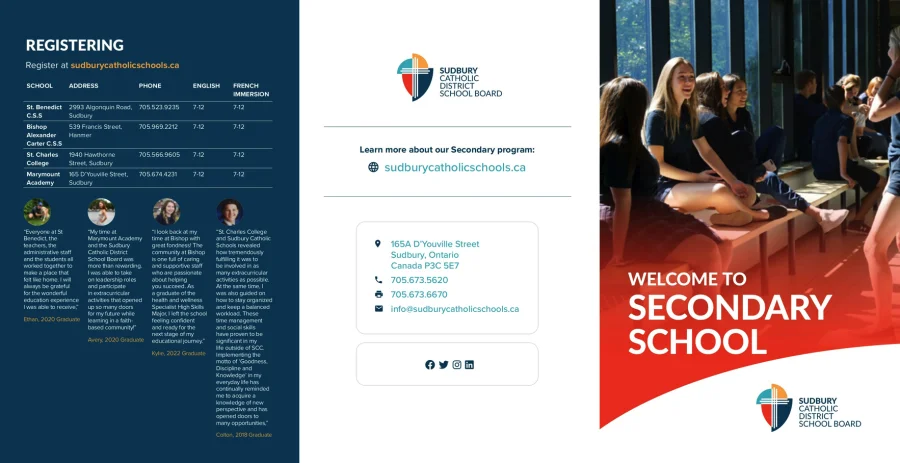
The Sudbury Catholic District School Board in Ontario made this two-page flipbook for families choosing a secondary school. Each page holds three tri-fold panels, six in total.
What works
- Contacts beside the call to register. The exterior left panel lists four schools, grade ranges, language options, and phone numbers next to the instruction to register.
- Emotion before logistics. The interior opens with seven graduate expectations and four identity questions, including “Where do I belong?”
- A scannable program matrix. A specialist high skills grid shows which school offers which sector.
The gap: Interior content squeezes onto one wide canvas, so text turns tiny on small screens. The register link leads to a homepage, and the email link carries a stray space.
Borrow this: Place a contact table beside your registration prompt. Families shouldn’t hunt for a number.
2. NSLC program
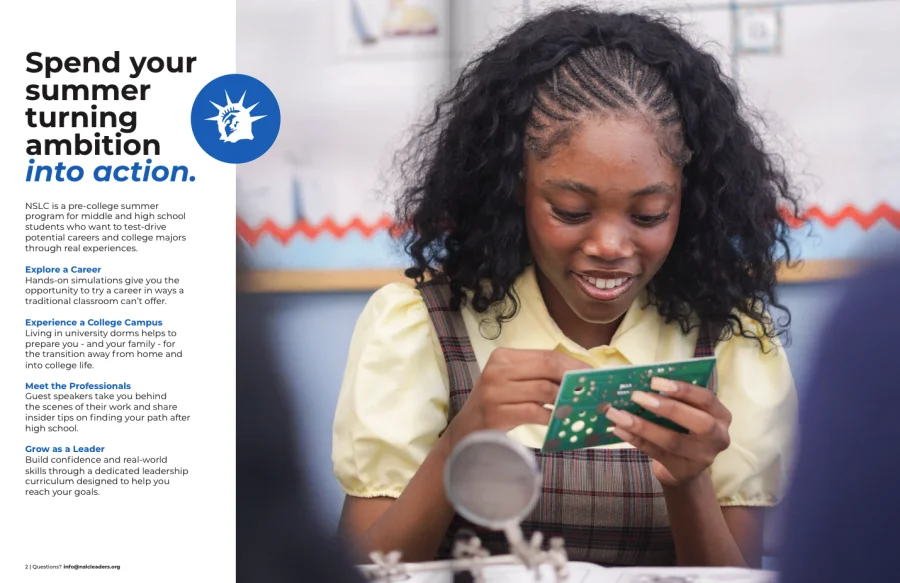
What works
- One layout, many programs. Program pages (p8 to p36) repeat identical blocks: activities, locations, duration, a testimonial, and a link.
- Color-coded navigation. A contents page and labeled side tabs sort programs into five subject families.
- Objections answered. Scholarship dates, payment terms, and cancellation conditions sit beside a registration link (p39).
The gap: That final page is dense, and four survey percentages (p5) carry no sample size or date. Add a method line whenever you publish self-reported outcomes.
Borrow this: Design one program-page layout, then reuse it for every offering.
3. St. Petersburg College: a two-page program directory
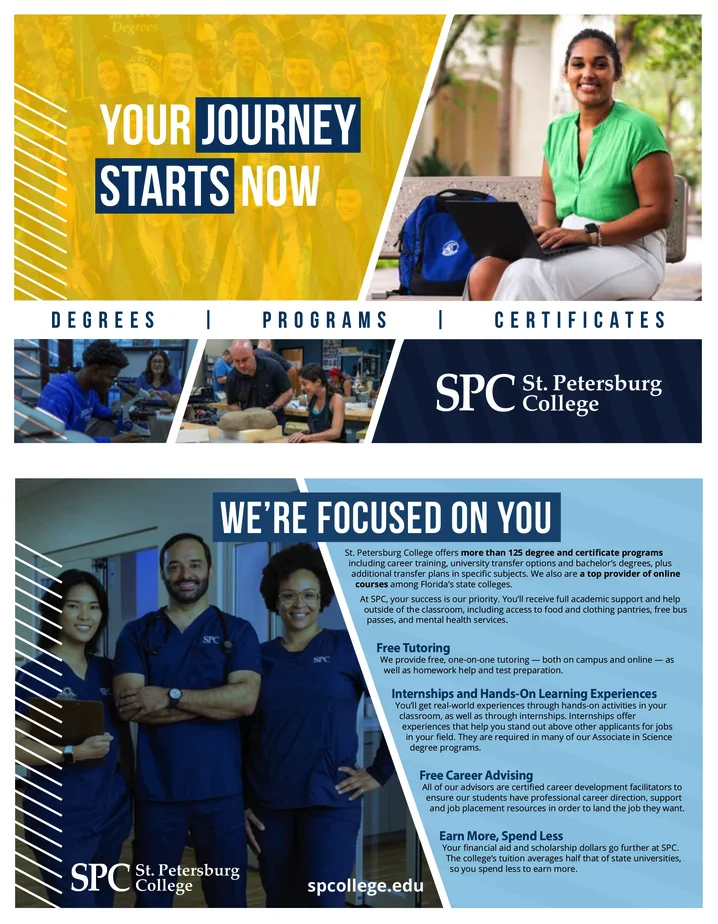
St. Petersburg College in Florida packs degrees, programs, and certificates into two oversized pages, each 10.5 by 13.5 inches.
What works
- Support made tangible. Page one backs a promise of personal attention with four concrete benefits: free tutoring, practical experience, career advice, and affordability.
- A legend that saves time. The directory (p2) groups programs by discipline and credential, then flags online options with a simple symbol.
The gap: No apply or visit action appears anywhere. Narrow type strains small screens, and every web address is printed rather than linked.
Borrow this: Add a symbol legend to long program lists, so readers filter by study mode at a glance.
4. University of Washington College of Education
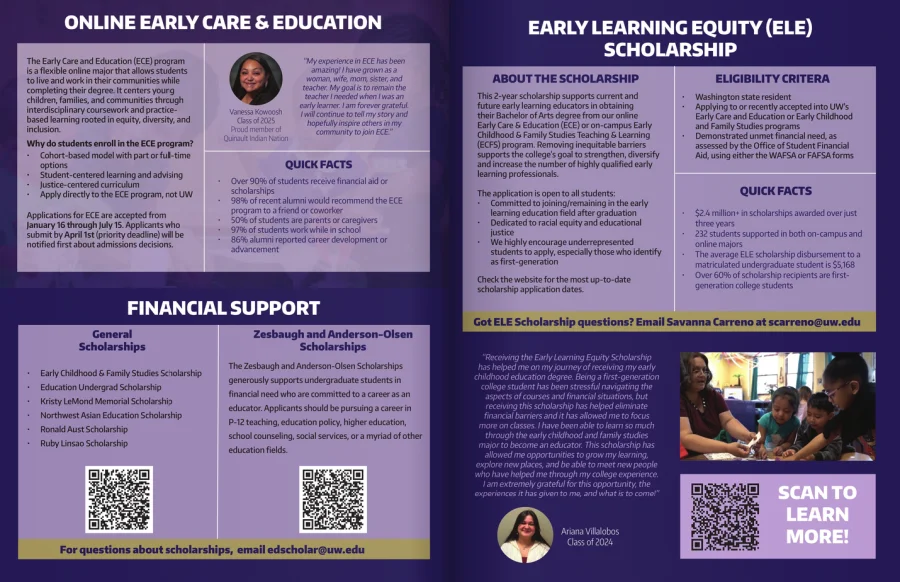
This undergraduate guide compares four programs and a minor, then turns to funding.
What works
- Side-by-side comparison. Each program (p2 to p4) pairs a description, a student voice, and quick facts, so readers weigh options without flipping back.
- Funding made concrete. The scholarship page (p5) states eligibility, names a contact, and reports $2.4 million-plus awarded to 232 students over three years, according to the publisher.
- QR codes with a destination. Four codes lead to program and scholarship pages.
The gap: Outcome percentages lack a cohort, year, or method. Most deadlines have no direct application link beside them.
Borrow this: Attach a source line and date to every quick-fact block.
5. UC Riverside
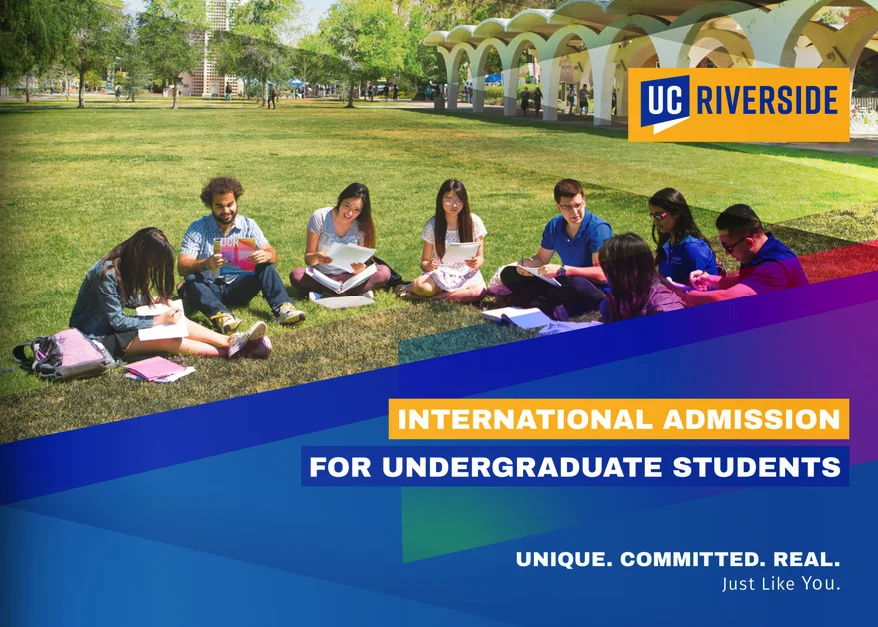
Treat this 16-page flipbook as a structure study, not current guidance. It dates from May 2021, so costs and requirements are archival.
What works
- Audience on the cover. The title names international undergraduates directly, and a welcome (p2) introduces support services immediately.
- Clickable contents. A 16-item menu lets readers jump from rankings to housing to costs.
- Cost beside action. One page (p14) combines fees, a scholarship, a calculator link, and the application route.
The gap: Four dense columns of requirements (p15) cite dates that have passed, and the download link returned a 404 during our review.
Borrow this: Pair costs with the way to apply on one page, and date every requirement or link to a maintained one.
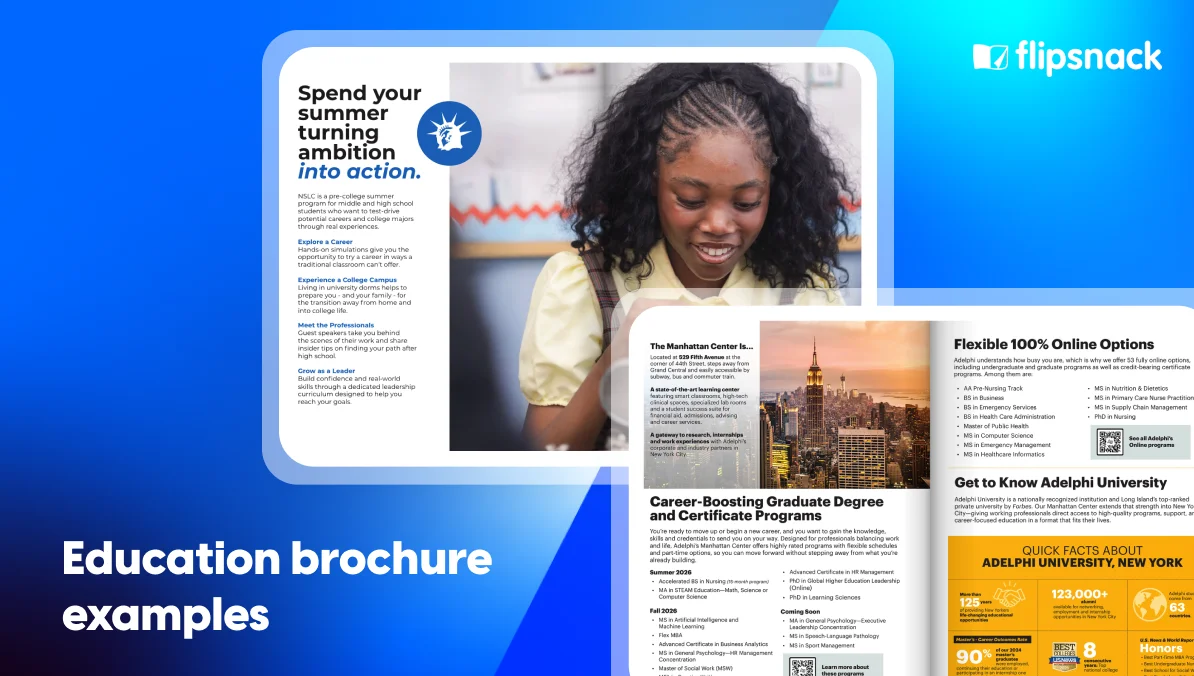
6. Adelphi University Manhattan Center
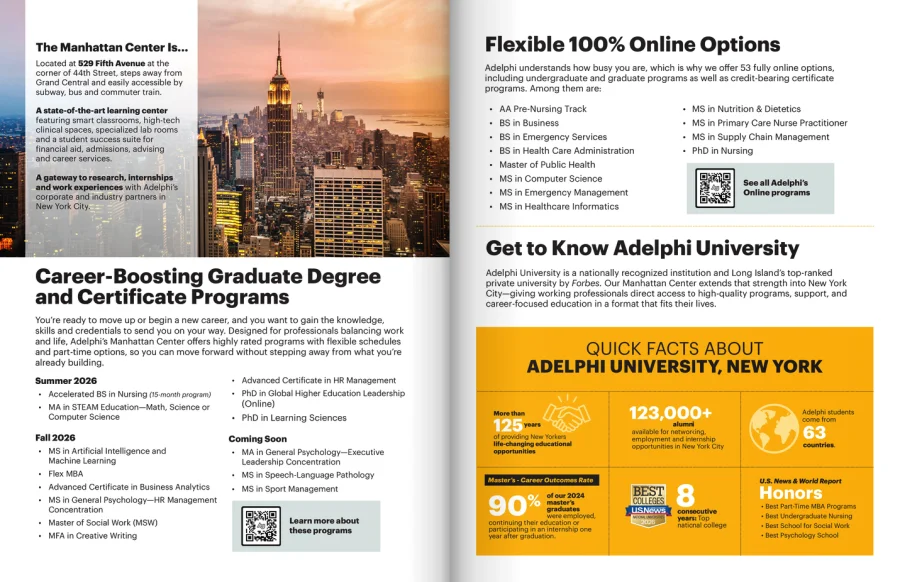
Adelphi’s Manhattan guide addresses career changers who need flexible schedules. The result is compact and decisive.
What works
- Programs sorted by start date. Summer 2026 and Fall 2026 offerings sit apart from a “Coming Soon” block (p2).
- A quick-fact grid. Six panels (p3) turn credentials into scannable facts.
- A decision page. The last page combines flexibility, walking times to transit hubs, new labs, a scholarship note, and one action prompt.
The gap: Next steps rely on QR codes beside a plain web address, which adds friction for readers already holding a phone. Several claims describe the whole university, not this center.
Borrow this: Separate current and upcoming programs, so readers see what’s open now.
What can education brochures do beyond recruitment?
The short answer: They can explain strategy to trustees, welcome parents, and report progress. Each job needs different proof, but one discipline holds: a single audience and a single next step.
7. Prairie State College: a strategic plan as a brochure
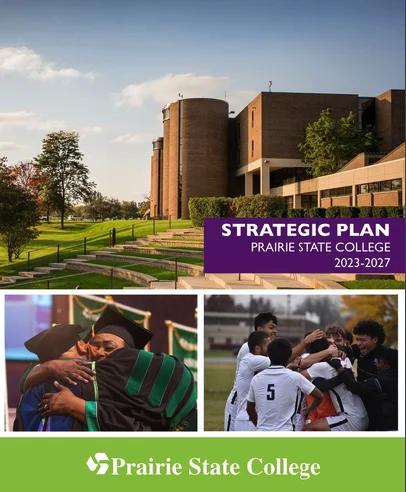
In Illinois, Prairie State College condenses its 2023-2027 plan into eight pages. It doesn’t recruit anyone, and doesn’t pretend to.
What works
- Priorities you can summarize. Six numbered goals sit under color-coded headings across a single spread.
- Visible consultation. Page 7 describes four phases, four half-day workshops, and surveys of students, employees, trustees, and community members.
The gap: Goals carry no baselines, targets, owners, or dates, so readers can’t judge progress. A printed website is the only action.
Borrow this: Show how a plan was built, then publish progress against each goal.
8. Vassar College: a parent guide organized around a four-year timeline
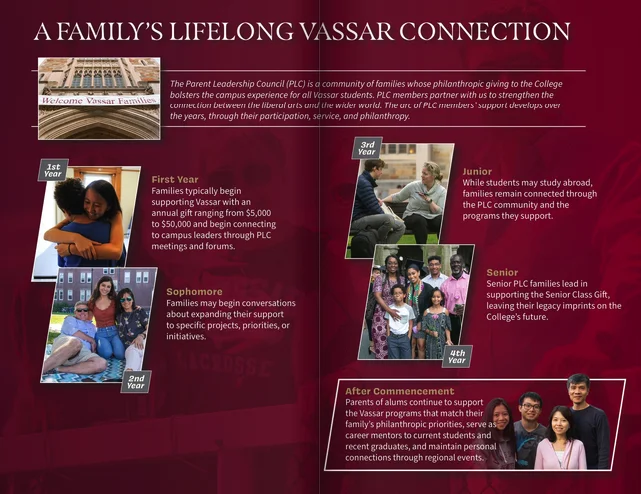
Vassar’s Parent Leadership Council guide invites families to volunteer and give. It runs 11 pages at 5.5 by 8.5 inches.
What works
- A voice parents recognize. Page 2 opens with a letter from four council chairs, written parent to parent.
- Expectations up front. Page 3 lists what members do, including an annual leadership gift of $5,000 to $50,000-plus. Candor earns trust.
- A timeline across four years. A spread maps involvement from first year through life after commencement.
- Reader options. The viewer’s accessibility panel offers a cover description and font-size controls.
The gap: The joining action is a small printed email and phone line (p6). A 2024-25 calendar (p8) already looks dated.
Borrow this: Make the main action large, linked, and impossible to miss.
What should an education brochure include?
The short answer: A strong education brochure gets five parts right: a cover aimed at one reader, a layout that guides the eye, visuals that carry real people and voices, content that answers the decision, and one clear next step. Skip any element your audience doesn’t need, and stamp every claim with a year or an edition.
Each part below borrows from the eight examples above, so you can see the idea working in a real flipbook.
Cover design: how to create a cover that grabs attention
Your cover answers one question in seconds: is this for me? Name your reader up front, then back it with a real photo and a promise.
- Name the reader. UC Riverside speaks to international undergraduates before anything else.
- Pair people with a promise. St. Petersburg College sets student faces beside an encouraging headline.
- Limit the message. A cover that sells every program convinces nobody.
Layout: how to organize information so it is easy to follow
Readers scan before they read. Group details by the questions families ask, then give each group a predictable home.
- Repeat one structure. NSLC reuses one template across its program pages, so readers learn the pattern once.
- Provide quick jumps. UC Riverside offers a clickable contents list, and NSLC adds color-coded side tabs.
- Add a key. St. Petersburg College marks study mode with one symbol, which lets readers filter fast.
Visuals: how to use relevant photos and testimonials
Real faces and named voices build trust faster than stock photography. Place each one beside the claim it supports.
- Choose your own people. Photos of actual students and campus show daily life, while stock images show nothing.
- Name every testimonial. NSLC names alumni and parents, and UW names class years, so readers can judge the source.
- Pair voices with facts. UW sets a student quote beside quick facts on each program page.
- Match the speaker to the reader. Vassar lets council chairs address parents directly, as peers.
Content: what information helps students and parents decide
Families and students weigh cost, fit, and support. Answer those first, then add a year to every number.
- Programs people can scan. Group by discipline, as SPC does, and mark study modes.
- Cost beside the route to apply. UCR’s cost page is the model; date every figure.
- Funding and deadlines. NSLC and UW state eligibility, dates, and contacts.
- Practical logistics. Vassar covers travel and lodging; Adelphi lists transit distances.
- Proof with a source and a year. Rankings and outcomes need method lines, which UW and NSLC lack.
CTA: how to direct readers to their next step
Readers who reach the end still need a nudge. Offer one action, and make it easy on a phone.
- Choose one action. Apply, register, visit, or ask. Prairie State points only to its website, and Vassar closes on contact details in small type.
- Swap printed addresses for links. Several examples print URLs that nobody can tap. Live links turn each one into a one-touch action.
- Spare phone readers a detour. Adelphi depends on QR codes, which adds a detour for anyone reading on mobile.
- Put the action beside the proof. NSLC places its registration link next to scholarship, payment, and cancellation terms.
For layout fundamentals, see our brochure design anatomy guide and our walkthrough on making a brochure from scratch.
Which size and format should an education brochure use?
The short answer: Match page count to the decision. Two pages suit fast browsing, 4 to 16 pages suit comparison, and 40 pages suit a high-stakes commitment. Landscape canvases read better on screens, while portrait fits print.
| Brochure | Pages | Size or orientation | Decision supported |
|---|---|---|---|
| St. Petersburg College | 2 | Portrait, 10.5 × 13.5 in | Browse programs |
| Adelphi Manhattan Center | 4 | US Letter portrait | Ask about a program |
| University of Washington | 6 | Portrait | Compare majors and funding |
| Prairie State College | 8 | Portrait spreads | Understand strategy |
| Vassar College | 11 | Portrait, 5.5 × 8.5 in | Join a council |
| UC Riverside | 16 | Landscape, about 1.4:1 | Apply as an international student |
| NSLC | 40 | 8.5 × 11 in portrait | Commit to a summer program |
| Sudbury Catholic DSB | 2 canvases | Wide landscape, about 1.94:1 | Register for Grade 9 |
Wide canvases force zooming on mobile, so reflow dense panels into single pages when most readers browse that way. For print specifications, check standard brochure sizes for print.
Covers do early work. UC Riverside names its audience in the title, and St. Petersburg College pairs student photos with a motivational headline.
Should an education brochure be print or digital?
The short answer: Use both. Print wins at fairs, campus visits and mailboxes. Digital takes the rest, because live links, quick updates, and engagement data live there.
| Capability | Digital flipbook | |
|---|---|---|
| Updating content | Reprint and redistribute | Edit once; readers open the latest version |
| Next step | Printed address or QR code | Live link, button, or contact form |
| Reach | Hands, mailboxes, events | Email, websites, social, QR scans |
| Measurement | Hard to attribute | Views, reading time, and clicks |
| Accessibility | Fixed type size | Adjustable options where the viewer supports them |
| Best moment | Face-to-face and mailed viewbooks | Remote readers and mobile browsing |
Print wins in the room. Digital wins everywhere else. Five of our eight examples relied on printed addresses or QR codes and offered no confirmed live link to shorten the path.
How do you make an education brochure with Flipsnack?
The short answer: Choose a template, customize it with Design Studio, replace printed addresses with live links, share by link or embed, then review engagement data. Five steps cover the full workflow.
Step 1: Pick a template
Start from a school brochure template, an educational template, or a college trifold. Pick page length by decision weight, using the table above.
Step 2: Customize your layout
Use Design Studio to swap text, photos, and colors, then add your logo. Build a navigation page with “Go to page” links, so readers jump straight to costs or programs.
Step 3: Turn printed addresses into live links
Add a link area or link button wherever readers should act next, so mobile visitors can respond at once. Embed a welcome video, and add a contact form where readers request information. Every option gets a full breakdown in our interactive content guide.
Step 4: Share and embed
Send your flipbook as a link, or place it on your admissions page with embed code. On printed copies, add a QR code that points to the same link.
Step 5: Review engagement
Check document tracking for page-level time, link clicks, devices, and locations. Pages that lose readers earn the next edit.
Want the broader picture? Explore our digital brochure maker, or compare options in our roundup of brochure design software.
Education brochures to get you started
| Audience | Format to start with | Example to study | Template |
|---|---|---|---|
| Secondary school families | Compact tri-fold style guide | Sudbury Catholic DSB | School brochure templates |
| Pre-college and summer programs | Multi-page guide built on a repeatable layout | NSLC | Educational brochure template |
| College program seekers | Short directory with a legend | St. Petersburg College | College trifold |
| University applicants and international students | Four to 16 pages plus a contents menu | UW College of Education, UC Riverside | University brochure design |
| Working professionals | Four-page guide organized by term | Adelphi | Program guide layouts |
| Trustees and parents | Report-style or timeline guide | Prairie State, Vassar | Parent guide layouts |
Choose a short directory if readers scan. Pick a multi-page guide if readers commit money or time. Many institutions do both, with the short version leading to the long one. A PDF still has a role when a mailing house or procurement office asks for a file.
Make your brochure end on a next step, not a last page.
FAQ about education brochures
A school brochure should include a welcome, programs and courses, school contacts, registration steps, and a clear next action. Add testimonials and practical details such as grade ranges and languages. The Sudbury Catholic DSB flipbook places contacts and registration side by side.
Start with the reader: a family, a student, or a trustee. Lead with their first question, then answer in short sections. Replace adjectives with specifics: programs, schedules, and costs. Finish with a single action, and verify each link before publishing.
Most brochures contain a cover, a welcome or introduction, body content, proof such as testimonials or data, and a call to action with contact details. NSLC’s guide maps these to a cover, program overview, program pages, student voices, and an enrollment page.
Brochures are short promotional pieces. A viewbook leans visual and narrative, usually for prospective students. A prospectus, the usual word in UK-style publishing, details courses plus admission criteria. Many institutions blend all three in one digital publication.
AI tools can draft copy and outline sections for your brochure. They can’t verify your programs, costs, or deadlines, and they generally produce text rather than a finished branded layout. Use AI for a first draft, then check facts and finish the design in an editor such as Design Studio.
Several tools offer free starting points. Flipsnack lets you try for free, and ready-made layouts for schools wait inside the editor. Check the current pricing page for plan limits before committing.
A mix works best. Print serves events and mailboxes, while digital versions let readers tap links, fill forms, and see updates, and show you engagement data. Start digital, then print copies for in-person moments.