Digital University Magazine: A Publishing Guide for Higher Education
Published on: January 22, 2026
Last updated: November 9, 2026
A university magazine can mean different things, from a student magazine to a research publication, an annual report magazine, or even an alumni magazine. The common thread is that these issues need to be easy to read, easy to share, and available long after release day.
PDF-only publishing is a common starting point, but it is rarely a good endpoint. A digital magazine format supports better reading on any device, makes it easier to add interactive elements, and helps you build a reliable archive of past issues. For universities, it also supports accessibility compliance and more controlled publishing when needed.
In this guide, you will see what types of university magazines exist, why PDFs fall short, and how to create a digital university magazine with Flipsnack, including interactivity, accessibility, and public or private sharing.
Table of contents
- What is a digital university magazine?
- Types of university magazines
- Which features does each type of university magazine need?
- Why PDF does not work as the final format
- Should a university magazine be print, digital or both?
- Benefits of digital magazines for universities
- How do you publish a university magazine online with Flipsnack?
- How do schools use Flipsnack for magazines and alumni communication?
- From PDF to a magazine people actually read
What is a digital university magazine?
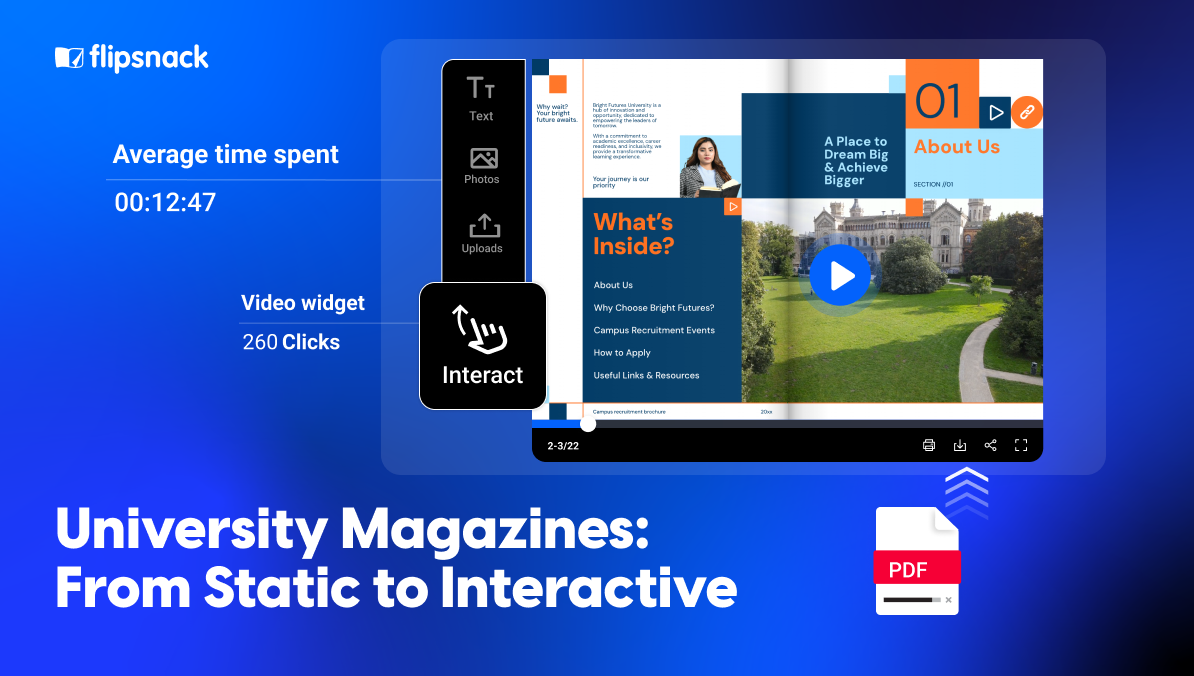
A digital university magazine is an online publication from a college or university that reaches students, staff, alumni or donors through a single web link. Pages keep the look of a printed issue and add video, forms and reader analytics. Every issue opens on phones, tablets and desktops without an app or download. Use a digital magazine maker to publish your next issue as an interactive flipbook.
Types of university magazines
University publishing is not one format. Different teams create different kinds of academic magazines, often with different audiences and rules.
1. Annual report magazine
This is where a magazine and an annual report overlap. It is used for official institutional reporting, outcomes, and accountability. These issues need stable access because people reference them months or years later. Publishing a report for donors and boards? See how to build an interactive annual report.
2. Research and innovation magazine
This type focuses on research outputs, funded projects, labs, and measurable impact. It is used for public outreach and for showing institutional value. It often needs links to supporting sources, research pages, and related publications.
3. Student magazine
A student magazine usually covers student stories, clubs, campus culture, and student work. It is often created by students or with student input, which means the process needs to be easy and repeatable each semester. Planning an alumni issue? Follow our step-by-step guide to create an alumni magazine.
4. Department or faculty magazine
These magazines communicate achievements, hiring news, events, and program updates. They tend to be shared with a focused audience and may need restricted access during review cycles.
5. Alumni magazine
An alumni magazine is related, but it should not drive the whole strategy. It is usually aimed at alumni engagement and community updates, and sometimes fundraising. The core needs are similar, though: readable on mobile, easy to share, and accessible. The difference is that privacy controls can matter more when content is targeted to alumni lists.
💡Note: You can create all these types of university magazines with Flipsnack (as we’ll see in a minute) and have something that looks like this:

Which features does each type of university magazine need?
Match each feature to its audience. Annual reports call for data visuals and a download link. Research magazines lean on video and citations, while student titles favor fast mobile reading. Faculty editions need program details. Alumni issues work best with event and giving links.
| Magazine type | Main readers | Features to prioritize | Metric to watch |
|---|---|---|---|
| Annual report magazine | Donors, board members, partners | Charts, video from leadership, a download link | Pages read and link clicks |
| Research and innovation magazine | Funders, peers, press | Embedded video, lab galleries, citation links | Time on page and shares |
| Student magazine | Current students | Fast mobile reading, quizzes, easy sharing | Opens and shares |
| Department or faculty magazine | Prospective students, staff | Program links, contact forms, buttons | Form submissions and link clicks |
| Alumni magazine | Graduates, donors | Class notes, event registration, giving links | Link clicks and returning readers |
Pick two features per audience, then track one metric. Flipsnack statistics show which pages readers open and which links they click, so the next issue improves on evidence instead of guesses.
Why PDF does not work as the final format
PDF is fine as a source file, but as the end product, it causes the same issues again and again for a university magazine, a student magazine, and an alumni magazine.
1. Accessibility compliance becomes harder than it needs to be
Universities cannot treat accessibility as optional. When the publication is only a static PDF, accessibility work tends to get postponed, or handled inconsistently, or lost when staff changes.
Even when a PDF is tagged, the reading experience can still be awkward for many users compared to an accessible digital viewer.
2. Static PDFs are a dead end for engagement
Teams often want to add interactivity later, like video messages, links, or extra context for research stories. A PDF posted on a site rarely supports that well. It also makes it harder to guide readers to the next action, like applying, subscribing, donating, or reading related research.
3. PDF hosting is fragile over time
Older issues often disappear after a site update, a CMS migration, or a change in ownership. For academic magazines that double as official documentation, losing old issues is not a minor problem. It breaks continuity and limits the long-term reference value.
4. Reading experience is often poor on phones
Many university magazines are designed with academic design tools with print in mind. When those layouts are posted as PDFs, reading on mobile becomes a pinch-and-zoom experience. That hurts reach, especially for prospective students, alumni, and public readers.
PDF versus flipbook at a glance
| Capability | Flipbook | |
|---|---|---|
| Accessibility | Depends on how the file was tagged and exported | Screen reader and keyboard support, with alt text on every page |
| Engagement | Static pages with basic links | Video, forms, quizzes and clickable navigation |
| Hosting | A file that gets copied, renamed and lost | One hosted link you share and keep current |
| Phones | Pinch and zoom | Reading view built for small screens |
| Reader data | Download counts at most | Page-level views, read time and link clicks |
| Where PDF wins | Prints at full quality and works offline | Needs a connection, so keep the PDF as your print master |
Should a university magazine be print, digital or both?
Choose both for most audiences. Readers still value paper, yet postage costs and global reach push institutions online. Produce one PDF, print a run for readers who want paper, and publish the same file as a flipbook for everyone else.
- Readers still like print. A University of Dayton Magazine reader survey (published January 2025) found that over three-quarters of respondents prefer print, while about 10% prefer the online edition. The article does not state the sample size.
- Costs push institutions online. Oxford Today went digital-only after printing and postage costs became unsustainable, and it kept a small print run for alumni who cannot read online.
- Choose digital first if alumni live abroad, postage keeps rising or you need reader data.
- Keep print if your own survey shows readers want paper.
Whichever mix you pick, the source file stays the same.
Upload your current issue, add video and links, and publish an interactive version in minutes. Start free with no design software.
Publish your university magazine (free) | Explore our magazine maker online
Benefits of digital magazines for universities
A digital magazine is not just a nicer wrapper around a PDF. It changes how the magazine is used, shared, and preserved.
1. Lower cost and easier distribution
Digital publishing reduces print and mailing costs. It also cuts the time spent managing distribution lists and logistics.
2. Better accessibility
Want to go deeper on accessibility rules? Our guide to ADA-compliant flipbooks covers what universities need to get right.
3. A path from simple to interactive
A digital university magazine can start simple, then grow. One issue may be mostly reading. The next issue may include video, links, and interactive elements that help readers understand the work and take action. A strong magazine creator lets you start with a PDF and add video, forms, or quizzes in later issues.
4. Long-term archiving that readers can trust
When digital publishing is treated as a library, not a one-time campaign, it becomes easier to keep an archive of past issues that stays available. That matters for annual report magazine content and research communication, where older issues still get referenced.
5. Easier sharing for every audience
A digital magazine can be embedded on a university website, shared by email, and posted on social channels without asking readers to download a file first. It also supports internal sharing during approvals.
6. Sustainability and green initiatives
Transitioning to digital publishing helps departments meet university-wide sustainability goals by reducing paper waste and the carbon footprint associated with physical distribution.
How do you publish a university magazine online with Flipsnack?
This is where you connect directly to what your clients need: moving from print to digital, accessibility compliance, interactivity, public and private publishing, and long-term availability.
Upload your PDF, add interactivity, switch on accessibility, set sharing, and keep an archive. Flipsnack is an online magazine maker that turns a finished issue into a trackable link. The five steps below take you from file to published issue.
Step 1: Start from the issue you already have
If your university magazine is designed in InDesign, Canva, another design tool, or even a drawing app, you can export a PDF and publish it as a digital flipbook. This helps teams move from print to digital without rebuilding the whole issue from scratch.
💡Note: If you want to, you can start from a university template or from scratch and save your design as a template for future issues.
Step 2: Add the interactivity that makes sense for academic content
A digital university magazine is not just pages on a website. It can include interactive elements that help readers navigate, understand content faster, and take action.
With Flipsnack, you can add interactivity that makes sense for universities, such as:
Elements for easy navigation
- A clickable table of contents so readers can jump to key sections like Research, Student life, Alumni news, or Annual report highlights.
- Buttons and internal links to move between sections and guide the reader through longer issues.
- Links to research papers, datasets, project pages, and lab websites.
- Clickable citations and “Learn more” links that support research claims without cluttering the page.
Interactive visuals instead of simple text
- Short videos for a dean’s message, a lab demo, a student project, or a campus story.
- Audio clips for short interviews or highlights, when relevant.
Forms for contact and questions
- Signup forms for newsletters and magazine updates.
- Event registration or interest forms for open days, research events, or alumni meetups.
- Contact forms for admissions, partnerships, or media requests.
Step 3: Activate accessibility
If accessibility compliance is a major concern, you want two things: accessible content and an accessible reading experience.
Flipsnack’s flipbook player supports keyboard navigation and screen reader navigation, and it aligns with standards such as WCAG and ADA, including Section 508.
You can activate the accessibility feature from the Customization section.
💡Note: A platform can support accessible reading, but the content still matters. If the source PDF has poor structure, missing text alternatives, or a confusing reading order, you still need to fix that upstream. Digital publishing makes it easier to deliver a better experience, but it does not magically repair inaccessible source files.
Step 4: Share it publicly or keep it private
University content often goes through approvals. Some issues are public, while others are internal drafts, board materials, or limited distribution documents.
Flipsnack offers multiple publishing options for
- Embed it on your university website
- Share via link
- Publish on social media
- Share via QR code
- Unlisted
- Password locked
- One-time passcode
- SSO only access
Step 5: Keep a digital archive
Academic magazines are long-term reference materials. Your readers may look for last year’s annual report magazine, or a past research feature, or an old student magazine issue.
With Flipsnack, you can create bookshelves for each university magazine type you have and keep a digital archive that anyone can access at any time.
How do schools use Flipsnack for magazines and alumni communication?
Wycliffe College, an independent day and boarding school in the Cotswolds, uses Flipsnack to share an online magazine from its Foundation office with the school community and alumni. The team uploads PDFs and uses private publishing to limit documents to chosen viewers.
For more institutional examples, read our guide to how universities use flipbooks and the Wycliffe College story.
Run every magazine from one workspace with roles and permissions, brand controls and accessibility support. Our magazine maker also shows which stories each audience reads.
See Flipsnack for higher education | Talk to our sales team
From PDF to a magazine people actually read
A university magazine is often an institutional asset, not a short-term campaign. That is why the format matters. A PDF on a webpage is easy in the moment, but it creates accessibility risks, limits interactivity, and often results in lost archives.
A digital university magazine gives you a better reading experience, better distribution, and a clearer path to accessibility and interactivity. With Flipsnack, you can start from the PDF you already produce, publish it publicly or privately, add interactive elements when you are ready, and share it through the channels universities actually use. Keep the PDF for print. Publish the flipbook for readers.
FAQ about digital university magazines
Universities publish five common types: annual report magazines, research and innovation magazines, student magazines, department or faculty magazines, and alumni magazines. Each serves a different reader, so features, tone and distribution change with the audience. Start with the reader, then choose the format.
A PDF works as a print master and an archive, yet it is a weak reading format. Accessibility depends on how the file was tagged, phones need pinch and zoom, and download counts reveal little. Publish a flipbook for readers and keep the PDF for print.
Start with a properly tagged source file, add alt text to every image and use real headings. Then publish in a viewer with keyboard and screen reader support. Flipsnack’s higher-education page lists WCAG 2.1 AA, ADA and Section 508 support, so confirm requirements with your accessibility office.
Most institutions choose both. A University of Dayton reader survey found over three-quarters of respondents prefer print, while Oxford moved Oxford Today online in 2017 to cut printing and postage costs. Produce one PDF, print a run, and publish the same file online.
Page-level statistics show views, read time and link clicks for each issue you publish. Your editorial team can compare issues by audience, move the strongest stories forward and trim pages readers skip. Donors and leadership also get clear proof that the magazine earns real attention.