How to Create a Multilingual Digital Flipbook for Global Audiences
Published on: August 18, 2026
Picture a marketing team finalizing a product catalog for launch in France, Germany, Brazil and Japan, all in the same week. Five deadlines, five language files, one designer trying to keep every version identical. By Friday, the German file still shows last quarter’s pricing, the Brazilian version lost its cover image, and nobody remembers which file is current.
This isn’t a translation problem. It’s a format problem.
Most teams treat every language as its own project: rebuild the layout, re-paste the copy, recheck the logo, repeat for each market. A multilingual flipbook removes that repetition. One source file generates every language version, keeping design, structure and branding identical everywhere it ships.
This guide covers how to build one: what separates it from a flipbook with a translated interface, the steps to translate content without breaking layout, and how growing companies keep every regional version on-brand as new markets get added.
Flipsnack builds this throughAI translation applied directly to a flipbook’s existing pages, so the layout and formatting stay untouched while only the words change, whether you’re translating the whole document or a single text box.
What is a multilingual flipbook?
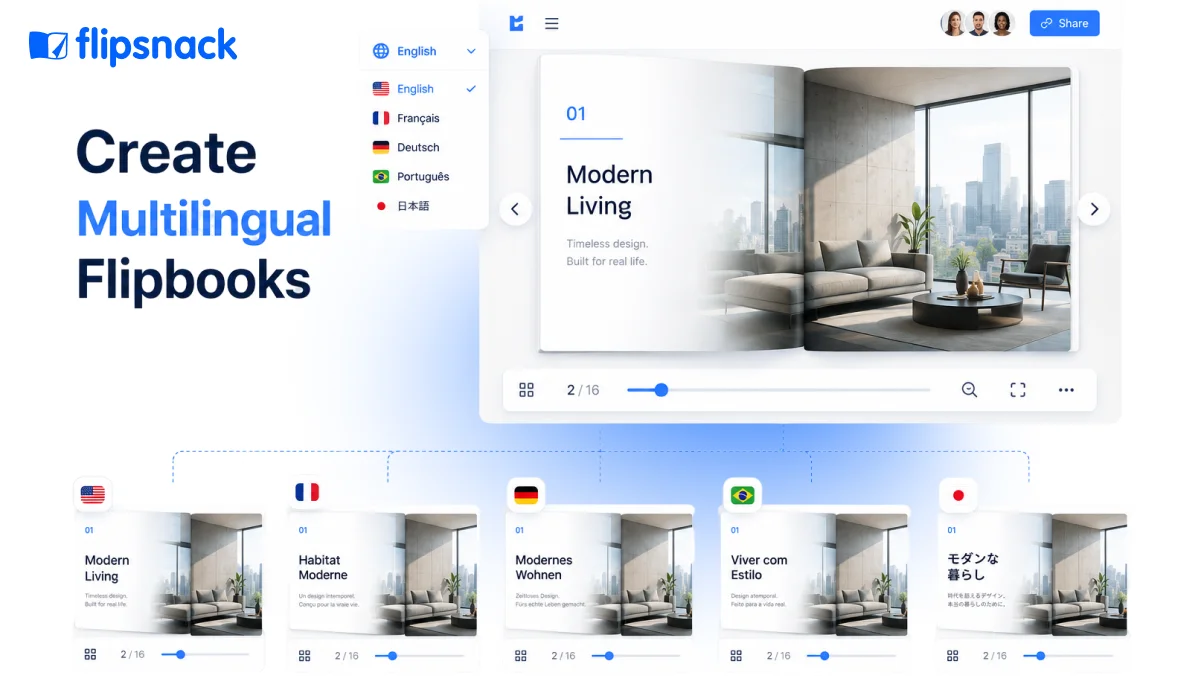
A multilingual flipbook is a single interactive digital publication, such as a catalog, brochure, or report, made available in more than one language from the same source file, so every regional version shares identical design, layout, and navigation.
Readers pick their language, then browse the same pages, images and interactive elements, just in their own words. Flipsnack builds this through AI translation applied directly to a flipbook’s existing pages, so the layout and formatting stay untouched while only the words change, whether you’re translating the whole document or a single text box.
Why one file per language breaks down
A single-language flipbook is simple to keep updated. Add a fourth market, and that simplicity disappears.
Each new language usually means a fresh file: same cover, copied by hand; same product grid, rebuilt from scratch; same claims, retyped by whoever on the team speaks that language. A pricing correction in the source file doesn’t reach the Spanish version until someone remembers to open it separately.
A separate file per market gets one country live. A single source file gets every market live, together.
Version control turns into an actual standing question: which file is current, who touched it last, and whether the regional team even knows headquarters updated the return policy last week. None of this is a translation problem. It’s a workflow one, and it gets worse with every market you add, not better.
Is a multilingual flipbook the same as one with a translated interface?
The short answer: No. A translated interface changes the buttons, menus and navigation around your flipbook. A multilingual flipbook changes the actual content on the page: the headlines, product copy and captions your reader came for.
Several flipbook tools let a reader switch the viewer’s language, so a French visitor sees “Suivant” instead of “Next” on the page-turn arrow. The publication itself, the pricing, the specifications, the pitch, stays written in whichever language the file was built in.
That’s a real feature, and it matters for accessibility. It solves a different job than multilingual content, and confusing the two leaves a reader staring at a perfectly localized button next to text they still can’t read. Flipsnack’s AI translation targets the words on the page instead, across a whole flipbook or specific text boxes, so a buyer in Tokyo reads product copy in their own language, not just a translated navigation label.
How to create a multilingual flipbook with Flipsnack
Build one flipbook in your primary language, run AI translation across the whole document or specific text boxes, review each version for tone, then publish every language from the same shared file.
Step 1: Build the source flipbook first
Design one complete flipbook in your primary language before touching translation. If you haven’t built one yet, start with ourcomplete guide to creating a digital flipbook, then come back here for the translation steps. Lock the layout, image placement and brand elements here, since every language version will inherit this structure exactly.
Step 2: Translate the whole flipbook or specific text boxes
RunAI translation over the entire flipbook for a full new-language version, or target individual text boxes when only one section, a new promotion or a region-specific disclaimer, needs its own wording. Either way, the layout stays put. Only the words move.
Step 3: Review for tone, not just accuracy
Machine translation gets the meaning right more consistently than the tone. Have a native speaker on the regional team scan the result for phrasing that reads correctly but sounds off, particularly in headlines and calls to action, where literal accuracy and persuasive tone often pull apart.
Step 4: Publish each language as its own linked version
Keep every language under the same project so a pricing or imagery update in the source file can push to each translated version, instead of someone hunting down five separate files later.
Keeping every language version on-brand
A translated flipbook that drifts off-brand costs more than one that never launched. A resized logo, a swapped font, a color slightly off tells a reader in Sao Paulo they’re getting the second-tier version of what a customer in Chicago sees.
Flipsnack’sbrand kit stores your logos, fonts and colors in one shared library, then locks them across every team member and language version, so the German catalog and the Japanese catalog use the same visual system without anyone rebuilding it by hand. For a deeper walkthrough, seehow to build a branding kit inside Flipsnack.
Where consistency typically breaks down:
- Font substitutions. A regional editor swaps in a local font because the brand font doesn’t support certain characters, and nobody flags it.
- Logo resizing. Someone drags the logo to fit a longer headline after translation, and it ships slightly stretched.
- Color drift. A screenshot-based rebuild introduces a shade a few tones off the brand palette.
- Orphaned templates. A regional team builds from an old template nobody updated after last year’s rebrand.
Lock the source file. Lock the template. Lock the brand assets. Every language version inherits the same system automatically.
Managing versions across regional teams
A growing company doesn’t translate once. It translates continuously, as new markets open and existing catalogs get updated.
Flipsnack Workspaces group flipbooks by region, department or language, so a marketing lead in one country finds and updates their version without digging through every other market’s files. Role-based permissions decide who edits what: an admin manages the master file and brand assets, an editor updates content within an assigned language version, and a contributor adds copy without touching layout.
This matters more as headcount grows. A five-person team manages version chaos through group chat and good memory. A company running catalogs across ten markets and three departments needs that structure built into the tool, so one regional mistake doesn’t quietly become the version that ships. Teams with heavier permissioning or integration needs can reviewFlipsnack for Enterprise for the deeper controls.
Getting the right language version to the right market
A translated flipbook only helps if the correct reader actually finds it. Distribution decides who sees which version.
Flipsnack gives you several ways to route each language version to its market:
- Direct link. Share a URL specific to each translated version, so a French campaign points to the French flipbook.
- Embed code. Drop the correct language version directly into a regional website or landing page.
- QR code. Print a market-specific QR code on packaging or in-store material, linking straight to that region’s language.
- Custom domain. Host each regional version under a branded subdomain, so the URL itself signals the right market.
Pick the method that matches where your reader already is: email for a sales-led market, embed for a regional website, QR code for anything physical.
Best practices for translating a digital publication without losing quality
A few habits separate a multilingual flipbook that reads naturally from one that reads like it was translated.
- Translate meaning, not just words. Idioms and product names that work in English often need a different phrase entirely, not a literal swap.
- Keep one source file as the single point of truth. Every language version should trace back to the same master, never a separate copy edited independently.
- Review headlines and CTAs by hand. These carry the most persuasive weight and the least tolerance for a phrase that reads slightly off.
- Check number and date formats per market. A date written 03/04/2026 means a different day in the US than across most of Europe.
- Start with your highest-traffic markets first. Confirm quality in two or three languages before expanding to the rest.
Frequently asked questions about multilingual flipbooks
Yes. Flipsnack’s AI translation works on specific text boxes as well as full documents, so you can update a single promotion or region-specific disclaimer without retranslating the entire catalog.
No. AI translation replaces the words on each page while layout, images and structure stay exactly as designed, which is the main difference between this and copying text into a separate translation tool.
A language switcher translates the reader interface, things like the “next page” button. A multilingual flipbook translates the actual content readers came for: headlines, product copy and captions.
There’s no fixed limit. Companies typically start with two or three priority markets, confirm translation quality and reader response, then expand as new markets open.
A native speaker on the regional team, ideally someone close to the target customer, should check tone and phrasing on headlines and calls to action, even when the underlying translation is accurate.
Not necessarily. You can share a distinct link per language, embed each version on a regional page, or route readers through one link with a language switcher, depending on how your markets are set up.
Start your first multilingual flipbook
Building one flipbook and expanding it into every market you serve beats rebuilding the same catalog five separate times. Start with your source file, translate with AI, review by hand, then publish each version from the same shared project. Related reading: if your team manages brochures across franchise or multi-location sites specifically, seehow to manage brochure translation across regional teams.