How to build a brand kit (+ 8 real examples)
Updated on: September 9, 2026
Three requests reached your designer before lunch. A distributor needs the logo on a dark background. Regional sales wants the deck template. Somebody in HR is asking which blue is the correct blue. None of that is design work. All of it waits for a designer anyway.
Multiply across a year and you get a specific, unbudgeted cost: skilled people answering questions a well-built brand kit answers on its own. Meanwhile the teams who stopped asking are guessing, which is how a stretched wordmark reaches a partner newsletter without anyone approving it.
Below: what belongs inside a branding kit, what one costs, eight real kits from companies, and how to build yours so 40 people can self-serve without going off-brand.
What is a brand kit?
A brand kit is a centralized collection of a company’s core visual identity assets: logo variations, color values, typography, imagery and iconography, packaged alongside instructions covering how each element gets used.
Anyone producing work on behalf of a company draws from that collection, whether they sit in marketing, sales, human resources or an external agency. Some organizations keep theirs as a downloadable PDF. Others build it into whichever platform their teams design in, so approved assets appear directly inside the editor.
Scale determines which approach survives contact with reality.
Here are Coca-Cola’s branding kit elements:
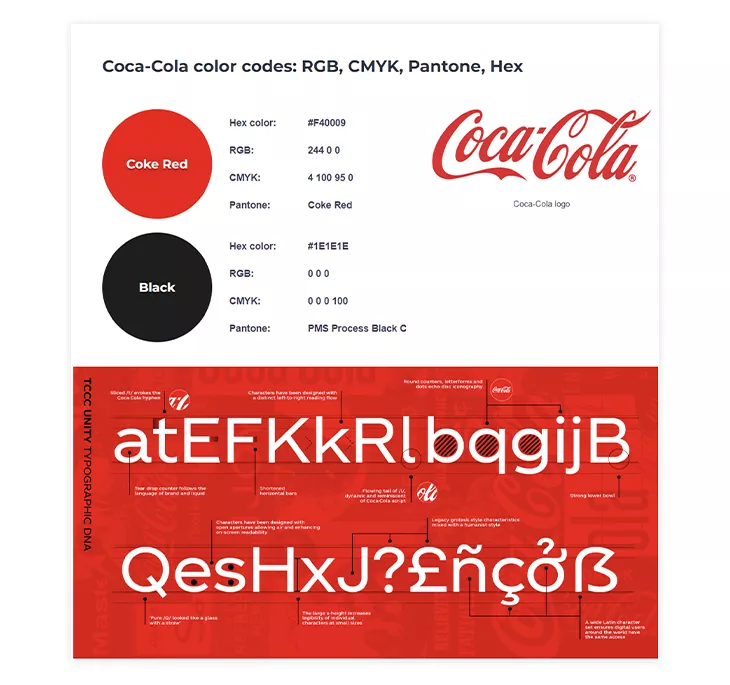
All of these elements are part of their brand kit, and they had great importance in establishing their brand identity. Coca-Cola used its visual elements perfectly to make an emotional connection with its customers. For many, Coca-Cola equals celebrations with family and friends.
In what follows, we’re going to dive deeper into how important a branding kit is for a business and why it’s crucial to create one.
Why do you need a branding kit?
“Most entrepreneurs and small business owners don’t really think about their brand image until there’s a problem with the image they’re developing.” That’s why it is important to develop your brand image with the help of a branding kit.
Forbes
Every brand kit contains four non-negotiable components: a logo suite, a color palette with exact values, a typography system and usage rules. Larger organizations add imagery direction, iconography, brand voice and pre-approved templates. Four elements make a kit usable. Eight make it governable.
| Component | What belongs in it | Where teams get it wrong |
| Logo suite | Primary mark, secondary or stacked lockup, monochrome version, favicon, clear-space rule, minimum size | Shipping one PNG and hoping for the best |
| Color palette | HEX, RGB and CMYK values, primary versus secondary distinction, accessible text pairings | Naming colors without publishing exact values |
| Typography | Heading, subheading and body typefaces, weights, a web-safe fallback, licensing status | Choosing a typeface nobody outside design owns a license for |
| Usage rules | Explicit do and do-not examples, applied to real layouts | Writing rules abstractly, so nobody recognizes a violation |
| Imagery direction | Photographic style, treatment, subject guidance, illustration approach | Assembling a mood board and calling it a standard |
| Iconography and graphics | Icon set, patterns, textures, stroke weights | Letting each designer introduce a different icon family |
| Brand voice | Tone, vocabulary preferences, terminology decisions, words to avoid | Filing voice separately, where designers never encounter it |
| Pre-approved templates | Locked layouts for recurring documents | Distributing editable files that drift within a quarter |
Look down the right-hand column and the same pattern repeats: every failure happens at the moment somebody applies an asset, not at the moment somebody documents one. Rules describe correct output. Templates produce it.
A guidelines PDF asks every person to read it, remember it and apply it correctly under deadline. Fine at four people. It breaks at forty, and breaks harder once regional offices and agency partners join, because compliance now rests on people who never saw the training.
Locked templates invert that in Flipsnack. Three locks cover three failure modes:
- Style. Transparency, borders and color stay fixed.
- Position. The logo stays where you put it, even when a headline runs long.
- Content. The logo file can’t be swapped, which is how retired marks resurface after a rebrand.
What’s the difference between a brand kit and brand guidelines?
A brand kit holds the assets. Brand guidelines explain the rules governing those assets. A brand book adds strategy: mission, positioning, values and personality. Most companies need all three, though rarely as three separate documents.
| Brand kit | Brand guidelines | Brand book | |
| Contains | Files and values | Rules and examples | Strategy and narrative |
| Answers | What do I use? | How do I use it? | Why does this exist? |
| Primary reader | Anyone producing content | Designers, agencies, partners | Leadership, new hires, investors |
| Typical format | Asset library inside a design platform | PDF or web page | Presentation or publication |
| Update frequency | Whenever an asset changes | Annually, or after a rebrand | Rarely |
| Length | Not applicable | 10–40 pages | 20–80 pages |
Practically, smaller organizations collapse all three into one document and function perfectly well. Complexity earns its keep only once multiple teams, regions or external agencies produce work simultaneously.
Publishing your guidelines separately carries a genuine advantage though: partners, journalists and resellers can reference them without anyone granting platform access. Spotify does exactly this, publishing developer-facing branding guidelines including licensing terms.
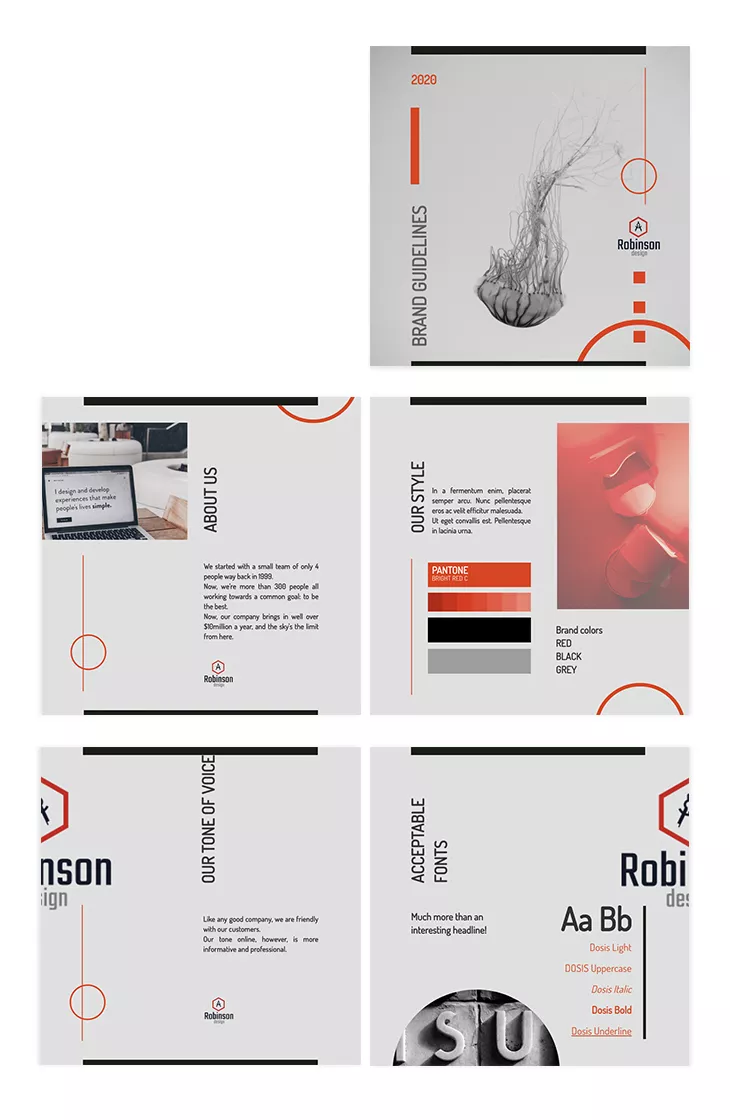
This is exactly what a brand guideline does: it offers clear rules on the dos and the don’ts of your intellectual property (your brand kit). While the branding kit is strictly related to the visual aspect, the branding guidelines are applied to the way you communicate as a brand, the way you write copy for ads, your social media posts, the way your digital flyers look, and so on.
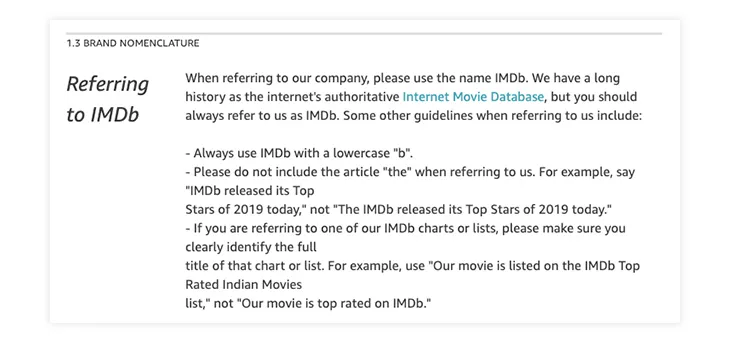
Here’s an example of a brand nomenclature guideline from IMDb to make you understand the differences even better:
If you have found the perfect font pairing for your logo, and someone wants to use your logo on their website. They either use the logo according to the guidelines you’ve created, or they can’t use it at all.
To make things easier, offer solutions for different situations. In this case, provide logo versions for both desktop and mobile. This will make it usable on screens regardless of the size. They will have options to choose from, but they won’t be allowed to modify them, as your brand guidelines won’t allow it.
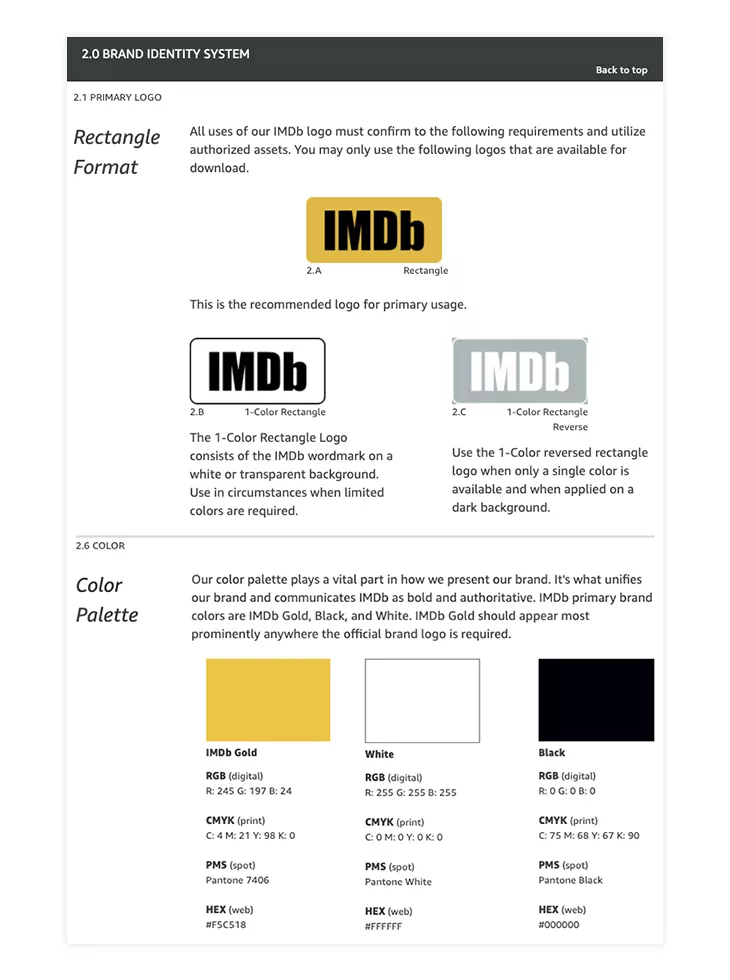
Here is an example of brand guidelines applied to the IMDb branding kit:
What does a brand kit include?
- Logo
- Font
- Colors
- Typography
Logo
When it comes to building a brand, the logo is an important part of the process. It is what represents your company from a visual point of view, but besides that, it can do much more. A strong logo design can leave a lasting impression and help differentiate your brand in a crowded market.
A logo grabs attention. Has it ever happened to you to see a logo, then take a few moments to analyze it? Maybe it used an interesting shape or a unique color combination. Or maybe it included a hidden message, such as the hidden arrow in FedEx’s case?
Chances are that if a logo grabs your attention and you find it interesting, you are more likely to look up the company and see what it has to offer. Maybe you aren’t interested in their products, but someone else might be. Badly designed logos might also grab attention, but it is better to make a positive impression.
Besides grabbing attention, a logo will also be an ambassador of your company’s values. In this case, the arrow represents “getting from point A to point B reliably with speed and precision.”
Moving on to the fonts.
Font
Fonts have their role, and choosing the right font for your brand is important. It might be intimidating to choose the right one since there are too many options to choose from. However, there are a few things to keep in mind when making your selection.
What type of business do you run? You can choose the font based on that. Is your business modern? A sans-serif font like Spotify uses might be the choice for you.

If you want your font to be distinctive, choose a script font, just like the Ford one.
Maybe a handwritten artistic font is more suitable, or a bold slab serif one. Regardless of the font type you choose, it should complement your business, not work against it. Just like in the case of logos, there are bad font options as well.
Fonts can help your business in different ways. Whether you use the fonts for your logo, your business cards, or other purposes, an interesting font choice will draw more attention than a regular bland one.
Fonts are important not only for your logo but for other marketing materials too. The right font can increase the value of a text, which means that the message you try to convey will have a bigger impact on readers. You can try utilizing a font generator to enhance your marketing materials and logo.
As I stated, each element of the branding kit plays an important role, but these elements need to be compatible to be effective. This takes us to the colors.
Brand colors
Choosing the right colors for your brand is essential, but it isn’t an easy task. The psychology of colors is a well-studied domain, and the results shouldn’t be ignored.
Colors have different meanings, send different messages, set different moods. A color such as blue can inspire trust and strength, while a red one can inspire passion and energy. Yellow is the color of optimism, while gray represents calm and balance. It is important for the colors you choose to be on par with the message you want to deliver.
As part of our redesign process, we too have also made some changes to our brand’s colors.
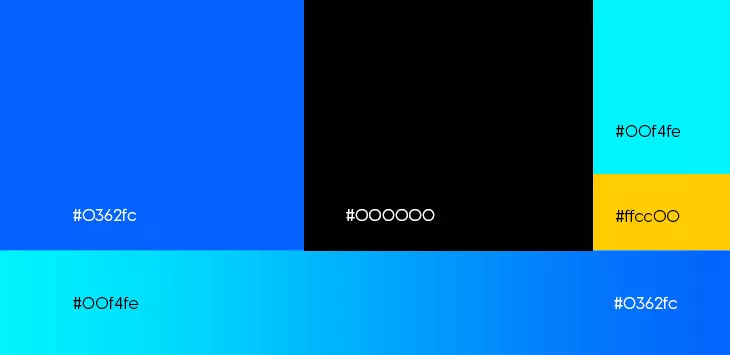
“We took our signature color, blue, and amped it up a little. We went from a more pale, calm shade, to a more vibrant one. One that makes a statement! We also introduced black in the equation. Black ensures an elegant contrast that further solidifies the presence of blue. White, on the other hand, is there to bring homage to the ancestors of digital flipbooks: papers!”
Besides changing the perception regarding your business, colors can also have a direct impact on your sales. If you have a product catalog, for example, use yellow to highlight certain products. For children’s products, use primary colors, as these draw their attention.
Pink is often used for menus, as it increases appetite. A red call to action message could have a bigger impact than a blue one. The list goes on and on. Regardless of the domain you work in, there surely is a color you can use to your advantage.
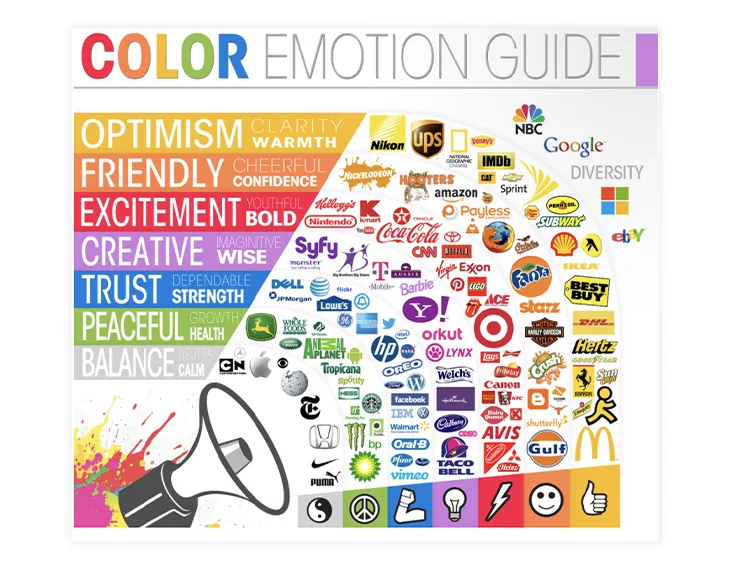
Color is important for text also. A blue text increases retention, while other colors increase comprehension or learning. Colors, when combined with fonts and typography, as you will see, can completely change the impact a text has.
Once you have identified your colors, it is important to maintain consistency. Use the same color schemes for all the channels: newsletters, websites, social media. Color consistency leads to brand consistency, and after all, this is what a branding kit should help you achieve. As a heads up, colors evoke negative feelings as well, so keep that in mind when making your choice.
Typography
Last but not least, we have typography. Equally important as the other elements, it is often the most ignored.
Typography is more than the font you use, it’s about “the art and technique of arranging type to make written language legible, readable and appealing when displayed.”
Wikipedia
The size of the text, the line height, the negative space in the text, all matter. These aspects might seem irrelevant, but in reality, they are far from it.
Kerning or letter spacing can greatly affect the overall design, and in some cases, it can even result in different words altogether.

Making mistakes such as these looks unprofessional, and it will surely turn people away. If you won’t bother fixing your text, how will you guarantee great quality?
Typography, when used with a great font and color combination maximizes a text’s potential.
A well-written text can easily be ruined by a hard-to-read font or a color combination that strains your eyes. Good typography enhances the user experience, and that leads to a positive influence on your brand. A bad one will do the opposite.
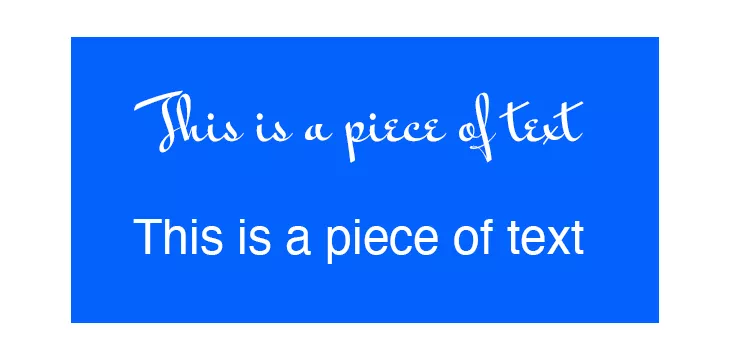
In this example, both the fonts and the background share a common color. However, the first text is more difficult to read because of the font when applied to a longer piece of text. This is why choosing the perfect font, color and typography is so important.
In what follows I’ll offer some examples of brand kits that perfectly combine all these elements.
Brand kit examples
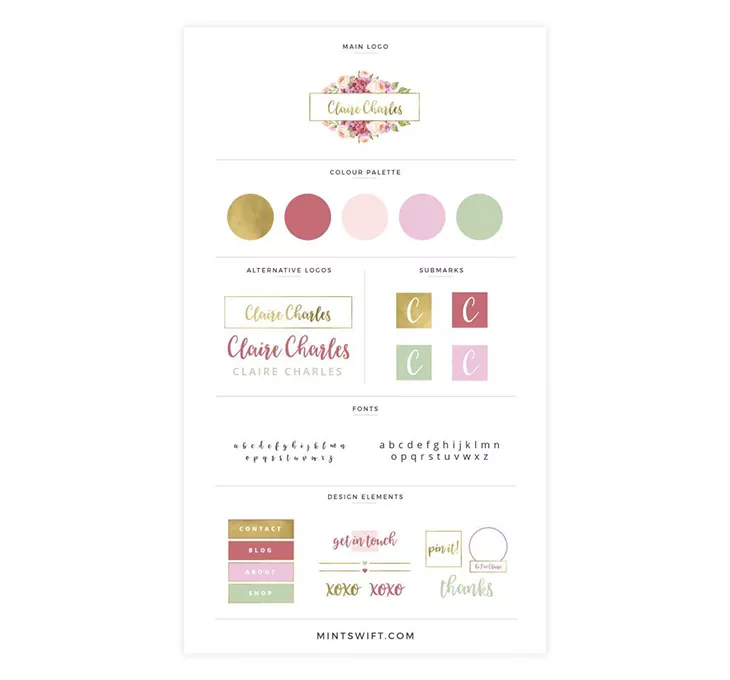
Here is a branding kit example that uses all the elements I mentioned, and combines them cheerfully and playfully. You can see the logo variations and a submark, which is to be used when the main logo is not the best option.
There are also font options and you can see how these colors look when applied to different design elements. The color choice is a happy one, suitable for a pastry shop or maybe a flower business. As Gregg Weisstein, Co-Founder of BloomNation, notes, “A strong brand identity isn’t just about aesthetics—it’s about creating an emotional connection that resonates with your audience.
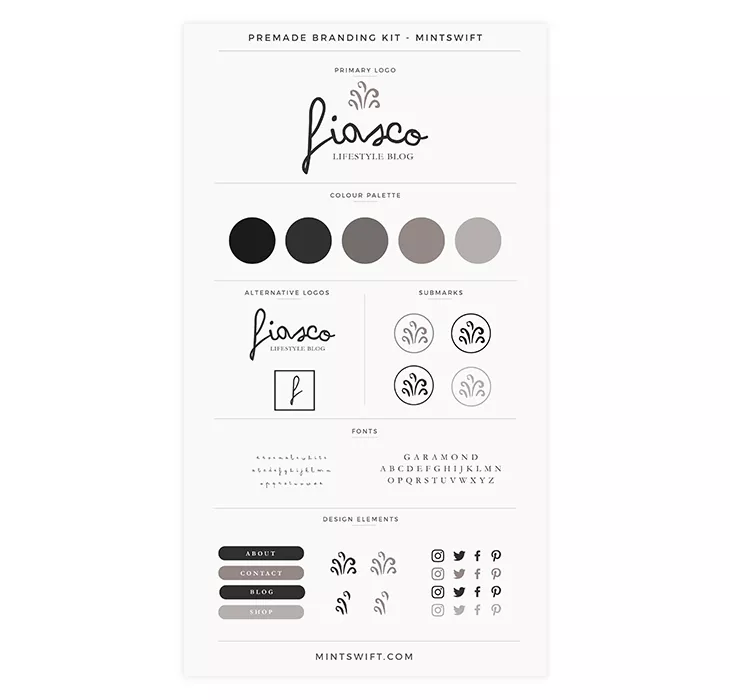
Here is another example from the same designer. The same elements are included in the branding kit, but this time, the tone is completely different. It uses a more somber color palette choice, and it highlights the difference the color choice can make.
The designer envisioned a lifestyle blog for this branding kit. Grey is a neutral color, it represents calm and balance, so any business that identifies with these values could use this color combination.
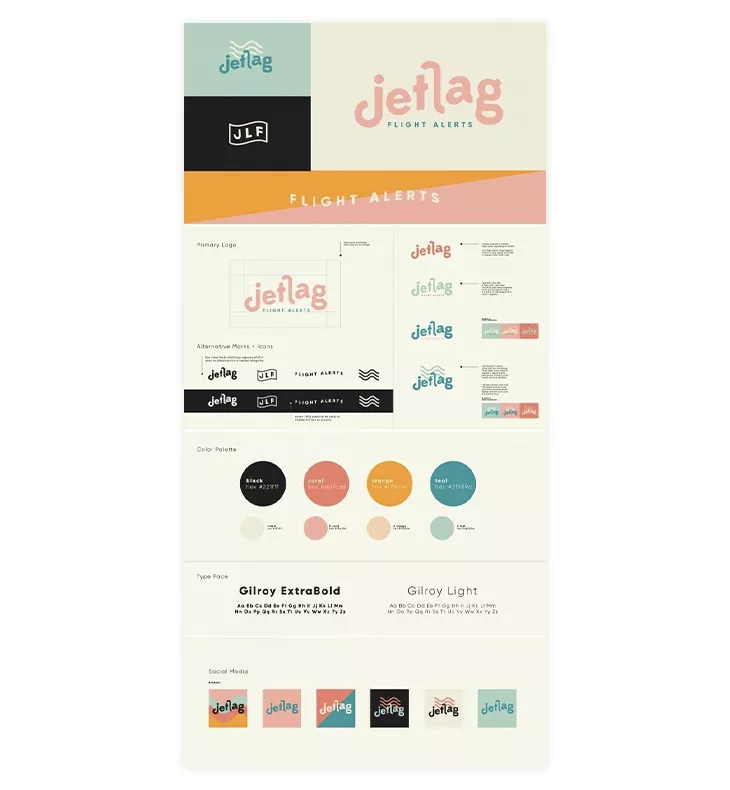
A third example, this time from a different designer. Once again, the same elements, with a different selection of colors. However, the designer has also included various color combinations for the social media icons.
The funky logo font choice and the color palette that reminisces of the 80s make it a perfect choice for a travel agency, just as the designer envisioned.
Each of these examples has proven that a great combination of logo, fonts, colors, and typography can lead to something beautiful.

How to build a brand kit in 6 steps
Audit whatever exists, decide what’s canonical, collect every file format teams actually need, document the rules against real layouts, publish somewhere colleagues already work and assign an owner. Most companies handle the first four steps and skip the last two, which is precisely why brand kits go stale.
Step 1. Audit what’s already circulating
Pull the last twenty documents your company published externally. Note every logo variant, every off-palette color, every substituted typeface. That inventory tells you which rules are being broken and therefore which rules to write first.
Step 2. Decide what’s canonical
Pick one primary logo. One heading typeface. Exact HEX values, not approximations. Ambiguity is what generates the drift you catalogued in step one.
Step 3. Collect real file formats
Marketing needs SVG. A print vendor needs CMYK-ready files. Somebody will need a favicon at 32 pixels. Missing formats guarantee improvisation.
Step 4. Write rules against real layouts
Abstract prohibitions get ignored. Show the stretched logo. Show the unreadable color pairing. Show the correct version beside it.
Step 5. Publish where work happens
A PDF buried in shared storage will be opened once. Assets loaded into whichever platform your teams design in get used by default, which is the entire point.
Step 6. Name an owner
Somebody approves changes and communicates them. Without that person, your kit describes the brand you had two years ago.
How to set up your brand kit in Flipsnack
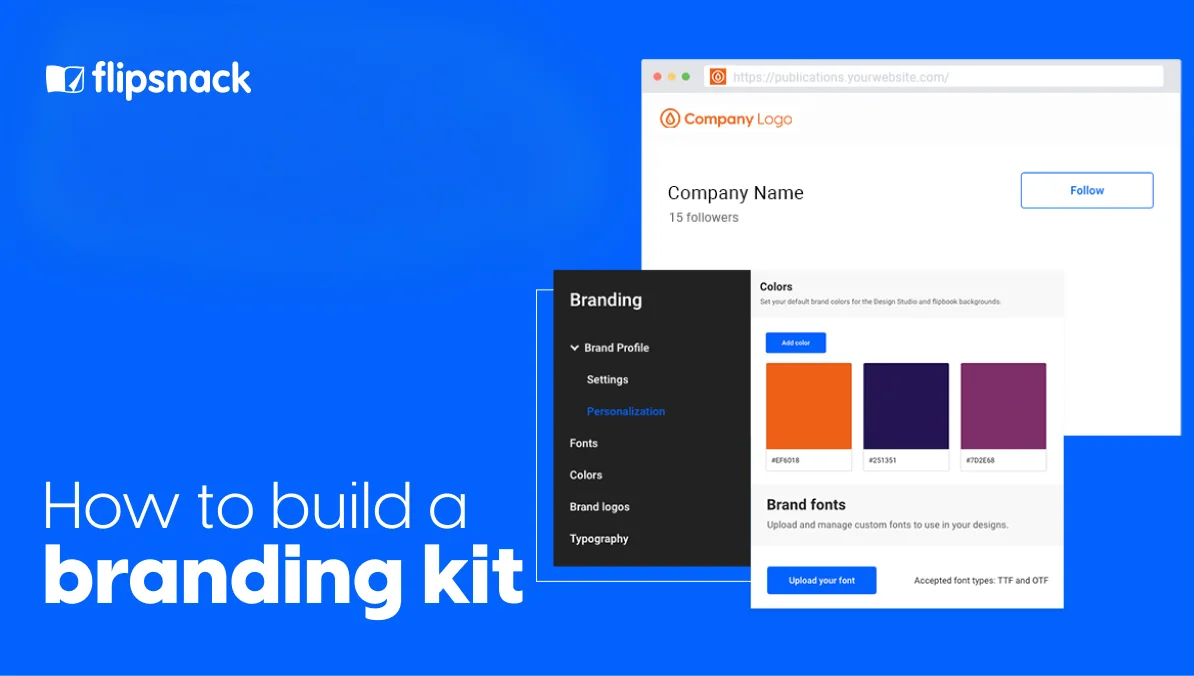
Brand kit settings live on the Branding page and come with Business and Enterprise plans. Everything you store there becomes the default for your whole workspace, so colleagues start from approved assets rather than searching for them.
Step 1. Open the Branding page
From your dashboard, select Branding in the left-side navigation panel. Every brand asset for the workspace lives here.
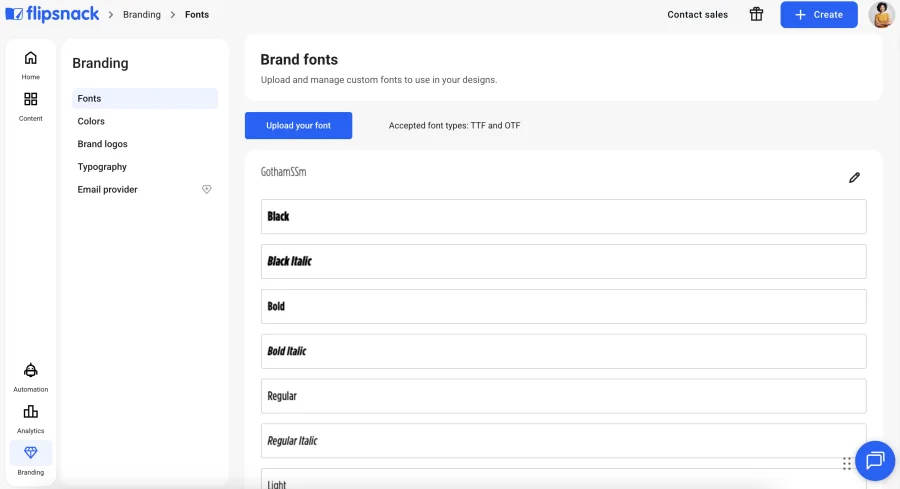
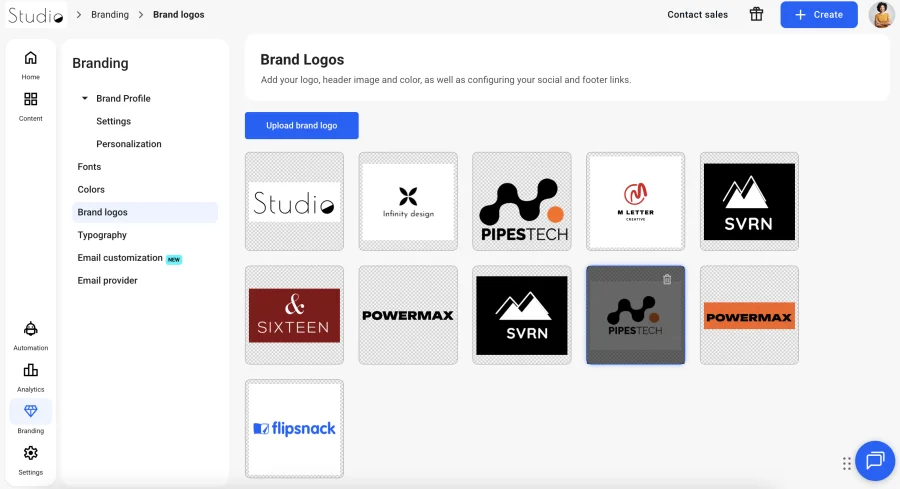
Step 2. Upload your brand logos
Add your logo files so they’re available during publishing without re-uploading each time. Upload once, apply to every publication afterward.
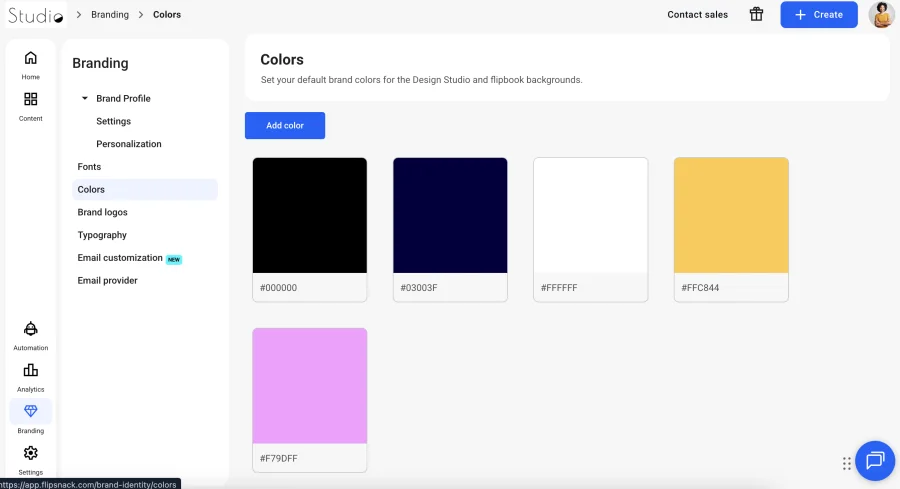
Step 3. Add your brand colors
Enter values in RGB, HSL or HEX. Saved colors appear during editing and publishing, which removes the guesswork that produces near-miss shades.
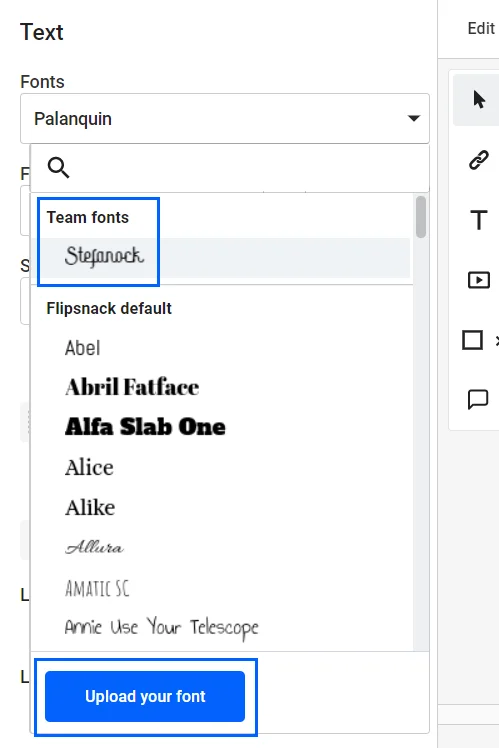
Step 4. Upload custom fonts
Add TTF or OTF files so your licensed typefaces appear in the Design Studio font menu alongside the standard library.
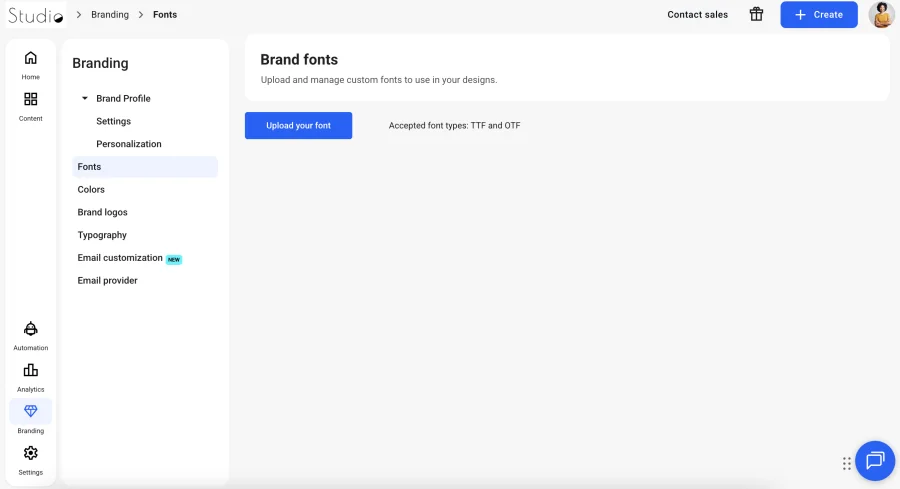
In order to use the font you’ve uploaded, click on any text in the document, then in the newly opened menu click on Fonts. The uploaded font will appear in the dropdown menu. In case you need to upload a different font, you can click on the Upload your font button, and it will take you to the branding page where you can repeat the first step.
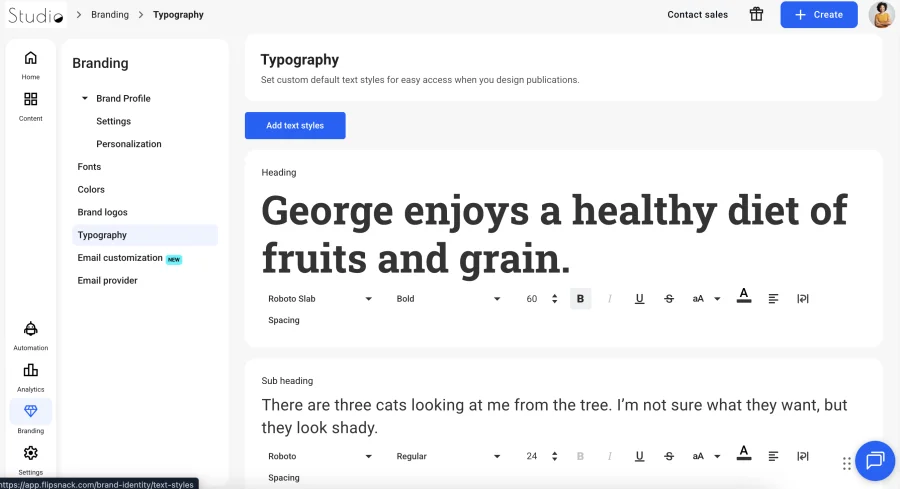
Step 5. Set typography presets
Define heading, subheading and body styles once, adjusting font, size, line height and letter spacing. Teammates then apply a named style instead of rebuilding formatting per document.
Step 6. Lock what shouldn’t change
Locked templates seal element position, content and styling. Colleagues can edit the copy that should change while the logo stays exactly where you put it
Brand governance across distributed teams
By using your brand kit in Flipsnack, you ensure brand consistency. To make sure that your documents will have the same tone and style, and will deliver the same message, you can use the new advanced lock feature. How does this work?
Let’s say that you want a specific element, such as your logo in a certain position on the page. You can place it in the desired position, then you can choose to lock the position, content, or style. By locking the position, the logo will remain where you’ve placed it. Choosing to lock the content ensures that no other image can replace the logo image. Finally, locking the style prevents others from altering the transparency, radius, border, and other styling options.
This feature applies to any element placed on-page, including text, videos, and other interactive elements you can use in Flipsnack. The feature is available to all users, regardless of the plan.
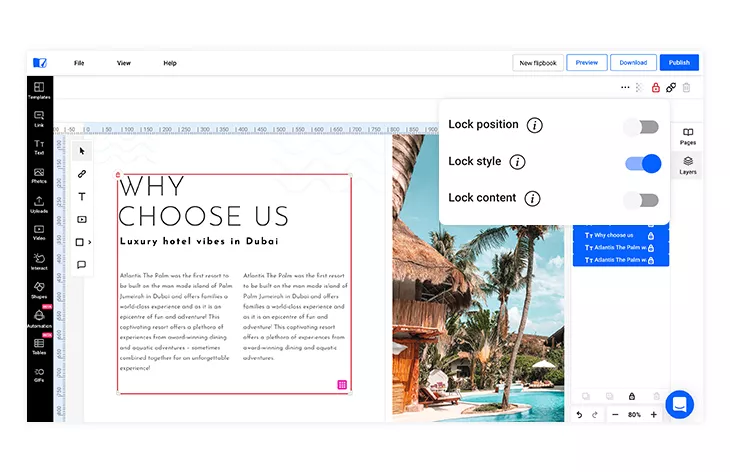
It allows you to design a template and lock the position of elements on the page, and then save the templates for later use. People will be able to use the templates, but they won’t be able to modify the locked elements.
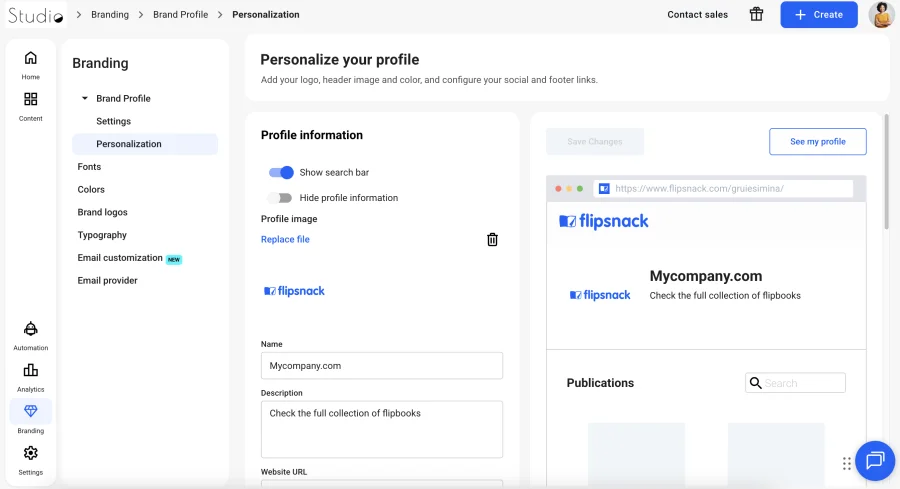
On top of that, once you have published your brand kit in Flipsnack, you can go the extra mile and customize it even more. There are different branding customization options to choose from. As part of our Enterprise plan, you can remove all Flipsnack branding and make your publication look as custom-built as possible. Set your own custom URL, or upload your own favicon for an extra touch of personality. In order to see all these premium features, click on Branding, then Personalization.
Conclusion
A branding kit is a very important aspect of a company’s business strategy. It helps a company maintain brand consistency, by delivering its message both internally and externally in a uniform way. Never forget how important all of the elements of the branding kit are, and how necessary it is to combine them wisely to attain the desired results.
Now that you know all these things, it’s time to get to work and create your own documents in Flipsnack. You can then integrate your branding kit elements in your digital magazines, brochures, catalogs, and more. Just create an account and start designing!
Frequently asked questions about brand kits
What should a brand kit include at minimum?
Four components: a logo suite covering primary, secondary and monochrome versions, a color palette with exact HEX, RGB and CMYK values, a typography system specifying heading and body typefaces, and usage rules demonstrated against real layouts. Larger organizations add imagery direction, iconography, brand voice and pre-approved templates. Anything beyond those eight is generally strategy documentation rather than a brand kit.
What’s the difference between a brand kit and brand guidelines?
A brand kit holds the assets themselves: files, color values, typefaces. Brand guidelines document the rules governing how those assets get applied. A brand book goes further, covering mission, positioning and personality. Smaller companies reasonably combine all three into one document; organizations running multiple teams or external agencies usually benefit from separating them.
How much does a brand kit cost?
Templates you complete yourself run $0 to roughly $50, with Canva-compatible options on Gumroad currently spanning that range. Freelance designers typically charge $500 to $2,000; one Dribbble service listing covering logo, palette, typography and icons is priced at $1,000. Agencies start around $5,000. Brand kit storage inside a design platform carries no separate fee.
Can you build a brand kit for free?
Yes. Free brand guidelines templates cover the four essential components, and free tiers of most design platforms allow limited asset storage. Free stops working at governance: locked templates, permissions and custom domains sit behind paid plans everywhere, Flipsnack included, where brand kit settings require Business or Enterprise.
What does a brand kit look like?
Most public brand kits take one of two shapes. Either a downloadable PDF running ten to forty pages, or a web page carrying downloadable assets alongside usage rules. Spotify, Yelp, Netflix, LinkedIn, Medium, Shopify and Hulu all publish web-based versions. Internally, a brand kit often looks like nothing at all, existing as stored assets that appear automatically inside a design tool.
How often should a brand kit be updated?
Whenever an asset changes, which is more frequent than most teams expect. New logo variations, added palette colors, replaced typefaces and fresh templates all warrant an update. A full review annually catches drift. Assigning one owner matters more than setting a cadence, since unowned kits go stale regardless of schedule.
Can you turn an existing PDF brand guide into something teams actually use?
Yes. Upload the PDF and publish it as an interactive document readable on any device, then update it under the same permanent link when assets change. Colleagues keep one URL instead of hunting for the current version. Flipsnack’s brand kit settings then store the same logos, colors and typefaces directly inside the editor, so approved assets appear where design work happens.